444CEOM1-CM202.pdf - 第94页
Page 2-10 444C-E-OMA02-A01-02 2-3 Main Menu NOTICE On this equipment, you are free to change the menu configuration of the operator mode. ( 3-5-5 Customizing Operator Mode ) Screen of operator mode 1 This icon shows an o…
Page 2-9
BASIC OPERATION
2
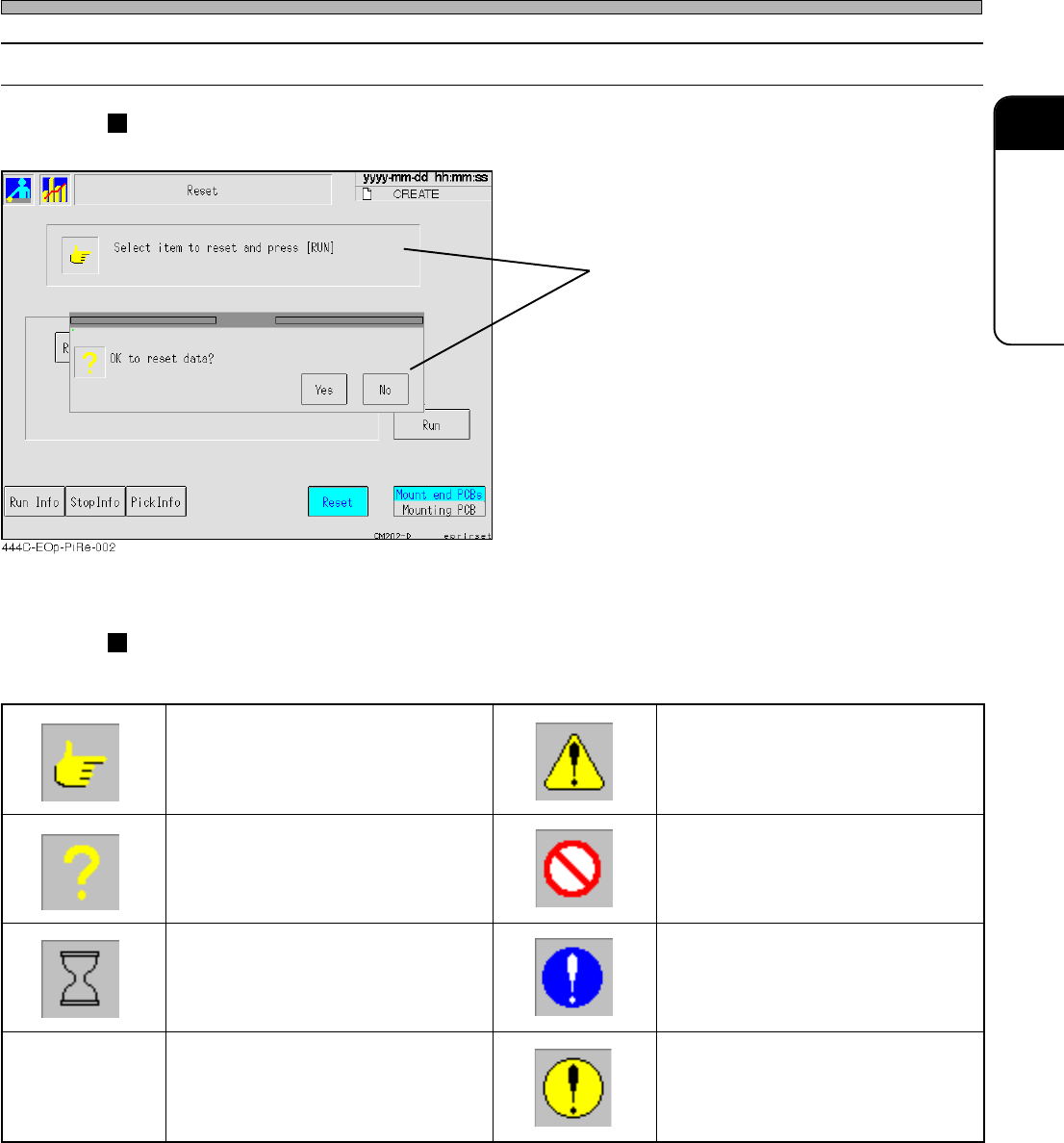
2-2-4 Messages
Messages to operators are displayed inside square frames.
Message icons
The following icon are at the head of message to show its type.
444C-E-OMA02-A01-01
Touch Panel
Message
egassemnoitcurtsnI egassemnoituac,gninraw,regnaD
egassemyriuqnI egassemnoitibihorP
egassemgnitiawemiT
egassemnoislupmoC
)dnuorgeulbano)!(krametihW(
egassemrorrE
dnuorgwolleyano)!(kramkcalB(
)emarfkcalbni
444C-107TE
Page 2-10
444C-E-OMA02-A01-02
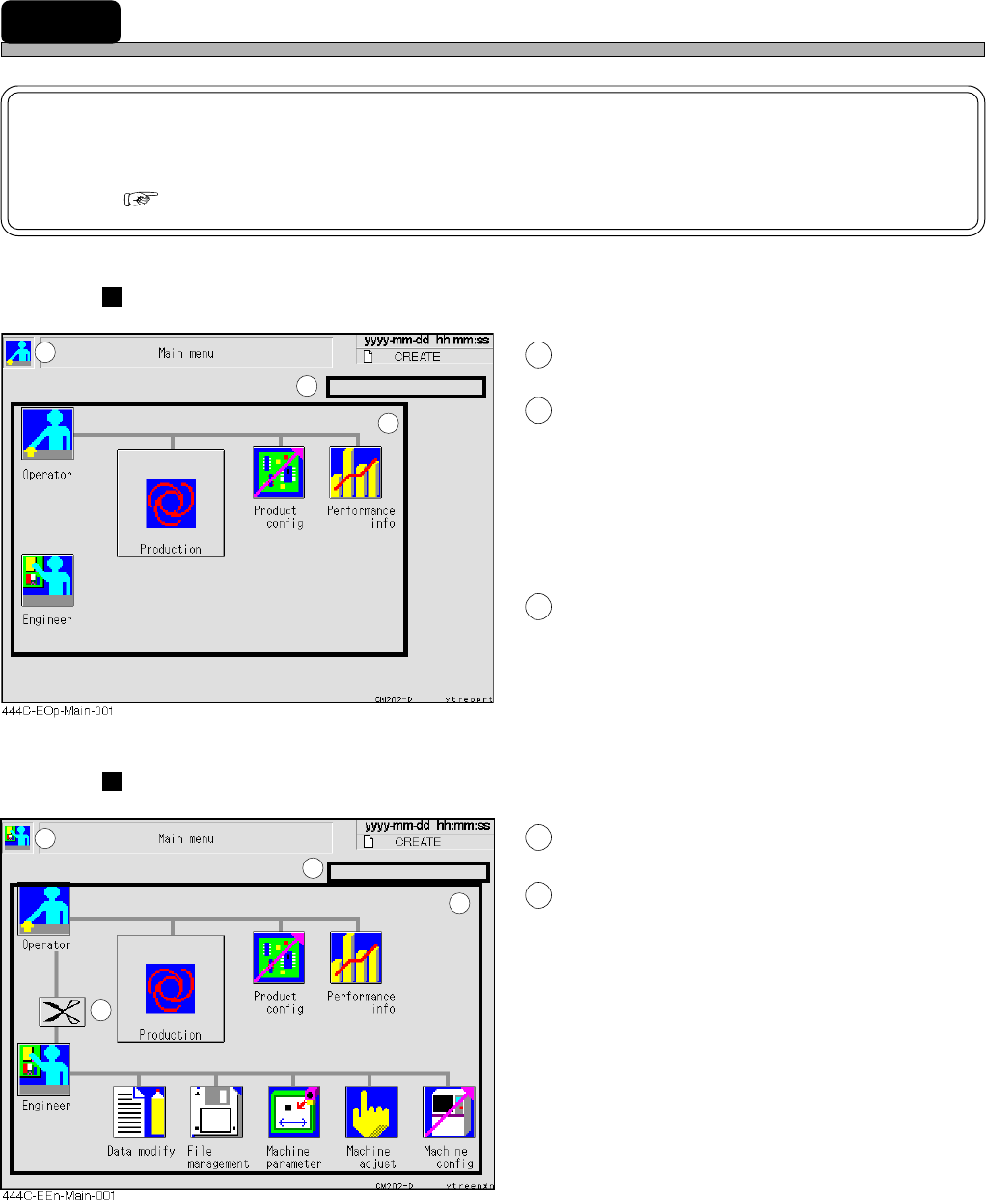
2-3 Main Menu
NOTICE
On this equipment, you are free to change the menu configuration of the operator
mode. ( 3-5-5 Customizing Operator Mode)
Screen of operator mode
1
This icon shows an operator mode.
2
Inspection period display area
When an inspection period is drawn on (to 90 %
of its cycle), the message is displayed in green.
When the inspection period has passed, it is
displayed in yellow.
∗ When the message is displayed, inspect this
machine. (Refer to the maintenance manual.)
3
Icon switches
Pressing each icon displays its menu screen.
Screen of engineer mode
4
This icon shows an engineer mode.
5
Pressing it displays the main menu of
operator mode.
1
2
3
4
5
2
3
Page 2-11
BASIC OPERATION
2
444C-E-OMA02-A01-01
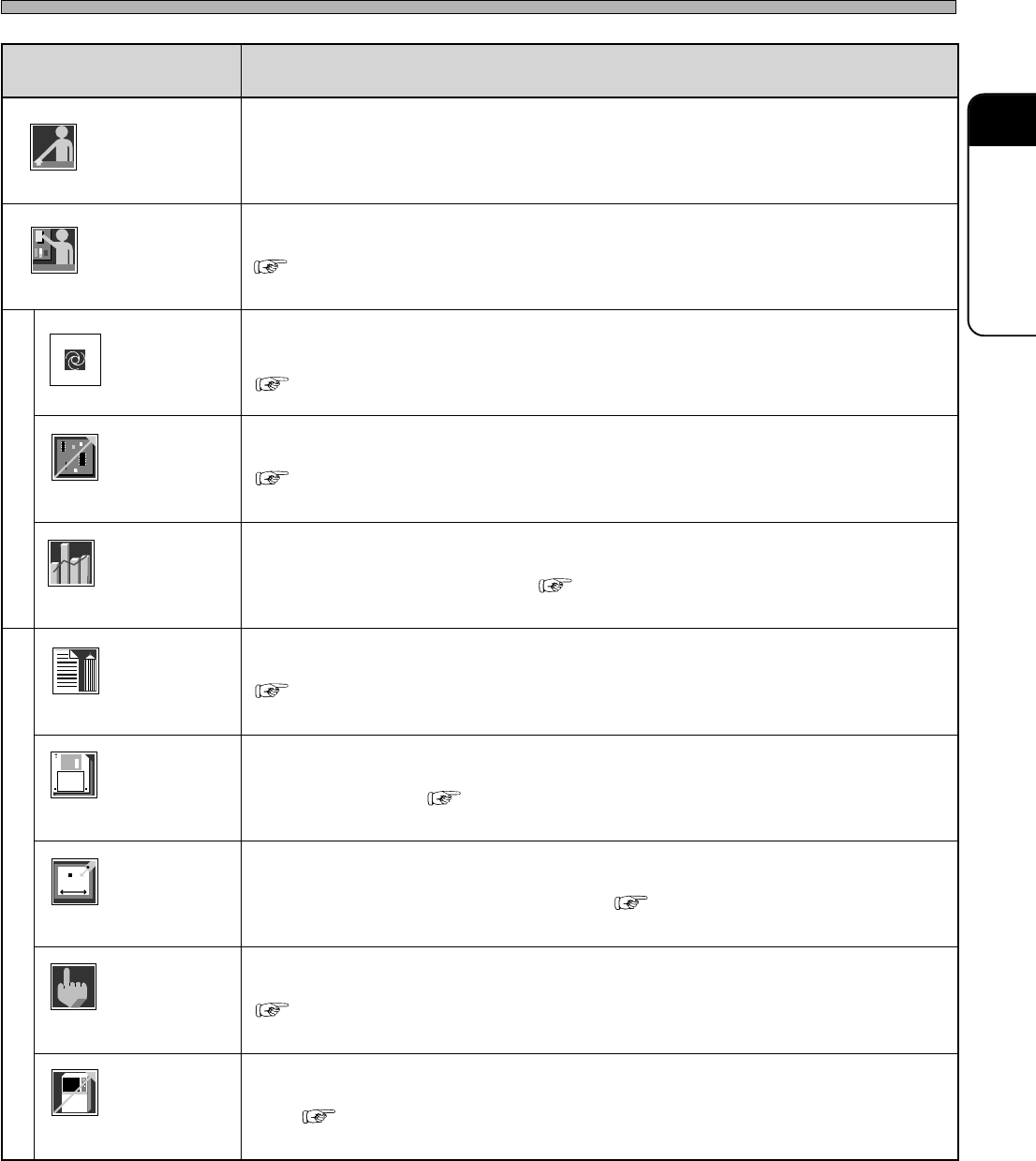
Main Menu
metI noitcnuF
rotarepO.edomrotareponaswohssihT
reenignE
).deriuqersidrowssapehT(.edomreenignenaotdehctiwssiedomrotareponA
)edoMreenignE4-2(
noitcudorP
.noitarepocitamotuanastratssihtgnisserP
.tesneebevahatadnoitcudorpdnaderaperpneebsahenihcamehtretfadesusitI
)NOITCUDOR4retpahC(
tcudorP
gifnoc
.noitomehtkcehcotdnatnempiuqeehtrofetisiuqersgnittesehtrofdesusisihT
)sgnitteSnoitcudorP2-3(
ecnamrofreP
ofni
nehwevitceffesitI.deyalpsidsinoitarepocitamotuanamorftognoitamrofniehT
)noitamrofnInoitcudorP3-3(.noitcudorpfoetatsehthctacuoy
yfidomataD
.atadnoitcudorpehtgnihcaetdnagnitide,gnitaercsahcusrofdesusisihT
)NOITACIFIDOM7retpahC(
eliF
tnemeganam
drah,TPaivsretemarapenihcamdnaatadnoitcudorpehtdaol/evasotdesusisihT
)NOITAREPOELIF6retpahC(.ksidyppolfdnaksid
enihcaM
retemarap
oteud,tnempiuqeehtfo.cte,eulavecnereferehttesdnaegnahcotdesusisihT
).launaMecnanetniaM(.tnemecalperstrapehtroecnanetniameht
enihcaM
tsujda
.enihcamehtfotraphcaefotnemtsujdadnakcehcnoitomehtrofdesusisihT
)tnemtsujdAenihcaM4-3(
enihcaM
gifnoc
noitcudorpnodnepedtonseodtahtenihcamehtfoetatsehttesotdesusisihT
)sgnitteSenihcaM5-3(.atad
Operator
Engineer
444C-106TE
Operator
Engineer
Production
Product
config
Performance
info
Data modify
File
managment
Machine
parameter
Machine
adjust
Machine
config
( 2-4 Engineer Mode)
( Chapter 4 PRODUCTION)
( 3-2 Production Settings)
( 3-3 Production Information)
( Chapter 7 DATA MODIFICATION)
( Chapter 6 FILE OPERATION)
( Maintenance Manual.)
( 3-4 Machine Adjustment)
( 3-5 Machine Settings)