444CEOM1-CM202.pdf - 第116页
Page 3-18 3-4-2 Conveyor Width Adjustment This is used to adjust the widths of all the conveyors to the set size of board automatically . ∗ Make sure no board is on the conveyor beforehand. ∗ After you have pressed Cnvr …
Page 3-17
FUNCTIONS
3
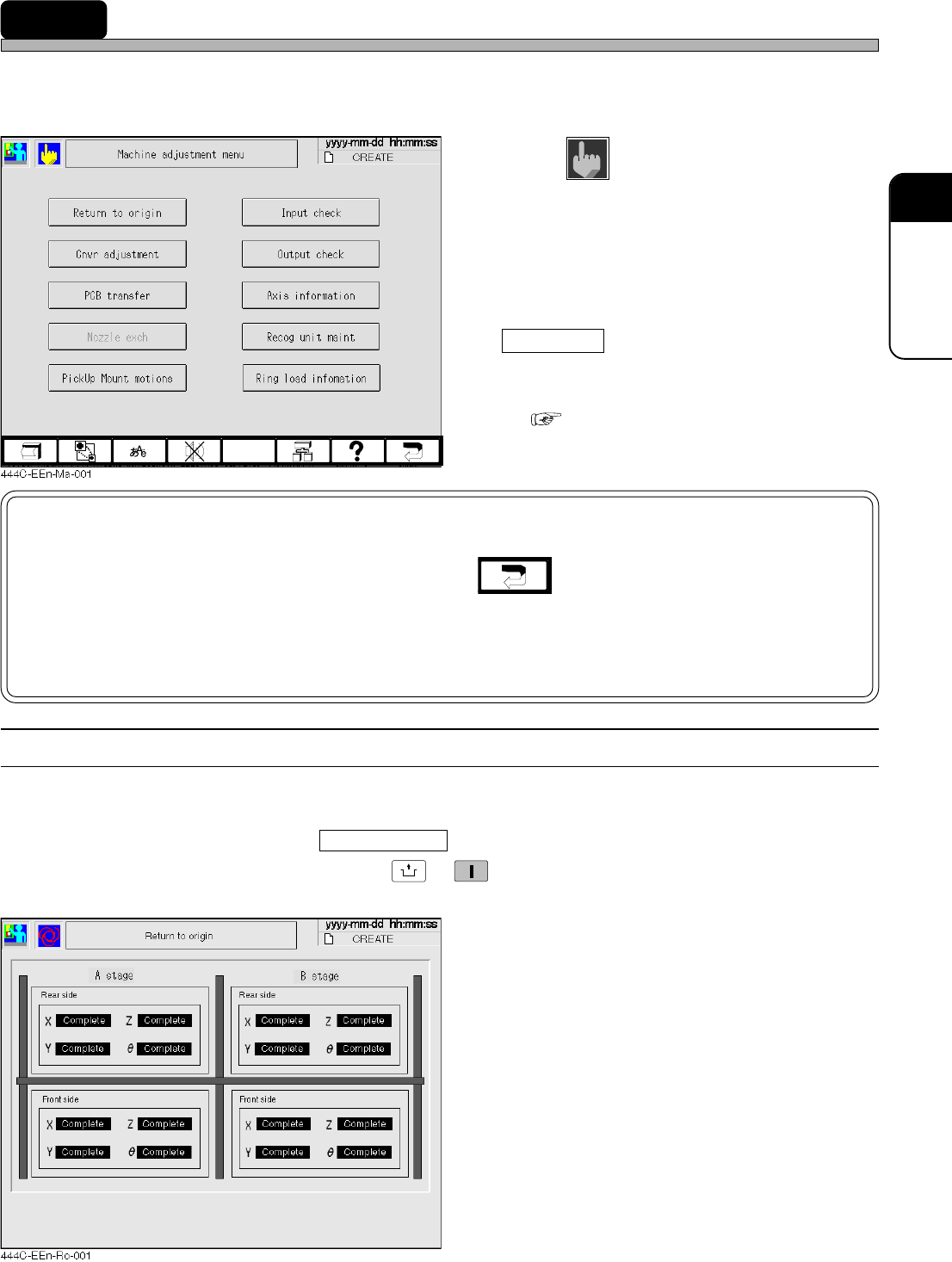
3-4 Machine Adjustment
This is used when you check the motion and make an adjustment of each part of the machine.
∗ On the main menu (default state) in the operator mode, you cannot select this function.
1. Press
Machine
adjust
on the main menu.
•“Machine adjustment menu” is displayed.
∗ Pressing a switch displays each setting screen.
NOTICE
When returning to the main menu by pressing , a message may be displayed.
· When deciding whether to put back the tape feeding rod if it has come out
· When retracting the Z-axis to the origin position, if it has been lowered, so as to
prevent nozzle interference
3-4-1 Returning to Origin
This is used to return all the axes to their origins.
∗ Make sure no board is on the conveyor beforehand.
∗ After you have pressed Return to origin on the machine adjustment menu, make sure the servo
switches are ON, and then press
UNLOCK
→
START
. All the axes return to their origins.
444C-E-OMA03-A01-03
Appears only if the optional nozzle changer is
installed.
( 3-4-4 Nozzle Changing (Option))
Nozzle exch
Page 3-18
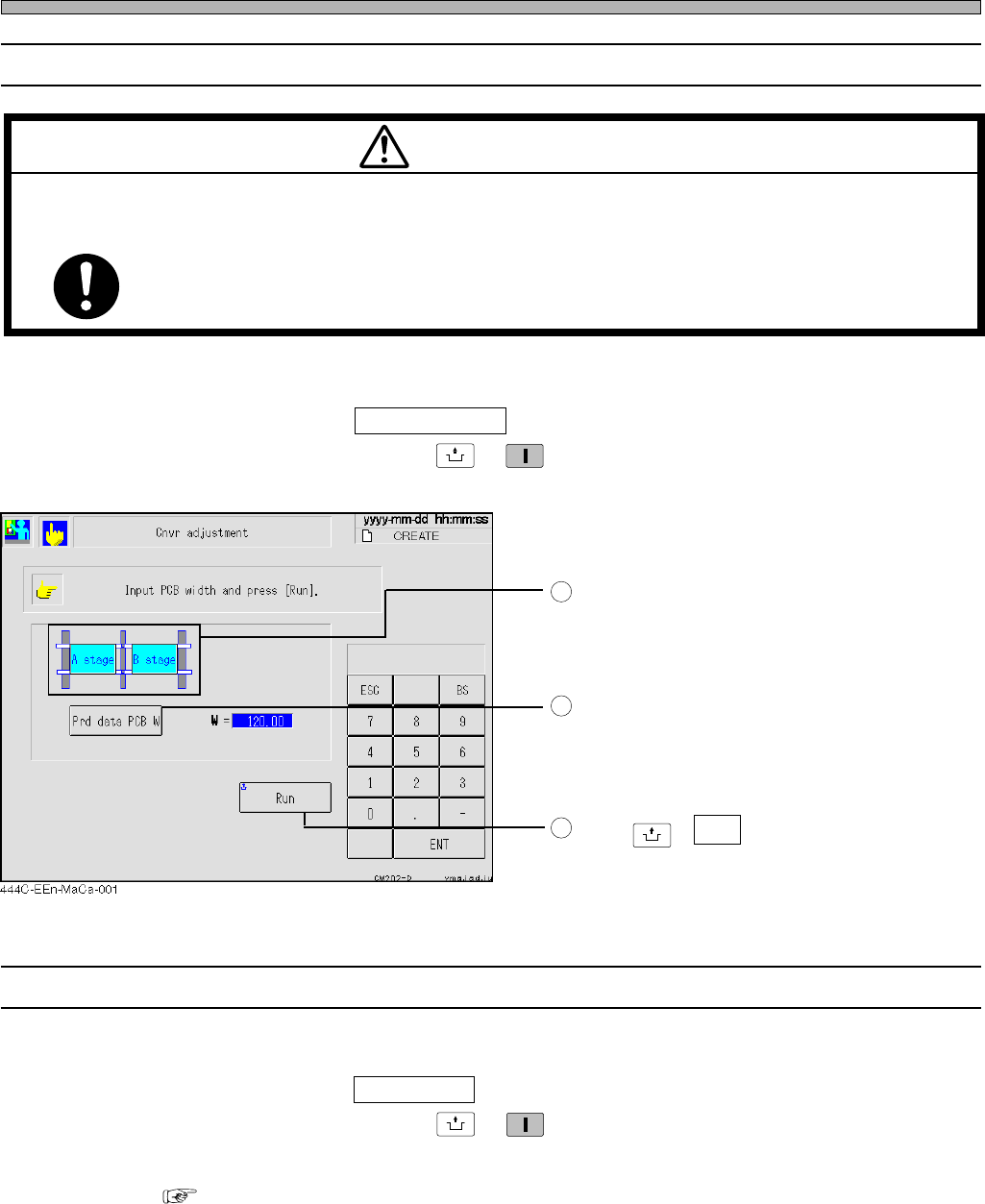
3-4-2 Conveyor Width Adjustment
This is used to adjust the widths of all the conveyors to the set size of board automatically.
∗ Make sure no board is on the conveyor beforehand.
∗ After you have pressed Cnvr adjustment on the machine adjustment menu, make sure the servo
switches are ON, and then press
UNLOCK
→
START
. The conveyor width adjustment screen is dis-
played.
Choose a stage.
Press this switch to adjust the width to the
board width of production data.
When you would like to set the optional board
width, enter it with numeric keys.
Press
UNLOCK
+ Run .
The rails are adjusted automatically.
3-4-3 Board Transport
This is used to perform transporting board in, transferring it from the stage A to B and transporting
it out to the next process for each step.
∗ After you have pressed PCB transfer on the machine adjustment menu, make sure the servo
switches are ON, and then press
UNLOCK
→
START
. The board transport screen is displayed.
∗ The operating method is the same as that of the board transport of production settings.
( 3-2-4 Board Transport)
Machine Adjustment
1
2
3
444C-E-OMA03-A01-02
M35E
TURN OFF THE SERVO SWITCH BEFORE PLACING A BOARD ON OR
REMOVING IT FROM THE CONVEYOR.
You will have serious injury if the machine is actuated.
WARNING
Page 3-19
FUNCTIONS
3
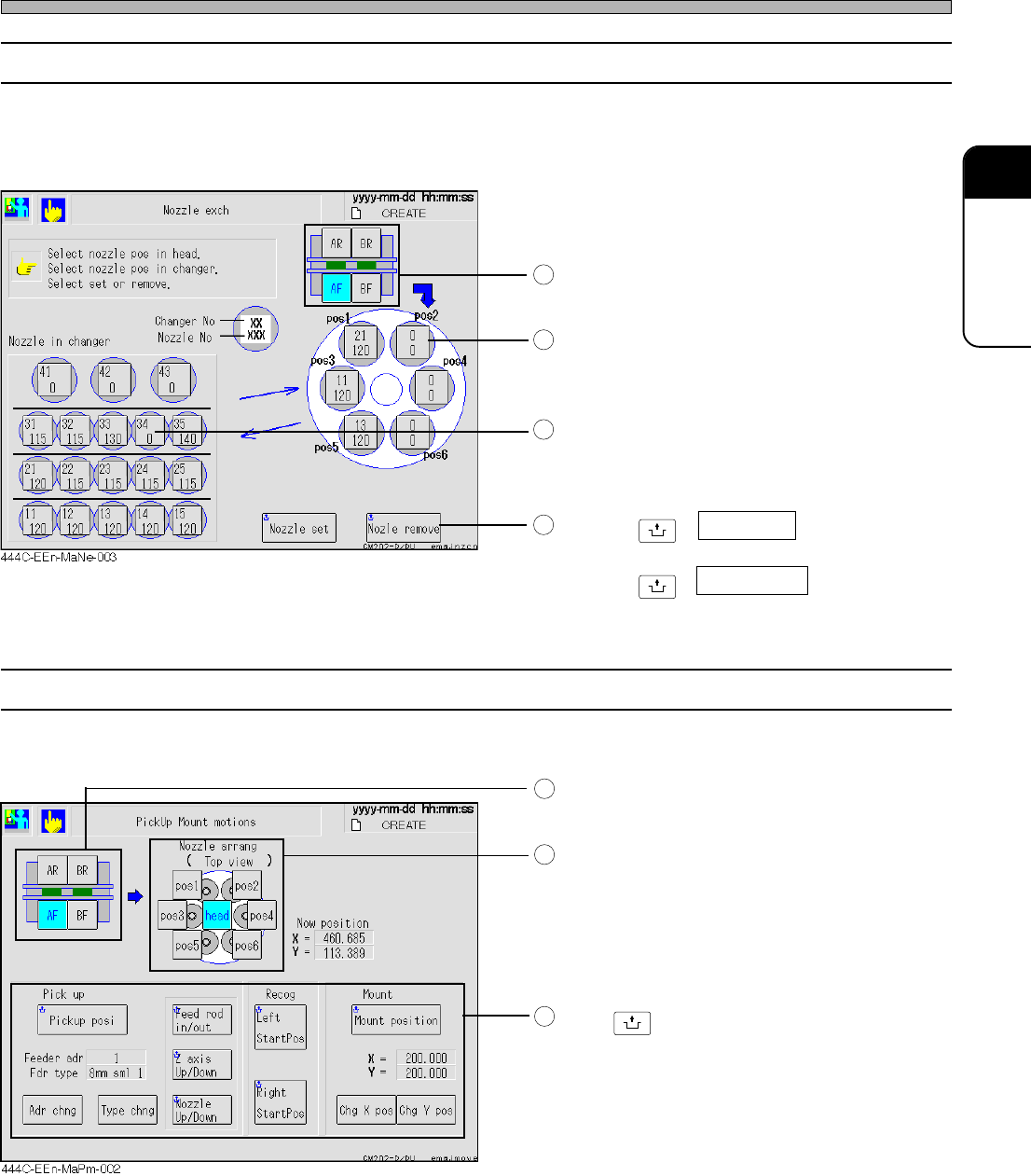
3-4-4 Nozzle Changing (Option)
This is used to change the nozzle attached to the optional head for the one in the nozzle changer
(option).
∗ This is not displayed when the nozzle changer (option) has not been set.
Choose a target head.
(CM201 has only the stage A.)
Choose a nozzle attached to the head.
Choose a nozzle in the changer.
Pressing
UNLOCK
+ Nozzle set fits the nozzle in
the nozzle changer to the head.
Pressing
UNLOCK
+ Nozl set chk removes a
nozzle from the head and puts it away in the
nozzle changer.
3-4-5 Pick-up and Mounting Motions
This is used to check the pick-up, recognition and mounting position of the chosen head or nozzle.
Choose a target head.
(CM201 has only the stage A.)
Choose a head or a nozzle.
For the nozzles that support the simultaneous
pick-up, you can choose the two of them at the
same time. (Each combination such as POS1
and POS2, POS3 and POS4, POS5 and
POS6.)
Press
UNLOCK
+ Each position key.
The chosen head or nozzle moves to that
position.
In the Pick up field, set the address and type.
In the Mount field, choose the X-Y coordinates.
• At the pick-up position, letting the nozzle out/
back, rising/lowering Z-axis and letting the
sending rod out/back can be performed.
Machine Adjustment
1
2
3
4
1
2
3
444C-E-OMA03-A01-04