444CEOM1-CM202.pdf - 第136页
Page 3-38 Others 444C-E-OMA03-A01-01 Displays the mount state check screen. The sequence numbers and error types of all the mount-error components are displayed. • Check mount-error components, and mark the mount-OK ones…
Page 3-37
FUNCTIONS
3
Others
444C-E-OMA03-A01-01
3-6-9 Recovery mount function against chip mount error (Only
when an optional pick-up sensor is available)
At the mount state check screen, the head camera checks the mount state. Then you can select
whether or not to recovery-mount the mount-error components.
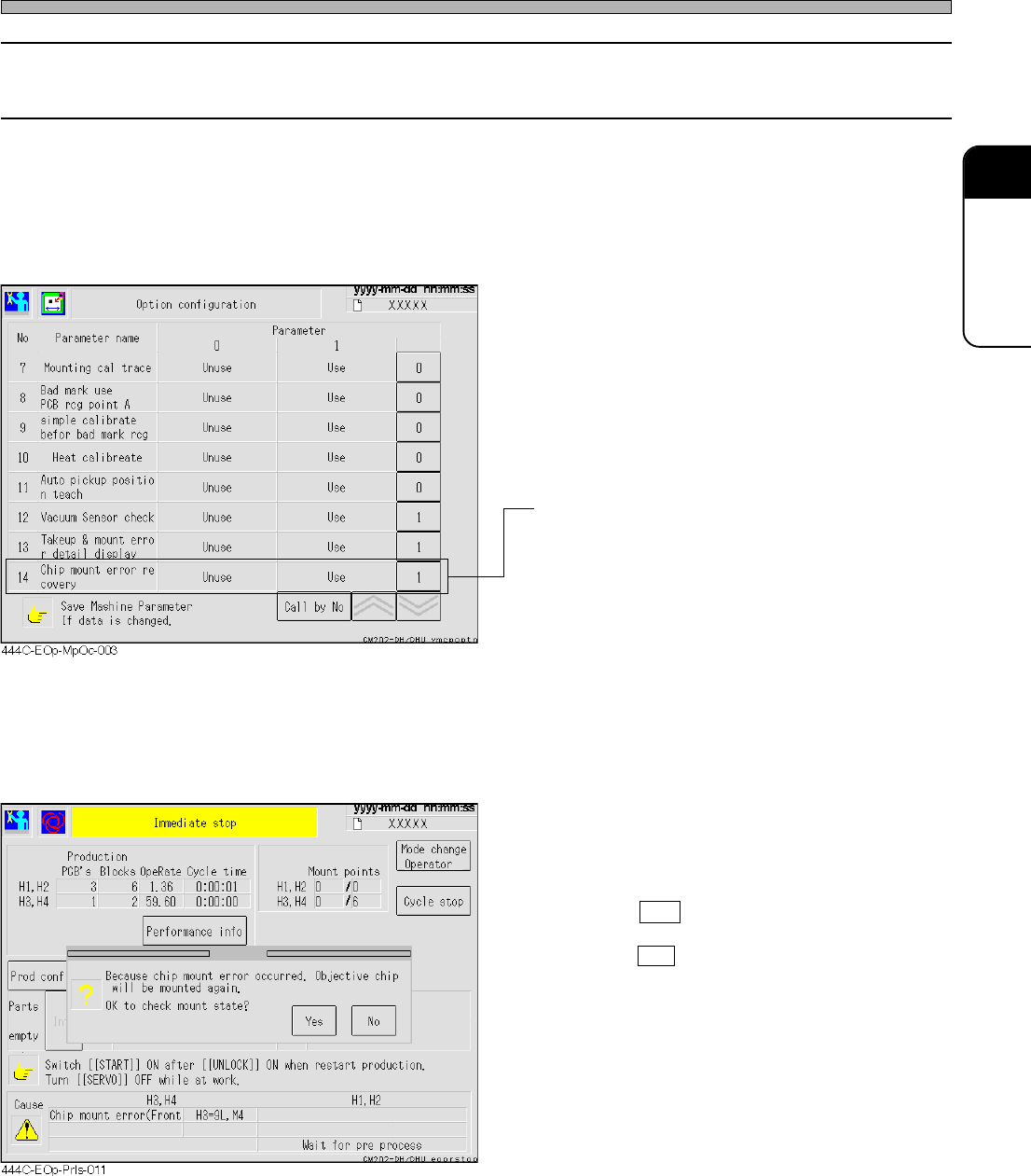
1. Selection whether or not to use the recovery mount function
• When the item “Chip mount error recovery”
on the option configuration screen is set to
“Use (1),” mount-error components can be
recovery-mounted automatically. When it is
set to “Unuse (0),” mount-error compo-
nents are not recovery-mounted because
they are considered to have already been
mounted.
• Set “Chip mount error recovery” to ‘1’ (Use).
To continue conventional operation, set it to ‘0’
(Unuse).
2. When “Chip mount error recovery” is set to “Use (1)”
• If a chip-mount error occurs during operation,
the mount state check screen displays.
When you wish to check the mount state of the
mount-error components, press Yes.
• Pressing Yes displays the mount state check
screen.
Pressing No returns the screen to the immedi-
ate-stop screen, and recovery-mounts the
mount-error components at the time when
production resumes.
Page 3-38
Others
444C-E-OMA03-A01-01
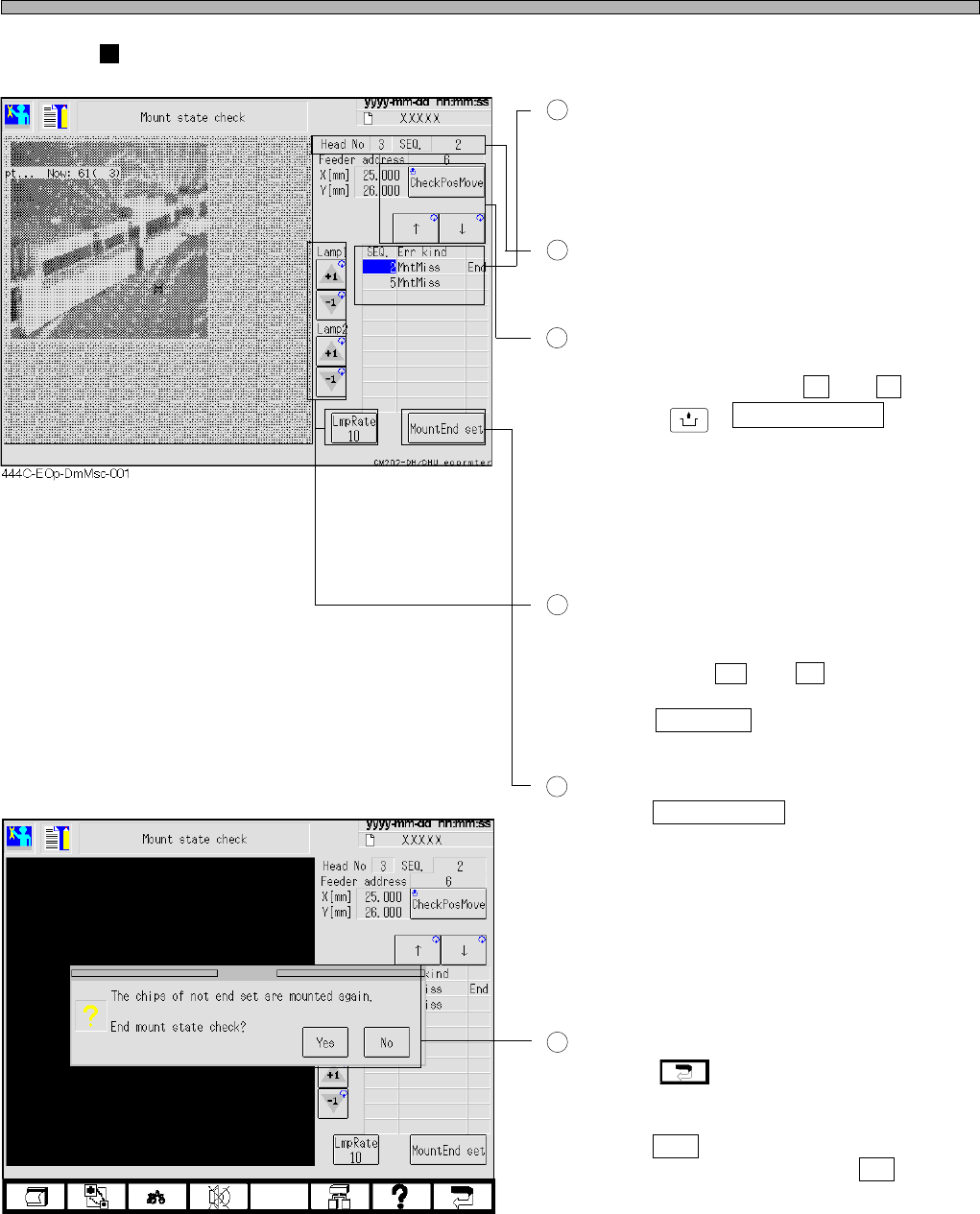
Displays the mount state check screen.
The sequence numbers and error types of all
the mount-error components are displayed.
• Check mount-error components, and mark the
mount-OK ones with “End.”
The detailed information of the cursor-selected
mount error is displayed at the upper right of
the screen.
When you wish to check the mount state of the
mount-error components, select the desired
SEQ using arrow buttons ( ↑ and ↓ ), and
then press
UNLOCK
+ CheckPosMove button.
The head camera travels to the mount position
of the mount-error component.
Unless the camera has traveled to the mount
position of the cursor-selected component, the
image is not displayed.
Adjustment of the head-camera lamp
The lighting values of the head camera can be
adjusted by pressing the increase and de-
crease buttons ( +1 and -1 ) of lamp 1 and
lamp 2.
Pressing LmpRate button toggles the lamp
adjusting rate between “10” and “1.”
Setting and Release of the mounted
Pressing MountEnd set releases “End” setting
if it is set in the cursor-selected row, or sets
“End” if it is not set.
The mount-error component marked with “End”
is not recovery-mounted when operation is
resumed.
The mount-error component that is not marked
with “End” is recovery-mounted when operation
is resumed.
Exit of mount state check screen
Pressing key displays the following
confirmation screen over the mount state
check screen.
Pressing Yes returns the screen to the
immediate-stop screen. Pressing No remains
the mount state check screen.
1
2
3
4
5
6
444C-EOp-DmMsc-002
Page 3-39
FUNCTIONS
3
Others
444C-E-OMA03-A01-01
3-6-10 Bad-component forced-ejection function (Only when a
bad-component forced-ejection unit is available)
The bad-component forced-ejection function forcibly scrapes out chips using the component
forced-ejection unit. (Available only for the nozzles with the numbers whose last two numerals are
00 to 15.)
This function is used if the conventional component-ejection blow cannot eject a chip out of a
nozzle because the chip has gotten caught or has been stuck by something adhesive.
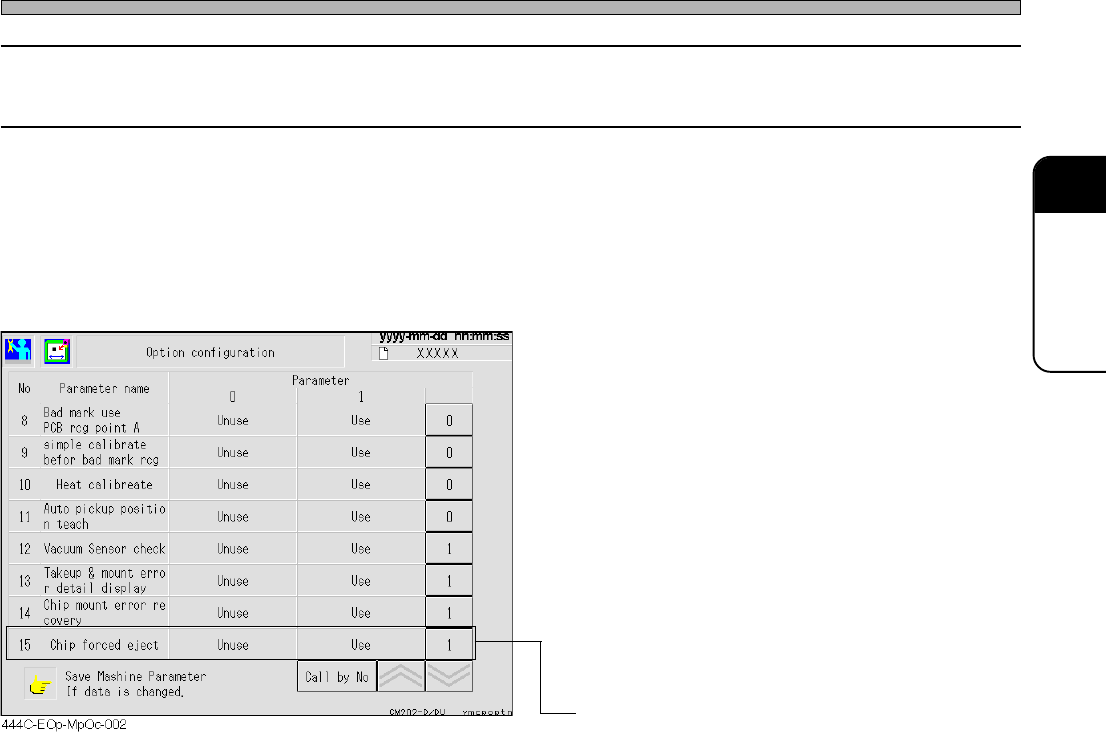
Selection whether or not to use the bad-
component forced-ejection function
When the item “Chip forced eject” on the
option configuration screen of the machine
parameters is set to “Use (1),” the chips are
forcibly scraped out by the component
forced-ejection unit if the conventional
component-ejection blow cannot eject
them.
When it is set to “Unuse (0),” the machine
comes to a chip-eject-error immediate stop
if the conventional component-ejection
blow cannot eject the chips.
• Set “Chip forced eject” to ‘1’ (Use).
To continue conventional operation, set it to ‘0’
(Unuse).