444CEOM1-CM202.pdf - 第88页
Page 2-4 y e k n o i t c n u f r e w o L n o i t c n u F t n i r p n e e r c S . n e e r c s f o y p o c d r a h t n i r p o t d e s U . T P h t i w d e t c e n n o c r e t n i r p e h t m o r f t u o d e t n i r p s i t…
Page 2-3
BASIC OPERATION
2
F 1F 2F 3F 4F 5F 6F 7F 8
2-2 Touch Panel
This machine is operated by using the touch panel and operating panel. This section describes the
basic operation of touch panel.
2-2-1 Touch Panel Configuration
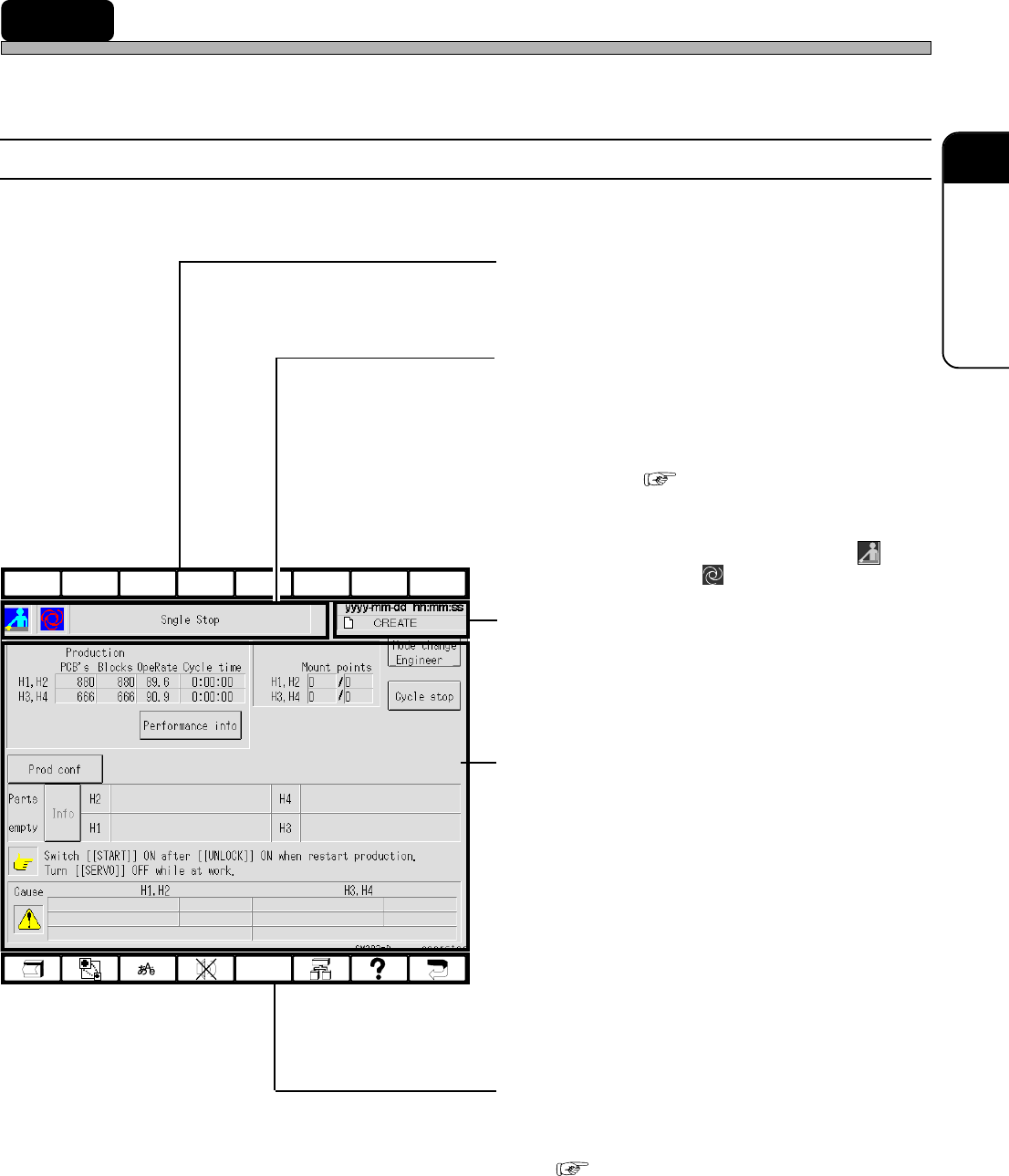
Touch panel configuration is as follows.
a) Upper function keys
Only the F1 key is used. (CM202 only)
b) Hierarchy, mode and menu name
display area
The state of current displayed screen is dis-
played by the icon and the item name. The
same icons as the ones of main menu are
displayed. ( 2-3 Main Menu)
e.g.) The screen as shown left
This shows this machine has come to an
immediate stop in the operator mode ( )
during production ( ).
c) Date, time and data name display area
Present date, time and data name are dis-
played.
d) State display, switches and messages
area
The state of this machine, messages, the
switches for operation and so on are displayed.
e) Lower function keys
These are allotted the functions to be used
frequently.
( 2-2-2 Function Keys)
444C-E-OMA02-A01-03
444C-EOp-PrIs-002
Page 2-4
yeknoitcnufrewoL noitcnuF
tnirpneercS
.neercsfoypocdrahtnirpotdesU
.TPhtiwdetcennocretnirpehtmorftuodetnirpsitI•
noitisopmirepuS
siyeksihtemityrevE.lenaphcuotehtnodesopmirepussineercsnoitingoceR
ezis-lluf,ecneuqesnirevosegnahcneercsnoitingocer,desserp → tfelreppu,ezis-2/1
→ thgirreppu,ezis-2/1 → thgirrewol,ezis-2/1 → tfelrewol,ezis-2/1 → .noiteled
noitcelesegaugnaL
revodehctiwsera)esenapaJrohsilgnE(segaugnaleht,yeksihtsserpuoynehW
.yletaidemmi
potsrezzuB
.gnidnuossitinehwrezzubapotsotdesU
pmujeerT
hcihw,deyalpsidsineercseertunemeht,neercsynatayeksihtsserpuoynehW
)pmujeerTegaptxeN(.neercsunemnesohcehtotgnipmujselbane
pleH
)pleHegaptxeN(.deyalpsidsineercsdeyalpsidtnerrucehtfonoitpircseD
yeknruteR
.enognidecerpehtotsnruterneercS
Touch Panel
2-2-2 Function Keys
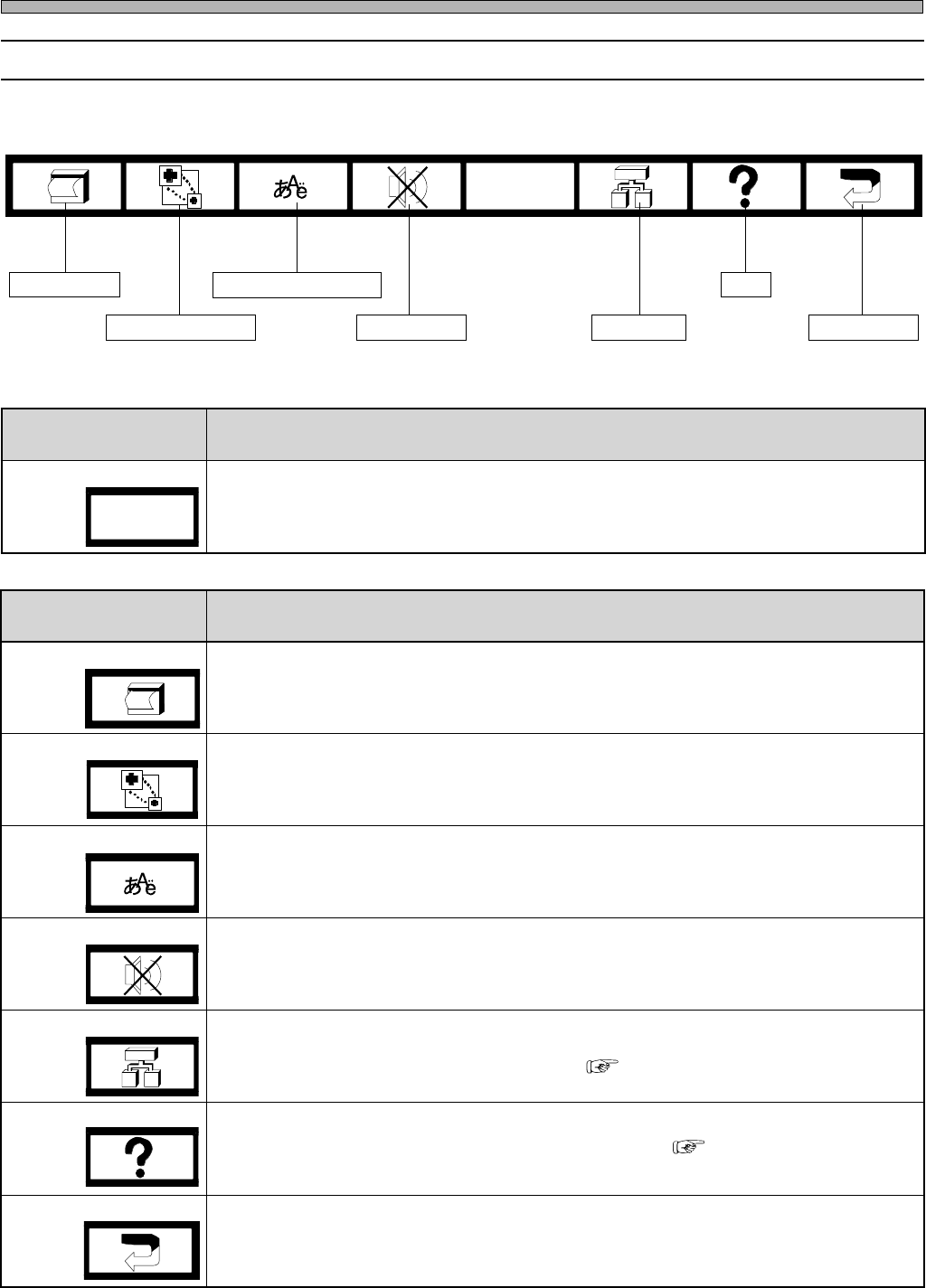
The lower function keys are allotted the following function. When you press the key, it functions.
Screen print
Superimposition
Language selection
Buzzer stop
Tree jump
Help
Return key
444C-105TE
444C-E-OMA02-A01-02
( Next page Tree jump)
( Next page Help)
yeknoitcnufreppU noitcnuF
egatsnoitisopmirepuS
noitceles
siyeksihtemityrevE.revodehctiwseranoitisopmirepusybdeyalpsidsegatsehT
.revodehctiwseraBdnaAegatseht,desserp
∗ .102MCrofdilavnisitI.ylno202MCrofsiyeksihT
444C-110TE
F1
Page 2-5
BASIC OPERATION
2
Touch Panel
444C-E-OMA02-A01-01
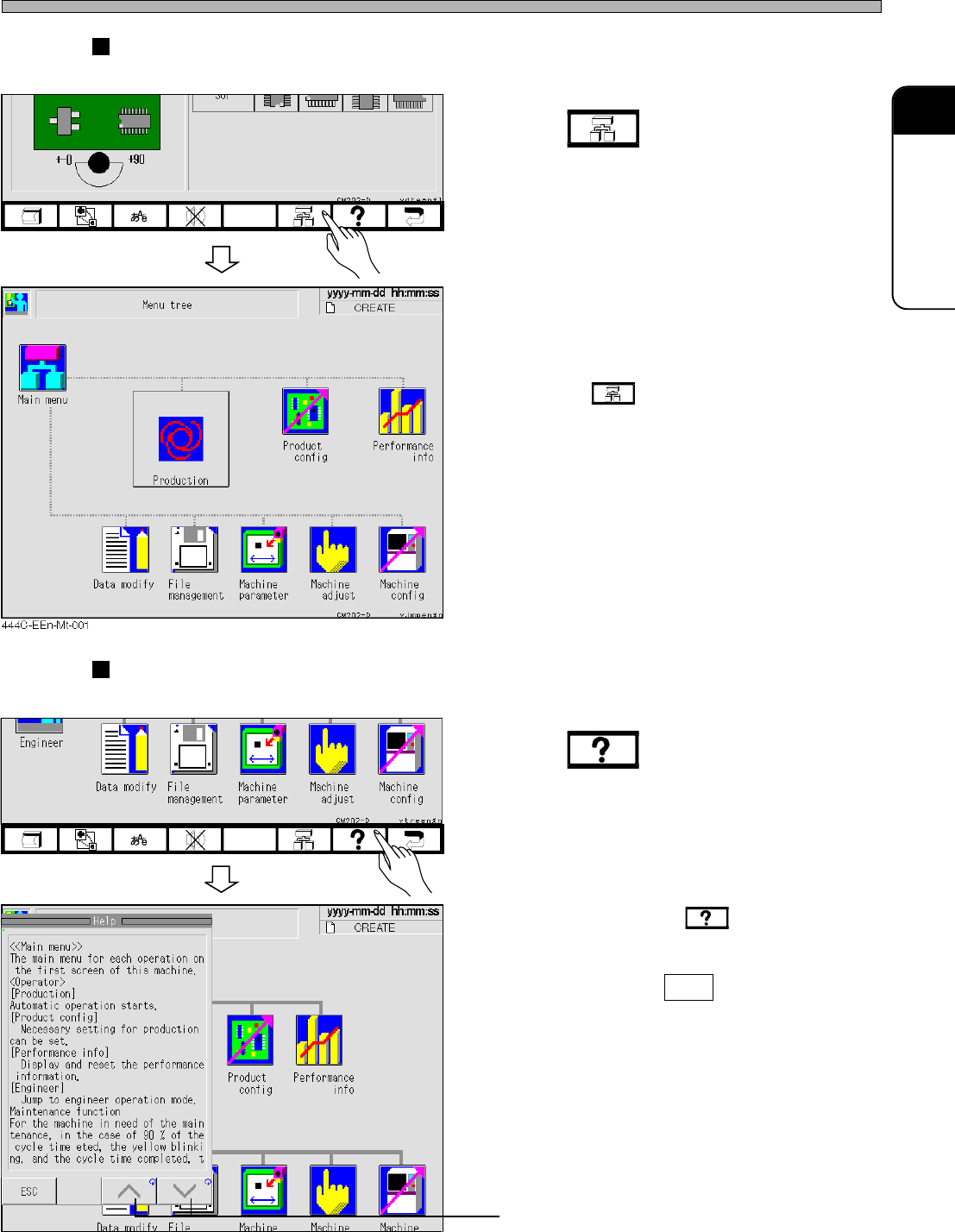
Tree jump
This key is used to jump from the current screen to the other screen immediately.
1. Press .
∗ Pressing at any screen displays the
menu tree screen.
Help
This key is used when you want to know how to operate and the explanation of each function.
1. Press .
• The help screen is displayed.
• Every time you press , the position of
message changes alternately (Left ⇔ Right).
• To exit Help, press ESC .
Screen is scrolled in the direction of arrow.
444C-EEn-DmAd-001
444C-EEn-Main-001
444C-EEn-Main-003