182050 User manual.pdf - 第176页
semi automatic ',163(&7,21 02'8/(29( 59,(: 7.2 User Manual Software Version 0 7SP02 Board Inspect ion The various board i nspections are shown below . NOTE Uneven tinn ing of th e board and/or mi saligne…

semi automatic
',163(&7,21
02'8/(29(59,(:
Software Version 07SP02 User Manual 7.1
CHAPTER 7 2D INSPECTION
MODULE OVERVIEW
Introduction 2D Inspection (2Di) utilizes the machine vision system for accurate detection of
paste on the board after printing. When this option is enabled the board can be
inspected for the amount of pad covered by solder paste, as a % of the aperture
size.
When certain function keys are selected the existing machine status page is
replaced by a Graphical User Interface (GUI). The GUI allows the user to setup
and navigate 2Di sites quickly and easily.
Purpose By monitoring the printing process, 2Di ensures the continual quality of board
printing. 2Di, if licensed, verifies the correct paste coverage.
If there is insufficient paste on the board, paste load and reprinting the board
operations can be undertaken.
2Di optimizes the cycle time by eliminating unnecessary paste dispensing
operations. To achieve this, the system inspects various areas of the board to
detect the amount of paste on pad.
Operation Board inspection is licensed and can be enabled in the Set Prefs menu. The
level of inspection is None (No Inspection) or Basic (Paste on Pad).
Pre-images Board inspection is achieved by image comparison. Therefore prior to printing,
the camera visits all programmed sites to capture images of the bare sites.
This captured image, called a Pre-image, is taken for every site setup. The two
available parameter settings for capturing Pre-images are:
• One - Pre-image captured on the first board in a batch only.
• Every - Pre-image captured on every board of a batch.
There is no provision to select sites to be pre-imaged individually. All sites are
pre-imaged once (one) or every cycle (every).
NOTE
A new batch may be started when the machine is switched ON/OFF or a product
file being re-loaded.
semi automatic
',163(&7,21
02'8/(29(59,(:
7.2 User Manual Software Version 07SP02
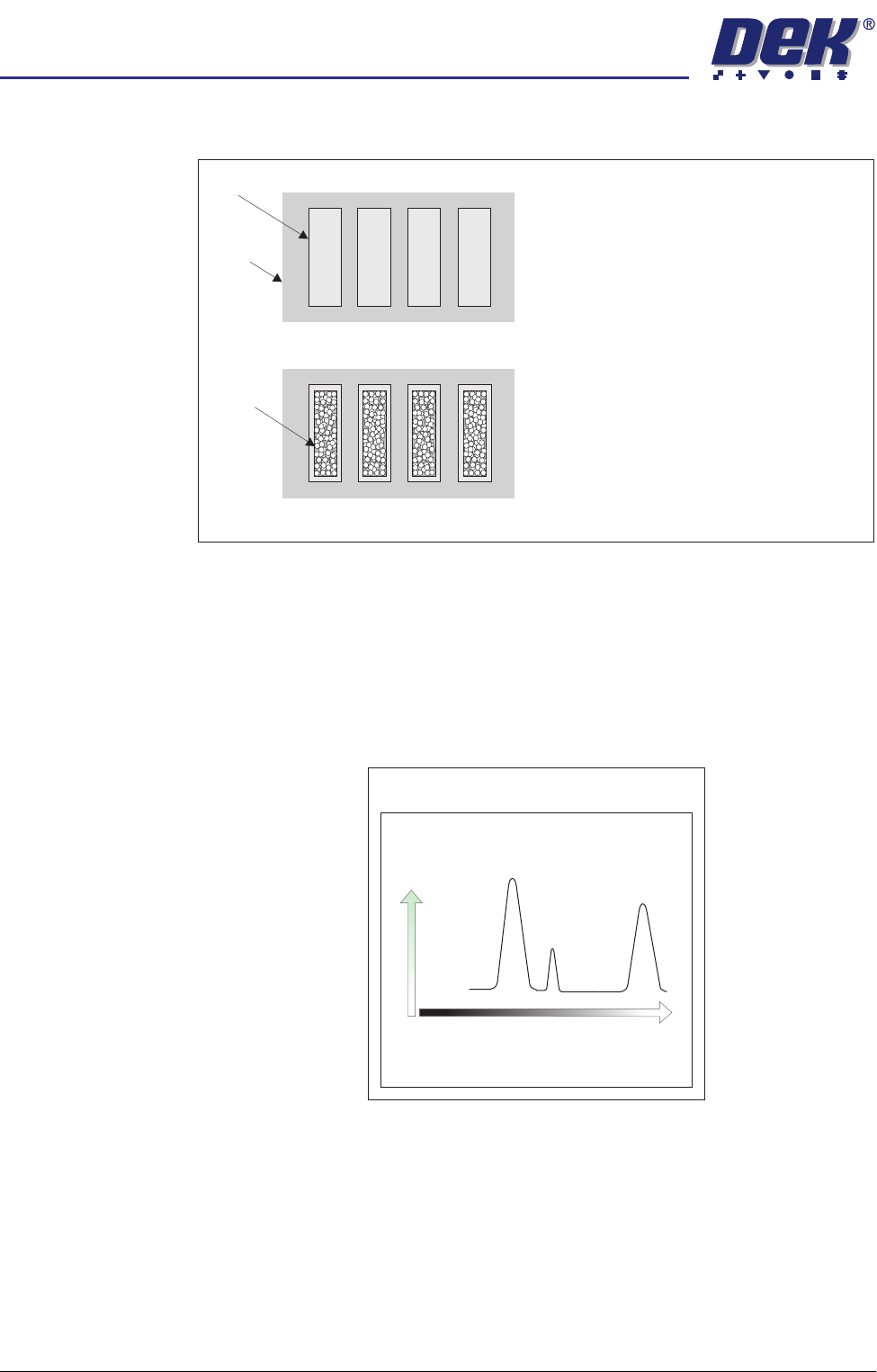
Board Inspection The various board inspections are shown below.
NOTE
Uneven tinning of the board and/or misaligned solder mask may be seen as
paste, which could cause false readings. DEK’s grey camera and lighting setup
can eliminate this effect.
Histogram The vision card analyses the grey scale levels of the pixels that make up the
site image. From this information a histogram is produced, this can be used as
a visual aid to setting up lighting for 2D Inspection.
The pad on a selected board site is
learnt as a reference for comparison
with inspected sites.
Since the area of the pad is learnt,
and the area of paste can be
recognized, any change in pad area
must be paste. Hence the area of
paste present can be calculated with
respect to the aperture size.
Pad
Board
Paste
Clean Board
Paste Present
Board Histogram
Number
of
Pixels
Black
PadBoard
Paste
White
Grey Scale Level
semi automatic
',163(&7,21
02'8/(29(59,(:
Software Version 07SP02 User Manual 7.3
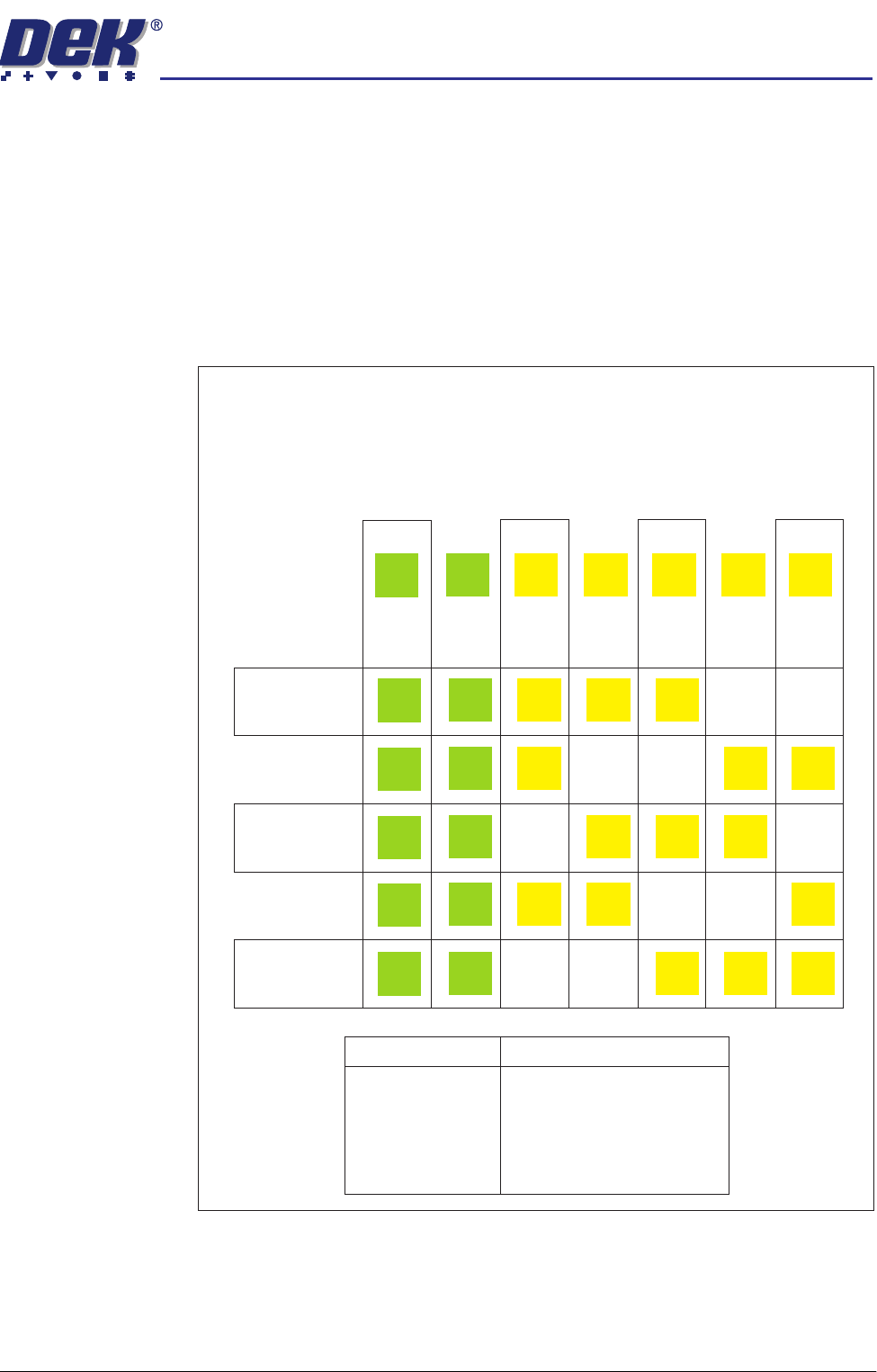
Inspection Cycles During setup, sites are given a priority of either Every Cycle (EC) or General
(G). The amount of sites inspected during each cycle is set using the min sites/
cycle parameter, this must be set to at least the amount of every cycle sites. As
the name suggests, EC sites are inspected every cycle. General sites are
inspected depending on the value of the min sites/cycle parameter and the
number of EC sites as follows:
Number of general sites inspected per cycle = Min sites/cycle parameter - EC
sites.
The general sites are inspected in rotation as shown below.
Figure 7-1 Site Inspection Cycles
min sites / cycle = 5
Cycle 1
Cycle 2
Cycle 3
Cycle 4
Cycle 5
In the example below, seven sites have been setup, with two given the priority
of and five given the priority of .
The min sites/cycle parameter is set at 5. As there are two EC sites, this leaves
three G sites to be inspected at each cycle as shown.
Every Cycle (EC) General (G)
Site 1
EC
EC
EC
EC
EC
EC
Site 2
EC
EC
EC
EC
EC
EC
Site 3
G
G
G
G
Site 4
G
G
G
G
Site 5
G
G
G
G
Site 6
G
G
G
G
Site 7
G
G
G
G
SITES
Cycle 1
Cycle 2
Cycle 3
Cycle 4
Cycle 5
Cycle 6
3, 4, 5
6, 7, 3
4, 5, 6
7, 3, 4
5, 6, 7
process repeats