182050 User manual.pdf - 第241页
semi automatic &21680$ %/(5( 3/(1,6+0 (176 9257(;3/8 681' (56&5 ((1&/($1 (5 Software Version 07SP02 User Manual 8.33 1. Carry out the procedure in the previou s section - Cleaning Casset te and Solve…
semi automatic
&21680$%/(5(3/(1,6+0(176
9257(;3/8681'(56&5((1&/($1(5
8.32 User Manual Software Version 07SP02
Solvent Advice The following solvents MUST NOT be used in the underscreen cleaner. How-
ever, this list is not complete and does not mean that any solvent not mentioned
is compatible, with DEK machines.
• Rosstech 106 FE
• Rosstech 162 ND
• Acetone
DEK are continuously evaluating alternative solvents. If you wish to use a
particular type of solvent, but are unsure of its suitability for DEK machines,
please contact the DEK Customer Support Group.
Solvent Replenishment
WARNING
RECOMMENDED SOLVENTS. ANY SOLVENTS USED MUST COMPLY WITH
LOCAL ENVIRONMENTAL GUIDELINES. DEK RECOMMEND USING SOLVENTS
THAT ARE ENVIRONMENTALLLY FRIENDLY, IE CFC FREE AND WATER BASED.
SOLVENTS USED MUST HAVE FAST EVAPORATION RATES AND FLASHPOINT
SPECIFICATIONS GREATER THAN 39ºC.
WARNING
SOLDER PASTE AND SOLVENTS. WHEN USING OR HANDLING ANY SOLDER
PASTE OR SOLVENT FORMULATION THE MANUFACTURERS’ RECOMMEND
SAFETY PRECAUTIONS MUST BE STRICTLY ADHERED TO.
WARNING
PROTECTIVE CLOTHING. APPROVED PROTECTIVE CLOTHING SHOULD BE
WORN BY SOLDER PASTE AND SOLVENT HANDLERS AT ALL TIMES TO
ELIMINATE FUME INHALATION, EYE CONTACT, SKIN CONTACT AND
INGESTION.
WARNING
SOLVENT SOLUTION. DO NOT MIX SOLVENT SOLUTIONS. FLUSH THE
SOLVENT TANK THOROUGHLY WHEN CHANGING TO A DIFFERENT SOLVENT
SOLUTION.
WARNING
SOLVENT SPRAY. THE UNDERSCREEN CLEANER SPRAYS A FINE JET OF
SOLVENT SOLUTION ON TO THE CLEANER. APPROVED PROTECTIVE
CLOTHING SHOULD BE WORN.
semi automatic
&21680$%/(5(3/(1,6+0(176
9257(;3/8681'(56&5((1&/($1(5
Software Version 07SP02 User Manual 8.33
1. Carry out the procedure in the previous section - Cleaning Cassette and
Solvent Replenishment.
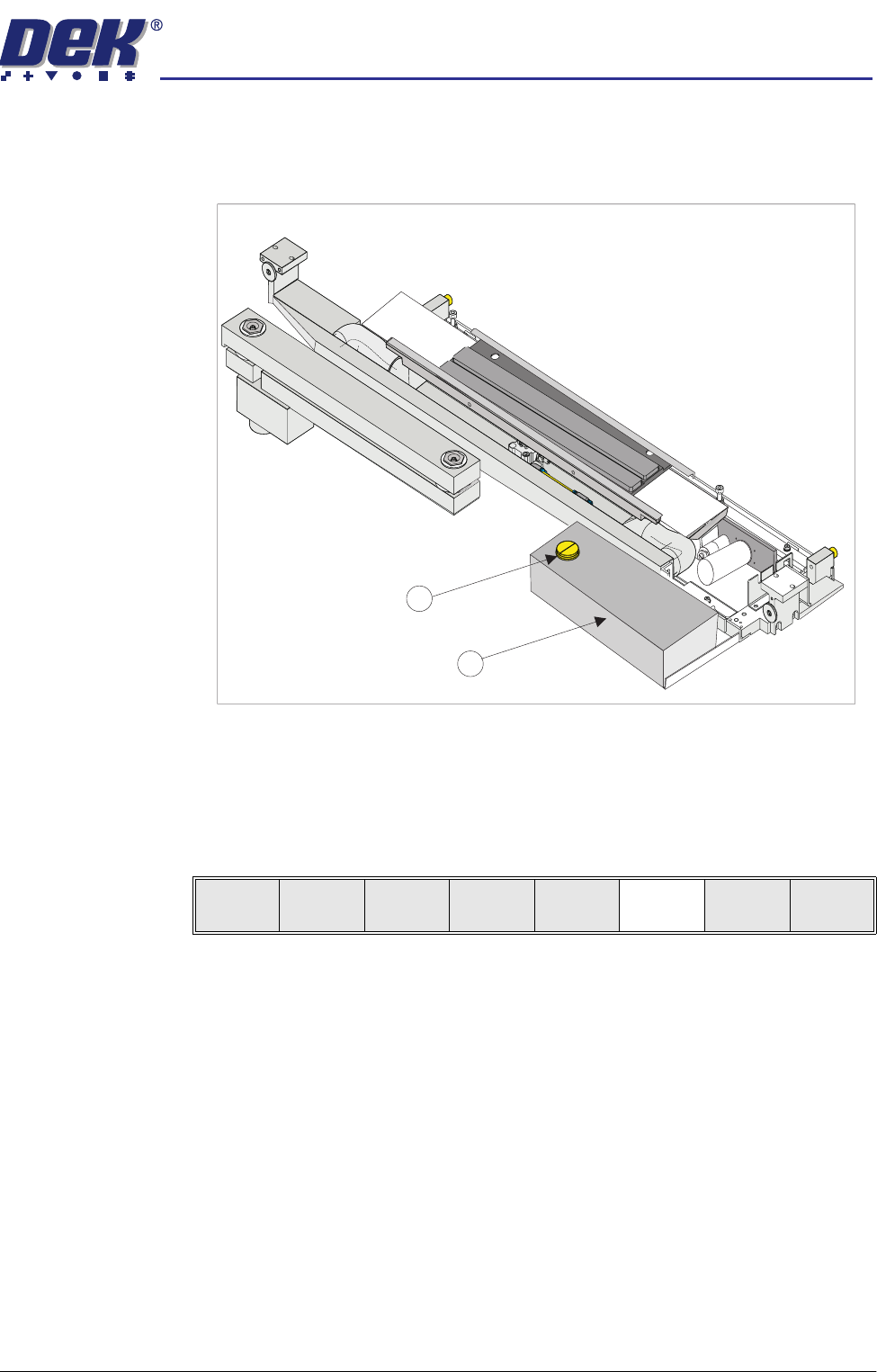
2. Remove the solvent tank cap (1) from the solvent tank (2).
3. Using a suitable solvent refill the tank and replace the cap.
4. Close the front printhead cover.
5. Press the System button.
6. Press Prime Solvent (F6). The message ‘Press the two button control
buttons to prime solvent.’ is displayed.
7. Prime the solvent using the two button control.
1
2
Change
Screen
Board
Clamps
Prime
Solvent
Exit
semi automatic
&21680$%/(5(3/(1,6+0(176
9257(;3/8681'(56&5((1&/($1(5
8.34 User Manual Software Version 07SP02
Cleaning Cassette Replenishment
WARNING
PROTECTIVE CLOTHING. APPROVED PROTECTIVE CLOTHING SHOULD BE
WORN BY SOLDER PASTE AND SOLVENT HANDLERS AT ALL TIMES TO
ELIMINATE FUME INHALATION, EYE CONTACT, SKIN CONTACT AND
INGESTION.
WARNING
FLAMMABLE. THE USED VORTEX CLEANING CASSETTE AND VORTEX FILTER
CASSETTE CONTAIN RESIDUES OF UNDERSCREEN CLEANER FLUID AND
SOLDER PASTE. OBSERVE MANUFACTURERS’ RECOMMENDED DISPOSAL
INSTRUCTIONS.
NOTE
The cleaning cassettes come in different sizes, ensure the correct size is
replaced.
1. Carry out the procedure in the previous section - Cleaning Cassette and
Solvent Replenishment.
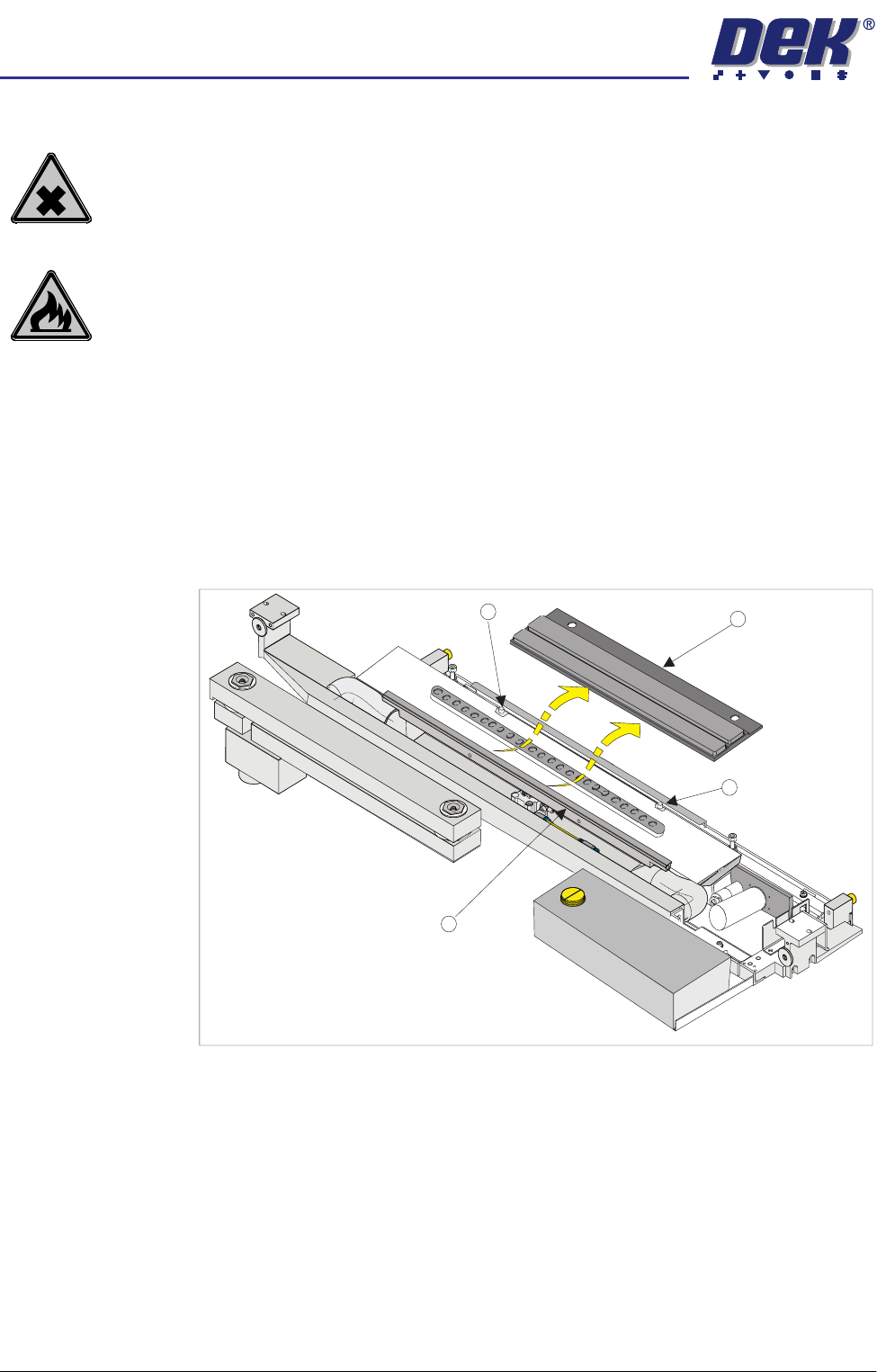
2. Carefully lift the cleaning cassette (1) clear of the two pins (2) and slide out
from beneath the solvent spray bar (3).
3. Dispose of the used cleaning cassette in accordance with local authority
guidelines.
4. If the filter is to be replaced continue with Step 4. If the filter cassette is not
being replaced go to Step 7.
1
2
2
3