00197463-03_SM_CPP_Customer_EN.pdf - 第30页
4 Component camera and component sensor 4.1 Replacing the component camera [03018637‑xx] 30 Service Manual SIPLACE Multistar (CPP / CPP M) 02/2018 Fig.30: Fixture points for component camera 1. Screws at the foot of the…
4 Component camera and component sensor
4.1 Replacing the component camera [03018637‑xx]
Service Manual SIPLACE Multistar (CPP / CPP M) 02/2018 29
4 Component camera and component sensor
4.1 Replacing the component camera [03018637‑xx]
Parts, equipment and tools
●
Select the required spare part:
– Component camera C&P (type 23) 6x6 GigE [03105195Sxx]
– Component camera C&P (type 29) 27x27 digital RK [03018637Sxx] (without GigE)
– Component camera C&P (type 30) 27x27 GigE [03101672Sxx]
– Component camera C&P (type 38) 16x16 digital RK [03051870Sxx]
– Component camera CPP (type 45) 15x15 GigE [03106380Sxx]
Overview
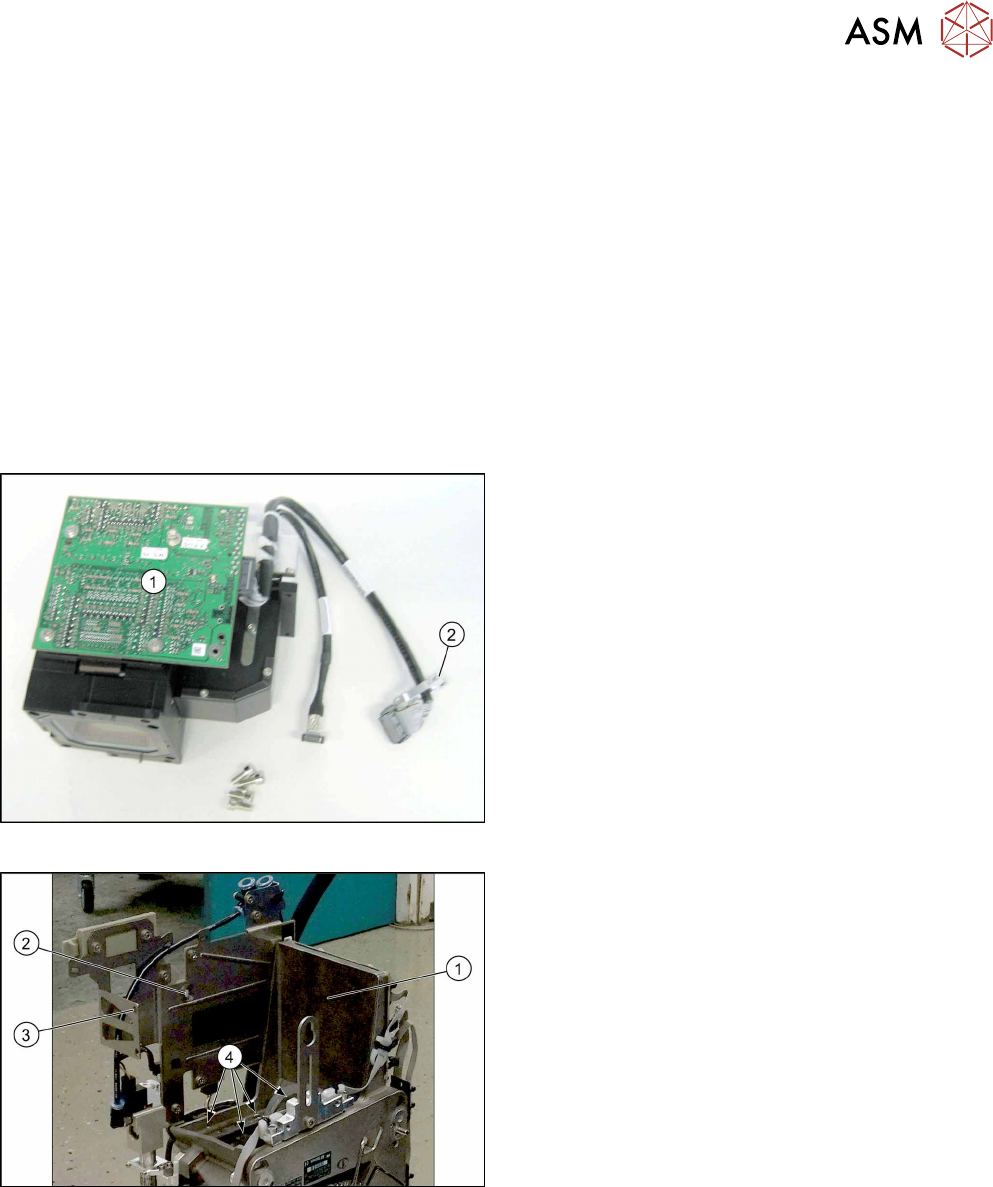
Fig.28: Component camera
1. Illumination control
2. Cable holder
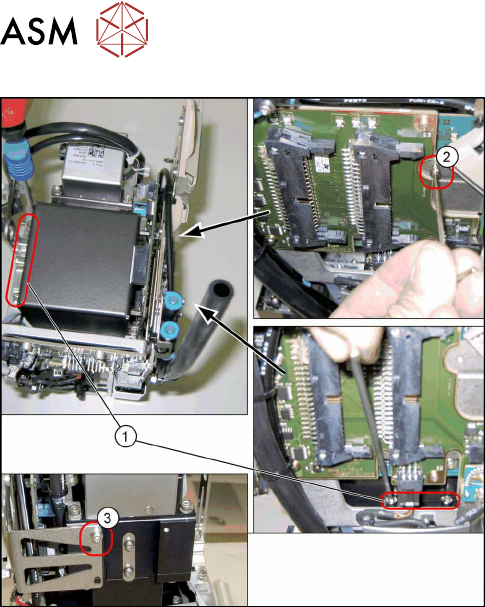
Fig.29: CPP head without component camera
1. Mounting position for the component camera
2. Fixing hole on the board holder
3. Fixing hole on the bracket
4. Fixing holes for the foot of the component cam-
era (two each on each side)
4 Component camera and component sensor
4.1 Replacing the component camera [03018637‑xx]
30 Service Manual SIPLACE Multistar (CPP / CPP M) 02/2018
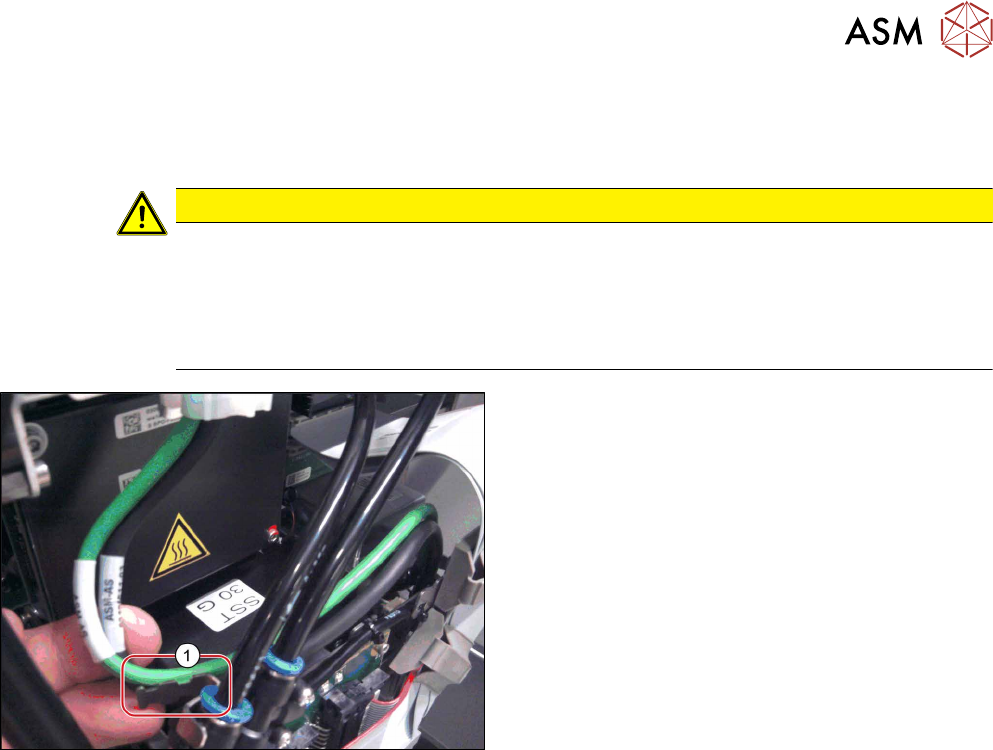
Fig.30: Fixture points for component camera
1. Screws at the foot of the camera 4x)
DIN912-M3x16-A2-70 [00325349-xx]
2. Screw on the board holder (1x)
ISO4762-M2.5x4-A2-70 [03042531-xx]
DIN125-A2.7-140HV-A2 [00201583-xx]
3. Screw on the retaining bracket (1x)
ISO 4762 - M 2.5 x 4-A2-70 [03042531-xx ]
DIN 125-A 2.7-140HV-A2 [00201583-xx]
Preparation
► Remove the head from the machine. For details about removing and fitting the placement
head, refer to the service manual for your machine.
fit the head on the head mount [03056231‑xx].
► Make sure that the component sensor protective cap is fitted.
1.1.3 "Protecting the component sensor" [}8]
Removal
► Open the cable holders for the component camera cable.
► Remove the six screws fastening the component camera.
(4x on the camera base, 1x on the board holder, 1x on the retaining bracket)
► Carefully pull the component camera off the locating pins.
4 Component camera and component sensor
4.1 Replacing the component camera [03018637‑xx]
Service Manual SIPLACE Multistar (CPP / CPP M) 02/2018 31
Installation
► Follow the removal instructions in reverse order for installation. Also observe the following in-
structions:
CAUTION
Installation instructions
► Make sure that you do not damage or contaminate the camera lens system.
► Tighten the fourscrews fastening the component camera base with a torque of 2Nm
and the other two screws hand-tight.
► Make sure that the GigE cable is run correctly (see below).
Fig.31: Fastening the GigE cable
Only heads with GigE:
► Use cable ties to fasten the GigE cable to the fix-
ture(1) (if present).