00197463-03_SM_CPP_Customer_EN.pdf - 第58页
5 Front plate, star, Z axis and smoothed distributor disc 5.5 Replacing the Single Core Solution (SCS)[03054790Sxx] (only for heads fromFS05) 58 Service Manual SIPLACE Multistar (CPP / CPP M) 02/2018 5.5.1 Power module …
5 Front plate, star, Z axis and smoothed distributor disc
5.5 Replacing the Single Core Solution (SCS)[03054790Sxx] (only for heads fromFS05)
Service Manual SIPLACE Multistar (CPP / CPP M) 02/2018 57
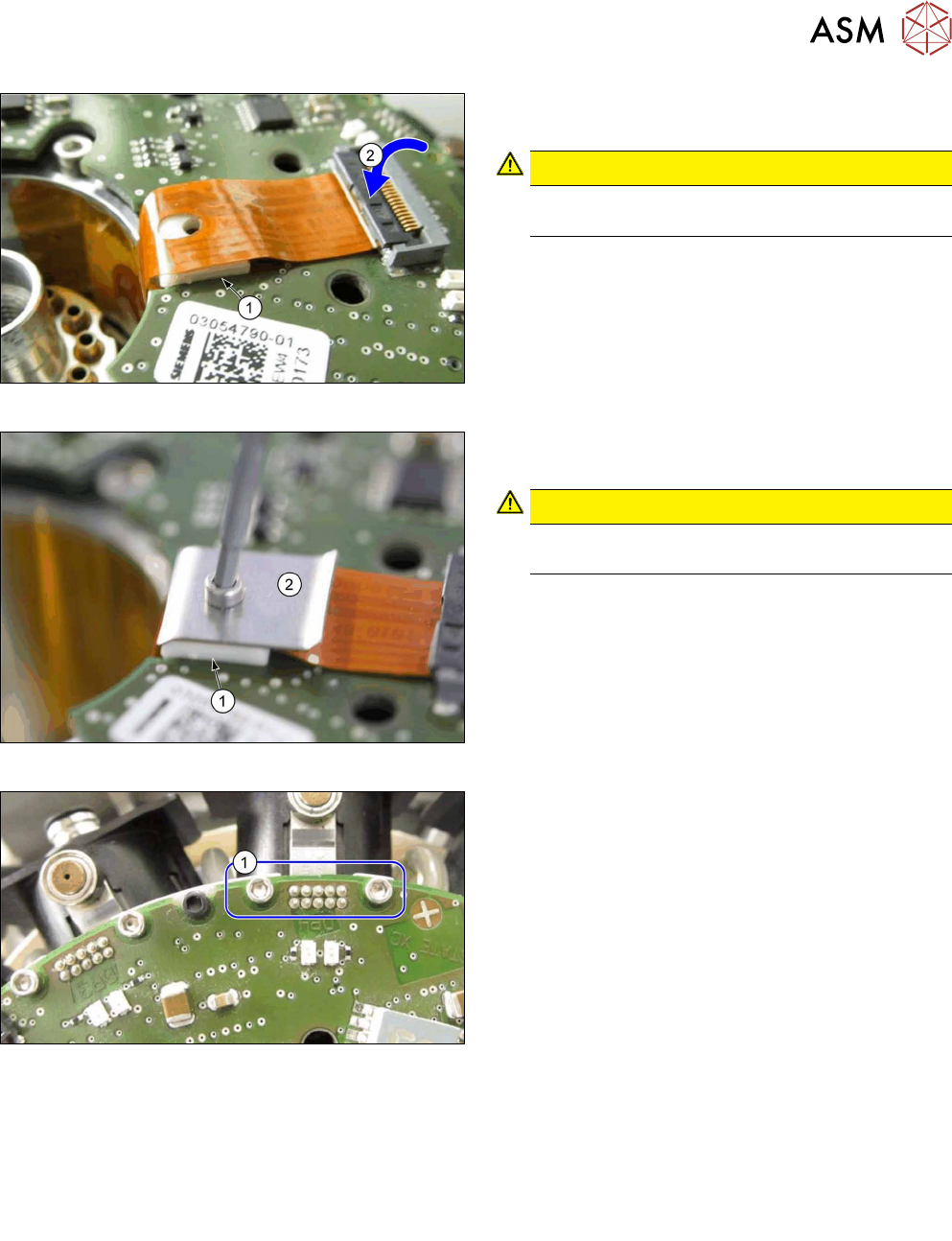
Fig.88: Connecting the Flexprint cable
► Place the white mat(1) into the SCS recess, un-
der the Flexprint cable.
CAUTION!
Pay attention to the correct installation posi-
tion of the white mat(1).
.
► Insert the Flexprint cable contact shoe into the
connector(2) and lock it.
Fig.89: Fitting the strain relief
► Fit the strain relief for the Flexprint cable.
Hand-tighten the screw.
CAUTION!
Pay attention to the correct installation posi-
tion of the mat(1) and the cover (2).
.
Fig.90: Fastening the connector with screws
► For all twelve drives: fit both screws(1), which
fasten the connectors to the Flexprint cables on
the SCS.
Torque: 0.1Nm
► Follow the removal instructions in reverse order for further installation.
Also observe the installation instructions in the following sections:
8.4 "Replacing the holding circuit" [}101]
5.2 "Removing and fitting the star (only for heads from FS05 upwards)" [}43]
5.1 "Replacing the front plate [03061102-xx]" [}35]
► Observe in particular the torques specified!
5 Front plate, star, Z axis and smoothed distributor disc
5.5 Replacing the Single Core Solution (SCS)[03054790Sxx] (only for heads fromFS05)
58 Service Manual SIPLACE Multistar (CPP / CPP M) 02/2018
5.5.1 Power module for 12 DP drives [03054771‑xx]
Overview
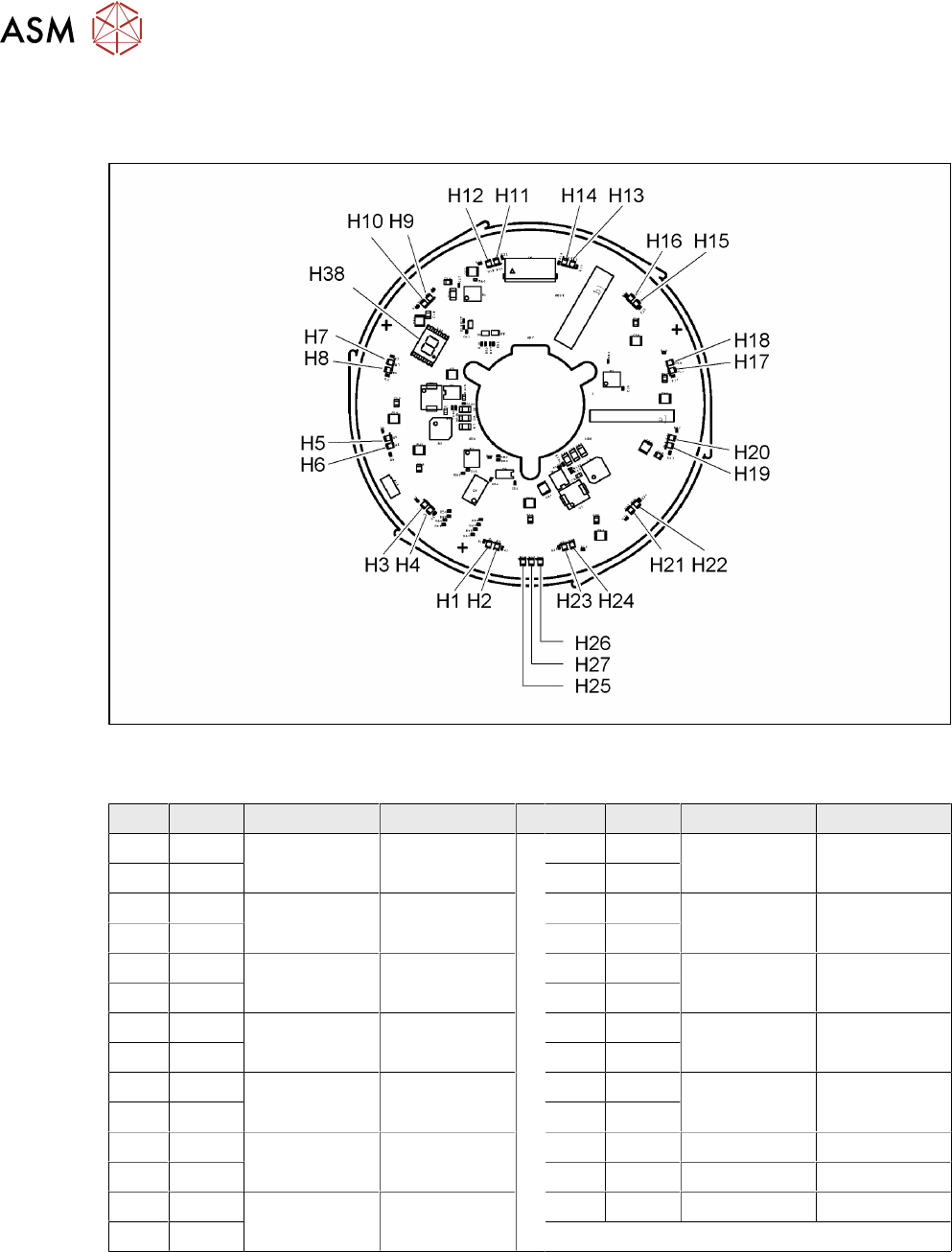
Fig.91: 03054771-02
LED [03054771-02]
LED Color Status Function LED Color Status Function
H1 RD See status
table
DP1 H15 RD See status
table
DP8
H2 GN H16 GN
H3 RD See status
table
DP2 H17 RD See status
table
DP9
H4 GN H18 GN
H5 RD See status
table
DP3 H19 RD See status
table
DP10
H6 GN H20 GN
H7 RD See status
table
DP4 H21 RD See status
table
DP11
H8 GN H22 GN
H9 RD See status
table
DP5 H23 RD See status
table
DP12
H10 GN H24 GN
H11 RD See status
table
DP6 H25 GN ON +24VDC
H12 GN H26 GN ON +5VDC
H13 RD See status
table
DP7 H27 GN ON +3.3VDC
H14 GN
5 Front plate, star, Z axis and smoothed distributor disc
5.5 Replacing the Single Core Solution (SCS)[03054790Sxx] (only for heads fromFS05)
Service Manual SIPLACE Multistar (CPP / CPP M) 02/2018 59
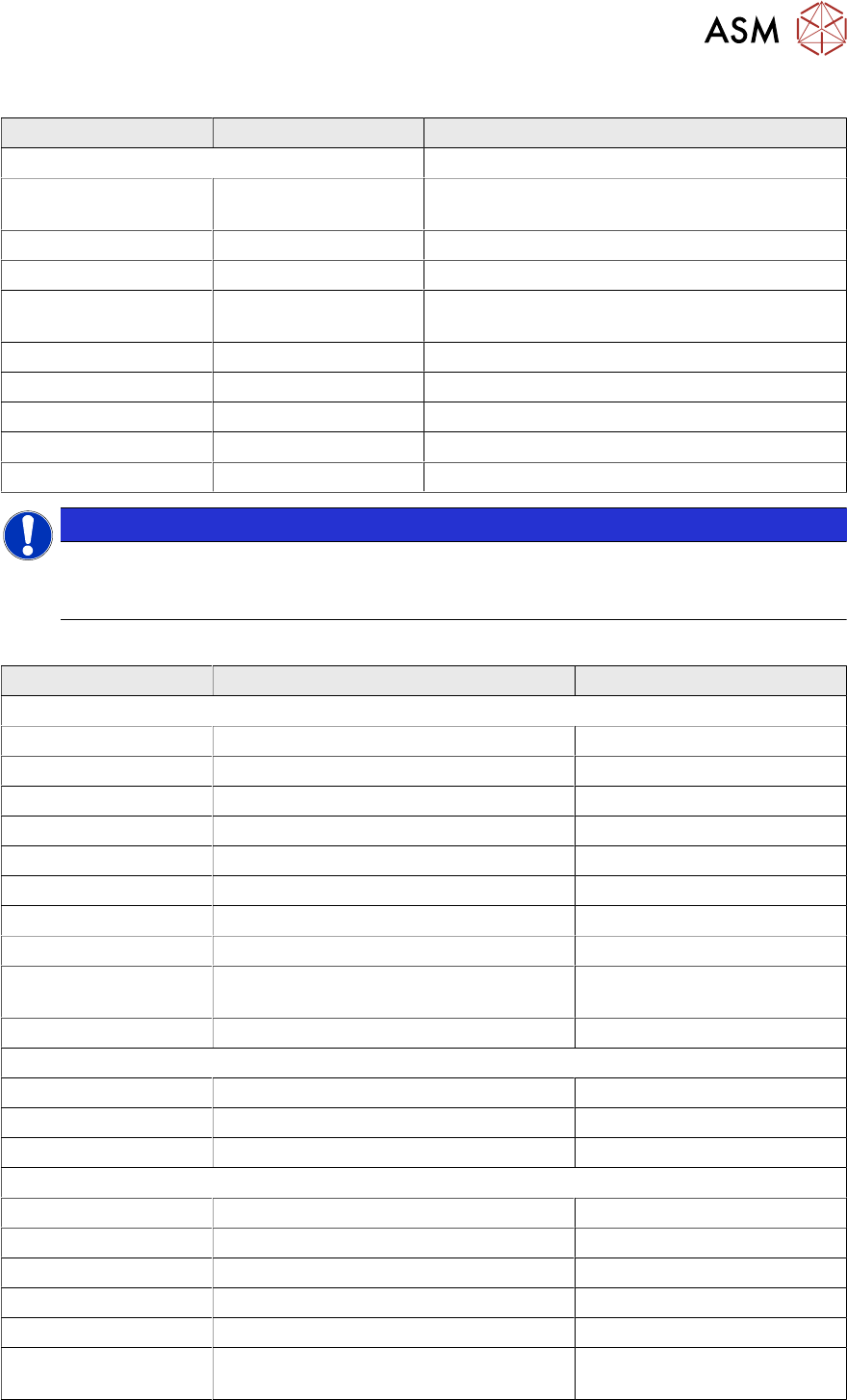
Statuses of LED (RD) and LED (GN) [03054771-02]
Status LED RD Status LED GN Description
Flashing alternately with high frequency Download Z down sensor
Flashes OFF Application for Z down sensor missing (Bios act-
ive)
ON OFF Error in application 2, e.g. leff error
Flashes OFF Z down sensor not initialized
Flashes ON DP is referenced, but ACK error signaled from Z
down sensor
OFF OFF Z down sensor: no communication
OFF ON DP drive operation while positioning
OFF Flashes Z down sensor ready, but drive not referenced
Flashes rapidly OFF Reserved
OFF Flashes rapidly Reserve
NOTICE
No voltage
No voltage is present, when the statuses of LED RD, LED GN or the 7-segment display are
OFF.
7-segment display status H38 [03054771-02]
Display Status Comment
BIOS
0 Init
b Mapping
ERR1 IRAM HW error
ERR2 XRAM HW error
ERR3 CHKS HW error
ERR4 RAM HW error
| Baud rate recognition Waiting for telegram
b (flashes) . No application
|- (flashes) -| Waiting time prior to application access On SCS close to 0, due to
faster start-up
A Application has been started
Download
E Delete CAN download
Rotate segments Load CAN download
P Program CAN download
Application
0 Check FPGA and DSP codes
||| sequential Code errors FPGA or DSP Code missing or inconsistent
|| 2 sequential Error when initializing FPGA HW error while loading
8 Download machine data to APP2
. (flashing) Normal operation
A three-digit error num-
ber, sequential
Operating system error (OSE)