00197463-03_SM_CPP_Customer_EN.pdf - 第62页
5 Front plate, star, Z axis and smoothed distributor disc 5.5 Replacing the Single Core Solution (SCS)[03054790Sxx] (only for heads fromFS05) 62 Service Manual SIPLACE Multistar (CPP / CPP M) 02/2018 Status 7-segment di…

5 Front plate, star, Z axis and smoothed distributor disc
5.5 Replacing the Single Core Solution (SCS)[03054790Sxx] (only for heads fromFS05)
Service Manual SIPLACE Multistar (CPP / CPP M) 02/2018 61
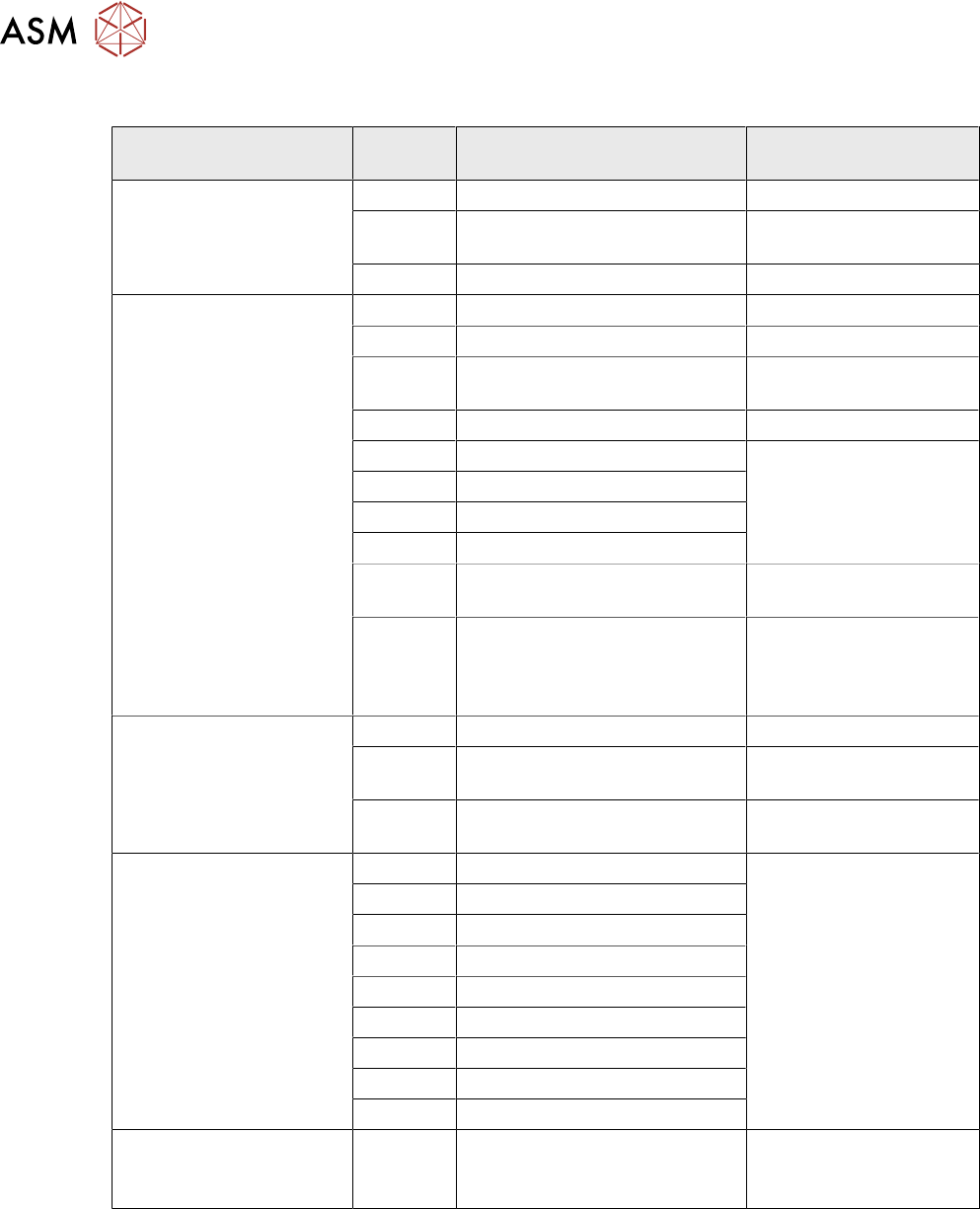
5.5.3 Troubleshooting
Error messages SCS
State LED
red
LED
lamp
green
7-seg. Comment Possible
troubleshooting
solutions
De-energized OFF OFF 8 LEDs and 7-segment
display off
---
Download ZDS Flashes Flashes Red-flashes; green-
flashes alternately at high
frequency
No error
Download SCS (see 7-seg. display) ---
Waiting for baud rate
detection
(baud rate has not
been detected yet)
(see 7-seg. display) ---
Error during baud
rate detection
(see 7-seg. display) ---
CAN error (error
frames)
(see 7-seg. display) ---
SCS application is
missing (BIOS active)
(see 7-seg. display) ---
ZDS application is
missing (BIOS active)
Flashes OFF Red-flashing; green-off Load ZDS
application
Visualization node
number
Not applicable – can be
read on SCS-PCB printed
---
Error in application 2
- error drive, e.g. Ieff
error
ON OFF Red-on; green-off Replace drive if
this occurs multiple
times
Z down sensor not
initialized
Flashes OFF Red-flashing; green-off Memory loss
→ replace the
drive
DP is referenced but
Ack error reported by
ZDS (1).
Flashes ON Red-flashing; green-on Encoder error
→ replace drive
Z down sensor - no
communication
OFF OFF Red-off; green-off Replace the drive
DP drive operation at
positioning
OFF ON Red-off; green-on -> the
drive is in position regula-
tion.
DP _drive OK
DP drive operation at
positioning
OFF OFF Red-off; green-off -> The
drive is currently perform-
ing a task
(no end message).
No error
ZDS is ready for op-
eration, but the drive
has not been refer-
enced
OFF Flashes Red-flashing; green-
flashing
No error
Reserve Flashes OFF Red-flashing; green-off
(rapid)
---
Reserve OFF Flashes red-off; green-flashing
(rapid)
---
5 Front plate, star, Z axis and smoothed distributor disc
5.5 Replacing the Single Core Solution (SCS)[03054790Sxx] (only for heads fromFS05)
62 Service Manual SIPLACE Multistar (CPP / CPP M) 02/2018
Status 7-segment display on the SCS
State Display Comment Possible troubleshoot-
ing solutions
During download E (E)rase, memory will be deleted No error
P (P)rogramming, memory is be-
ing written
No error
Rotating Memory is being loaded No error
BIOS | Waiting for baud rate detection No error
0 Initialization No error
b (B)ios, no application Bootphase Bios
→ no error
A Application has been started No error
ERR1 HW error IRAM Hardware error
→ replace assembly
ERR2 HW error XRAM
ERR3 HW error CHKS
ERR4 HW error RAM
B(flash-
ing).
No application Load application
|-(flash-
ing)-|
Waiting period before jump to
the application,
almost 0 for SCS - due to fast
boot
No error
Application 0 Check FPGA und DSP code No error
8 Download machine data to ap-
plication 2
No error
. (flash-
ing)
Normal status No error
User defined errors
(three-digit number shown
sequentially)
081 Too many friends Incorrect addressing by
SIRIO
→ error message with
bug report
082 Unknown GSM
083 Communication error
097 CAN_ID already exist
098 CAN_ID already initialized
099 GSM initialization error
100 CAN-ID is too big
101 Wrong CAN ID
102 Wrong number of subsystems
OSE error
(three-digit number shown
sequentially)
001 - 079 Operating system error
→ error message with
bug report
5 Front plate, star, Z axis and smoothed distributor disc
5.6 Replacing the energy transmission for the rotor [03068843‑xx]
Service Manual SIPLACE Multistar (CPP / CPP M) 02/2018 63
5.6 Replacing the energy transmission for the rotor
[03068843‑xx]
Parts, equipment and tools
●
Energy transmission for rotor assembly CPP [03068843‑xx]
Overview
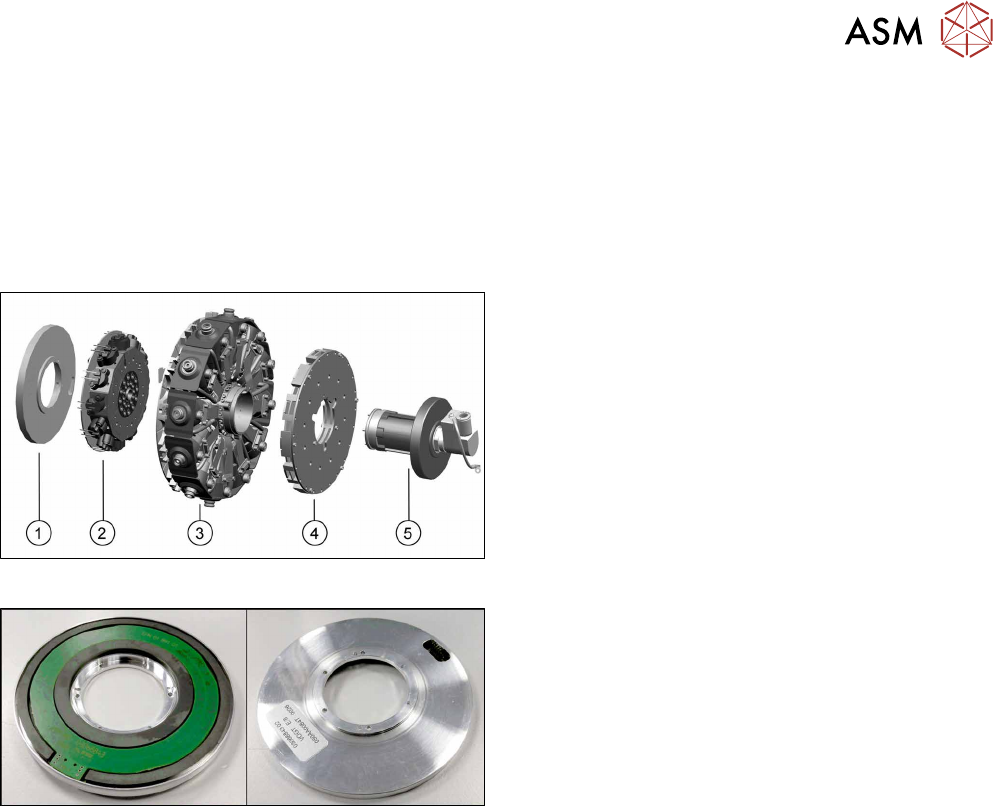
Fig.93: Star structure
1. Energy transmission for rotor
2. Valve terminal
3. Star carrier with DP drives
4. Single Core Solution (SCS).
5. Holding circuit with screwed joint
Fig.94: Energy transmission for rotor (front and back)
Energy transmission for rotor assembly CPP
[03068843‑xx]
Preparation
► Remove the head from the machine. For details about removing and fitting the placement
head, refer to the service manual for your machine.
fit the head on the head mount [03056231‑xx].
► Make sure that the component sensor protective cap is fitted.
1.1.3 "Protecting the component sensor" [}8]