00197902-03_UM_X-Serie-S_EN.pdf - 第227页
User manual SIPLACE X-Series 4 Setting up and commissioning From software version 710.0 Edition 12/2016 4.3 Setting up the machine 227 4.3.4 PCB conveyor he ight on the machine The machine can be set to the following PCB…

4 Setting up and commissioning User manual SIPLACE X-Series
4.3 Setting up the machine From software version 710.0 Edition 12/2016
226
4.3.3 Fitting attached parts
The machine is delivered with the monitor, operating panel, keyboard and indicator lamp disman-
tled. To fit these components, proceed as follows:
– To fit the indicator lamps see section 4.3.3.2
, page 226
– To fit the operating panel see section 4.3.4, page 227
– To fit the monitors see section 4.3.3.4, page 226
– Hook up the keyboard fixture and connect the keyboard.
4.3.3.1 Checking and setting the protective cover switch
Check the function of the protective cover switch (see 2.5.1 on page 77).
Adjust the protective cover switch if necessary (see service manual).
4.3.3.2 Fitting the indicator lamp
Insert the indicator lamp into the hole until the lamp tube projects sufficiently into the terminal
beneath.
Connect the cable for the indicator lamps to the connector. The cable with connector is lo-
cated in the tube.
Tighten the two screws on the terminal so that the indicator lamp is clamped into place.
4.3.3.3 Fitting the operating panel
Use the 4 fastening screws to fix the operating panel to the monitor mount and then connect
the cable.
Check the cable connections.
4.3.3.4 Fixing the monitors
Use the 4 fastening screws to fix the monitor to the monitor mount and then connect the cable.
Check the cable connections.

User manual SIPLACE X-Series 4 Setting up and commissioning
From software version 710.0 Edition 12/2016 4.3 Setting up the machine
227
4.3.4 PCB conveyor height on the machine
The machine can be set to the following PCB conveyor heights:
900 mm ± 15 mm 4
930 mm ± 15 mm (standard height) 4
950 mm ± 15 mm (SMEMA height) 4
4
4.3.5 Tools and equipment
You will need the following tools and equipment to adjust the height of your machine:
You will need the following tools and equipment to adjust the height of your machine:
– Fork wrench SW 36, Item no. 00096286-01
– Wrench of width 36 for the setting screw M24x2x120 used to adjust the height of the machine
feet.
– Hook wrench 135 - 145 for adjusting the middle machine feet,
Item no. 00376519-xx
– Single head wrench SW 65, Item no. 00353827-0, width 65 for the hexagonal lock nut M24
on the middle machine foot
– Allen wrench, size 10, Item no. 00373926-01 for hexagon socket-head screws M12x80 for
fastening the spacers on the middle machine feet
– Allen wrench, size 19, Item no. 00373928-01 for hexagon socket-head screw M24x90 for
temporary fixture of clamping pieces for the four outer machine feet
– Torque wrench with hexagonal pin, size 19, tightening torque 130 Nm
for final fastening of four outer machine feet
– Machine spirit level: accuracy 0.02 mm/m
– Fork lift truck (specification see 4.1.4.3 on page 208).
– Air cushion transport system: SIPLACE HSxx, Item No. 00119002-S01 (optional)
PLEASE NOTE
The PCB conveyor height is the distance between the top edge of the PCB conveyor belt
and the bottom edge of the machine feet.
4 Setting up and commissioning User manual SIPLACE X-Series
4.3 Setting up the machine From software version 710.0 Edition 12/2016
228
4.3.6 Presetting board conveyor height
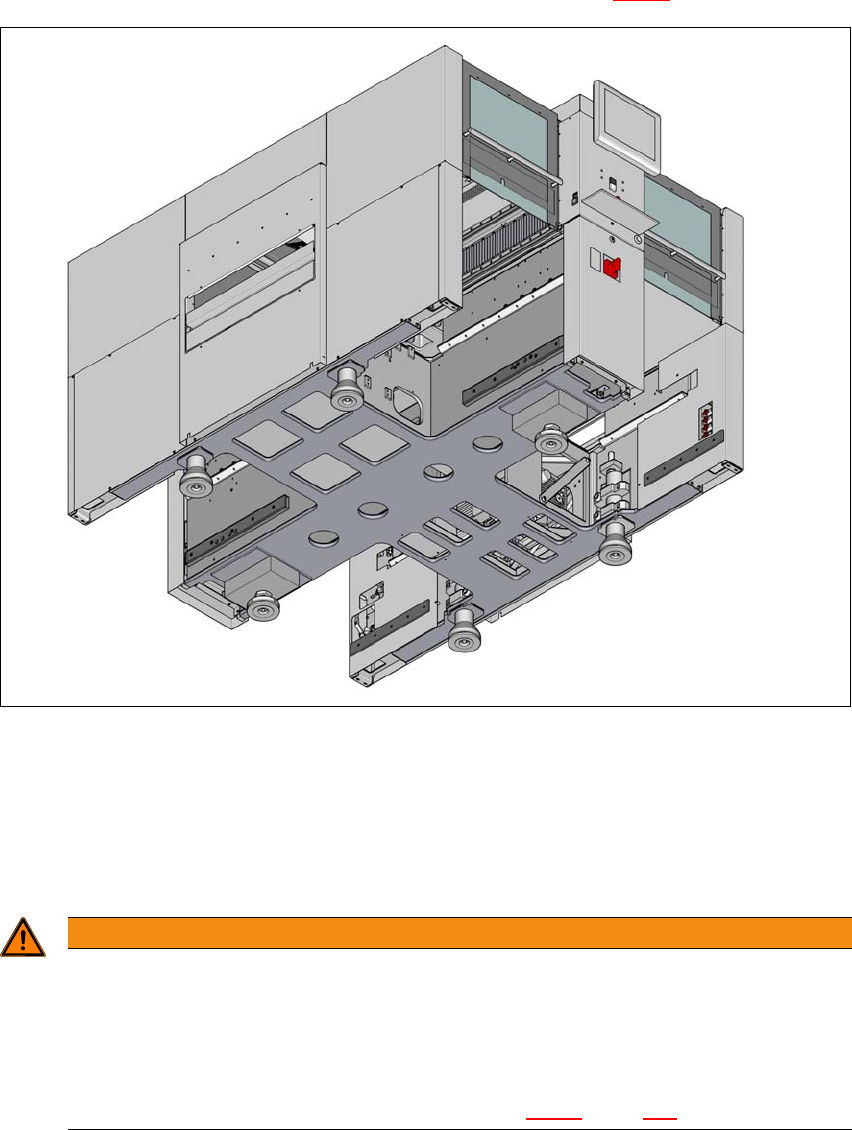
Push the forks of the fork lift under the machine, as shown in fig. 4.3 - 2.
4
Fig. 4.3 - 2 Contact surfaces - forks parallel to the direction of PCB transport (example of SIPLACE X2 S / X3 S / X4
S shown)
(1) Contact surfaces for fork lift truck forks
Please note the following points before you raise the machine in order to avoid irreversible dam-
age to the machine:
4
WARNING
Risk of damage due to excessive fork spacing!
The spacing of the machine feet is 776 mm. Increasing this spacing, so that the machine
is lifted up via the side sections of its machine frame, can lead to deformation of the ma-
chine frame.
The forks may only be opened to a degree which ensures that they are still within
the contact area of both machine feet (see fig. 4.3 - 2
, page 228).