80S-15贴片机.pdf - 第265页
SIPLACE 80S/F/G Service Manual 8 IC Head Edition 01/97 8 - 17 8.4.4 Calculate the Z ero Point Correction for the D Axis PLEASE NOTE The sta rting va lue on the ax is disp lay s hould be app roximat ely 0 if the p in of t…

8 IC Head SIPLACE 80S/F/G Service Manual
Edition 01/97
8 - 16
8.4 Servicing Work on the Dr Axis
8.4.1 Tools, Equipment and Consumables
8.4.2 Spare Parts
8.4.3 Replace Motor with Tacho for the Dr Axis
See item 4 in Fig. 8.3.1 page 8 - 12
To disassemble the motor
–
Detach all electrical cables to and from the motor.
–
Loosen the two M3 hexagon socket head screws fixing the motor in place.
–
Remove the motor from the top.
To reassemble the motor
–
Clean the rubber lining of the friction wheel (item 3) and the ring (Ø 12 mm) on the motor shaft with isopro-
pyl alcohol.
–
Replace the motor and fix in place.
Ensure that there is good contact between the motor drive shaft and the friction wheel.
–
Check that the axis is moving correctly with reference to the Adjusting Instructions.
From item number
Hexagon socket head screw key, set
SITEST program
Adjusting Instructions
Nozzle, type 416 00322545-01
Isopropyl alcohol
From item number
Motor/tacho (dr axis) 00306383-02
SIPLACE 80S/F/G Service Manual 8 IC Head
Edition 01/97
8 - 17
8.4.4 Calculate the Zero Point Correction for the D Axis
PLEASE NOTE
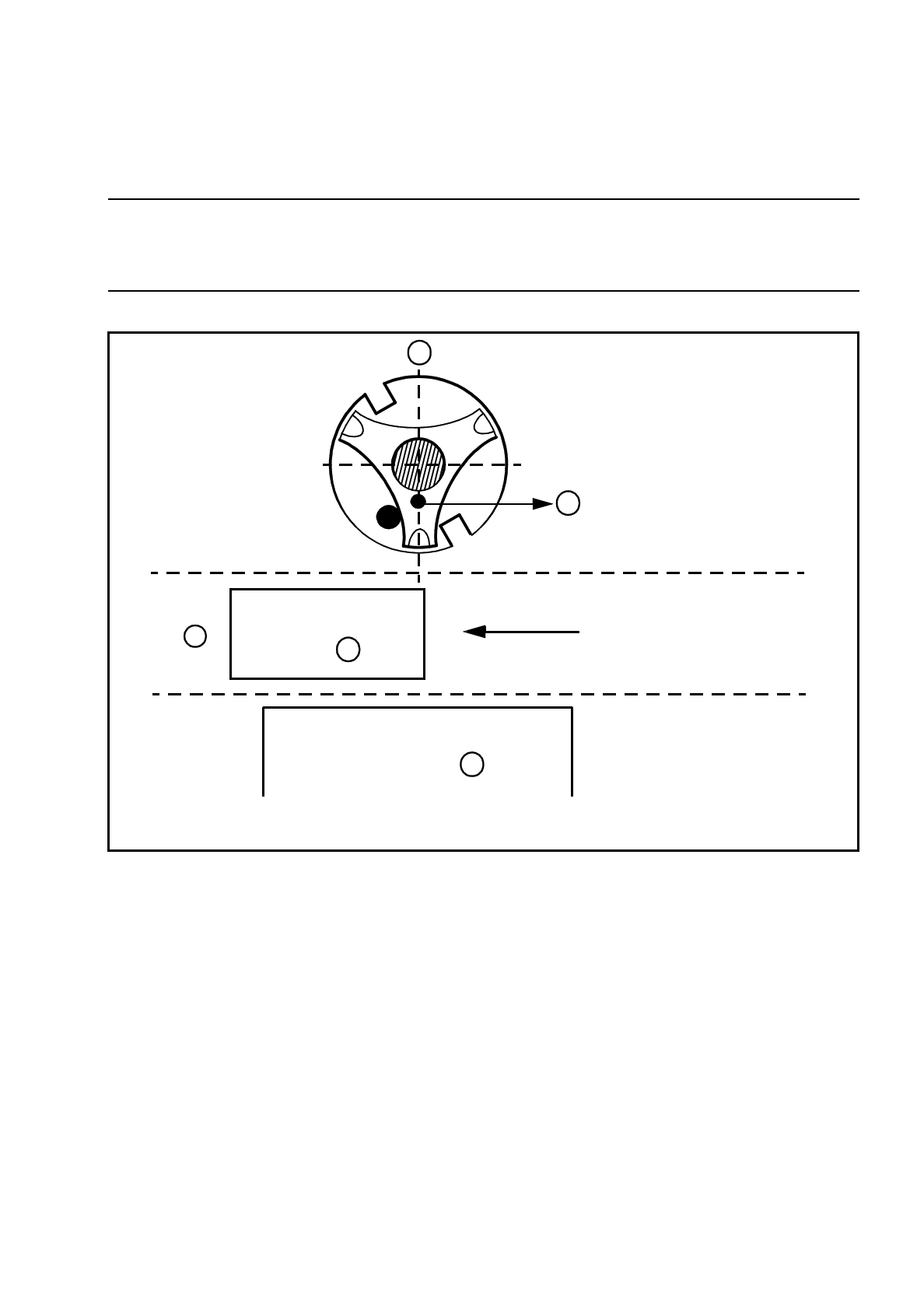
The starting value on the axis display should be approximately 0 if the pin of the nozzle support is pointing
towards component table no. 3.
Fig. 8.4.1 0° position of the dr axis
Key to Fig. 8.4.1
To accurately calculate the zero point correction value, you require the IC head camera and a type 416 noz-
zle.
●
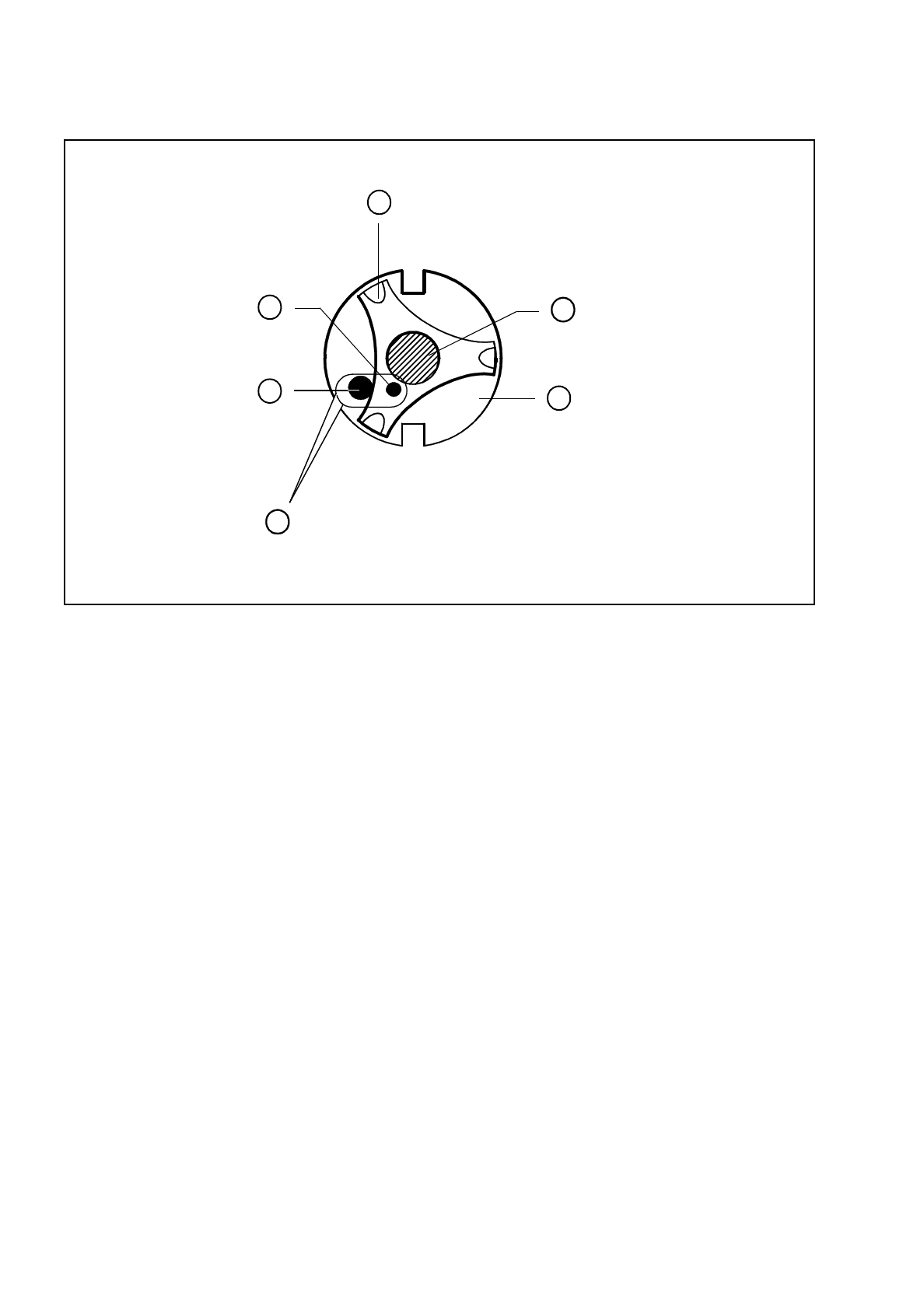
Place the nozzle in the correct position, as shown in Fig. 8.4.2.
●
To ensure that the nozzle is clearly visible to the IC camera, mark the tip of the nozzle with washable white
paint.
A 0° position of the dr axis
B The pin of the star should point towards component table 3
C PCB transport direction
D Component table 3
PCB
A
B
C
D
Table 3
8 IC Head SIPLACE 80S/F/G Service Manual
Edition 01/97
8 - 18
Fig. 8.4.2 Correct position of the nozzle with respect to the nozzle support (spring steel sheet)
Key to Fig. 8.4.2
●
Move the IC head over the IC head camera.
●
Switch on the IC head camera.
●
Press
ALT
Ø or ALT 9.
●
Disable the dr axis and align the nozzle over the red crosshairs.
1 Spring plate on the star (spring steel sheet) 2 Sleeve
3 Nozzle 4 Pin in the nozzle
5Pin
A The two pins must be opposite one another, with the pin of the nozzle lying against the spring plate.
A
2
4
3
5
1