Xg系列调整手册.pdf - 第23页
2 Before beginning adjustments 2- 17 2. Prepar atory w ork 2.7 Selecting the PCB data To perform basic adjustments (explained in Chapter 3), the PCB data named "MCH_SETUP" must be used. To perform FAMF adjustme…
2
Before beginning adjustments
2-16
2. Preparatory work
2.6 Changing the machine setting (when needed during
adjustment)
When the machine setting needs to be changed during adjustments, you must exit the
adjustment utility. However, only the "Adjust Mode" parameter can be changed while
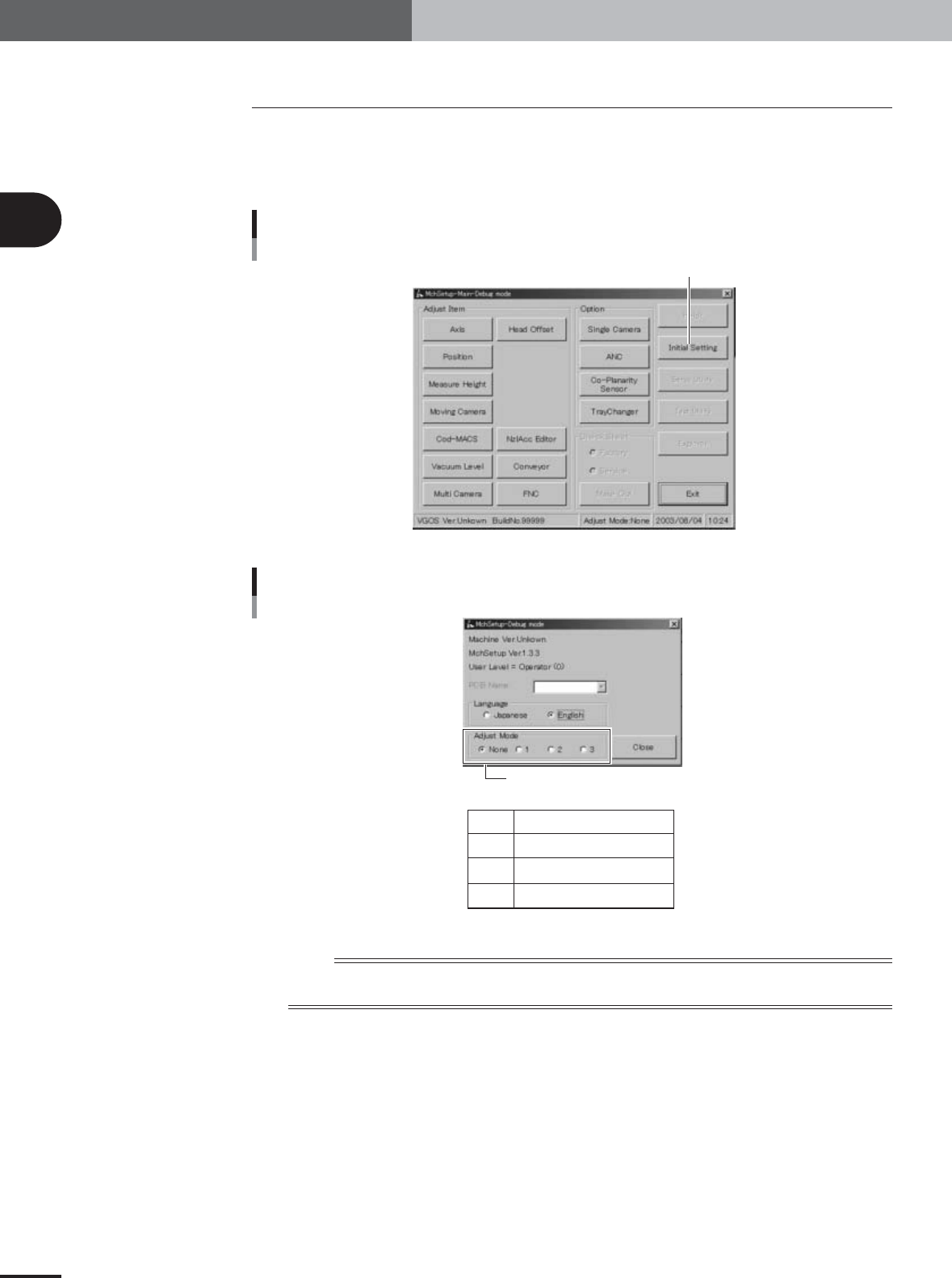
you are still in the adjustment utility. To do this, press the [Initial Setting] button in the
adjustment utility menu window and select the "Adjust Mode" option buttons as needed.
Adjustment utility menu window
Press the [Initial Setting] button.
27021-X9-A0
Initial setting dialog box
None
1
2
3
Adjust Mode is not used.
Adjust Mode1
Adjust Mode2
Adjust Mode3
Select "Adjust Mode".
27200-X9-00
n
NOTE
The [Initial Setting] button in the adjustment utility menu window allows you to easily change the "Adjust Mode"
parameter without exiting the adjustment utility.
2
Before beginning adjustments
2-17
2. Preparatory work
2.7 Selecting the PCB data
To perform basic adjustments (explained in Chapter 3), the PCB data named
"MCH_SETUP" must be used.
To perform FAMF adjustments (explained in Chapter 4) after all necessary basic adjust-
ments are complete, the PCB data with a name beginning with "FAMF" must be used.
Be sure to load the specified PCB data into the machine to perform each adjustment
correctly.
PCB data used for machine adjustments
Adjustment items
Basic adjustments
Camera parameters
R-axis accuracy offset
Head offset
FAMF adjustments
(using glass PCB)
FAMF adjustments
(using adjustment station)
PCB data to be used Machine models
MCH_SETUP
FAMF_71_OLD
FAMF_72_OLD
FAMF_74_OLD
FAMF_61_OLD
FAMF_62_OLD
FAMF_64_OLD
FAMFST_73
FAMFST_74
FAMFST_63
FAMFST_64
FAMFST_65
YV100Xg family
YV88Xg
YV100Xg family
YV88Xg
YV100Xg family
YV88Xg
25017-X9-00
1
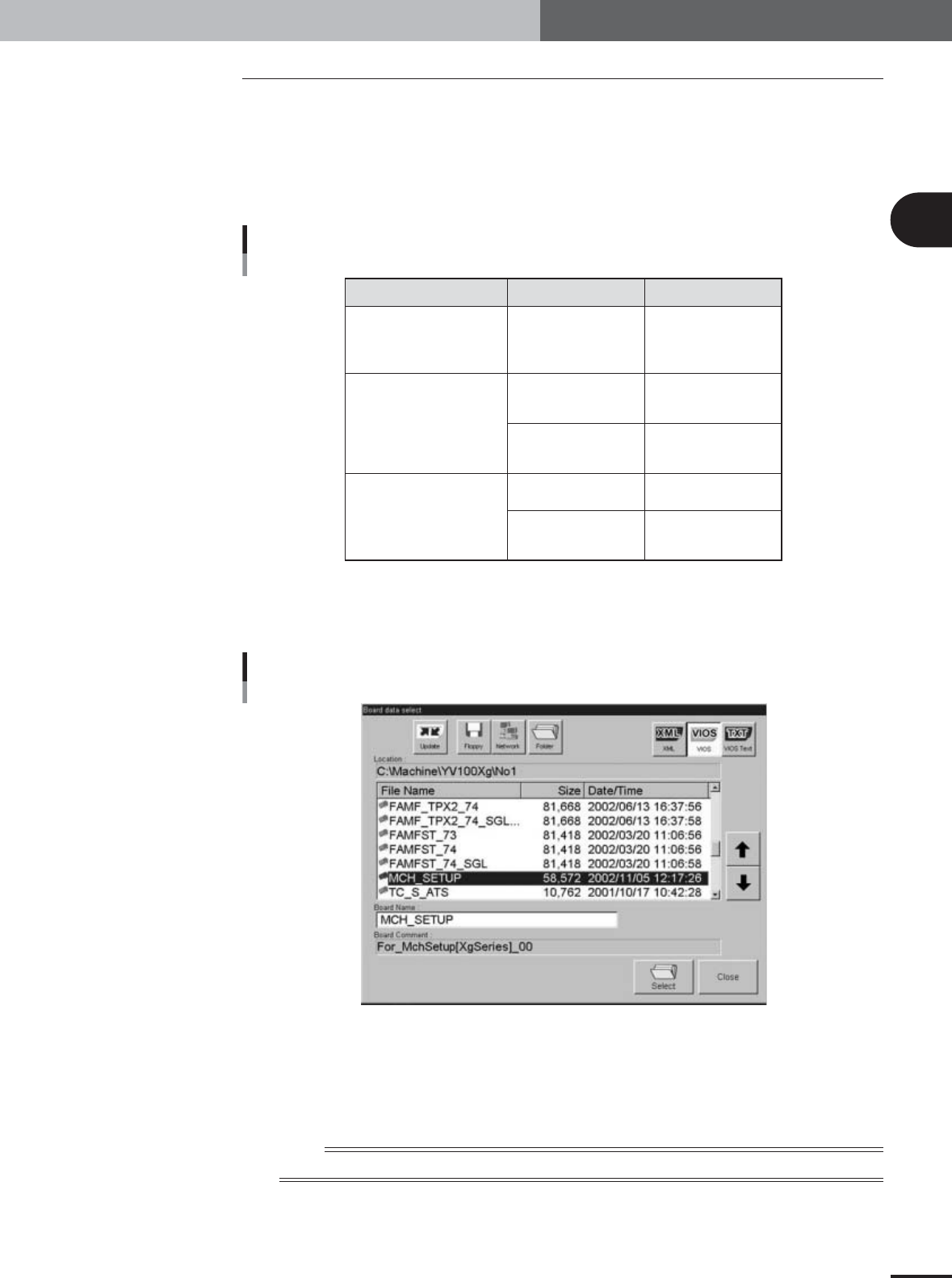
Press the [Board] button on the Setup screen.
The "Board data select" dialog box appears showing a list of registered PCB data.
Board Data Select dialog box
27024-X9-00
2
Select the PCB data.
1.Check that the [VIOS] button is pressed.
2.Line up the cursor with the PCB data you want to select and press the [OK]
button.
n
NOTE
Changes you made on the machine setting screen (VmSpec screen) are enabled after loading PCB data.

Table of Contents
1. Camera parameter adjustments . . . . . . . . . . . . . . . . . . . 3-3
1.1 Camera lighting level adjustments . . . . . . . . . . . . . . . . . . . . . . . . 3-3
1.1.1 Adjusting the moving camera lighting levels . . . . . . . . . . . . . . . . . . 3-3
1.1.2 Adjusting the multi-vision camera lighting levels . . . . . . . . . . . . . 3-10
1.1.3 Adjusting the single-vision camera lighting levels . . . . . . . . . . . . . 3-14
1.2 Camera scale calibration . . . . . . . . . . . . . . . . . . . . . . . . . . . . . . 3-18
1.2.1 Preparation for the moving camera scale calibration . . . . . . . . . . . 3-18
1.2.2 Calibrating the moving camera scale . . . . . . . . . . . . . . . . . . . . . . . 3-24
1.2.3 Calibrating the multi-vision camera scale . . . . . . . . . . . . . . . . . . . 3-25
1.2.4 Calibrating the single-vision camera scale . . . . . . . . . . . . . . . . . . . 3-28
2. R-axis accuracy offset . . . . . . . . . . . . . . . . . . . . . . . . . . 3-32
2.1
Measuring the R-axis accuracy offset with the multi-vision camera . . .
3-32
2.2
Measuring the R-axis accuracy offset with the single-vision camera . .
3-35
3. Head offset adjustments . . . . . . . . . . . . . . . . . . . . . . . . 3-38
3.1 Preparation for head offset adjustments of Heads 3, 5, and 7
(YV100Xg family) or Head 2 (YV88Xg) . . . . . . . . . . . . . . . . . . . 3-38
3.2 Adjusting the head offset of Heads 3, 5, and 7
(YV100Xg family) or Head 2 (YV88Xg) . . . . . . . . . . . . . . . . . . . 3-41
3.3 Preparation for head offset adjustments of Heads 2, 4, 6 and 8
(YV100Xg family) . . . . . . . . . . . . . . . . . . . . . . . . . . . . . . . . . . . . 3-43
3.4
Adjusting the head offset of Heads 2, 4, 6 and 8 (YV100Xg family
) . . 3-48
Chapter 3 Basic adjustments