Dual Simultaneous Programmable Pitch Rev 02.pdf - 第29页
Dual-Simultaneous Pr ogrammable Pitch Owner ’s Manual Operation © 2024 Nordson Corporation 25 4.5 Production Set up 4.5.1 Setup Travel Limits Travel limits shou ld only need to be setup once before the system’s initial p…

© 2024 Nordson Corporation 24
4 Operation
4.1 Overview
The DSPP is integrated into ECW utilizing a FIS terminal. Valve pitch is controlled by inputs from the
ECW-FIS sent to the logic program loaded on the motor controller. This section covers the following
topics:
•
Theory of Operation
•
Production Setup
4.2 Safety First
Operation of the Dual-Simultaneous Programmable Pitch involves mechanical devices and electrical
power. It is essential that every person servicing or operating the DSPP fully understands all hazards,
risks, and safety precautions. See Section 2 - Safety for additional information.
WARNING!
Allow only qualified personnel to perform the following tasks. Follow the safety
instructions in this document and all other related documentation.
4.3 Tools and Materials Needed
• Conformal Coating Characterization Card
4.4 Theory of Operation
The Dual-Simultaneous Programmable Pitch (DSPP) is a programmable valve pitch system that can be
mounted onto the Select Coat SL-1040 Conformal Coating System. The DSPP allows two of the same
conformal coating applicators to be installed and operated simultaneously, coating two parts at the same
time. The pitch, or distance between applicators, is programmed and adjusts automatically at
changeover, greatly reducing the setup time due to adjustments and validation. The DSPP provides valve
pitch adjustment from 55-205 mm. Minimum pitch can be increased to 100 or 130 mm when required to
prevent applicators from crashing.
Dual-Simultaneous Programmable Pitch Owner’s Manual Operation
© 2024 Nordson Corporation 25
4.5 Production Setup
4.5.1 Setup Travel Limits
Travel limits should only need to be setup once before the system’s initial production run. However, if
applicators are changed, if programs change, or if other hardware changes are made, travel limits may
need to be reestablished.
To setup travel limits:
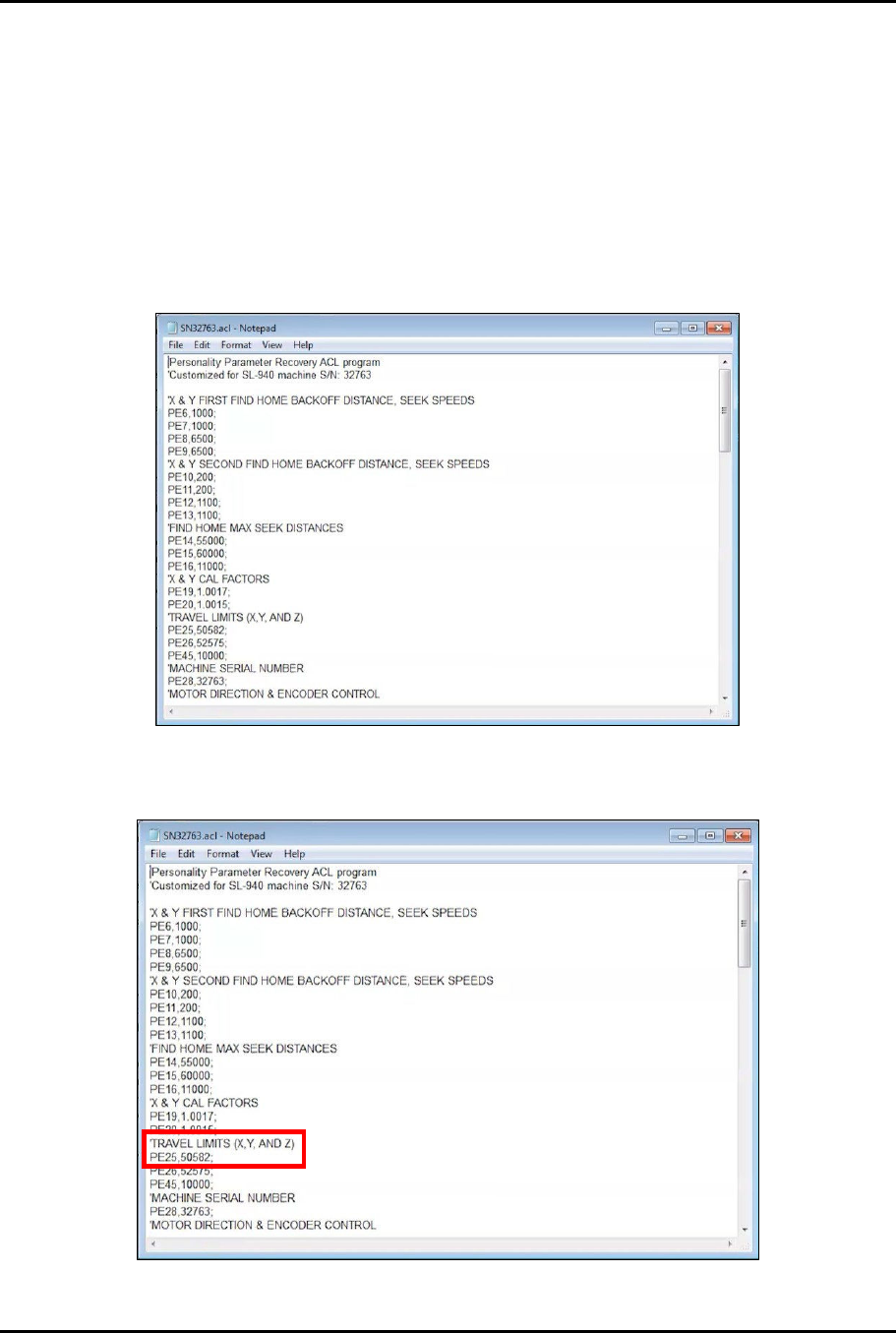
1. Access the EasyCoat folder in File Explorer and search for file SNXXXXX.acl and open the
file in Notepad (Figure 4-1).
Figure 4-1 Open SNXXXXX.acl File
2. In the SNXXXXX.acl file, locate PE25 under TRAVEL LIMITS (X, Y, AND Z) (Figure 4-2).
Figure 4-2 Locate PE25
Dual-Simultaneous Programmable Pitch Owner’s Manual Operation
26 © 2024 Nordson Corporation
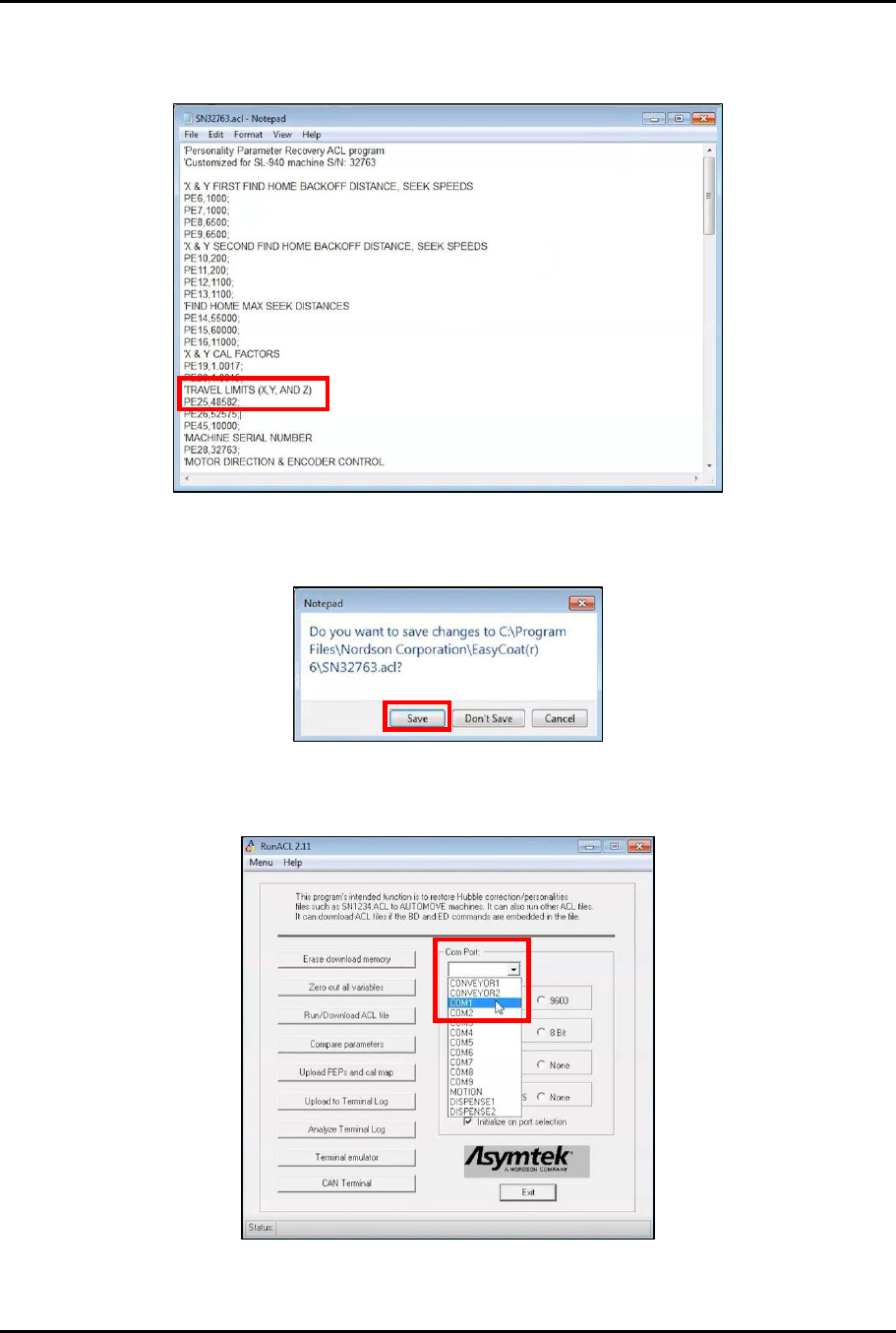
3. Subtract 2,000 from the PE25 value and change PE25 to the new value (Figure 4-3).
Example: 50582-2000=48582
Figure 4-3 Change PE25
4. Close and save the SNXXXXX.acl file (Figure 4-4).
Figure 4-4 Save SNXXXXX.acl File
5. Open RunACL and change the Com Port setting to COM1 (Figure 4-5).
Figure 4-5 Change Com Port to COM1