SIPLACE X-Series (SIPLACE X-Series S, from SC 708.1) Edition 05/2015 EN User manual.pdf - 第87页
User manual SIPLACE X-Series 2 Operational safety From software version 708.1 Version 05/2015 2.6 Safety features 87 2.6.3.3 Description of functions Main switch in OFF position (see item 1 in fig . 2.6 - 5 , page 84 ) 2…
2 Operational safety User manual SIPLACE X-Series
2.6 Safety features From software version 708.1 Version 05/2015
86
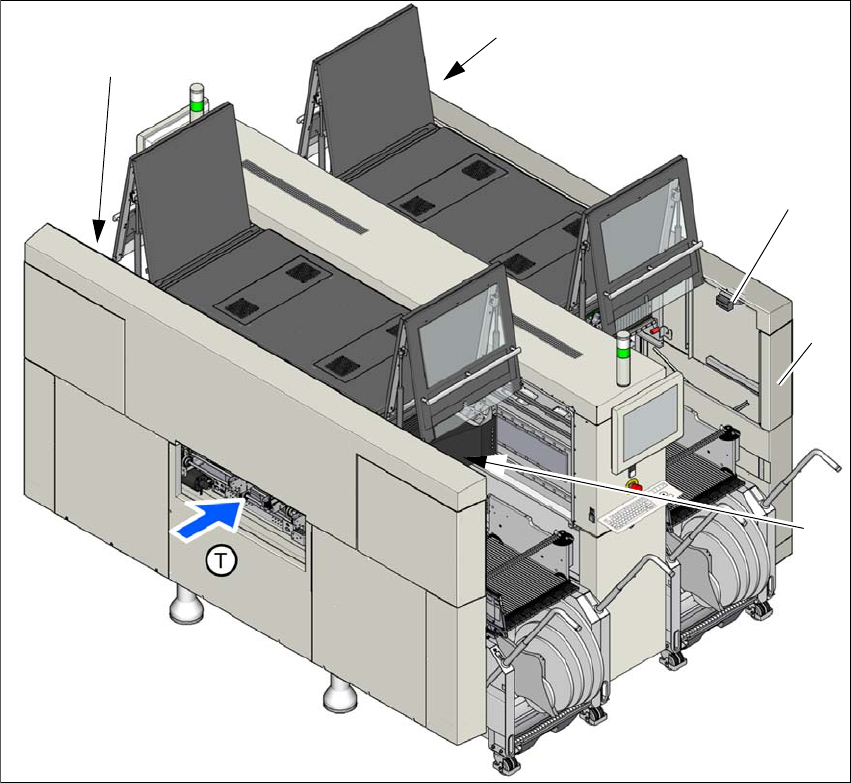
2.6.3.2 Position of protective switches on the machine
2
Fig. 2.6 - 7 Position of protective switches on the machine (example of SIPLACE X4i S shown)
(1) Protective cover switch, location 1
(2) Protective cover switch, location 2
(3) Protective cover switch, location 3
(4) Protective cover switch, location 4
(5) Example service flap with protective cover switch at location 2 (optional at all locations)
(T) PCB transport direction
(2)
(3)
(1)
(4)
(5)

User manual SIPLACE X-Series 2 Operational safety
From software version 708.1 Version 05/2015 2.6 Safety features
87
2.6.3.3 Description of functions
Main switch in OFF position (see item 1 in fig.
2.6 - 5, page 84) 2
The main power switch disconnects the three phases L1, L2, and L3 from the power supply.
2
Main switch in ON position 2
When the main switch is switched to ON, the mains voltage is switched through and all AC/DC
converters are addressed.
The control computer starts and all supply voltages, with the exception of the intermediate circuit
voltages for the gantry axes (300 V-) and the star axes (160 V-), are made available internally.
Stop button, black (items 2 and 7 in fig. 2.6 - 5, page 84 and items 3 + 5 in fig. 2.6 - 6, page 85)2
These buttons are used to stop the machine.
Start button, green (items 3 and 6 in fig. 2.6 - 5, page 84 and items 2 + 4 in fig. 2.6 - 6, page 85)2
After switching on the main power switch you will be prompted to press the start button in order to
start the machine for placement jobs. The same prompt appears if you open the protective covers
or the press the EMERGENCY STOP button.
Press the start button for at least 200 ms, up to a maximum of 1500 ms, and then let go. The
machine is switched on when you let go of the button.
DANGER
Incorrect handling of the machine can therefore result in death or severe injury or con-
siderable damage to equipment.
The following components still carry potentially lethal voltages even if the main power
switch is switched off:
– Cable connection terminals L1, L2, and L3 of the S1 main power switch
– Main input terminal X95
– Service socket X98
– Safety cutoff (CSB) still live for 5 minutes after switching off the main switch.
– The color of all individual wires, which still carry electricity, even if the main power
switch is switched off, is orange.
Always follow the applicable accident prevention and DIN regulations (particularly
EN 60204, part 1 or IEC 60204, part 1) and the applicable regulations in your own
country.
The safety door to the power supply must ONLY be opened by appropriately quali-
fied and trained personnel.

2 Operational safety User manual SIPLACE X-Series
2.6 Safety features From software version 708.1 Version 05/2015
88
Component counter 2
The number of placed components (component counter) can be read on the station software. For
more information, refer to the Online Help.
EMERGENCY STOP button with forced locking (item 5 in fig. 2.6 - 5, page 84 and item 1 in fig.
2.6 - 6, page 85) 2
The EMERGENCY STOP button is red and latches in the ON position when pressed. When you
press the EMERGENCY STOP button, the switching contact of the EMERGENCY STOP circuit
opens and the safety cutoff (CBS) trips. The intermediate circuit voltage (300 VDC) for the gantry
axes and the intermediate circuit voltage (160 VDC) for the star axes is switched off. The servo
amplifiers for the DP and Z axes are still supplied with 42 VDC. The signaling contact of the
EMERGENCY STOP button opens and the message "EMERGENCY STOP pressed" appears on
the screen. The following modules are deactivated:
– PCB conveyor
– PCB clamping
– Width adjustment
– PCB stopper
– Feeder Control Unit
– Compressed air supply for empty tape cutter
2
Protective cover switch 1 to 4 (items 1 to 4 in fig. 2.6 - 7, page 86) 2
These switches check whether the protective covers are closed. When they are closed, the
EMERGENCY STOP contact and the signaling contact are closed. If one of the covers is opened,
the EMERGENCY STOP contact and the signaling contact will open. Individual components are
disabled or remain enabled (see fig. 2.6 - 9
, page 92 ).
Protective cover switch for service flap (optional) 2
This switch checks whether the service flap is closed. When they are closed, the EMERGENCY
STOP contact and the signaling contact are closed. If the service flap is opened, the EMER-
GENCY STOP contact and the signaling contact will open. Individual components are disabled or
remain enabled (see fig. 2.6 - 9
, page 92 ).
PLEASE NOTE
Placement is interrupted and can then either be continued or canceled once the machine
is working correctly again.