CMV12000_DS000603_6-00.pdf - 第44页
Document Feedback CMV12000 Functional Description Datasheet • PUBLIC DS000603 • v6 - 00 • 2023 -Sep- 22 84 │ 43 Reg. Name Address Bits Default Description Vtfl3 106 106[13:7] 64 Sets the level of kneepoint 2: Bit [13] =0…
Document Feedback
CMV12000
Functional Description
Datasheet • PUBLIC
DS000603 • v6-00 • 2023-Sep-22
84 │ 42
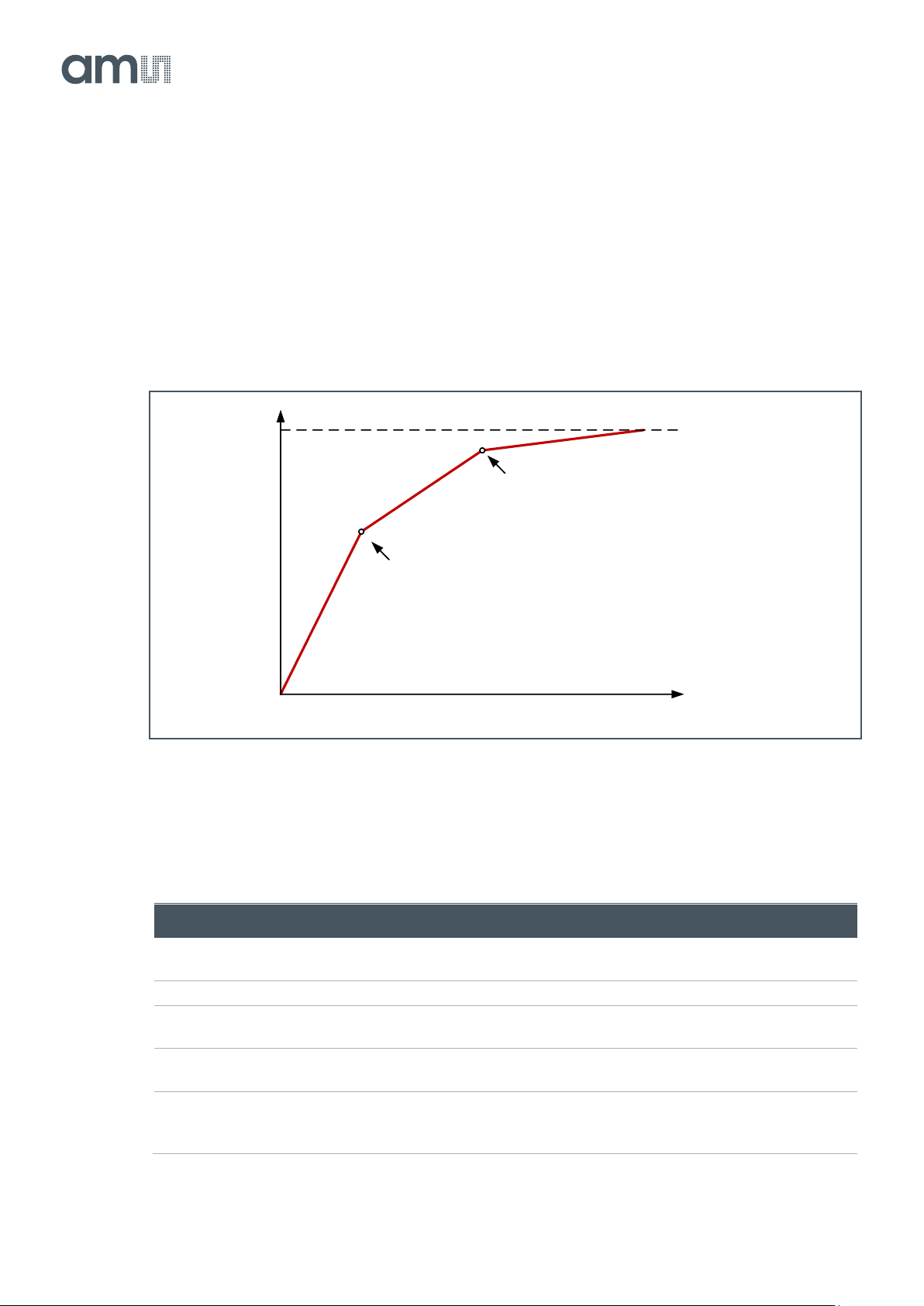
influenced by this multiple slope and will have a normal response. The Vtfl voltages and different
exposure times are programmable using the sequencer registers. Using this feature, a response as
detailed in the figure below can be achieved. The placement of the kneepoints in X is controlled by the
Vtfl programming (64 = Vlow; 127 = Vhigh), while the slope of the segments is controlled by the
programmed exposure times.
A good starting point is to set Exp_kp1 to 1% of the total exposure time and Exp_kp2 to 10% and
setting Vtfl2 to 84 and Vtfl3 to 104.
Figure 49:
Multiple Slope HDR Kneepoints
The following registers need to be programmed when multiple slopes in internal exposure mode are
desired.
Figure 50:
Multiple Slope HDR Settings with Internal Exposure
Reg. Name
Address
Bits
Default
Description
Exp_time
71
72
[15:0]
[7:0]
1536
Sets the total exposure time
Number_slopes
79
[1:0]
1
Sets the number of slopes (min=1, max=3)
Exp_kp1
75
76
[15:0]
[7:0]
0
Sets the exposure time of kneepoint 1
Exp_kp2
77
78
[15:0]
[7:0]
0
Sets the exposure time of kneepoint 2
Vtfl2
106
106[6:0]
64
Sets the level of kneepoint 1:
Bit [6] = 0/1: Enable/Disable DAC
Bits [5:0]: Vtfl2 voltage level
Saturation
level
Kneepoint 1
Kneepoint 2
# of electrons
Output signal
Document Feedback
CMV12000
Functional Description
Datasheet • PUBLIC
DS000603 • v6-00 • 2023-Sep-22
84 │ 43
Reg. Name
Address
Bits
Default
Description
Vtfl3
106
106[13:7]
64
Sets the level of kneepoint 2:
Bit [13] =0/1: Enable/Disable DAC
Bits [12:7]: Vtfl3 voltage level
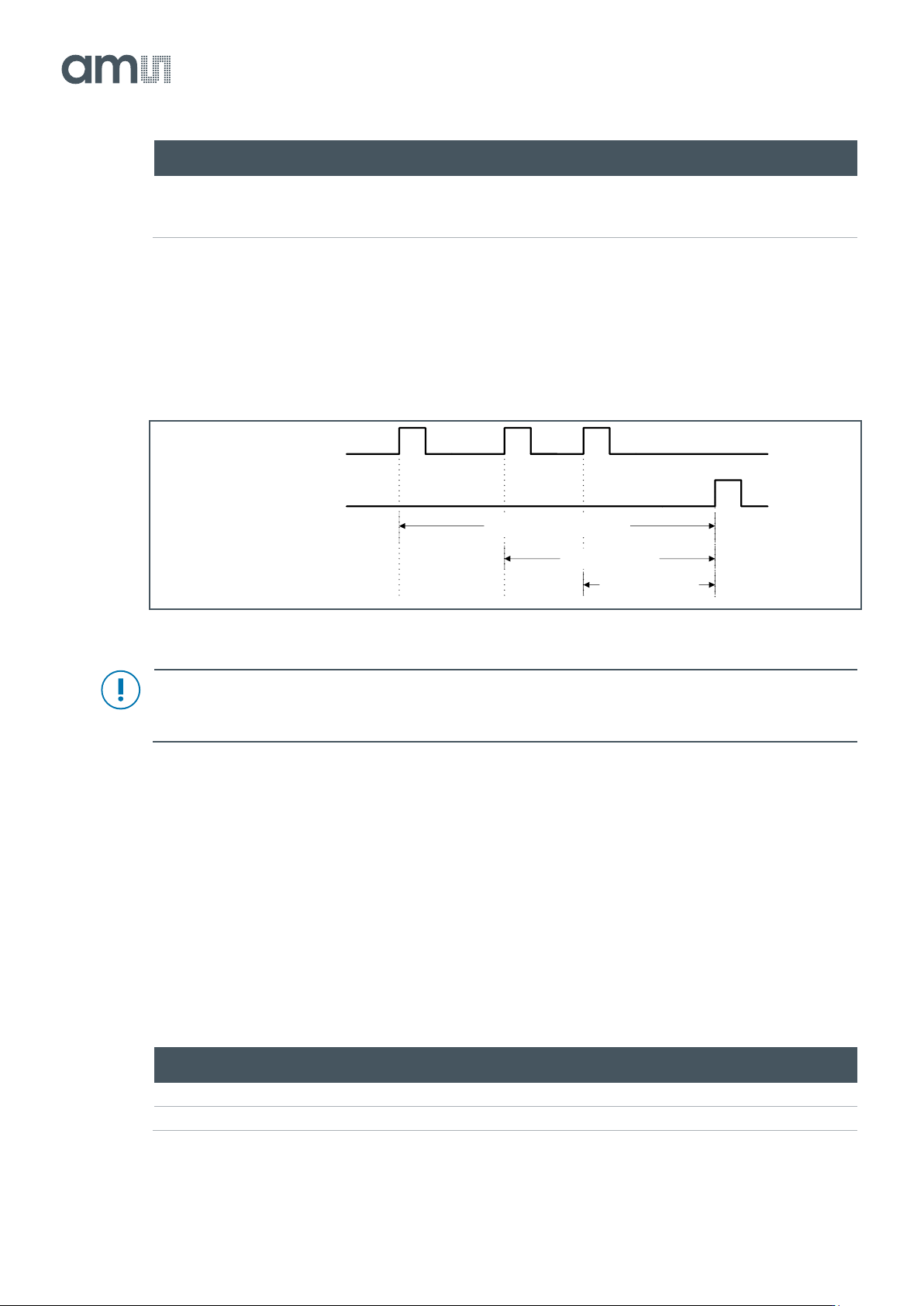
With external exposure mode, the kneepoint and total exposure times are set with the T_EXP1/2 and
FRAME_REQ triggers. The timing that needs to be applied in this external exposure mode looks like
the one below.
Figure 51:
Multiple Slope HDR with External Exposure
Attention
A combination of multiple slope and interleaved HDR is not supported.
7.4.4 Windowing
To limit the amount of data or to increase the frame rate of the sensor, windowing in Y direction is
possible. The number of lines and start address can be set by programming the appropriate registers.
The start address of a window should be a multiple of four (0, 4, 8 …).
The size (number of rows) of a window has to be a certain multiple and this depends on the mode and
number of sides used. These multiples are stated below:
Figure 52:
Window Size Multiples
Sides Used
Normal
XY-Subsampling
Binning
1
1
2
4
2
2
4
8
FRAME_REQ
T_EXP1
Total exposure time
Exposure kp1
Exposure kp2
Document Feedback
CMV12000
Functional Description
Datasheet • PUBLIC
DS000603 • v6-00 • 2023-Sep-22
84 │ 44
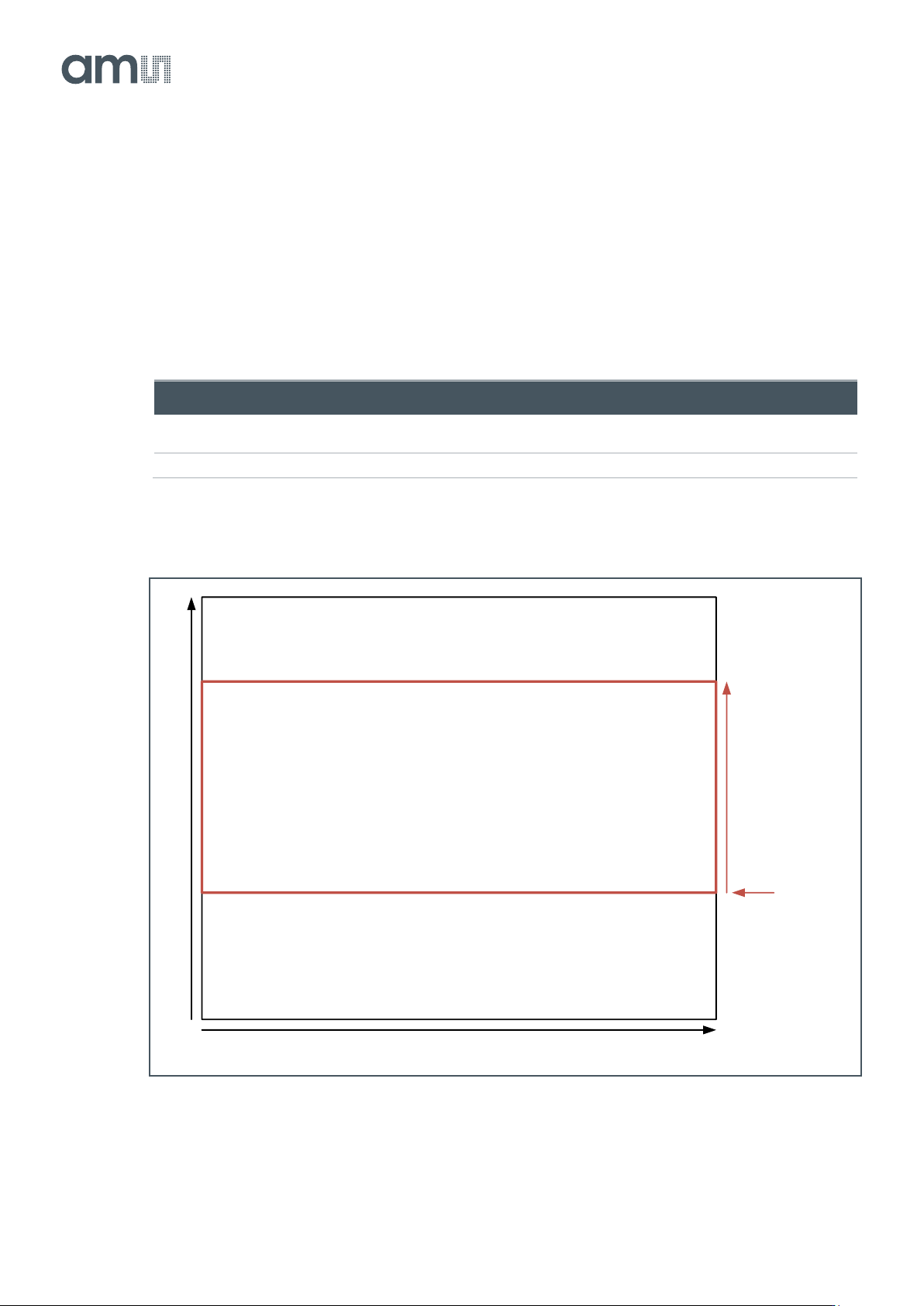
The CMV12000 has the possibility to read out multiple (max=32) predefined sub-windows in one read-
out cycle. The default mode is to read out one window with the full frame size (4096x3072).
Single Window
When a single window is read out, the start address and size can be uploaded in the corresponding
registers. The default start address is 0 and the default size is 3072 (full frame).
Figure 53:
Single Window Settings
Reg. Name
Address
Bits
Default
Description
Number_lines_tot
1
[15:0]
3072
Total number of lines read out from the sensor (1 to
3072).
Y_start_1
2
[15:0]
0
Row start address of the window (0 to 3071).
Figure 54:
Single Window
4096
3072
Number_lines_tot
Y_start_1