M3plus_OperationManual_e.pdf - 第165页
在线预览 M3plus_OperationManual_e.pdf PDF 文档。

Table of Contents
1. Using the Editor . . . . . . . . . . . . . . . . . . . . . . . . . . . . . . . . 5-1
1.1 Jump . . . . . . . . . . . . . . . . . . . . . . . . . . . . . . . . . . . . . . . . . . . . . . . 5-1
1.1.1 Specifying the line number to jump . . . . . . . . . . . . . . . . . . . . . . . . 5-1
1.1.2 Jump to the top line . . . . . . . . . . . . . . . . . . . . . . . . . . . . . . . . . . . . 5-2
1.1.3 Jump to the bottom line . . . . . . . . . . . . . . . . . . . . . . . . . . . . . . . . . 5-3
1.1.4 Copying and pasting the data . . . . . . . . . . . . . . . . . . . . . . . . . . . . 5-4
1.2 Filtering . . . . . . . . . . . . . . . . . . . . . . . . . . . . . . . . . . . . . . . . . . . . 5-6
1.2.1 Filtering . . . . . . . . . . . . . . . . . . . . . . . . . . . . . . . . . . . . . . . . . . . . . 5-6
1.2.2 Canceling the filter . . . . . . . . . . . . . . . . . . . . . . . . . . . . . . . . . . . . 5-7
1.3 Find and Replace . . . . . . . . . . . . . . . . . . . . . . . . . . . . . . . . . . . . . 5-8
1.3.1 Find . . . . . . . . . . . . . . . . . . . . . . . . . . . . . . . . . . . . . . . . . . . . . . . . 5-8
1.3.2 Replace . . . . . . . . . . . . . . . . . . . . . . . . . . . . . . . . . . . . . . . . . . . . 5-10
1.4 Sort . . . . . . . . . . . . . . . . . . . . . . . . . . . . . . . . . . . . . . . . . . . . . . 5-12
1.5 Multiplying the Component Data . . . . . . . . . . . . . . . . . . . . . . . 5-13
2. Block offset . . . . . . . . . . . . . . . . . . . . . . . . . . . . . . . . . . . 5-14
2.1 Creating the block offset data . . . . . . . . . . . . . . . . . . . . . . . . . . 5-14
2.2 Block offset conversion and reconversion . . . . . . . . . . . . . . . . . 5-17
2.2.1 Executing the block offset conversion . . . . . . . . . . . . . . . . . . . . . 5-17
2.2.2 Reconverting to the multi-block data . . . . . . . . . . . . . . . . . . . . . . 5-19
3. Optimizing the data . . . . . . . . . . . . . . . . . . . . . . . . . . . . 5-20
3.1 Setting the optimizing conditions . . . . . . . . . . . . . . . . . . . . . . . 5-21
3.2 Executing . . . . . . . . . . . . . . . . . . . . . . . . . . . . . . . . . . . . . . . . . . 5-24
4. PCB file format conversion . . . . . . . . . . . . . . . . . . . . . . 5-25
4.1 Converting VIOS into XML . . . . . . . . . . . . . . . . . . . . . . . . . . . . . 5-25
4.2 Converting XML into VIOS . . . . . . . . . . . . . . . . . . . . . . . . . . . . . 5-27
Chapter 5 Editing the PCB data
5
Editing the PCB data
5-1
1. Using the Editor
1.1 Jump
This section explains what you can do with the Editor that starts by pressing the [Editor]
button on the Setup screen.
On the Editor's main view window, the cursor can be jumped to the top, end or any
desired data line number. This function can be used on the "Board Info", "Parts Info",
"Mark Info", "Block Offset Info", "Local Fiducial Info" and "Local Badmark Info"
displays in the main view window.
1.1.1 Specifying the line number to jump
A jump can be made to a specified line number.
1
Place the cursor at any position in the main view window.
2
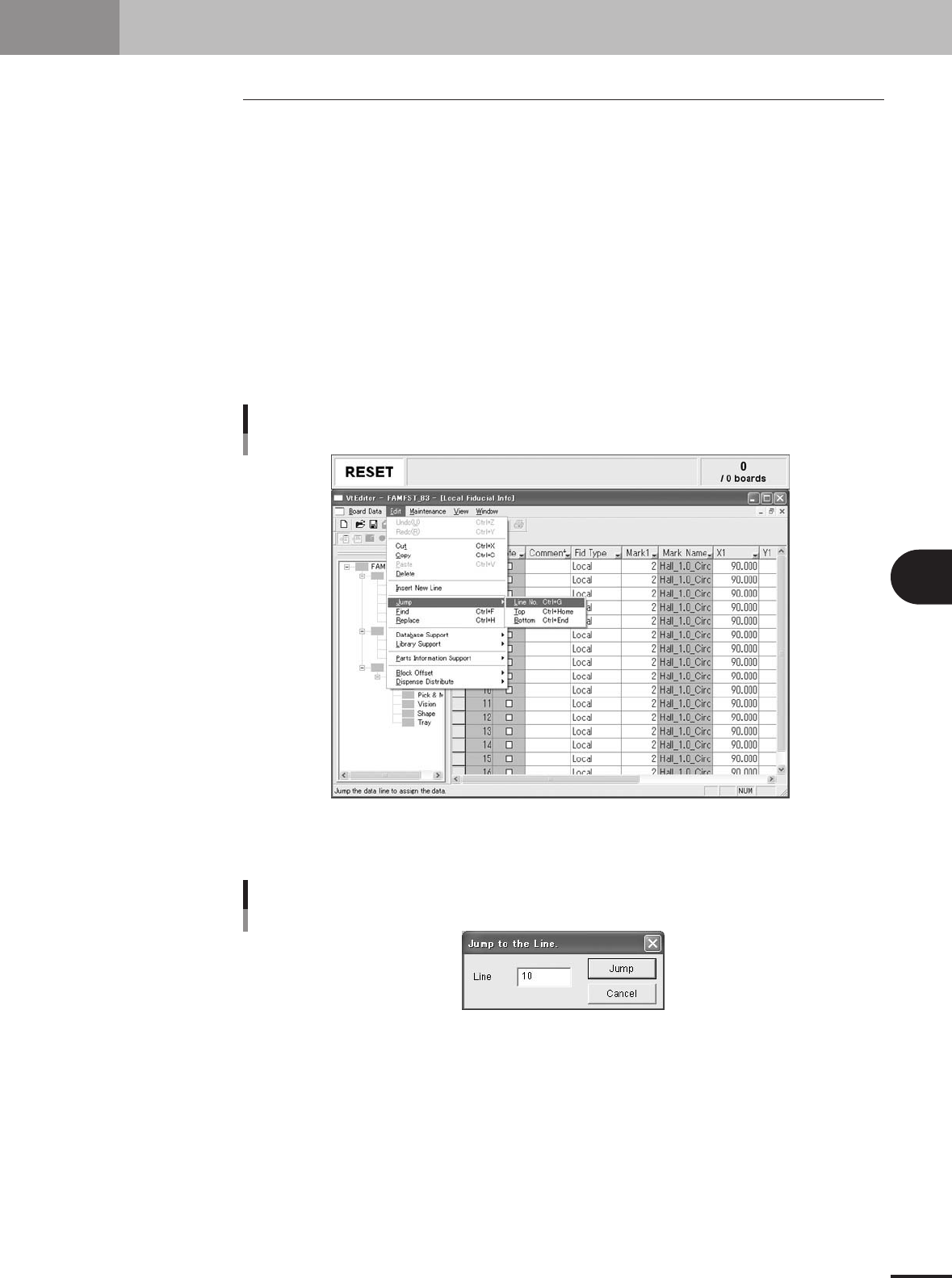
Select the "Jump" command to jump to the specified line number.
1.Select "Jump" - "Line No." from the Edit menu.
The "Jump to the line" dialog box appears.
"Jump" - "Line No." command
27505-5E-20
2.Specify the line number and click the [Jump] button.
The cursor will jump to the specified line number.
"Jump to the line" dialog box
27506-5E-20