M3plus_OperationManual_e.pdf - 第244页
1 - 3 1 P art names and functions TSF1 main body 3 Clamp release lev er Po sitioning pin C Clamp Po sitioning pin L Po sitioning pin R 73102-5V-00 Clamp release lever Use this lever to release the "Clamp". Clam…
1 -2
1
Part names and functions
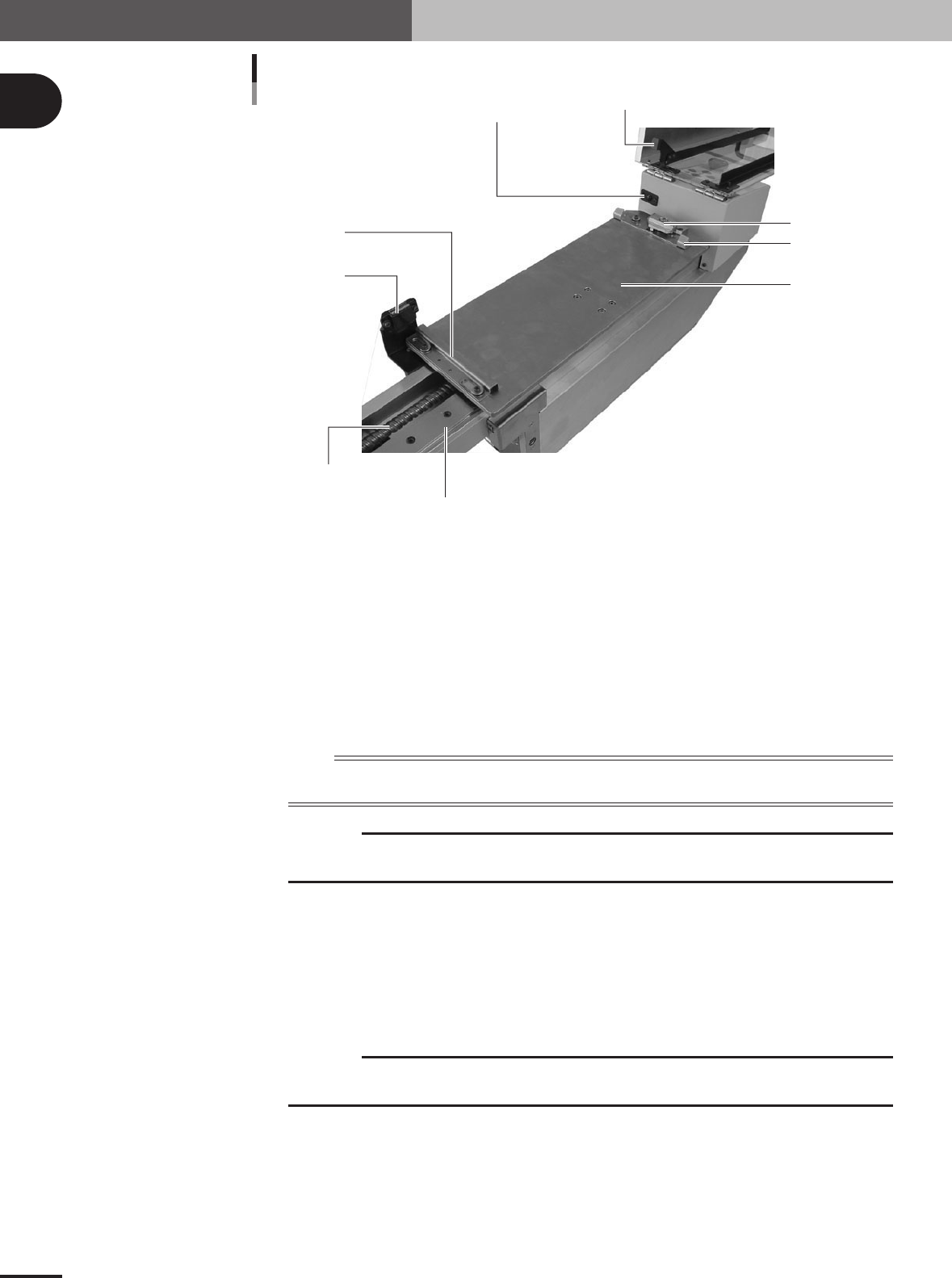
Cover safety switch
Safety switch push plate
Tray guide F
Magnet catch
Hold knob
Top plate
TSF1 main body 2
Tray guide R
Shuttle axis linear guide
Shuttle axis ball screw
73101-5V-00
Tray guide F
Holds the forward edge (mounter side) of the tray when placed on the top plate.
Top plate
This plate moves along the shuttle axis to convey the tray clamped on the plate.
Tray guide R
Holds the rear edge (TSF1 operation panel side) of the tray when placed on the top plate.
Hold knob
Use this knob to clamp the tray on the top plate.
n
NOTE
The shuttle is an assembly consisting of the top plate, tray guides F and R and the hold knob. The shuttle moves
back and forth along the shuttle path (axis).
c
CAUTION
Do not hold the shuttle section when carrying the TSF1 or installing to the mounter. Doing so
might cause the TSF1 to malfunction.
Magnet catch
Keeps the upper safety cover closed.
Shuttle axis ball screw
Moves the shuttle along the shuttle axis.
Shuttle axis linear guide
The shuttle moves along this linear guide.
c
CAUTION
Do not hold the linear guide or apply shock to the linear guide when carrying the TSF1 or
installing to the mounter. Doing so might cause the TSF1 to malfunction.
Cover safety switch
This is the interlock switch for the upper safety cover. When the upper safety cover is opened, this
switch triggers emergency stop (servo control OFF).
Safety switch push plate
When the upper safety cover is closed, this push plate activates the cover safety switch so the
mounter detects that the upper safety cover is closed.
1 -3
1
Part names and functions
TSF1 main body 3
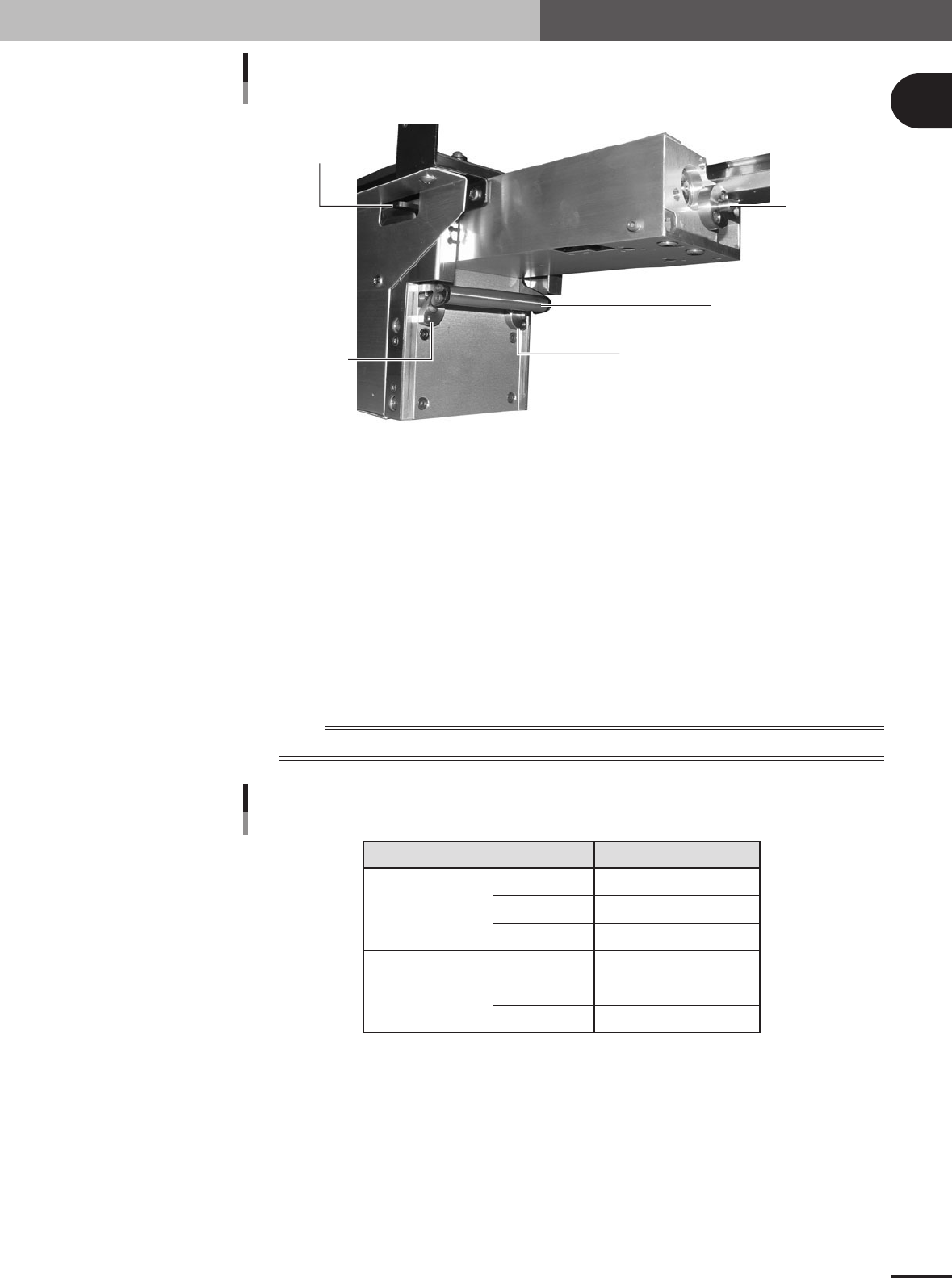
Clamp release lever
Positioning pin C
Clamp
Positioning pin L
Positioning pin R
73102-5V-00
Clamp release lever
Use this lever to release the "Clamp".
Clamp
Clamps the TSF1 on the feeder plate of the mounter (M CUBE PLUS).
Positioning pin L
Insert this pin into the positioning hole on the feeder plate.
Positioning pin C
Insert this pin into the positioning hole on the feeder plate.
Positioning pin R
Insert this pin into the positioning hole on the feeder plate.
n
NOTE
The positioning pins must be inserted into the specified positions as shown in the table below.
Positioning pin insertion position
Position 1
Position 2
TSF1 position Positioning pin
L
C
R
L
C
R
1
3
5
8
10
12
Feeder plate No.
75103-5V-00
1 -4
1
Part names and functions
1.2 Operation switch description
The following explains how to use the TSF1 operation panel switches.
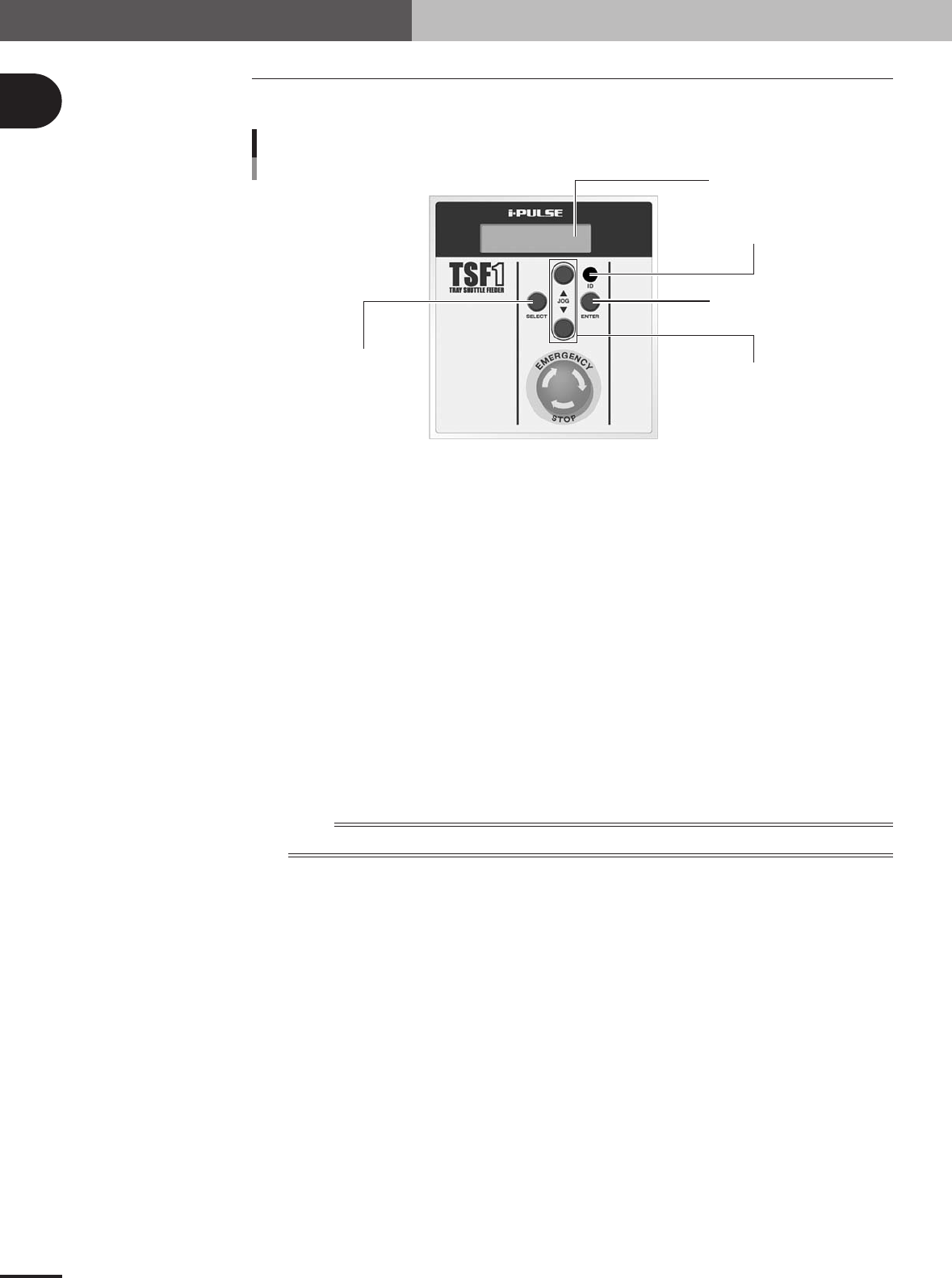
ENTER button
ID setting dial
JOG button
SELECT button
LCD (Liquid crystal display)
Operation switch panel
73104-5V-00
SELECT button
Use this button to select the manual operation (movement to tray replacement position or return to
origin operation).
ENTER button
Press this button to perform the manual operation selected with the SELECT button.
ID setting dial
Select the position on the feeder plate where the TSF1 is installed. (Select "1" when installing the
TSF1 in position 1, and select "2" when installing it in position 2.)
JOG buttons
Use these buttons to move the shuttle in JOG mode.
Pressing the [▲] button moves the shuttle toward the work position (mounter side).
Pressing the [▼] button moves the shuttle toward the tray replacement position (TSF1 operation
switch panel side).
LCD (Liquid crystal display)
Shows the TSF1 status.
n
NOTE
For more details on how to operate the TSF1, see section 2.4, "Manual operations".