00197199-04_IM_WLAN-Infrastructure.pdf - 第60页
Components Motorola MC67 / MC75 PDA 3.6.2 Configuration 60 Installation Manual WLAN Infrastructure for SIPLACE ► Select the Options icon (1). ► Select the entry Regulatory from the drop down list. ► In the n ext screen s…
Components
3.6.2 Configuration Motorola MC67 / MC75 PDA
Installation Manual WLAN Infrastructure for SIPLACE 59
3.6.1.1
3.6.1.1 Safety Instructions
Safety Instructions
The Pocket PC conforms to laser class 2.
Warning label W216 (shown above) is displayed on the Pocket PC.
3.6.2
3.6.2 Configuration
Configuration
Motorola PDAs of the MC67 / MC75 series can be used as wireless clients (pocket PC). The current firm
-
ware for these supports WPA-TKIP with preshared keys, which forms the basis for a secure application
on SIPLACE placement machines.
We recommend that you perform PDA parameterization within the range of an active WLAN infrastruc
-
ture radio cell. To configure and connect the PDA to the WLAN infrastructure, proceed as follows:
3.6.2.1
3.6.2.1 Manage Profiles
Manage Profiles
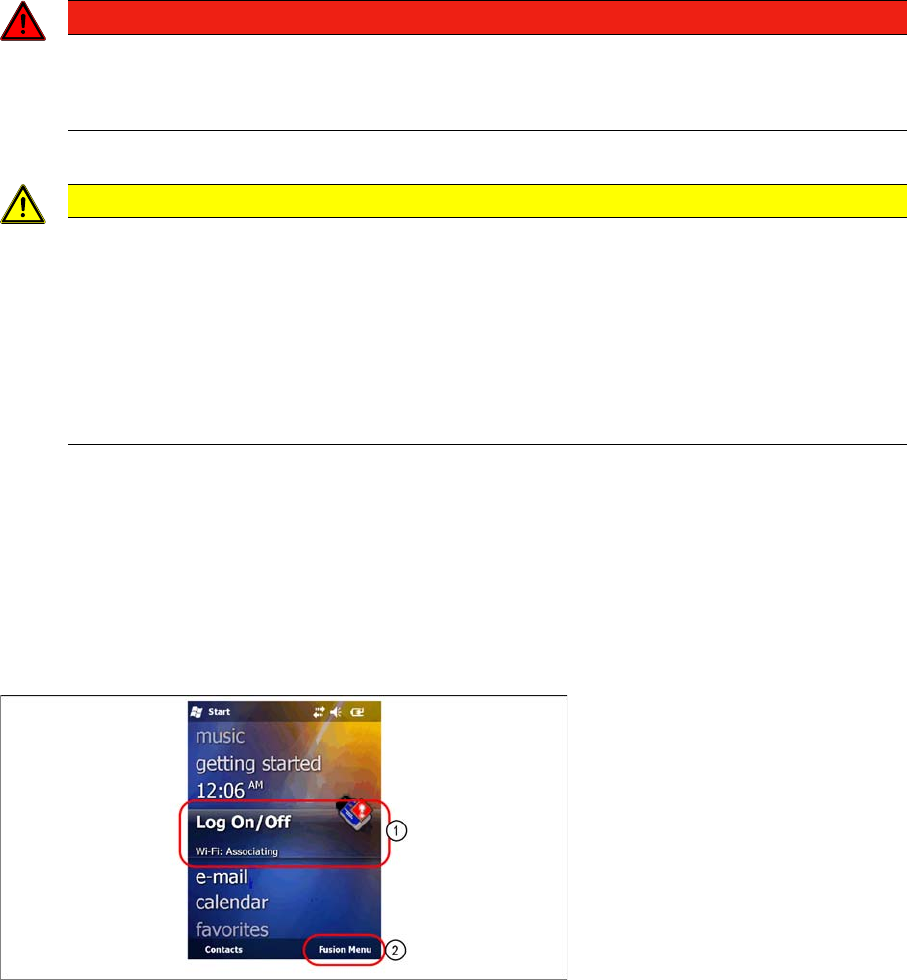
► Select Log On/Off (1).
► Select Fusion Menu (2).
DANGER
LASER RADIATION!
Laser Class 2
► Do not look into the beam!
CAUTION
Laser regulations
Before operating the pocket PC, inform all operating personnel about the laser regulations.
While operating the Pocket PC, observe the respective regulations in line with VDE 0837 "Pro
-
tection from radiation emitted by laser devices" and the "Laser radiation" accident prevention
regulations (VBG93), applicable in Germany.
Also observe the accident prevention regulations applicable in your country.
Despite the low laser power, avoid looking directly at the laser beam. The natural closure reflex
of your eyelids will protect your eyes from the visible beam.
Components
Motorola MC67 / MC75 PDA 3.6.2 Configuration
60 Installation Manual WLAN Infrastructure for SIPLACE
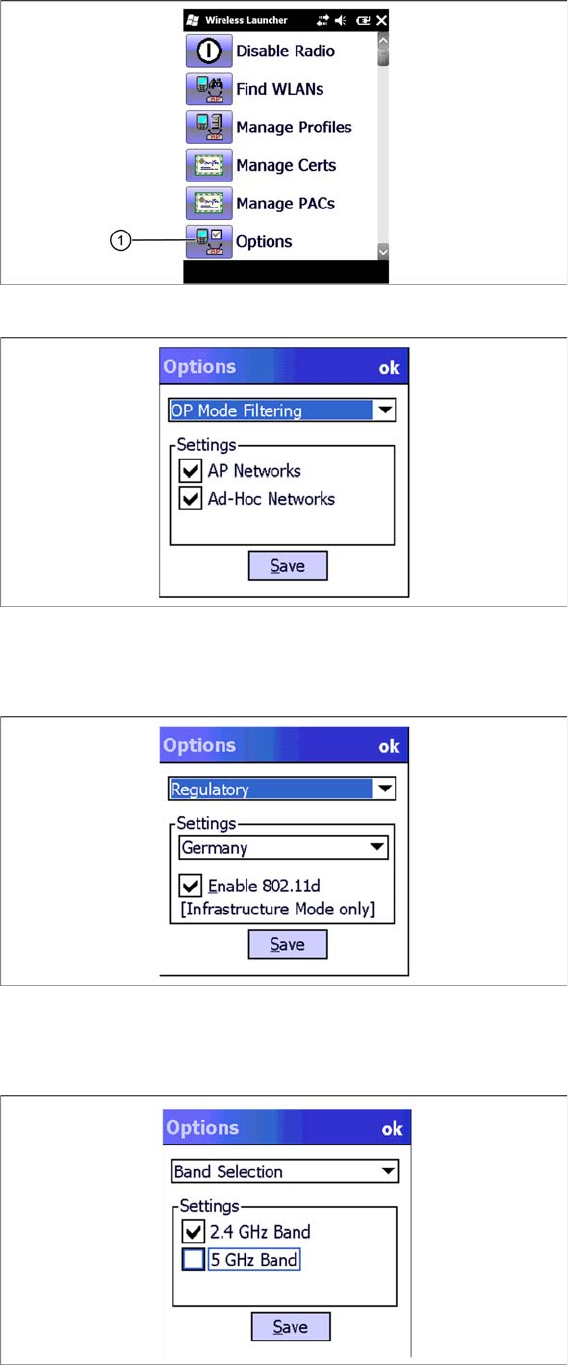
► Select the Options icon (1).
► Select the entry Regulatory from the drop down list.
► In the next screen select the country of use. The selected country must be identical with the setting
of the appropriate Access Point.
► Select the entry Band Selection from the drop down list.
► In the next screen select the band of use. The selected band must be identical with the setting of the
appropriate Access Point.
► Click on Save.
Components
3.6.2 Configuration Motorola MC67 / MC75 PDA
Installation Manual WLAN Infrastructure for SIPLACE 61
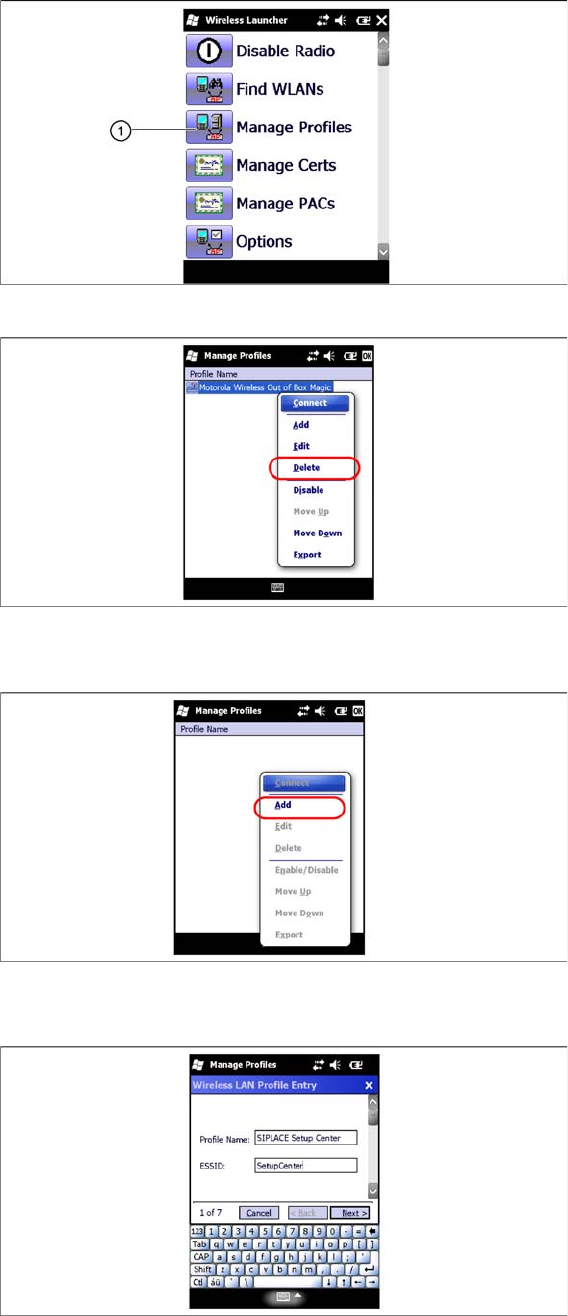
► Select the Manage Profiles icon (1).
► Select the „Out of the box profile and open the context menu.
► Click on Delete.
► Click on Add to add a new profile.
► In the next screen, select a profile name and enter the SSID (network name) set in the access point.
► Select Next to continue.