00197199-04_IM_WLAN-Infrastructure.pdf - 第72页
Components Basic Settings for Your Own WIFI Access Point 3.6.2 Configuration 72 Installation Manual WLAN Infrastructure for SIPLACE
Components
3.6.2 Configuration Basic Settings for Your Own WIFI Access Point
Installation Manual WLAN Infrastructure for SIPLACE 71
3.7
3.7 Basic Settings for Your Own WIFI Access Point
Basic Settings for Your Own WIFI Access Point
You can also use other (own) WIFI access point devices. These WIFI access point devices must fulfill
the following standards:
▪ 802.11a
▪ 802.11b
▪ 802.11 g
▪ 802.11n
The WIFI access point devices must be configured with the following settings:
▪ Stand Alone AP
▪ Access Point: Bridge Mode
▪ Static Address : 192.168.1.10
▪ DHCP Server & DNS Forwarding
▪ DATA Radio
▪ Wireless LAN Settings: SSID “SIPLACE” & PSK WPA2
Components
Basic Settings for Your Own WIFI Access Point 3.6.2 Configuration
72 Installation Manual WLAN Infrastructure for SIPLACE
Annex
4.1.1 Installing the USB LAN Adapter Primary Setup Tool
Installation Manual WLAN Infrastructure for SIPLACE 73
4
4 Annex
Annex
4.1
4.1 Primary Setup Tool
Primary Setup Tool
The PST tool is used to perform the primary network settings for the Scalance W788 and W744.
4.1.1
4.1.1 Installing the USB LAN Adapter
Installing the USB LAN Adapter
Install the network card on the Setup Center computer with the help of the driver CD and documentation
supplied.
4.1.2
4.1.2 Installing the PST Tool (Primary Setup Tool)
Installing the PST Tool (Primary Setup Tool)
Start the installation from the Setup Center CD by executing the file \3rdparty installer\Sca
-
lance\PST\Setup.exe.
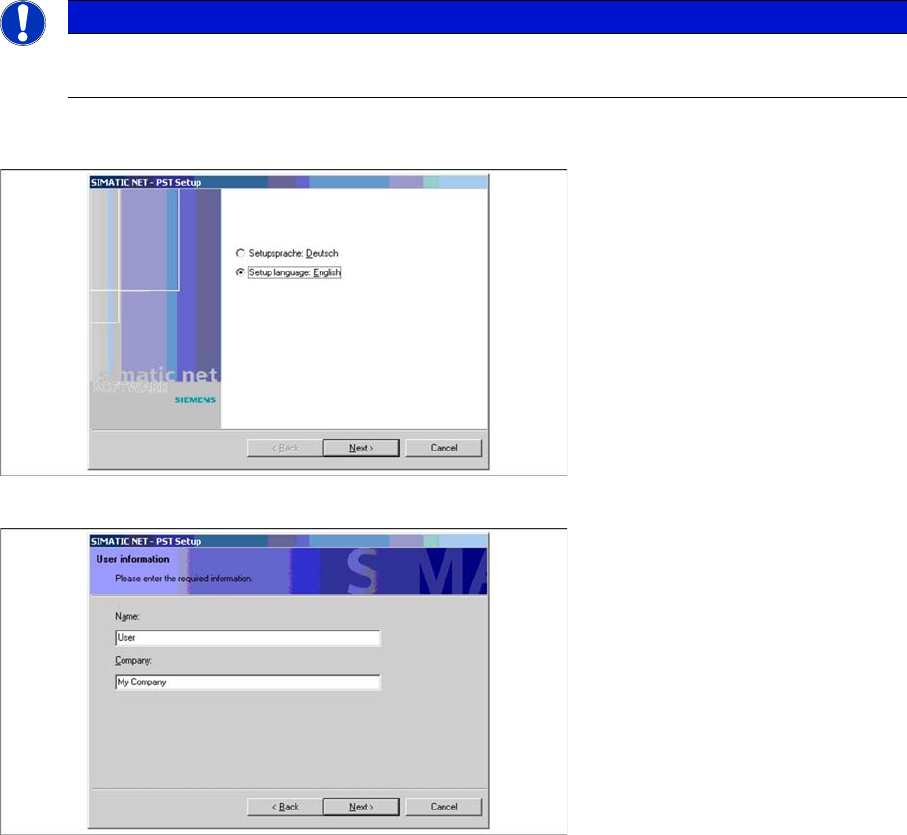
► Select your required language for the installation procedure and continue.
► Enter the user information and continue.
NOTICE
PST Tool
The PST tool does not run under Windows Vista.