00197199-04_IM_WLAN-Infrastructure.pdf - 第70页
Components Motorola MC67 / MC75 PDA 3.6.2 Configuration 70 Installation Manual WLAN Infrastructure for SIPLACE ► Select the Advanced tab page and disable all features in this scre en. ► Click on OK to save the settings. …
Components
3.6.2 Configuration Motorola MC67 / MC75 PDA
Installation Manual WLAN Infrastructure for SIPLACE 69
3.6.2.4
3.6.2.4 Switching Off the Standby Mode (Optional)
Switching Off the Standby Mode (Optional)
Due to the hardware design of the MC67 / MC75 the power of the wireless device is disconnected when
the MC67 / MC75 switches to the standby mode. As a result, reestablishing the wireless connection
takes 5 - 8 seconds after waking up from standby.
To work around this behavior, we recommend to disable the standby mode, proceed as follows.
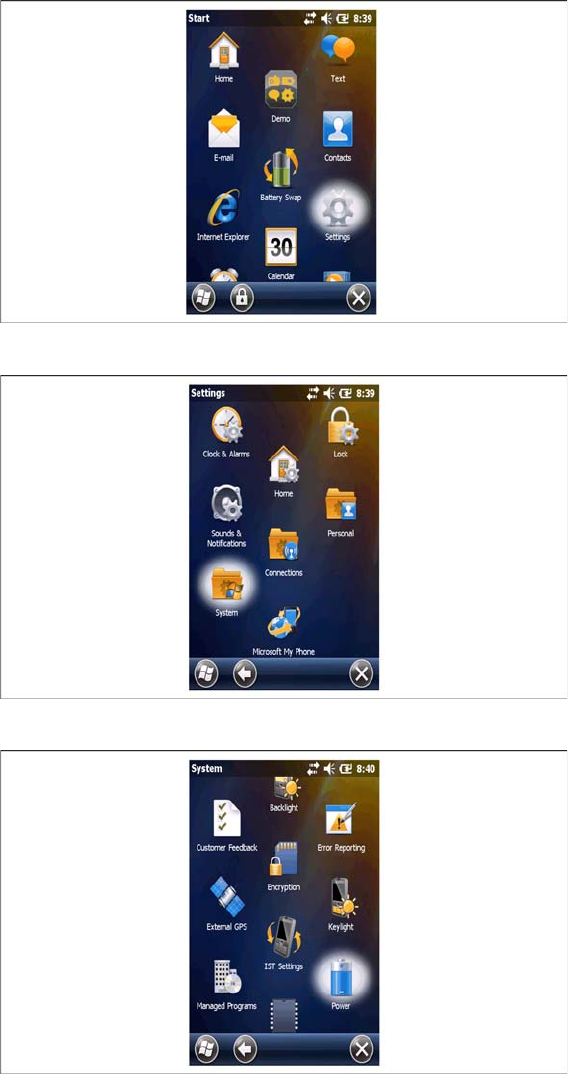
► Select the Settings icon from the Start menu.
► Select the System icon in the Settings menu.
► Select the Power icon in the System menu.
Components
Motorola MC67 / MC75 PDA 3.6.2 Configuration
70 Installation Manual WLAN Infrastructure for SIPLACE
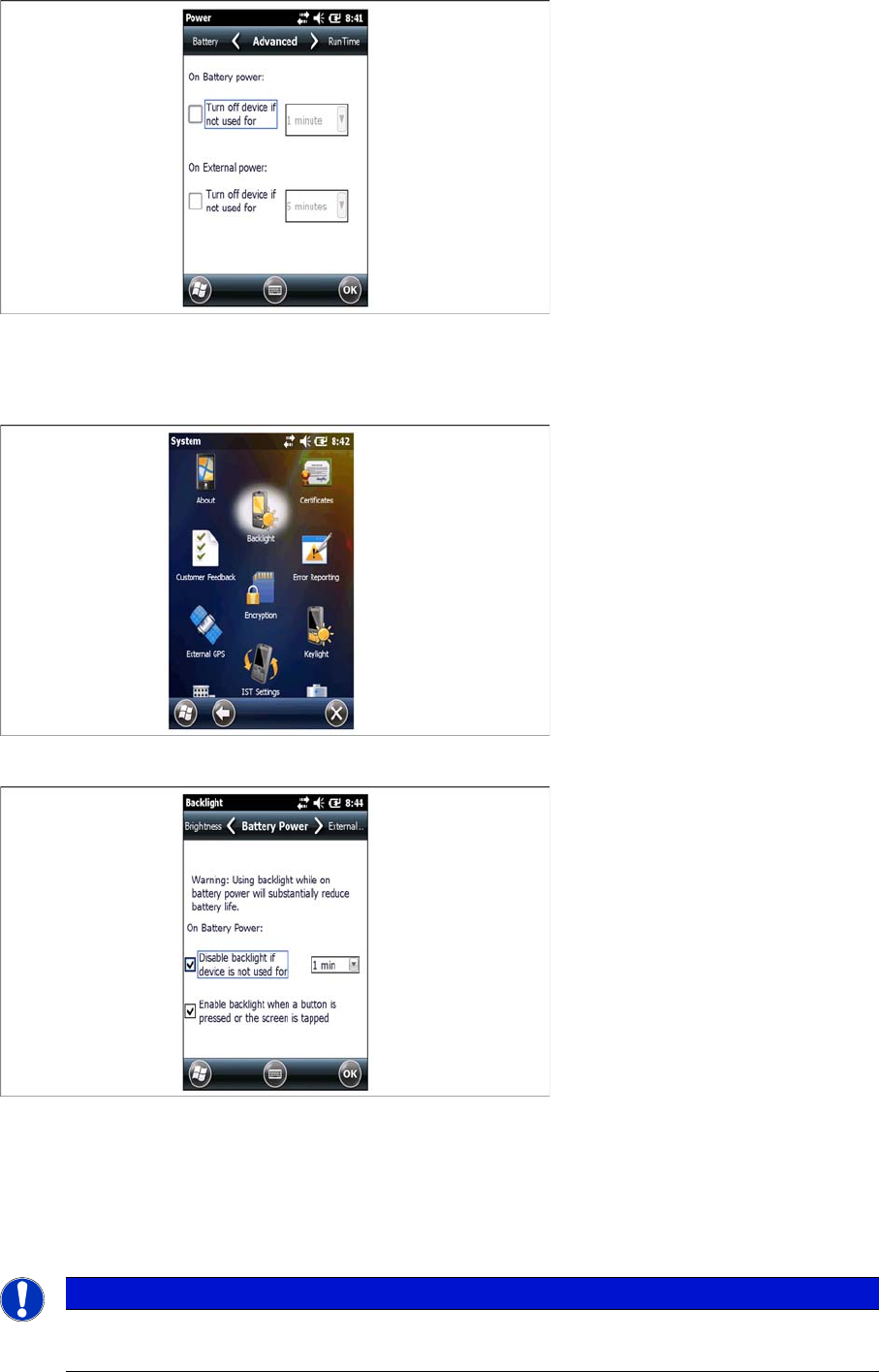
► Select the Advanced tab page and disable all features in this screen.
► Click on OK to save the settings.
⇨ The power settings dialog will be closed.
► Select the Backlight icon in the System menu.
► Enable all features in the Battery Power tab page.
► Set the time value to 1 minute.
► Click on OK to save the settings.
⇨ The Backlight settings dialog will be closed.
► Close the Settings dialog.
NOTICE
Battery Power
To save battery power we recommend to place the PDA in the cradle if it is not used
Components
3.6.2 Configuration Basic Settings for Your Own WIFI Access Point
Installation Manual WLAN Infrastructure for SIPLACE 71
3.7
3.7 Basic Settings for Your Own WIFI Access Point
Basic Settings for Your Own WIFI Access Point
You can also use other (own) WIFI access point devices. These WIFI access point devices must fulfill
the following standards:
▪ 802.11a
▪ 802.11b
▪ 802.11 g
▪ 802.11n
The WIFI access point devices must be configured with the following settings:
▪ Stand Alone AP
▪ Access Point: Bridge Mode
▪ Static Address : 192.168.1.10
▪ DHCP Server & DNS Forwarding
▪ DATA Radio
▪ Wireless LAN Settings: SSID “SIPLACE” & PSK WPA2