00197199-04_IM_WLAN-Infrastructure.pdf - 第9页
Components 3.1.1 Features Motorola AP6521 Access Point Installation Manual WLAN Infrastructure for SIPLACE 9 3 3 C o m p o n e n t s Components 3.1 3 . 1 M o t o r o la A P 6 5 2 1 A c c e s s P o in t Motorola AP6521 Ac…
SIPLACE WLAN Concepts
Legacy Concept
8 Installation Manual WLAN Infrastructure for SIPLACE
2.2
2.2 Legacy Concept
Legacy Concept
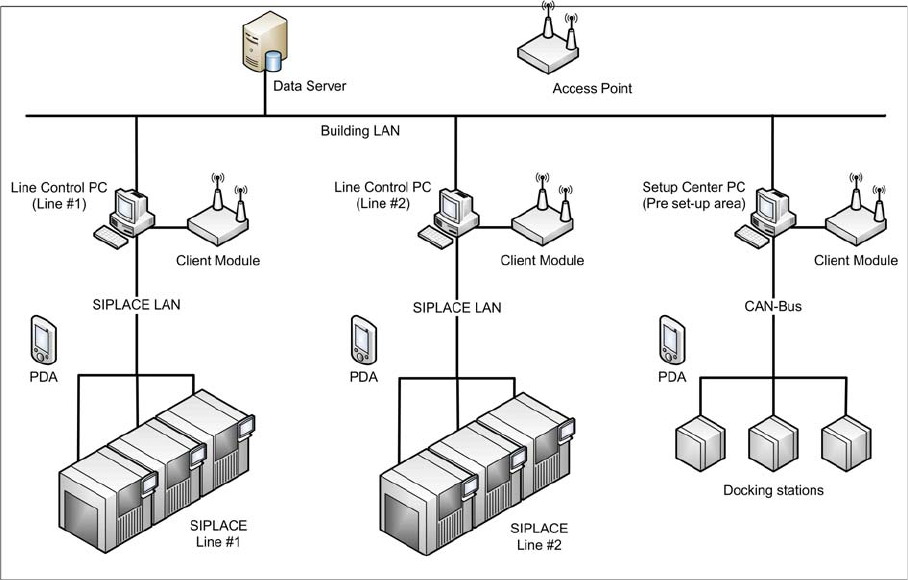
A single access point is used. The access point has no wired connection to any network. The line control
PC’s and the Setup Center PC of the pre set-up area are linked via a Client Module SCALANCE W744-
1Pro. This requires realization of a further network connection (RJ45 10/100Mbps) via USB and the cor
-
responding adapter.
Components
3.1.1 Features Motorola AP6521 Access Point
Installation Manual WLAN Infrastructure for SIPLACE 9
3
3 Components
Components
3.1
3.1 Motorola AP6521 Access Point
Motorola AP6521 Access Point
Information
The AP6521 and AP6522 access points can use use WiNG software as its onboard operating system.
The AP6522 is the successor of AP652. The unique WiNG software enables the access point to function
as a Standalone “thick” access point, or a Virtual Controller AP capable of adopting and managing up to
24 access points of the same model.
For Installation, please refer to the WiNG 5.8 ACCESS POINT SYSTEM REFERENCE GUIDE
https://atgsupportcentral.motorolasolutions.com/content/emb/docs/manuals/MN002229A01.pdf
3.1.1
3.1.1 Features
Features
▪ Operating temperature range: 0 to 40°C
▪ Power over Ethernet (PoE in accordance with 802.3af)
▪ WEP encryption
▪ 802.11b/g – up to 54 Mbit/s in 2.4GHz band
▪ 802.11a – up to 54 Mbit/s in 5GHz band
▪ 802.11n - MCS 0-15 up to 300Mbps
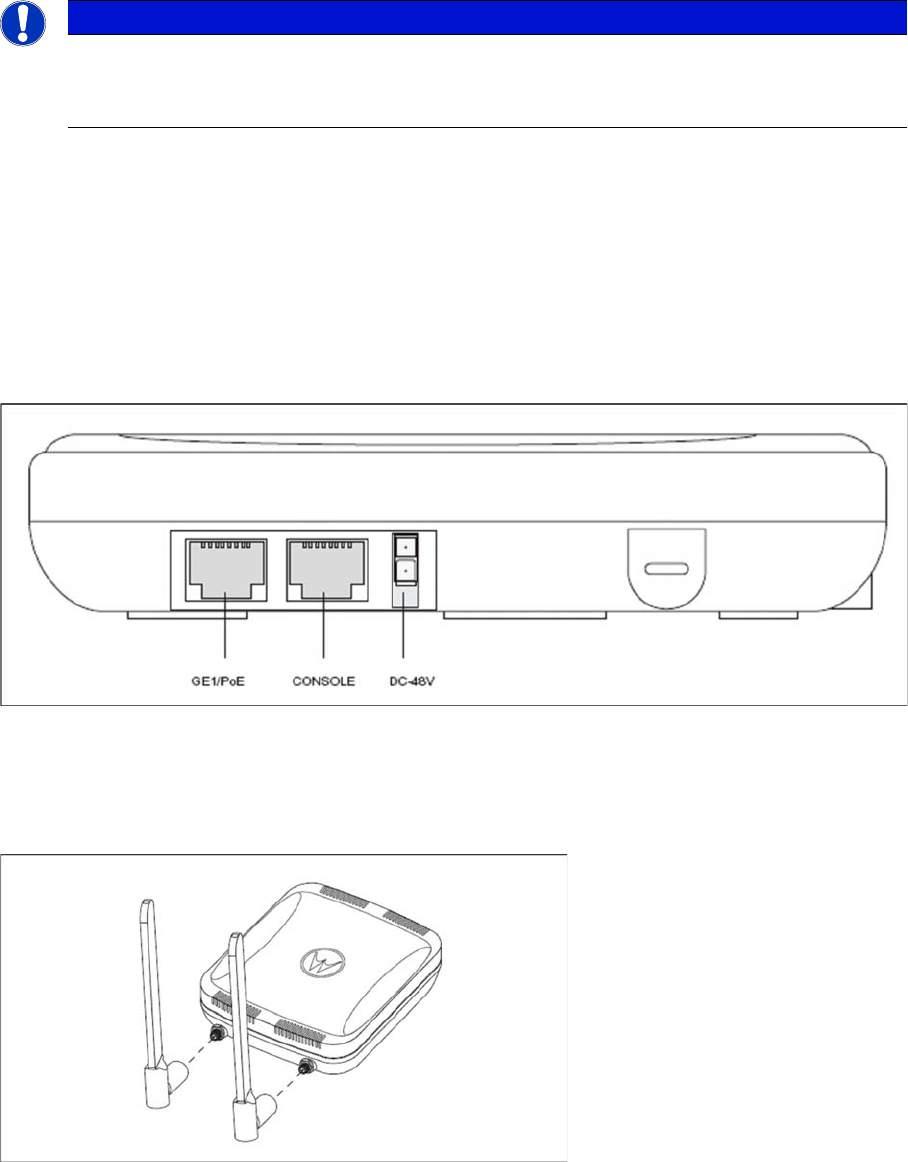
An AP-6521 Series access point has one RJ-45 connector supporting an 10/100/1000 Ethernet port con
-
nection and requires 802.3af compliant power from an external source.
The access point contains runtime firmware which enables the unit to boot after either a power up or a
watchdog reset. The runtime firmware on the access point can be updated via the Ethernet interface.
Components
Motorola AP6521 Access Point 3.1.2 Installation
10 Installation Manual WLAN Infrastructure for SIPLACE
3.1.2
3.1.2 Installation
Installation
An AP-6521 Series access point can be attached to a wall, mounted under a suspended T-Bar or above
a ceiling.
To prepare for an installation, perform the following:
► Verify that the contents of the box includes the intended access point and accessory hardware.
► Review site survey and network analysis reports to determine the location and mounting position for
the access point.
► Connect a CAT-5e or better Ethernet cable to a PoE compatible device and run the cable to the in
-
stallation site. Ensure there is sufficient cable slack to perform the installation steps.
► Determine whether the access point is powered using a Power Injector system, combining data and
power to the access point’s GE1/PoE port or will be powered from a conventional power adapter pro
-
viding power only to the access point’s DC-48V connector.
Place the access point using the following guidelines:
► Install the access point at an ideal height of 3 meter from the ground.
► Orient the access point antennas vertically for best reception.
► Point the access point antennas downward if attaching to the ceiling.
For further information about installation, please refer to the access point documentation
NOTICE
Mounting location
Select a mounting option based on the physical environment of the coverage area.
Do not mount the access point in a location that has not been approved in a site survey.