YSM20R_YSM20WR_Mainte_E.pdf - 第106页
3-45 3 Periodic maintenance items 4 L oosen the belt. 1. Before loosening the conveyor belt, mark the current position of pulley bracket (YSM20R/YSM20WR single-lane type/YSM20WR dual-lane type: pulley mounting bolt) with…
3-44
3
Periodic maintenance items
5.2 Inspecting conveyor belt and cleaning guide
Inspect the conveyor belt for wear. As the belt wears away, slippages may occur that prevent securely
conveying the boards. It is therefore necessary to make periodic checks for wear of the conveyor belt.
Additionally, if belt wear debris accumulate on the light receiving surface of the conveyor sensor, troubles such
as incorrect board detection may occur. If belt wear debris accumulate in the belt guide or pulley periphery,
the belt may be fixed.
YSM20R/YSM20WR has following 4 types of conveyor. The position of tensioner (pulley bracket/pulley) and
belt tension standard are different among 3 types.
• YSM20R Dual-stage type
• YSM20R Single-lane type
• YSM20WR Dual-lane type
• YSM20WR Single-lane type (for transferring heavy board)
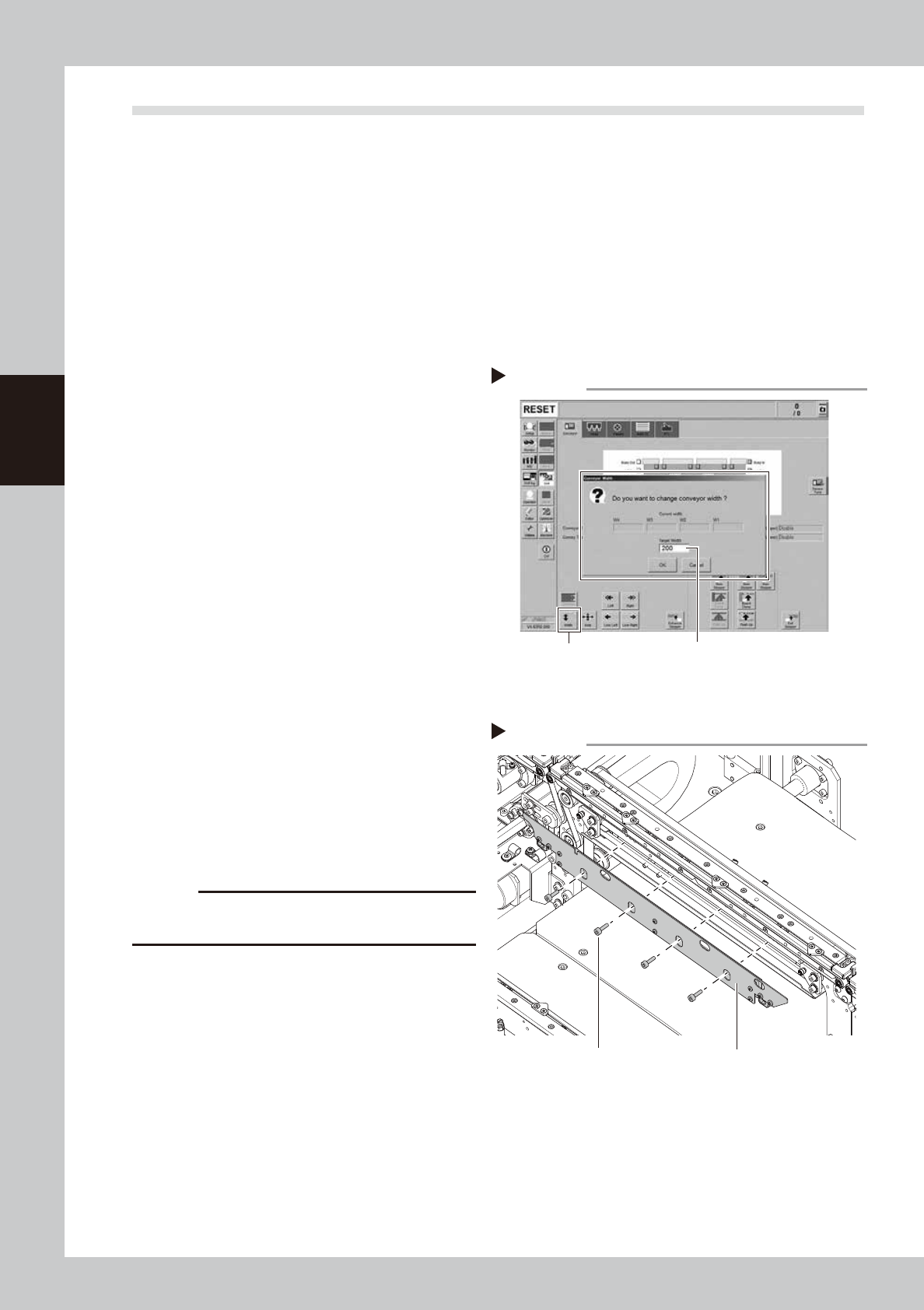
1
Change the conveyor width to a
convenient width for maintenance
work.
1. Press the [Width] button to display the
"Conveyor Width" screen.
2. In the "Target Width" box, enter a width
wide enough (about 200 mm) for using
tool (hex wrench) and press [OK] button.
The conveyor is changed to the specified
width.
2
Prepare for work.
e
1. Take off all accessories susceptible to the
magnetic fields, such as a wristwatch
and/or magnetic ID card.
2. Press the emergency stop button and
then open the machine safety cover.
3. If the machine is carriage type, detach
carriage to easily access to the conveyor.
4. Place a square cloth on the push-up
plate.
3
Detach the board clamp plates.
Use a hex wrench (3) to remove the 4 board
clamp bolts. Then remove the board clamp
plate.
c
CAUTION
Do not remove any bolts other than the 4 bolts shown in
the figure on the right.
Changing the conveyor width
Step 1
[Width] button Enter width that tool can be entered.
(about 200 mm)
54304-KMK-00
Detaching board clamp plate
Step 3
Board clamp plateMounting bolt
53363-KMK-00
3-45
3
Periodic maintenance items
4
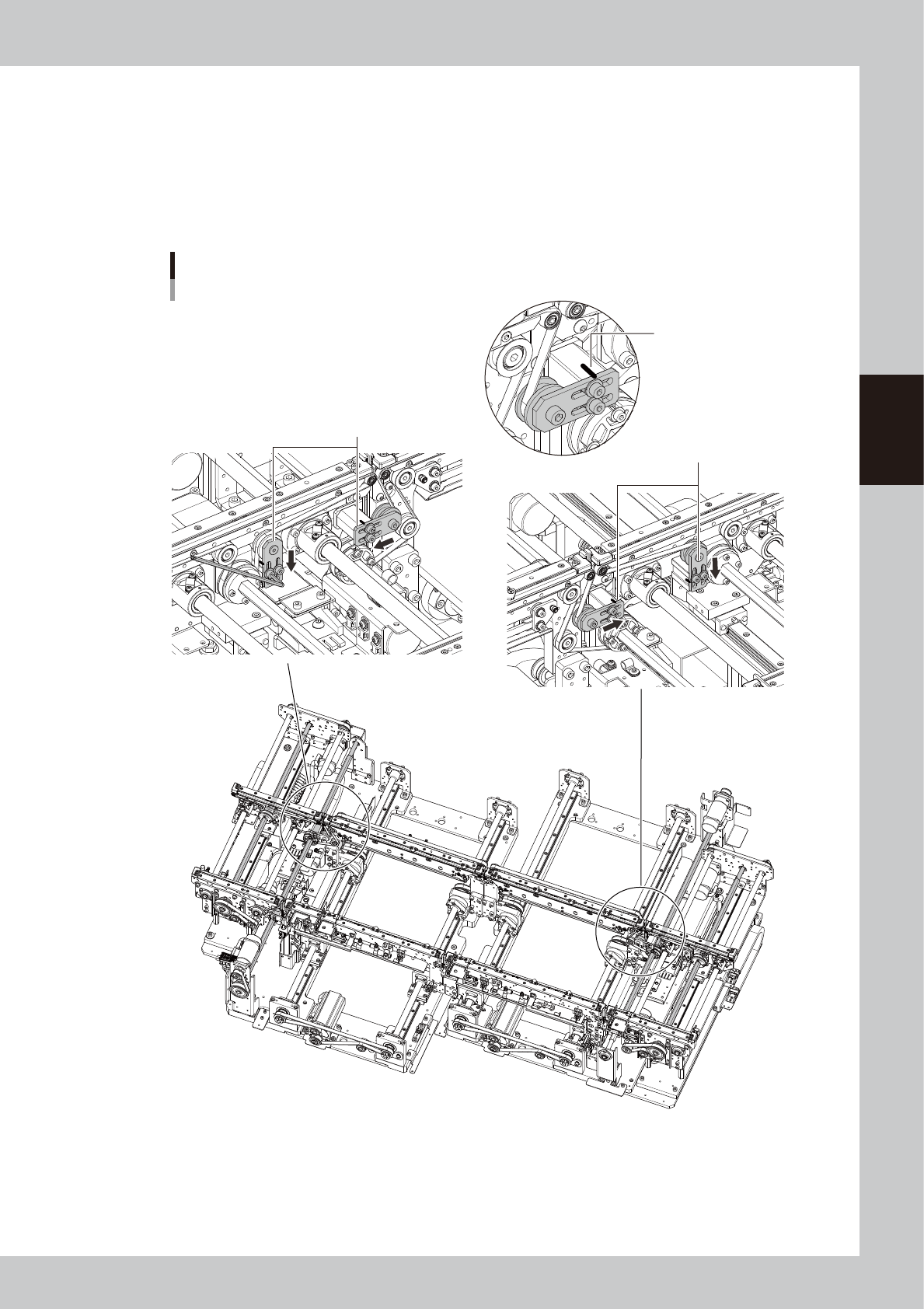
Loosen the belt.
1. Before loosening the conveyor belt, mark the current position of pulley bracket (YSM20R/YSM20WR
single-lane type/YSM20WR dual-lane type: pulley mounting bolt) with a permanent marker.
2. Loosen 2 bolts mounting pulley bracket (pulley) with hex wrench (3) and move the bracket to the
end of the slotted hole (in loosening direction).
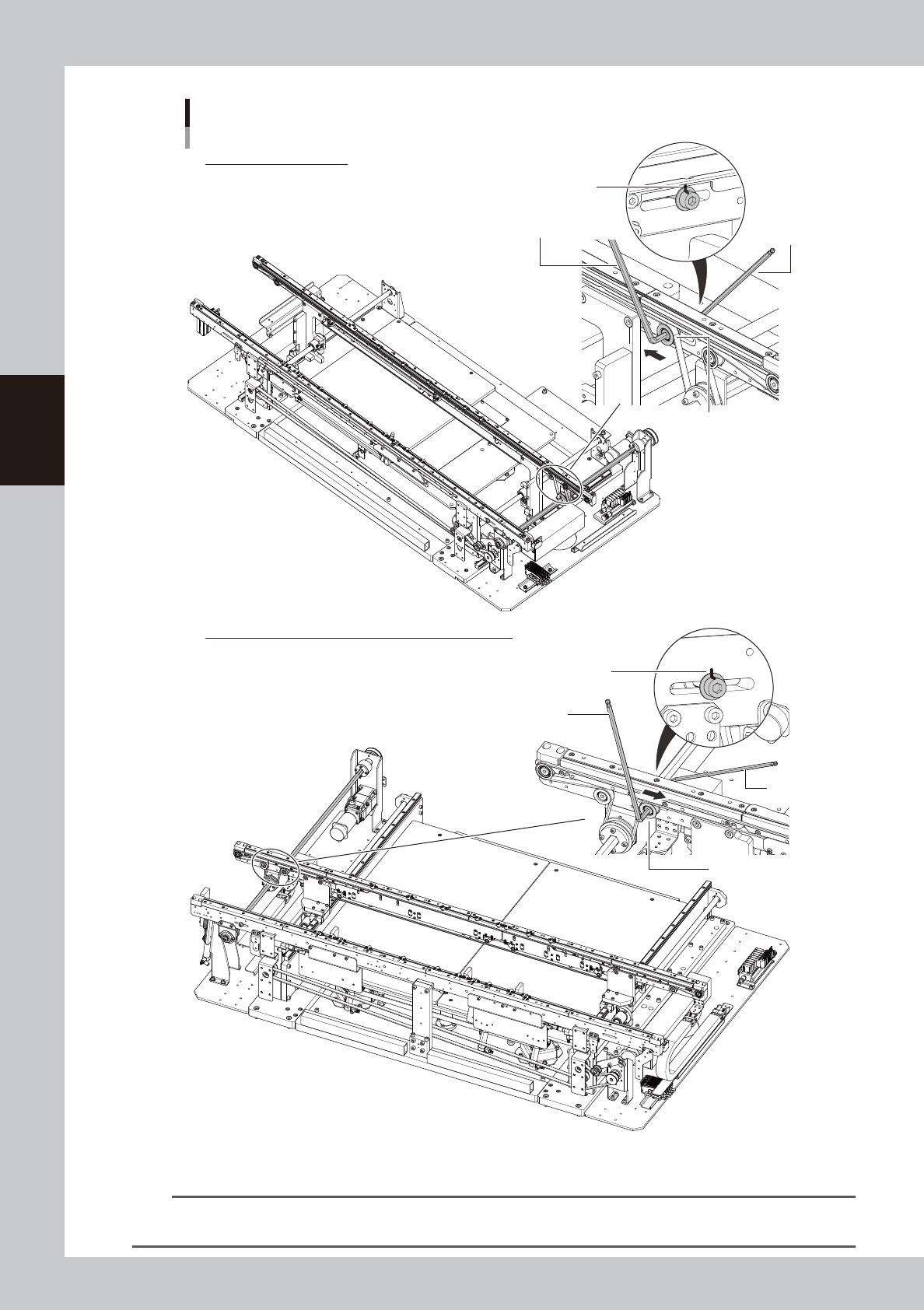
Regarding YSM20R/YSM20WR single-lane type/YSM20WR dual-lane type, loosen pulley mounting bolts
with hex wrenches (4 and 5) and move the pulley.
W1-axis
W3-axis
W4-axis
W2-axis
Loosening the conveyor belt
YSM20R Dual-stage type
■ W3-axis, W4-axis
■ W1-axis, W2-axis
Loosen the brackets.
Loosen the brackets.
Mark bracket position
with permanent marker.
53364-KMK-00
3-46
3
Periodic maintenance items
Loosening the conveyor belt
Loosen the pulley.
Mark pulley position.
Hex wrench (5)
Hex wrench (4)
Loosen the pulley.
Mark pulley position.
Hex wrench (5)
Hex wrench (4)
* This image is right flow type.
Regarding YSM20WR Single-lane, the tensioner (pulley) locates at the downstream side of the flow direction.
YSM20R Single-lane type
YSM20R Single-lane type (for transterring heavy board)
53365-KMK-10
TIP
Regarding YSM20W Single-lane, the tensioner (pulley) locates at the downstream side of the conveyor flow direction.
Therefore the tensioner (pulley) location varies if the machine flow direction is different.