YSM20R_YSM20WR_Mainte_E.pdf - 第74页
3-13 3 Periodic maintenance items 2. Monthly maintenance This section describes the procedures for cleaning and lubricating the X-axis ball screw , guide and the Y -axis guide and linear scale after cleaning them. The in…
3-12
3
Periodic maintenance items
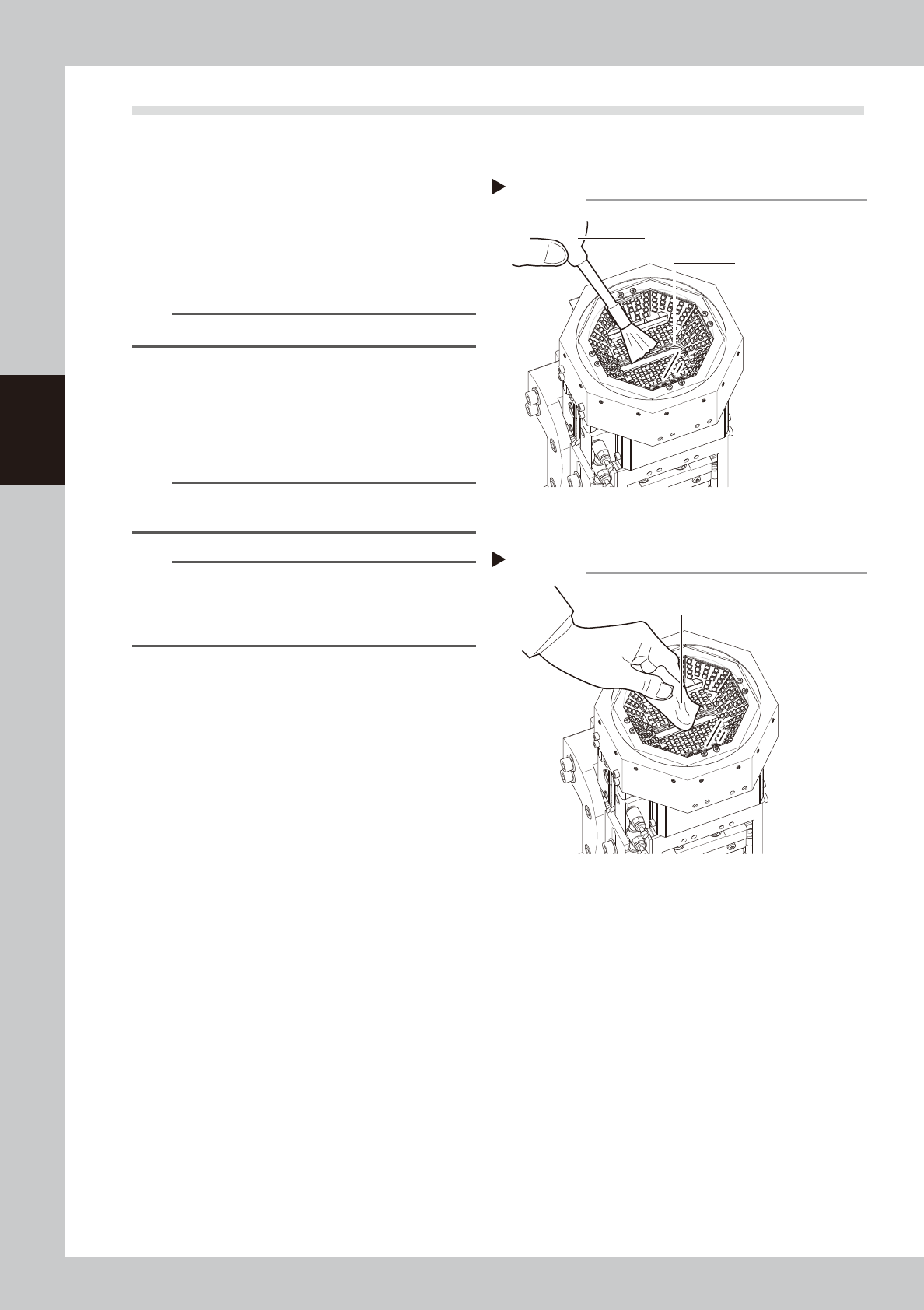
1.4 Cleaning multi-camera lighting's protective glass
Adhered dust, etc., on the multi-camera lighting's protective glass can cause component recognition errors. To
prevent this, it is recommended to inspect and clean in a periodic manner.
e
1
Blow off dust on the lighting's
protective glass.
1. Press the emergency stop button and
then open the machine safety cover.
2. Remove the dust on the lighting's
protective glass with a blower brush.
TIP
A blower brush is optional purchase item.
2
Wipe the lighting's protective glass
with a cloth or cleaning paper.
Wipe the lighting's protective glass with
lint-free cloth or cleaning paper with a small
amount of lens cleaner.
n
NOTE
A lens cleaner and cleaning paper are optional
purchase items.
n
NOTE
If dirt cannot be removed completely even after
performing the work stated above, clean the backside
of the protective glass or the lighting referring to "4.1.2
Cleaning multi-camera" in this chapter.
Blowing off dust with blower brush
Step 1
Protective glass
Blower brush
53318-KMK-00
Wiping protective glass
Step 2
Lint-free cloth or
cleaning paper
53319-KMK-00
3-13
3
Periodic maintenance items
2. Monthly maintenance
This section describes the procedures for cleaning and lubricating the X-axis ball screw, guide and the Y-axis
guide and linear scale after cleaning them. The inspection items and cautions are given below.
n
Inspection items
1. Any foreign object adhering to the ball screws and guides?
Check if any fallen chips have adhered to the ball screw and guides.
2. Do the ball screws and guides have the correct amount of grease?
Check if grease has flowed off or splattered in the air failing to adhere. Also check if grease has discolored or hardened.
e
3. Any abnormal sounds from the ball screws?
Press the emergency stop button. Then check for any abnormal sounds while pressing the X-axis manually.
Countermeasures
1. Ball screws and guides may be damaged when chips and other material bite into them. If chips are adhering, wipe
them off along with the grease or remove with tweezers, etc.
2. Apply grease while referring “Cleaning and lubrication” described later on.
3. Contact YAMAHA sales representatives when abnormal sound is heard even after trying the countermeasures in the
above Steps 1 and 2.
n
Cautions
w
WARNING
THIS MACHINE CONTAINS PARTS GENERATING STRONG MAGNETIC FIELDS. GREAT CARE SHOULD BE TAKEN WHEN A PART
OF YOUR BODY IS PUT INSIDE THE MACHINE FOR THE MAINTENANCE WORK. CAUTIONS REGARDING FERROMAGNETIC
FIELDS ARE DESCRIBED IN THE SECTION, "SAFETY INSTRUCTIONS", AT THE BEGINNING OF THIS DOCUMENT. ALWAYS
THOROUGHLY READ THIS SECTION TO FULLY UNDERSTAND ITS CONTENTS.
c
CAUTION
If abnormal noise is emitted from the ball screw or linear guide of each axis ball screw or linear guide, then contact
YAMAHA sales representatives. The disassembly and cleaning of the machine made by the customer is beyond the
coverage of the warrantee.
c
CAUTION
When performing the cleaning and greasing work, use square cloth to prevent parts from being lost or entering the
Y-axis linear part.
c
CAUTION
When handling grease, read the safety precautions stated in "Safety instructions" and "2.3.2 Lubricating tools and
grease"in Chapter 1.
3-14
3
Periodic maintenance items
2.1 X-axis
This section explains the X-axis inspection, cleaning, and lubrication procedures. For details regarding
lubrication points and the lubrication types, see "Chapter 5 Lubrication points". The user must provide the
grease gun (standard nozzle and bent type nozzle) and the prescribed grease (NSL).
2.1.1 Cleaning and greasing X-axis ball screw
1
Prepare for work.
e
1. Take off all accessories susceptible to the
magnetic fields, such as a wristwatch
and/or magnetic ID card.
2. Press the emergency stop button and
then open the machine safety cover.
3. Detach the carriage if the machine is the
carriage type.
4. Place a square cloth on the Y-axis linear
area and the push-up plate.
2
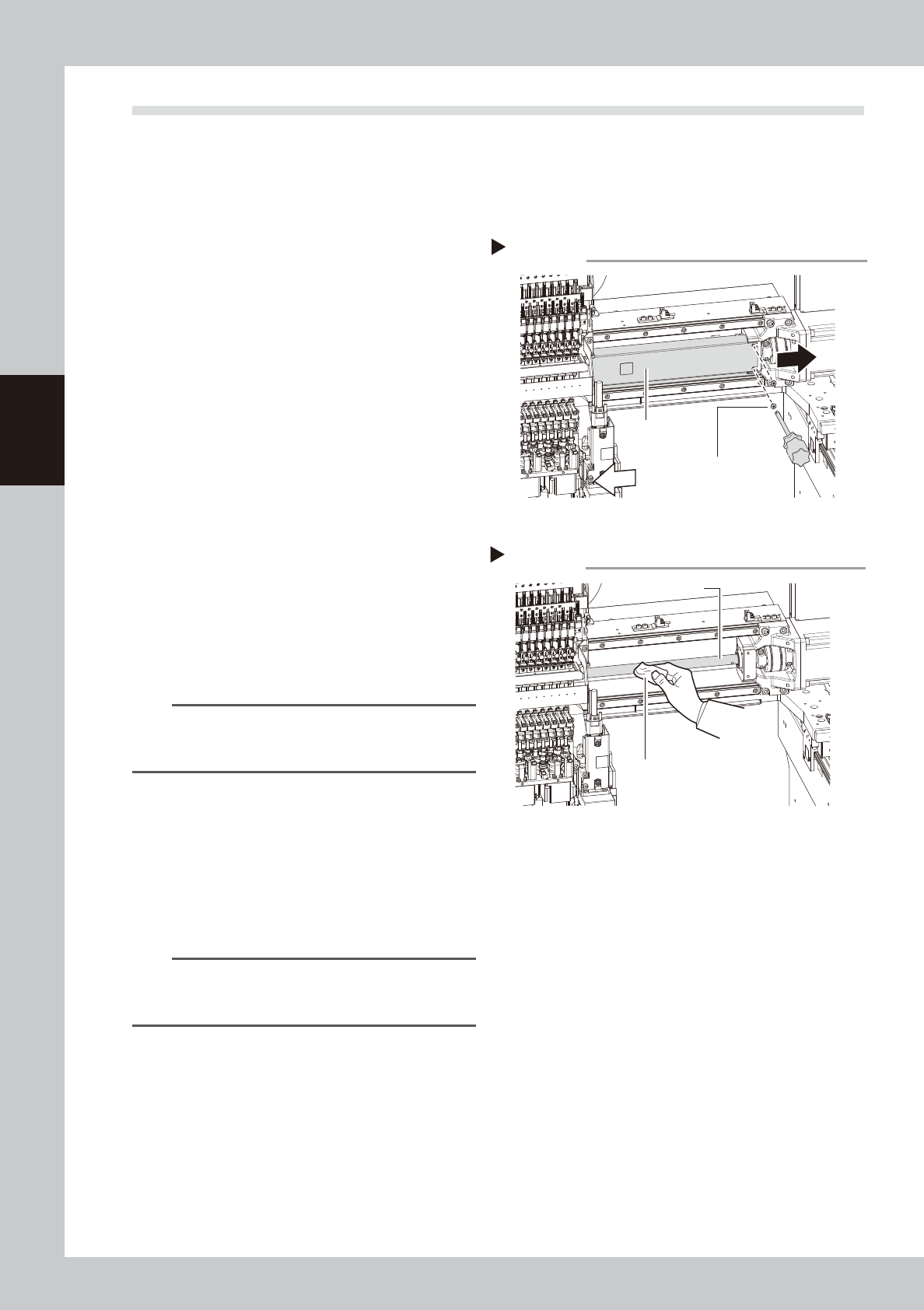
Remove the grease spattering
prevention cover.
Remove the X-axis grease spatter prevention
cover.
1. Use a Phillips screwdriver to remove the
screws that secure the grease spattering
prevention cover (right side when viewed
from the head).
Loosen the screws on the left side lightly.
2. Move the head to the left and pull out
the grease spattering prevention cover
toward the right to remove it.
TIP
Reattach the X-axis grease spatter prevention cover by
reversing the above removal procedure. Attach by
pressing the end of the cover which is at motor side.
3
Clean the ball screws.
1. Grasp the handle and move the head
unit to one end.
2. Wipe away the old grease and dirt from
the ball screw with a lint-free cloth.
3. Move the head unit to the opposite end,
then wipe the opposite-side ball screw.
n
NOTE
When cleaning the ball screw, carefully clean its
groove area as well. Be sure that the cloth, etc., being
used to clean the ball screw does not produce lint, etc.
Removing the spatter prevention cover
Step 2
Grease spattering
prevention cover
Cover securing screws
53320-KMK-00
Cleaning the ball screw
Step 3
Cloth
Ball screw
53321-KMK-00