YSM20R_YSM20WR_Mainte_E.pdf - 第95页
3-34 3 Periodic maintenance items 4. 6-month maintenance This section describes 6-month maintenance items. 4.1 Cleaning camera lighting unit T he lighting unit may become dirty due to dust and dirt. P eriodic cleaning is…
3-33
3
Periodic maintenance items
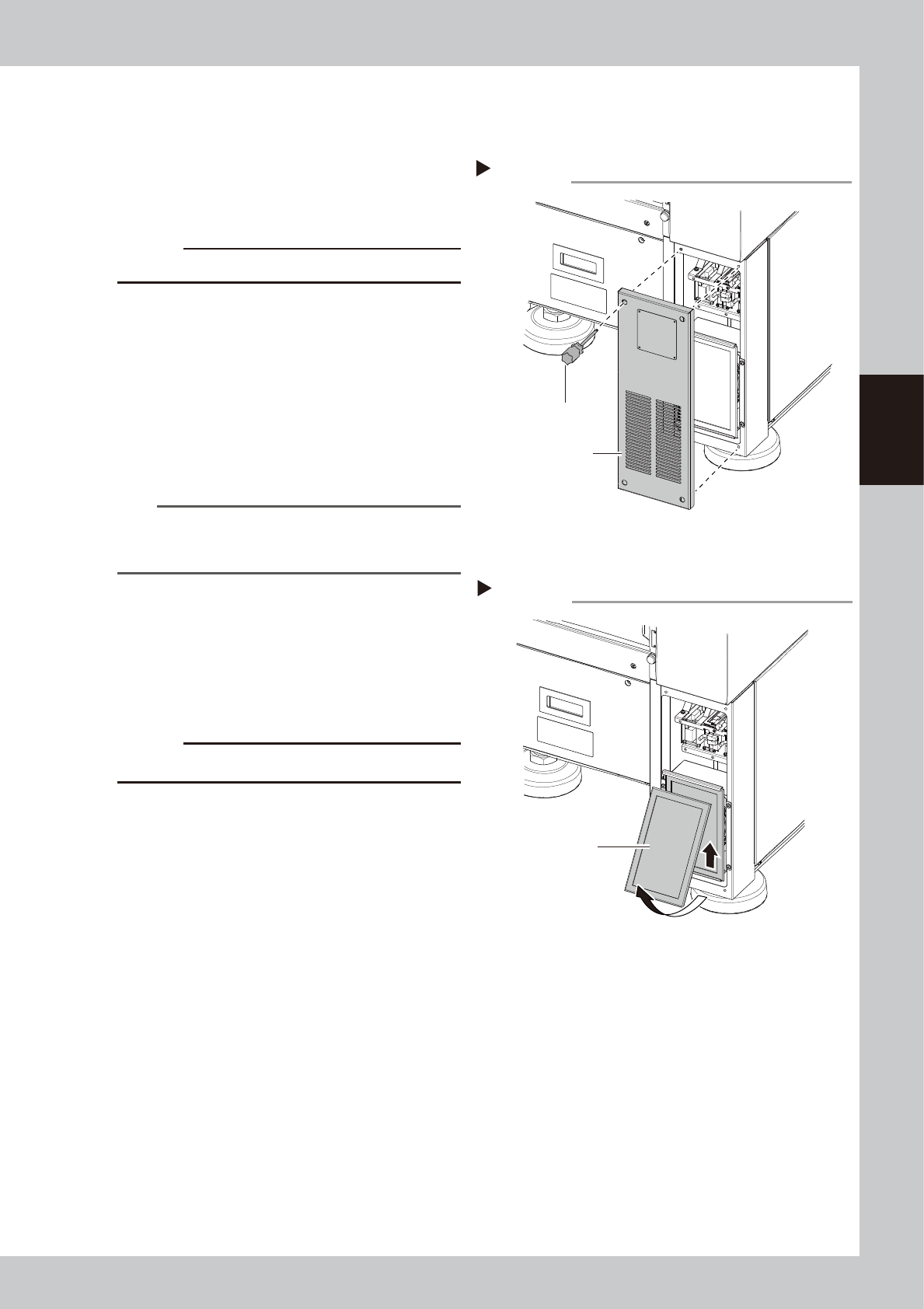
3.8.2 Cleaning machine rear side filter
The air intake filter for protecting the control unit is attached to the right of machine rear side.
1
Open the cover.
Use a Phillips screwdriver to remove 4 screws
mounting the cover. It is not necessary to
remove screws.
c
CAUTION
The ground wire is connected to the cover.
2
Detach the filter.
Push up the filter as shown in the figure on
the right and pull it out forward. When there
is no adjacent machine, the filter can be
detached by sliding it horizontally and
pulling it out.
3
Clean the filter.
Use a vacuum cleaner or vacuum assembly
to remove the dust sticking to the filter.
n
NOTE
If contaminants cannot be removed completely or if
the filter itself deteriorates, it is necessary to replace the
filter with a new one.
4
Return the filter to the original
position.
Reattach the filter by reversing its removal
procedure.
5
Return the covers to the original
positions.
c
CAUTION
Make sure not to pinch cables when attaching covers
.
Opening the cover
Step 1
Phillips screwdriver
Cover (Bottom right
of machine rear)
53378-KMK-00
Detaching the filter
Step 2
Filter
53379-KMK-00
3-34
3
Periodic maintenance items
4. 6-month maintenance
This section describes 6-month maintenance items.
4.1 Cleaning camera lighting unit
The lighting unit may become dirty due to dust and dirt. Periodic cleaning is recommendable.
c
CAUTION
Do not apply strong force or shock to the camera unit and lighting unit during cleaning. Optical axis adjustment might
become unreliable.
c
CAUTION
When a trouble related to lighting, etc. occurred, contact YAMAHA sales representatives. The disassembly and
cleaning of the machine made by the customer is beyond the coverage of the warrantee.
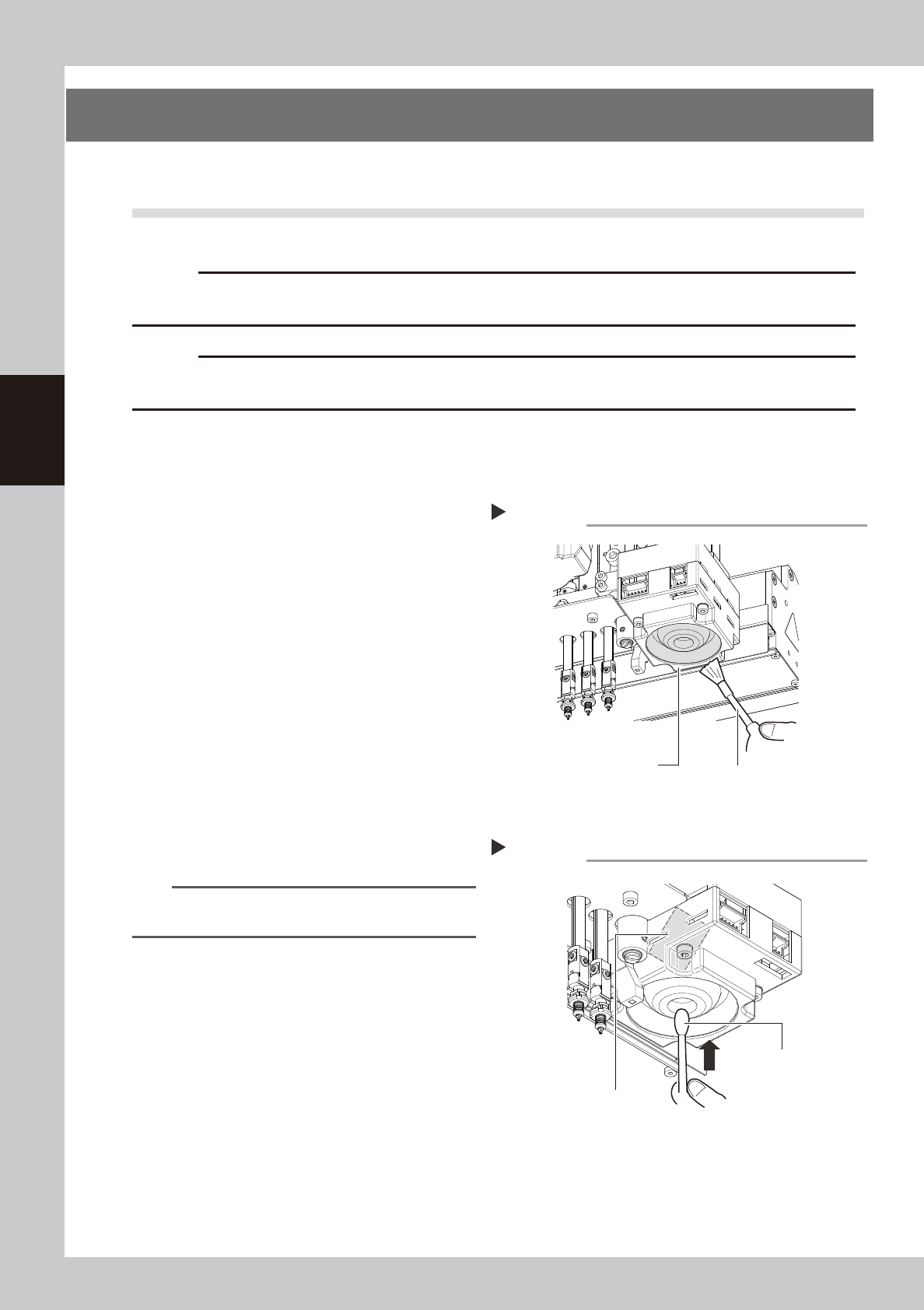
4.1.1 Cleaning fiducial camera
The fiducial camera is mounted on the head. The cleaning procedure for the camera's lighting unit is given
below.
1
Move the head unit.
1. Take off all accessories susceptible to the
magnetic fields, such as a wristwatch
and magnetic ID card.
e
2. Press the emergency stop button and
then open the machine safety cover.
3. If the machine is carriage type, detach
carriage to easily access to the head unit.
4. Move the head unit to a convenient
position for maintenance work.
2
Clean the lighting unit.
Use a blower brush to remove the dust from
the lighting unit.
3
Clean the reflector plate.
Use a cotton swab slightly dampened with
lens cleaner to clean the reflector plate side
as shown in the figure on the right.
TIP
The blower brush and lens cleaner are optional
purchase items.
Fiducial camera lighting unit
Using a blower brush to remove dust
Step 2
Blower brush
53346-KMK-00
Cotton swab
with lens cleaner
Cleaning the reflector plate
Step 3
Reflector plate
53347-KMK-00
3-35
3
Periodic maintenance items
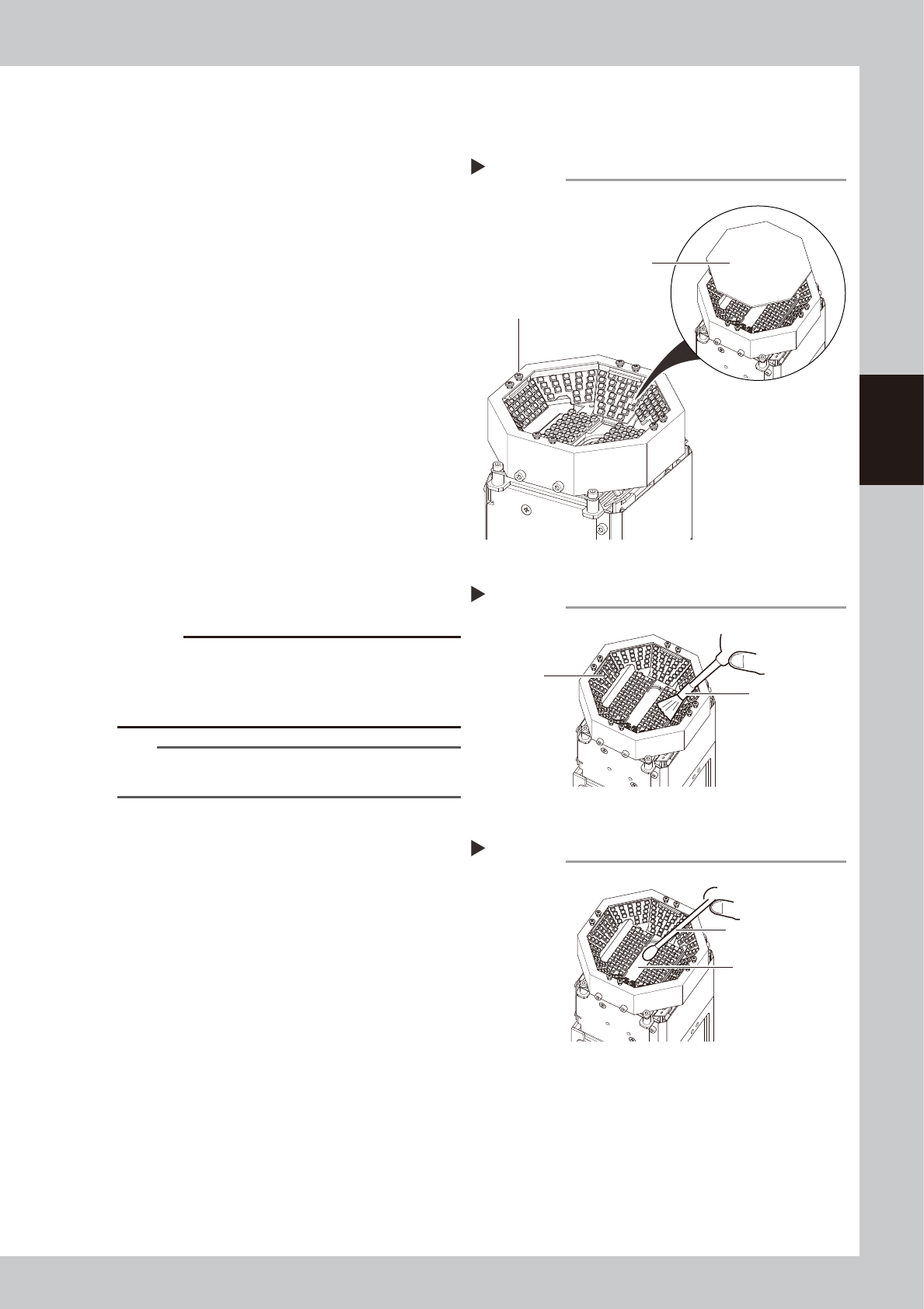
4.1.2 Cleaning multi-camera
The cleaning procedure for the multi-camera lighting unit is given below.
e
1
Detach the protective glass.
1. Press the emergency stop button and
then open the machine safety cover.
2. Use a Phillips screwdriver to loosen the 8
mounting screws and detach the
protective glass.
2
Wipe the protective glass with a
cloth.
Wipe off the top and bottom surfaces of the
protective glass using lint-free cloth with a
few drops of lens cleaner.
3
Clean the lighting.
Use a blower brush to remove the dust from
the lighting.
4
Clean the half-mirror.
Use a cotton swab with a small amount of
lens cleaner to clean the half-mirror.
5
Reattach the protective glass.
Place the protective glass at its original
position and tighten 8 mounting screws.
Tightening torque: 0.14 N·m
c
CAUTION
Be careful not to tighten the mounting screw
excessively. If the mounting screw is tightened
continuously with a force exceeding the tightening
torque, the screw hole may be damaged.
TIP
The blower brush and lens cleaner are optional
purchase items.
Detaching the protective glass
Step 1
Protective glass
Mounting screw
53348-KMK-00
Cleaning the lighting
Step 3
Lighting
Blower brush
53349-KMK-00
Cleaning the half-mirror
Step 4
Half-mirror
Cotton swab
with lens cleaner
53350-KMK-00i