YSM20R_YSM20WR_Mainte_E.pdf - 第99页
3-38 3 Periodic maintenance items 4.2 Base unit 4.2.1 Cleaning fan filter for control box T he air intake fan and the filter are in the control box controlling the machine. T he filter should be cleaned once 6-month, alt…
3-37
3
Periodic maintenance items
4.1.4 FM head: Simple cleaning of side-view camera
The light diffuser plate and mirror of the side-view camera are attached to the head. The light diffuser plate or
mirror opening of the side-view camera may be contaminated by dust. The periodic cleaning is recommended.
c
CAUTION
Do not apply strong force to the camera parts during cleaning. Doing so may damage the glass components used in
the camera unit.
e
1
Move the head unit.
1. Press the emergency stop button and
then open the machine safety cover.
2. If the machine is carriage type, detach
carriage to easily access to the head unit.
3. Move the head unit to a convenient
position for maintenance work.
2
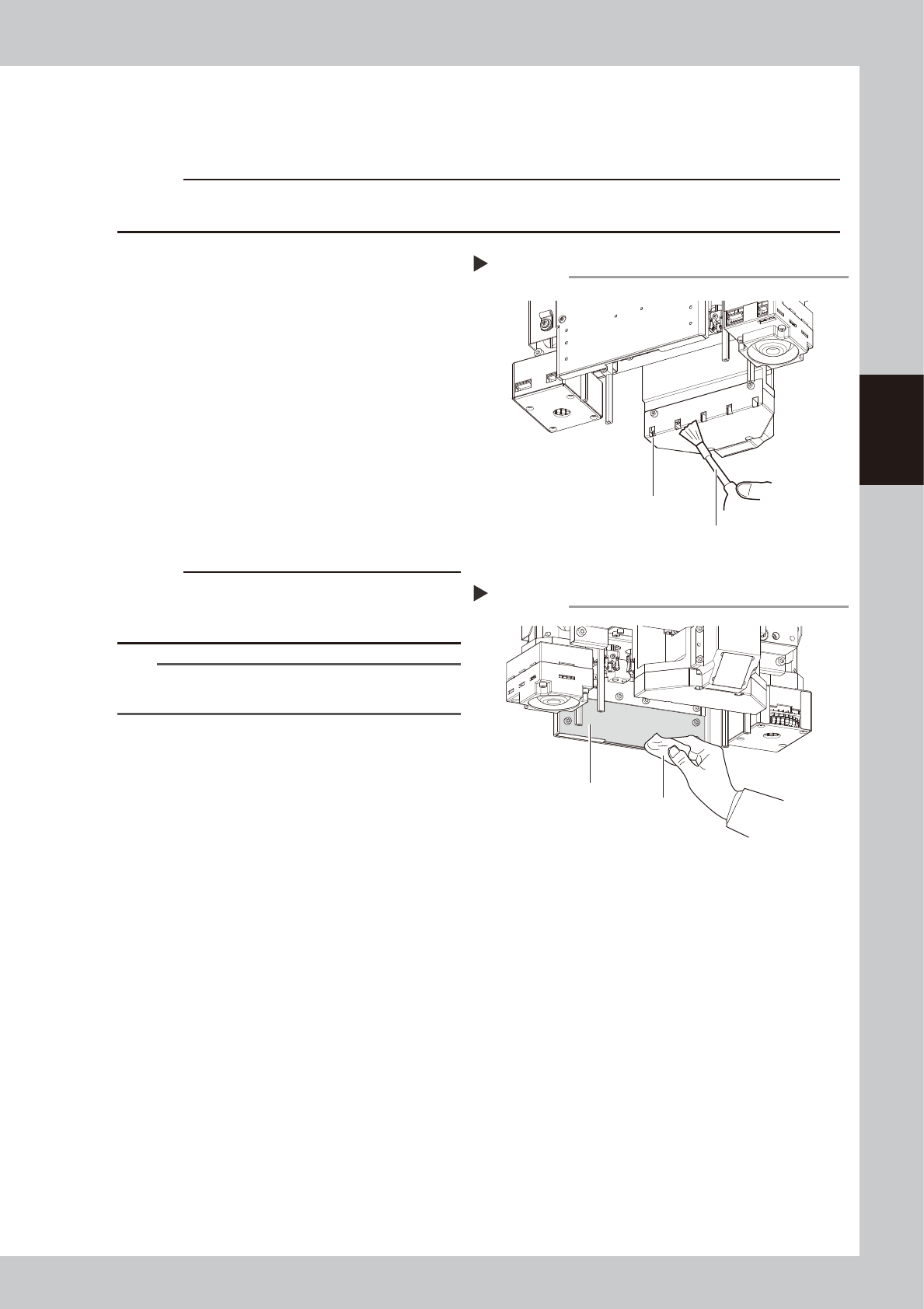
Clean the opening.
Use an blower brush to remove the dust from
the opening.
3
Clean the diffuser plate.
Apply a small amount of lens cleaner to
lint-free cloth or cleaning paper and clean
the diffuser plate.
c
CAUTION
Do not use solvent. If solvent is used, this may cause the
surface treatment of the diffuser plate to be peeled off
or discolored.
TIP
The blower brush , lens cleaner, and cleaning paper are
optional purchase items.
Cleaning the opening
Step 2
opening
Blower brush
53352-KMK-00
Cleaning the diffuser plate
Step 3
Diffuser plate
Cloth
53353-KMK-00
3-38
3
Periodic maintenance items
4.2 Base unit
4.2.1 Cleaning fan filter for control box
The air intake fan and the filter are in the control box controlling the machine. The filter should be cleaned
once 6-month, although this may vary depending on the machine condition.
n
Machine cover types
The machine cover varies depending on the machine types such as feeder exchange carriage or fixing bank. This manual
describes the procedure of the machine equipped with a carriage and a tape cutter. The procedure of detaching the cover
on the front right only is provided this time. However if cATS10 or sATS30 is not installed on the front side of the
machine, it is easier to work by detaching the cover on the front left as well.
1
Power off the machine.
1. If the machine is carriage type, detach
the front carriage.
2. Exit the software and power off the
machine.
2
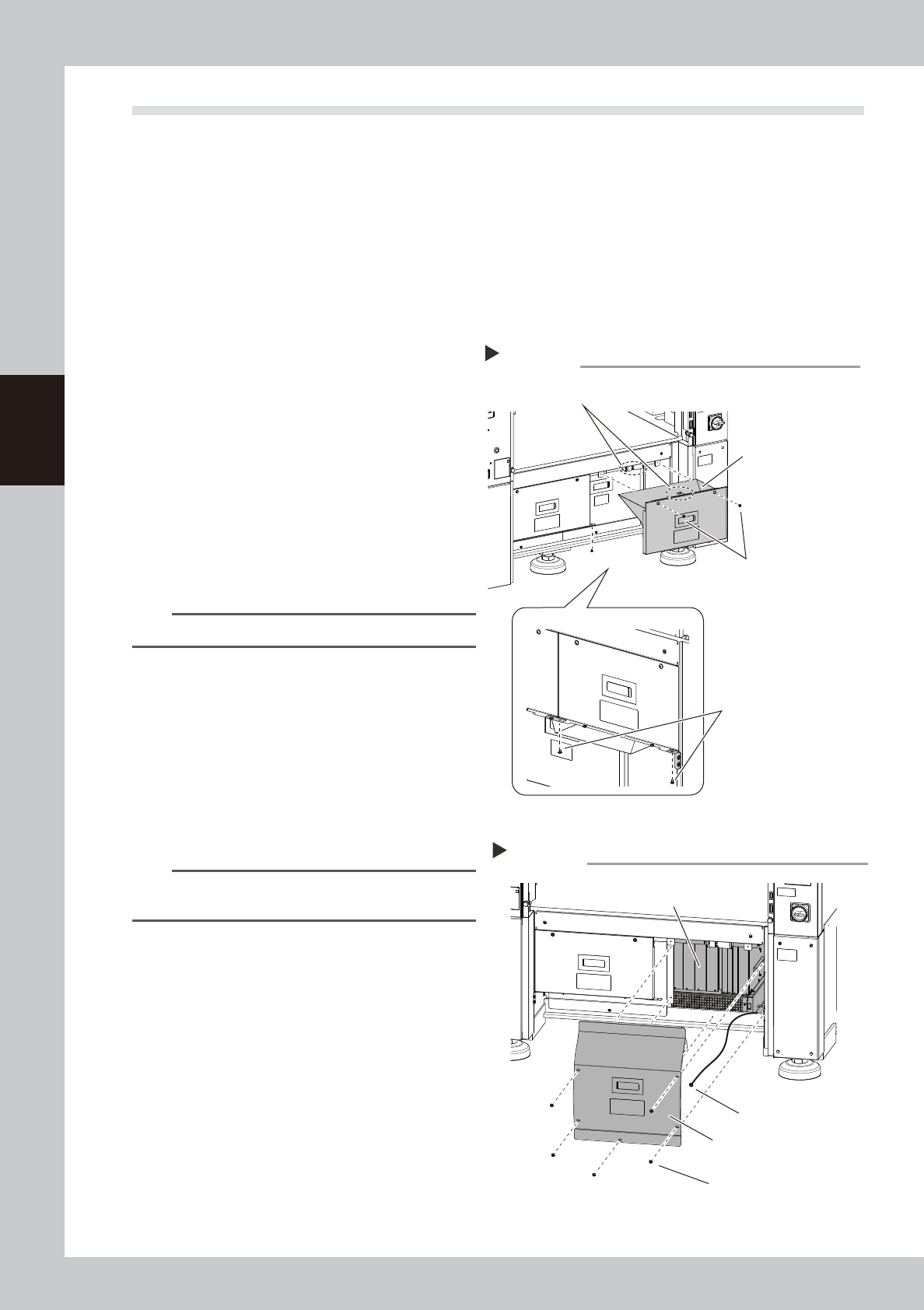
Detach the tape cutter safety cover.
1. Remove the mounting screws of the tape
cutter safety cover (front right) with a
Phillips screwdriver.
2. Pull the tape cutter cover forward and
detach it.
n
NOTE
The interlock key is attached on the tape cutter cover.
3
Detach the inner cover
1. Remove the mounting screws of the inner
cover (front right) with a Phillips
screwdriver.
2. Detach the cover.
3. A ground wire is connected to the rear
side of the cover. Remove the screw
mounting the ground wire with a Phillips
screwdriver.
n
NOTE
Toothed washer is installed to the ground wire mounting
screw. Make sure not to lose it when removing screws.
4
Clean around the control box.
If dust is around the control box, clean the
area with a vacuum cleaner, etc. before
detaching the filter.
Detaching the tape cutter safety cover
Step 2
Tape cutter safety cover
(front right)
Bottom of cover
Remove 2 screws
at the bottom of cover.
Cover mounting screw
Interlock key
53380-KMK-00
Detaching the cover
Step 3
Cover (front right)
Cover mounting screw
Control box
Ground wire
mounting screw
53381-KMK-00
3-39
3
Periodic maintenance items
5
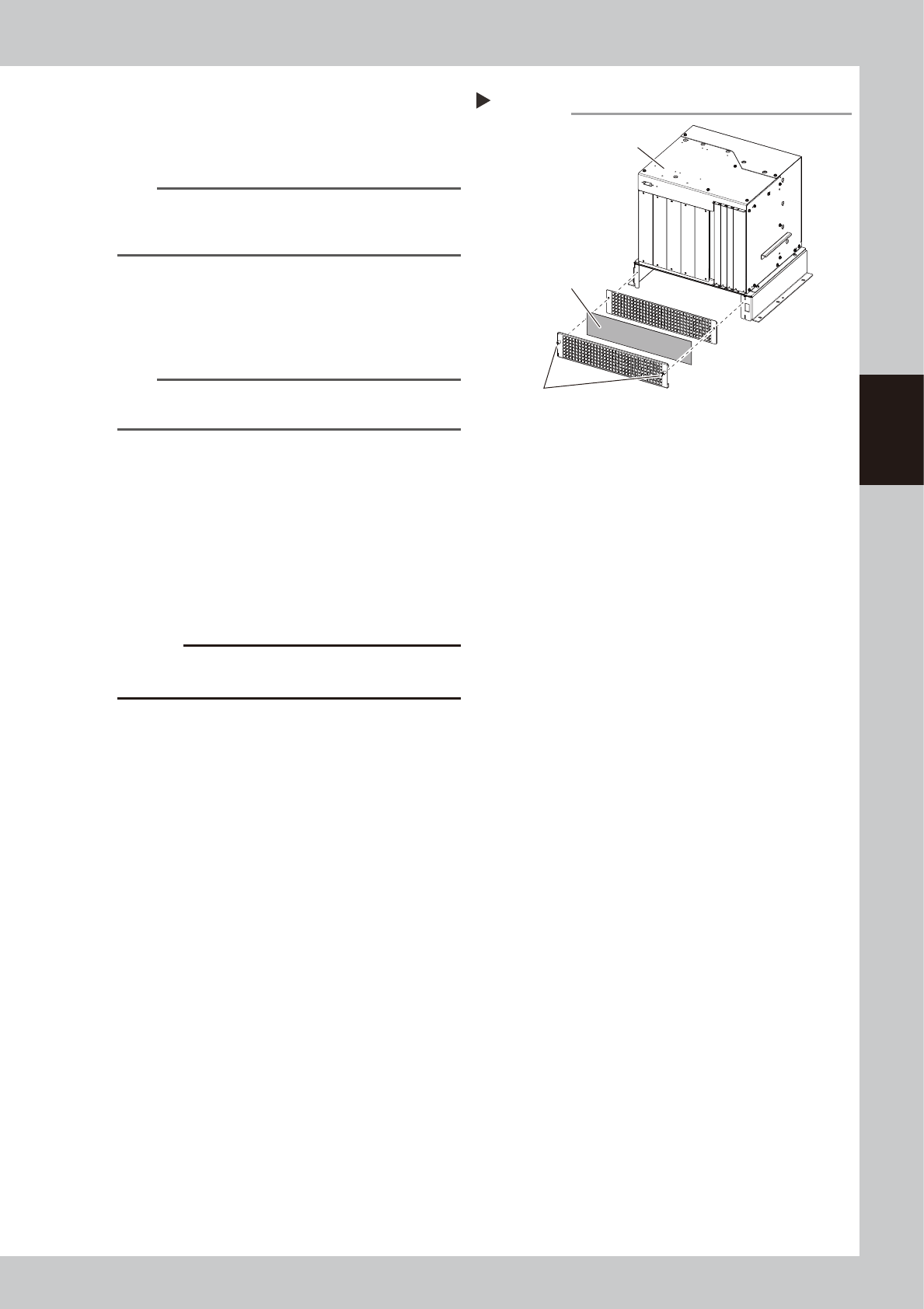
Detach the control box filter.
The filter mounting screws can be loosen
manually. Loosen the filter mounting screws
and detach the filter from the control box.
n
NOTE
Multiple cables are connected to the control box. If it is
difficult to access to the filter, disconnect the cables
from the control box as needed.
6
Clean the filter.
The filter locates between 2 covers. Detach
the filter and clean the dust sticking to the
filter with a vacuum cleaner or a vacuum
assembly.
NOTE
If dirt cannot be removed or the filter itself is
deteriorated, it is required to replace it with a new one.
7
Return the filter to the original
position.
Attach the filter to the control box in reverse
order of detaching it.
8
Return the covers to the original
positions.
1. Attach the inner cover.
2. Attach the tape cutter cover.
c
CAUTION
Take care that the cables are not trapped when
attaching covers.
Detaching control box filter
Step 5
Control box
Filter
Filter mounting screw
53382-KMK-00