YSM20R_YSM20WR_Mainte_E.pdf - 第166页
6-10 6 How to replace consumable parts 4. Conveyor 4.1 Replacing conveyor belt If significant looseness, contamination, or scuffing is found in the convey or belt when performing the work steps stated in "5.2 Inspec…
6-9
6
How to replace consumable parts
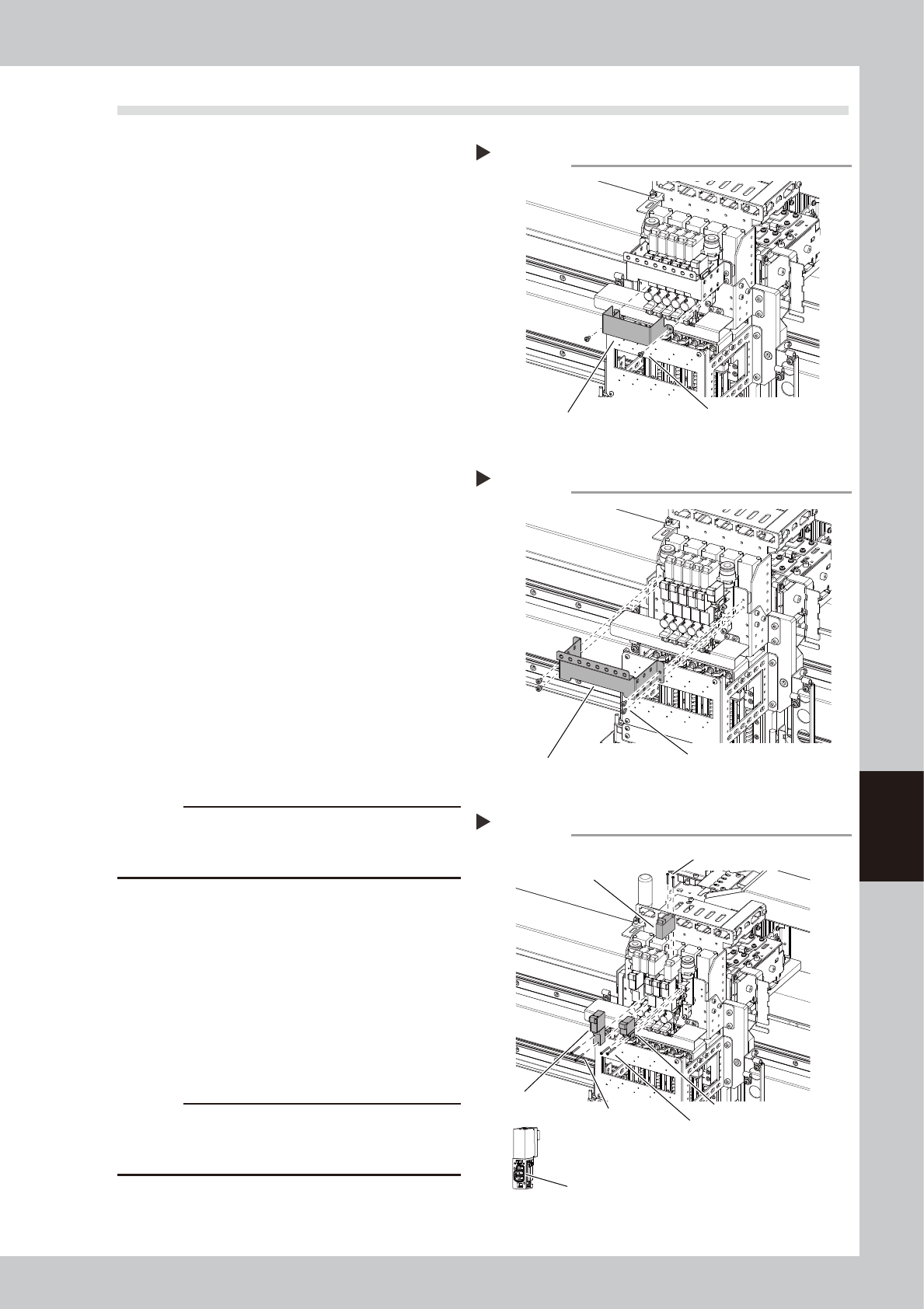
3.2 FM head: Replacing valves
1
Turn off the air supply and power
off the machine.
1. Exit the software and power off the
machine.
2. Turn the “Air supply/exhaust” switch
(valve) clockwise (Exh) to turn off the air
supply.
2
Make the preparations for work.
1. Move the head to an easy-to-work
position manually.
2. Place a square cloth under head unit.
3
Detach the baffle plate. (Only when
replacing the operation valve and
blow valve for cleaning)
Detach the baffle plate mounting screws (2
pcs.) with a Phillips screwdriver.
4
Detach the head plate.
Detach the head plate mounting bolts (4
pcs.) with a hex wrench (2.5). The cables are
connected to the head plate. However,
these cables do not need to be
disconnected.
5
Disconnect the connector.
Disconnect the connector of the valve you
want to replace.
6
Replace the valve.
Remove the mounting screws (2 pcs.) of the
valve you want to replace with a precision
Phillips screwdriver, and then replace the
valve.
c
CAUTION
The packing is attached to the back of the valve.
Replace the valve with a new one while carefully
checking the packing for dropping or catching.
7
Return the parts to their original
positions.
Return the connector, head plate, and
baffle plate to their original positions.
8
Check the valve operation.
Turn on the supply air and power on the
machine. Then check the operation of each
valve on the [Unit] - [Head] screen or [I/O]
screen.
c
CAUTION
When checking the operation of the blow valve for
cleaning on the [I/O] screen, be sure to remove the
nozzles from all heads.
Detaching the FM head baffle plate
Step 3
Baffle plate
Mounting screw (2 locations)
53614-KMK-00
Detaching the FM head plate
Step 4
Head plate
Mounting bolt (4 locations)
53615-KMK-00
Replacing the FM head valve
Step 6
Mounting screw (2 locations)
Mounting screw (2 locations)
Mounting screw (2 locations)
The packing is attached to the back of the valve.
Be careful not to drop this packing.
Blow valve
Blow valve for cleaning
Operation valve
53616-KMK-00
6-10
6
How to replace consumable parts
4. Conveyor
4.1 Replacing conveyor belt
If significant looseness, contamination, or scuffing is found in the conveyor belt when performing the work
steps stated in "5.2 Inspecting conveyor belt and cleaning guide" in chapter 3, the conveyor belt needs to be
replaced. Follow the steps below to replace the conveyor belt.
YSM20R/YSM20WR has following 4 types of conveyor.
• YSM20R Dual-stage type
• YSM20R Single-lane type
• YSM20WR Dual-lane type
• YSM20WR Single-lane type (for transferring heavy board)
Regarding YSM20R/YSM20WR Single-lane type / YSM20WR Dual-lane type machines, the procedures for
replacing the conveyor belt are mostly the same. However W2-axis and W3-axis of YSM20R Dual-stage type
machine partly differ the replacing procedure.
1
Change the conveyor width to a
convenient width for maintenance
work.
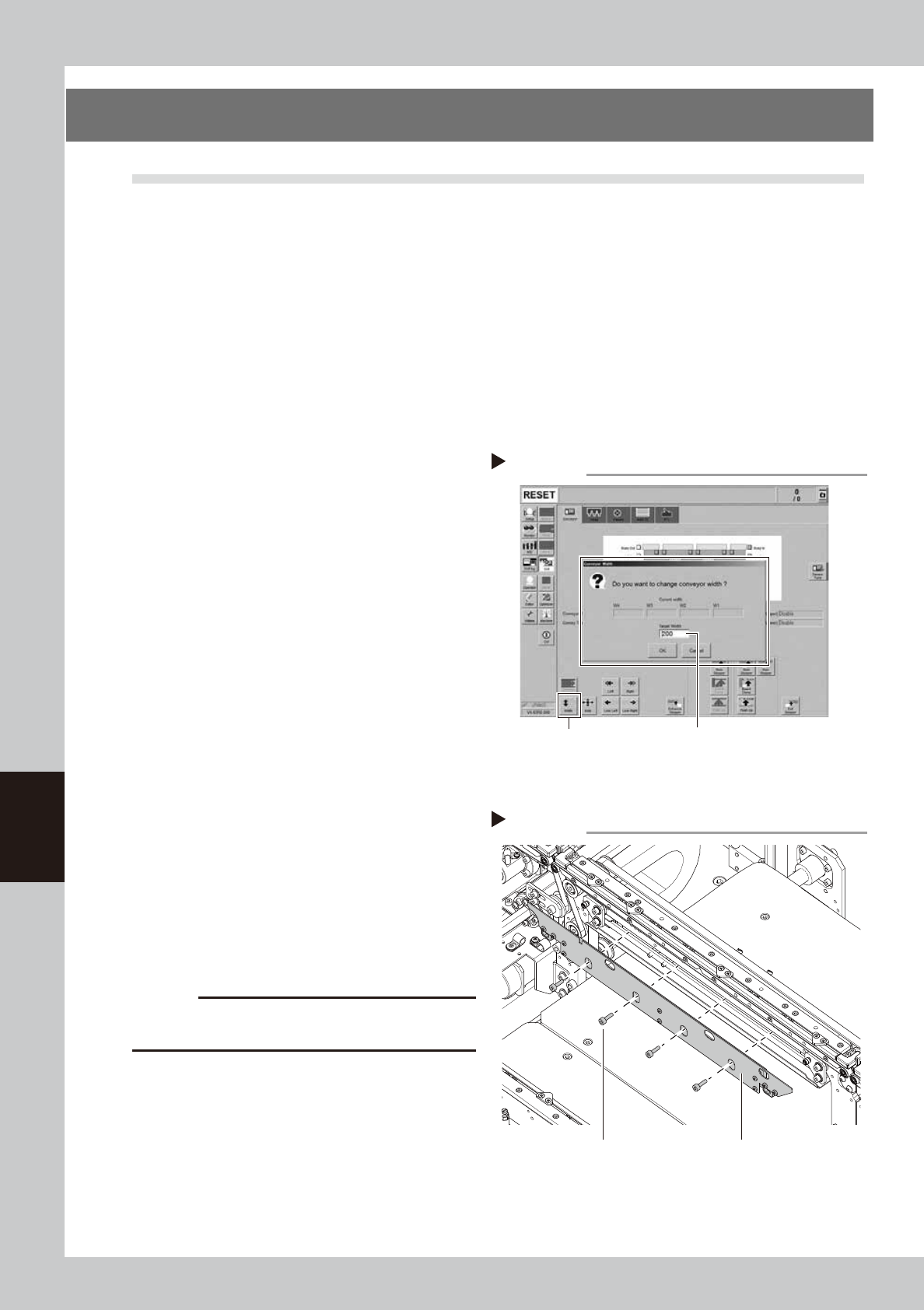
1. Press the [Width] button to display the
"Conveyor Width" screen.
2. In the "Target Width" box, enter a width
wide enough (about 200 mm) for using
tool (hex wrench) and press [OK] button.
The conveyor is changed to the specified
width
2
Make the preparation for cleaning.
e
1. Take off all accessories susceptible to the
magnetic fields, such as a wristwatch
and/or magnetic ID card.
2. Press the emergency stop button and
then open the machine safety cover
3. If the machine is the carriage type,
detach the carriage to easily access to
the conveyor.
4. Place a square cloth on the push-up
plate.
3
Detach the board clamp plates.
Use a hexagon wrench (3) to remove the 4
board clamp bolts, then detach the board
clamp plate.
c
CAUTION
Do not remove any bolts other than the 4 bolts shown in
the figure at right.
Detaching the board clamp plate
Step 3
Board clamp plate
Mounting bolt
53617-KMK-00
Changing the conveyor width
Step 1
[Width] button Enter width wide enough for using tool.
(about 200 mm)
54601-KMK-00
6-11
6
How to replace consumable parts
4
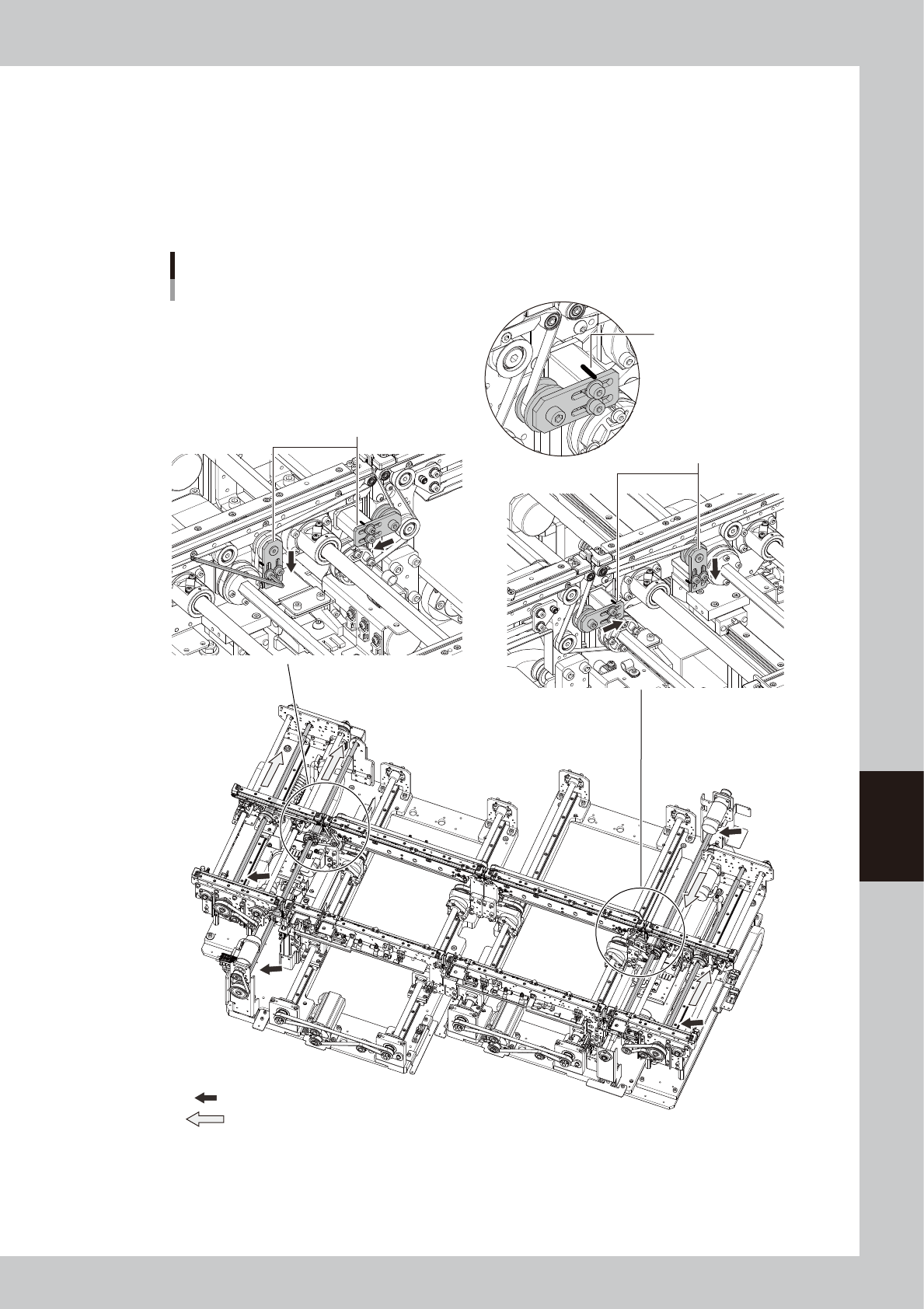
Loosen the belt.
1. Before loosening the conveyor belt, mark the current position of pulley bracket (YSM20R/YSM20WR
Single-lane type/YSM20WR Dual-lane type: pulley mounting bolt) with a permanent marker.
2. See the figure below and loosen 2 bolts mounting pulley bracket with hex wrench (3) and move the
bracket to the end of the slotted hole (in loosening direction).
YSM20R/YSM20WR Single-lane type/YSM20WR Dual-lane type: Loosen pulley mounting bolts with hex
wrenches (4 and 5) and move the pulley.
W1-axis
W3-axis
W4-axis
W2-axis
Replacing the conveyor belt
YSM20R Dual-stage type
■ W1-axis, W2-axis
Loosen the brackets.
Mark the bracket position
with a permanent marker.
■ W3-axis, W4-axis
Loosen the brackets.
: Place where the shaft is separated from the pulley.
: Shaft pull-out direction
53618-KMK-00