YSM20R_YSM20WR_Mainte_E.pdf - 第81页
3-20 3 Periodic maintenance items 3. 3-month maintenance This section describes 3-month maintenance items. 3.1 Cleaning and replacing air filter As a general guideline, the filter should be inspected once every 3 months,…
3-19
3
Periodic maintenance items
2.3 Conveyor
2.3.1 Checking conveyor sensor condition and operation
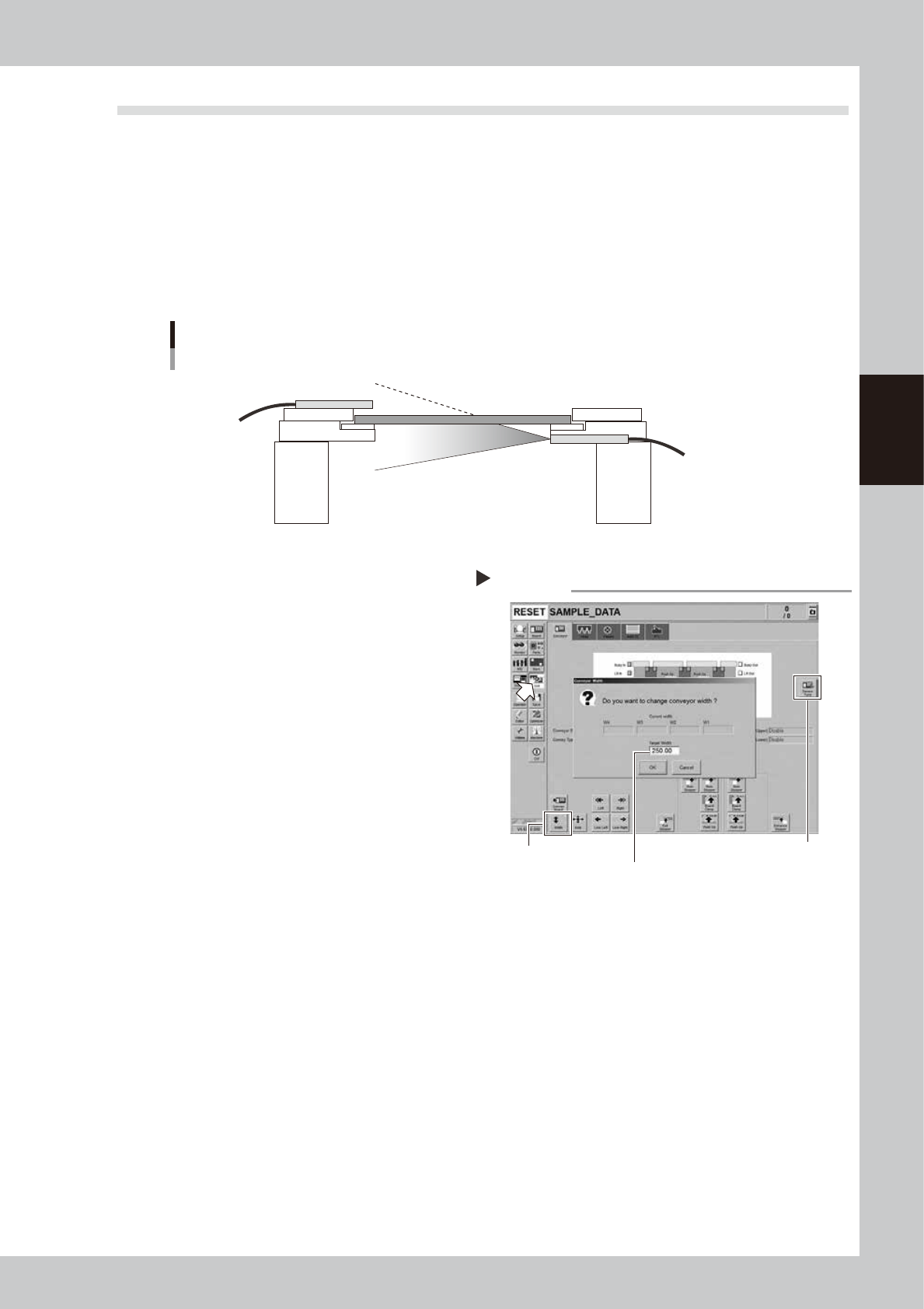
This machine uses a transmission type fiber sensor as the conveyor sensor.
As the conveyor width changes, the distance between the light emitting and light receiving sensors also
changes. Accordingly, the light receiving status of the sensor may change.
Therefore, a conveyor sensor tuning function is provided on this machine that stores the sensor light receiving
status after the conveyor rail width has been changed and automatically rewrites the sensor threshold value.
By changing the conveyor rail width periodically, you can check that the conveyor sensors and conveyor sensor
tuning operate correctly.
Checking the conveyor sensor condition and operation
Light emitting
Light receiving
53329-KMK-00
1
Make the preparations for work.
Check that there is no board on the
conveyor and that there is no push-up pin in
the conveyor movement range.
2
Open [Unit] - [Conveyor] screen.
3
Press the [Width] button to change
the conveyor width.
The "Conveyor Width" screen appears. Enter
a conveyor width and press the [OK] button.
The conveyor width is changed to the
specified width.
4
Check that no error occurs.
When no error message appears after the
conveyor width has been changed, the
conveyor sensors operate correctly. No
further check is needed.
If an error is displayed, perform the conveyor
tuning following the steps from 5.
5
Perform conveyor sensor tuning.
Press the [Sensor Tune] button on the right of
the [Unit] - [Conveyor] screen.
6
Check the sensor status.
Change the conveyor width again and
check that no error message appears.
7
Check the portion around the
sensor.
If the error message still appears, the light
receiving status around the sensor may be
poor, the sensor (amplifier) may malfunction,
or the fiber may break. First, remove
contaminant or dust from the sensor, change
the conveyor width again, and check that
no error message appears.
Checking the conveyor sensor
Step 2-5
[Sensor Tune] button
Enter desired conveyor width.
[Width] button
54301-KMK-00
3-20
3
Periodic maintenance items
3. 3-month maintenance
This section describes 3-month maintenance items.
3.1 Cleaning and replacing air filter
As a general guideline, the filter should be inspected once every 3 months, although this may vary depending
on the air supply conditions and the operating time. If lightly soiled, the filter can be clean by using the air
blow tool (option). The filter should be replaced when it can no longer be adequately cleaned by air-blowing.
1
Move the head unit.
1. Take off all accessories susceptible to the
magnetic fields, such as a wristwatch
and magnetic ID card.
e
2. Press the emergency stop button and
then open the machine safety cover. If
the machine is carriage type, detach
carriage to easily access to the head unit.
3. Move the head unit to a convenient
position for maintenance work.
4. Place a square cloth under head unit.
2
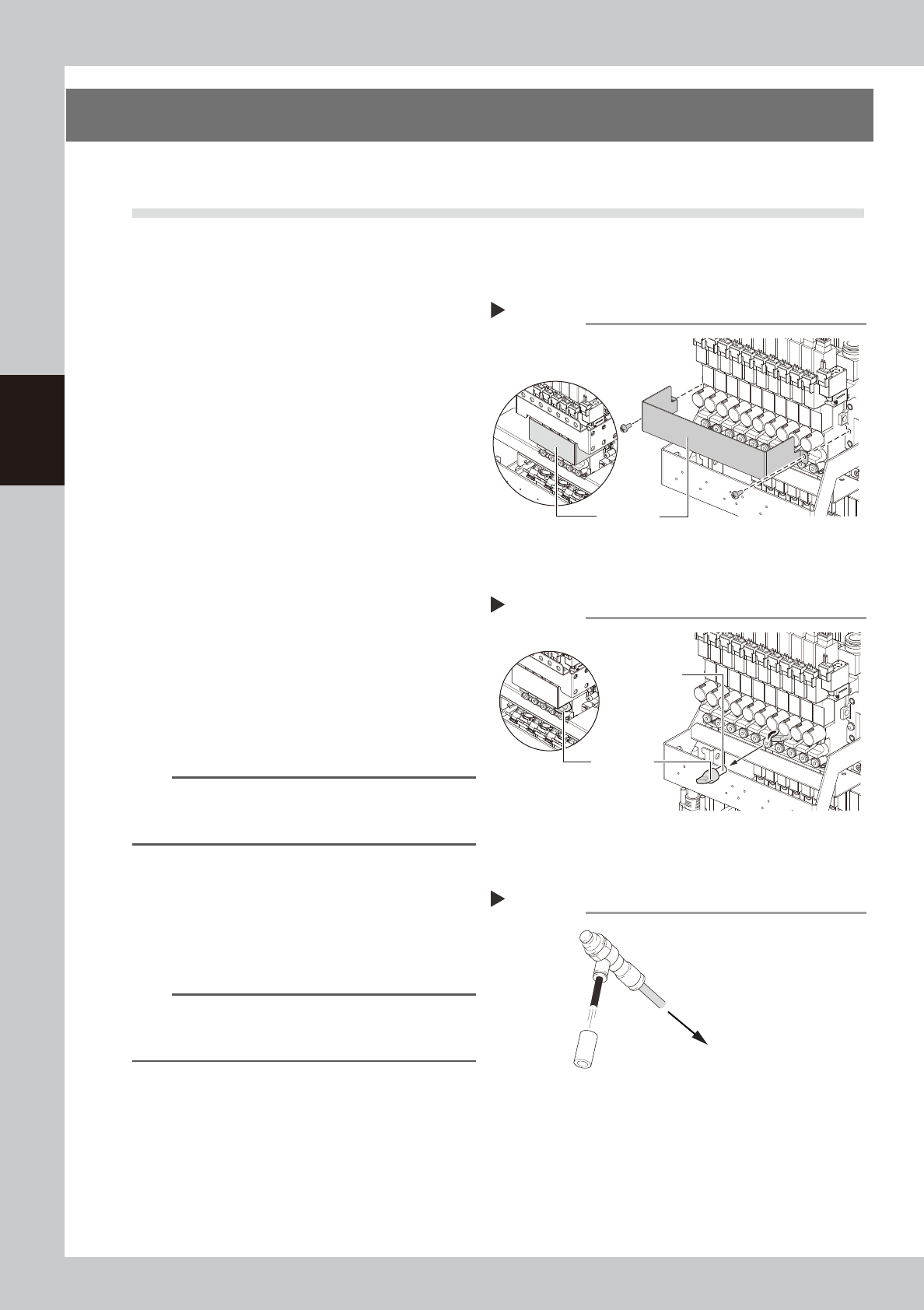
Detach the baffle plate.
Use a Phillips screwdriver to detach the
baffle plate shown in the figure on the right.
3
Detach the filter cap.
Turning the filter cap counterclockwise will
remove it together with the filter.
4
Clean the filter.
If the filter is only lightly soiled, it can be
cleaned with the air blow tool, and then
reused.
n
NOTE
If there are heavy dust deposits in the filter or the filter
has discolored, replace it with a new filter (KLW-M8527-
00X).
5
Attach the filter cap.
1. Fit the filter into the filter cap.
2. Insert the filter cap into its original
position and turn it clockwise to secure it.
3. Remove the square cloth.
n
NOTE
When attaching the filter, check also the status of the
gasket (KLW-M715B-00X). If the gasket deteriorates or is
deformed, replace it with a new one.
6
Attach the baffle plate.
1. Attach the baffle plate to the original
position with Phillips screwdriver.
2. Remove the square cloth.
Detaching the baffle plate
Step 2
Baffle plate
FM head
HM head
53330-KMK-00
Detaching the filter cap
Step 3
Filter cap
Filter
FM head
HM head
53331-KMK-00
Cleaning the filter
Step 4
Filter
Air blow tool
To air connector
53332-KMK-00
3-21
3
Periodic maintenance items
3.2 Checking ejector vacuum level
Check the ejector vacuum level of each head.
If the vacuum level does not reach at the specified level, it may be required to replace the ejector bit or valve.
Replace them referring to "6.1 Replacing the ejector bit" in chapter 3 or "3.1 HM head: Replacing valves" and
"3.2 FM head: Replacing valves" in chapter 6.
n
Example: HM head unit
e
1
Move head unit forward.
1. Press the emergency stop button and
then open the machine safety cover. If
the machine is carriage type, detach
carriage to easily access to the head unit.
2. Move the head unit to convenient
position for maintenance work.
2
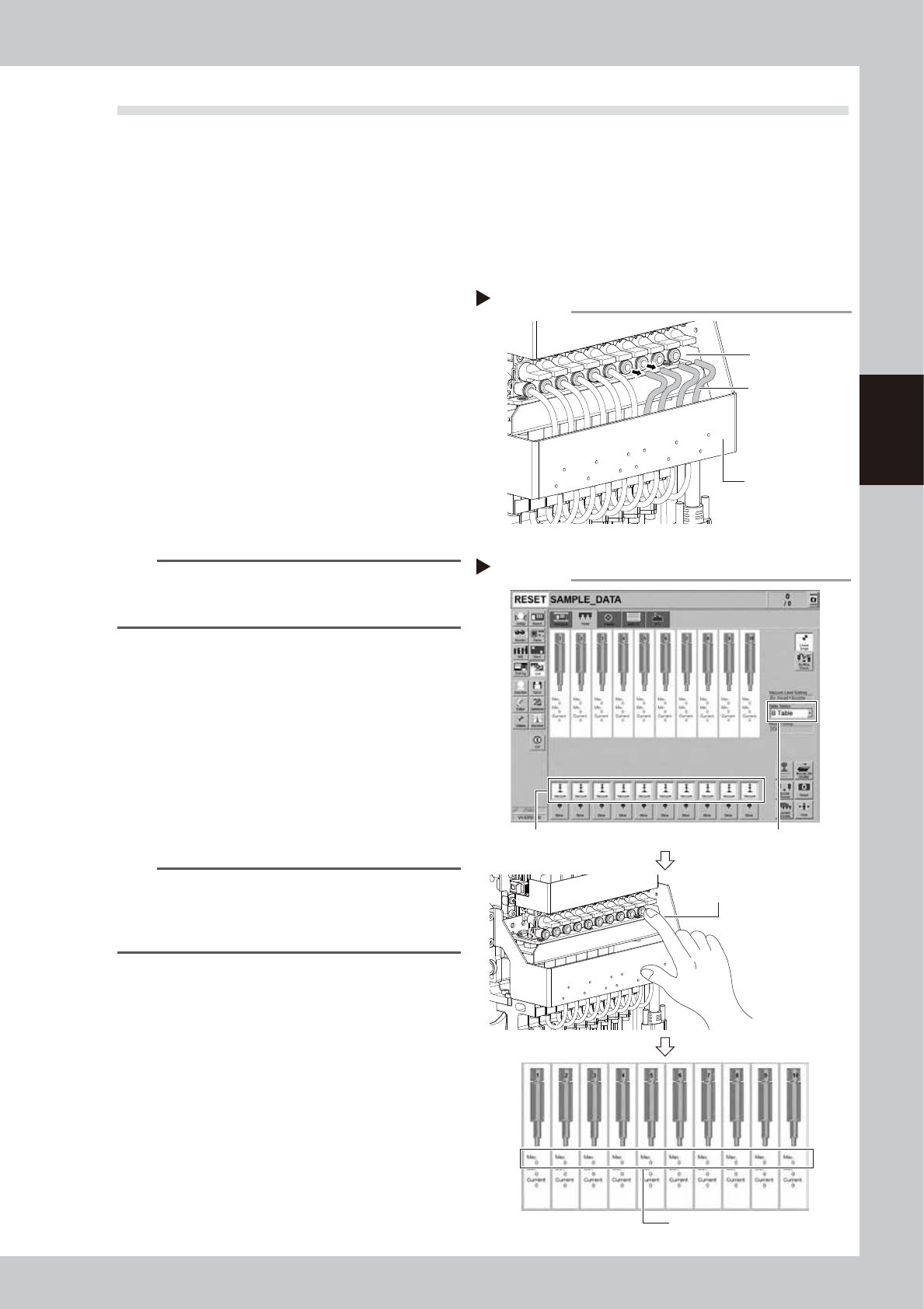
Disconnect air hoses from upper
air joints.
Disconnect all air hoses from upper air joints.
Do not disconnect air hoses from lower air
joints.
n
NOTE
Air hoses are connected to the holders on rear of front
cover of head unit. Make sure that air hoses will not
come off the holders.
3
Check vacuum level of each head.
1. Open [Unit] - [Head] screen.
2. Select desired head unit from "Table
Select".
3. Press the [Vacuum] buttons of all heads.
4. Cover the air joint with finger.
5. The vacuum level when sealed appears
in "Max" at the center of the screen.
Check that the measurement reference
value when sealed is "190" or more.
TIP
When the vacuum level does not reach at the
measurement reference value, review the air path
(ejector/valve) of the head. Then clean or replace it as
needed.
4
Return air hoses to the original
positions.
Disconnecting air hoses
Step 2
Air hose
Air joint
Head unit front cover
53397-KMK-00
Checking vacuum level
Step 3
Press [Vacuum] buttons of each head.
Check “Max” vacuum levels.
Cover air joint with finger.
Table Select
54312-KMK-00