YSM20R_YSM20WR_Mainte_E.pdf - 第185页
A-2 Appendix 1.2 Power connection terminals When opening the front lower right panel, y ou can find the power connection terminals. Connect the power cable leads as shown below to the L1, L2, L3 and ground terminal (PE) …
A-1
Appendix
1. Specifications
1.1 Air regulator unit
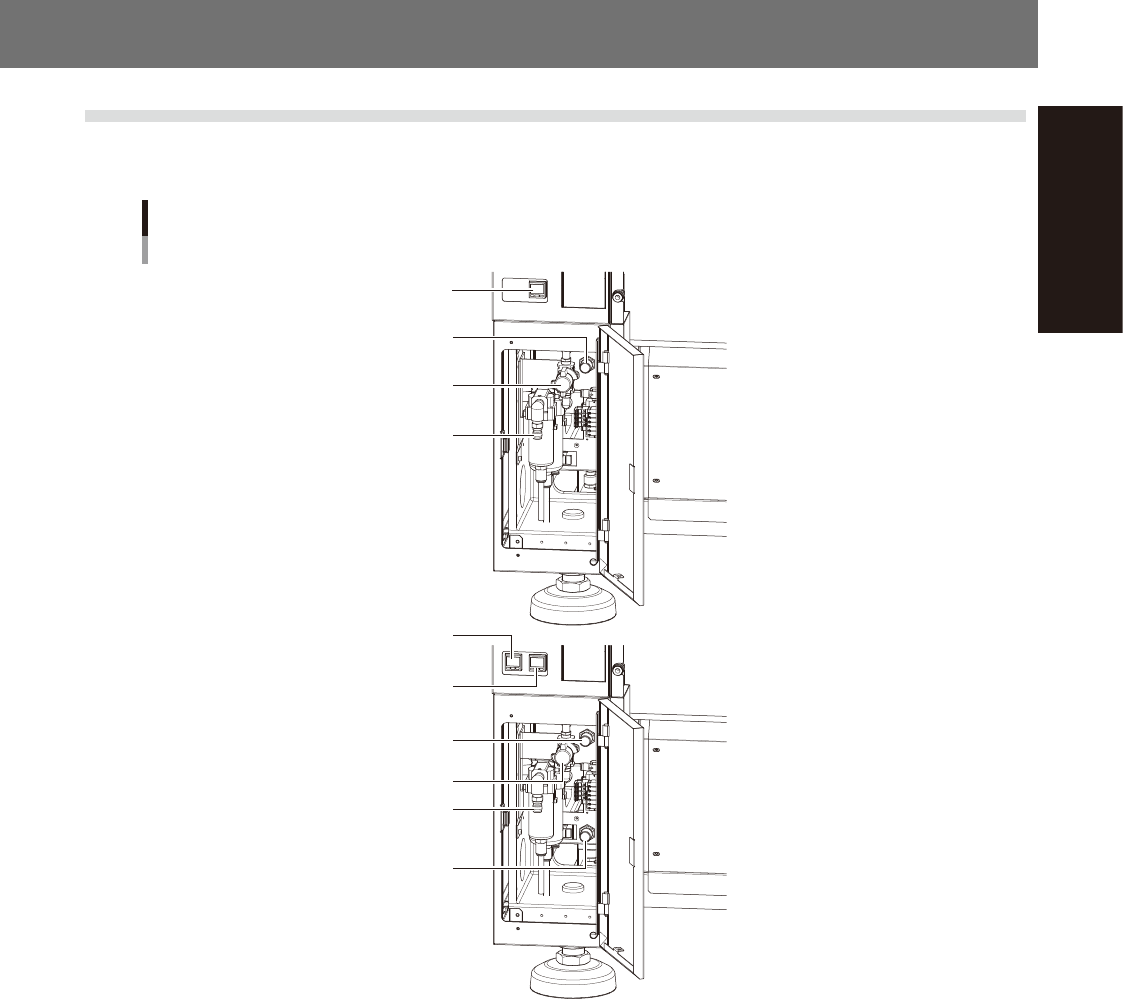
The regulator that regulates the air pressure supplied to the air drive section of this machine is located behind
the front lower left panel of the main unit. Specify the appropriate air pressure setting shown below.
Air pressure regulator and pressure gauge
For 1-beam
For 2-beam
Air supply/exhaust switch
Source air connector
Air pressure regulator
Digital pressure gauge
Digital pressure gauge
(A-table)
Digital pressure gauge
(B-table)
Air supply/exhaust switch
Source air connector
Air pressure regulator
(A-table)
Air pressure regulator
(B-table)
53A01-KMK-00
n
Supply air pressure
This is the pressure of the source air supplied to the machine. Before setting the air pressure with the air regulator, make
sure that this supply air pressure is in the following optimal range.
YSM20R/YSM20WR: 0.45MPa to 0.70MPa
n
Digital pressure gauge
When within the normal range, the air pressure displays in green. When the air pressure is beyond the upper/lower limit
values (air down detection), an error occurs, and the air pressure displays in red.
n
Set pressure and air-down detection pressure
Air pressure setting for machine : 0.40MPa (±0.01)
(When the air pressure reaches 0.45MPa, the air pressure display turns red.)
Pressure-drop detection level : 0.33MPa
n
Air supply/exhaust switch (valve)
Turning this switch to the right shuts off air supply and exhausts air that remains inside the machine.
n
Source air connector
Prepare an air hose with an inner diameter of at least 8 mm having a 40SH socket (Nitto Koki, or equivalent), and
connect it to this connector. Use dry, clean air passed through an air filter.
A-2
Appendix
1.2 Power connection terminals
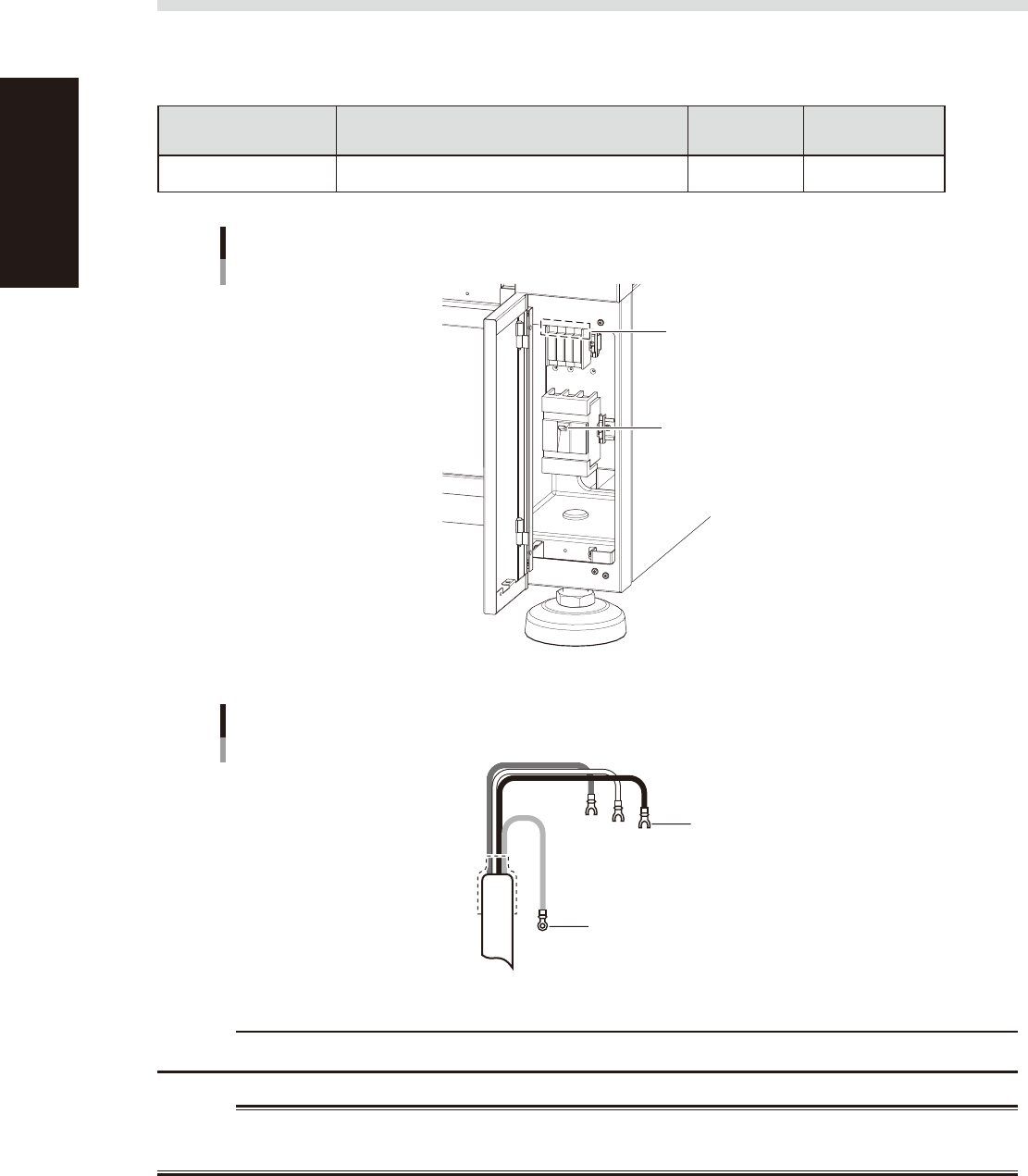
When opening the front lower right panel, you can find the power connection terminals. Connect the power
cable leads as shown below to the L1, L2, L3 and ground terminal (PE) on the power terminal block.
n
Power supply specifications
Model name Power
Frequency
Power
capacity
YSM20R/YSM20WR 3-phase AC 200/208/220/240/380/400/416V(±10%) 50/60Hz 10.4kVA
Power input terminals (L1, L2, L3)
and ground terminal
Main breaker
Power connection terminals
53A02-KMK-00
Ring-tongue crimp terminal
Insulated crimp terminal
Power cable
L2
L1
L3
L=100
PE
53A03-KMK-00
c
CAUTION
Use a power cable whose conductor cross-section area is greater than 6 mm
2
.
w
WARNING
TO AVOID THE RISK OF ELECTRICAL SHOCK, MAKE SURE THAT THE POWER SOURCE IS OFF BEFORE CONNECTING THE
POWER CABLE. ALSO MAKE SURE THAT THE GROUND CABLE IS SECURELY CONNECTED TO THE MACHINE.
A-3
Appendix
1.3 Connection between machines
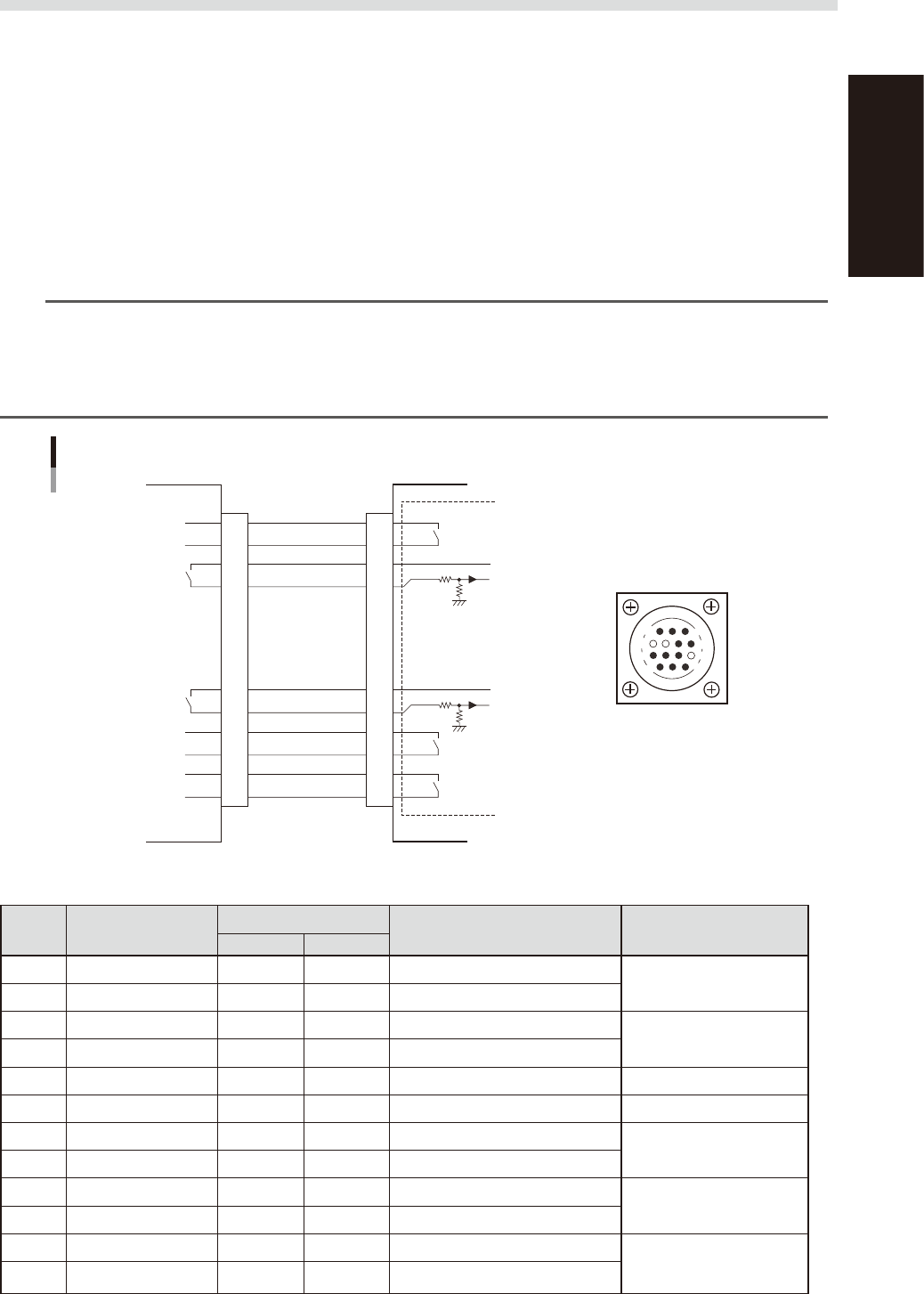
To exchange signals such as board request and operation status with the downstream or upstream machine, the
"NEXT INTERFACE" and "PREVIOUS INTERFACE" connectors located on the rear of the machine are used. The
"NEXT INTERFACE" connector connects to the downstream machine, and the "PREVIOUS INTERFACE"
connector connects to the upstream machine such as a loader.
1.3.1 PREVIOUS INTERFACE connector
When the following three conditions are met, the PREVIOUS INTERFACE circuit in the machine allows the next
board to be carried in. (ADVANCED GATE is selected.)
1. Machine is ready for carrying in a board (
Lane 1 BUSY OUT [T0100035] : ON /
(
Lane 2 BUSY OUT [T0100040] : ON
)
2. Board carry-in signal is input from the upstream machine. (
Lane 1
BA IN [N0100416] : ON /
(
Lane 2
BA IN [N0100420] : ON
)
3. Automatic operation signal is input from the upstream machine. (
Lane 1
UR IN [N0100417] : ON /
(
Lane 2
UR IN [N0100421] : ON
)
n
NOTE
• When the automatic operation signal (UR IN) from the loader turns off during transfer of a board, the machine
temporarily stops carrying in the board.
• When the board being carried in is detected by the entrance sensor, the BUSY OUT signal turns off.
• Carrying in the board is finished when both the BUSY OUT and BA IN turn off.
• The addresses of the lane 2 are used for the machines with the dual-lane specifications.
1
2
3
4
5
6
7
8
9
10
11
12
13
14
7
12
4
8
1
14
11
3
BUSY OUT
(LANE 1:T0100035)
(LANE 2:T0100040)
+24V
+24V
LR OUT
(LANE 1:T0100034)
(LANE 2:T0100037)
UR IN
(LANE 1:N0100417)
(LANE 2:N0100421)
BA IN
(LANE 1:N0100416)
(LANE 2:N0100420)
Signal input during
board carry-in
Signal output to
request board carry-out
Signal output during
automatic operation
Signal input during
automatic operation
LE OUT
(LANE 1:T0100036)
(LANE 2:T0100041)
Signal input during
waiting for board
between machines
I/O BOARD
PREVIOUS INTERFACE circuit
This machine PREVIOUS INTERFACEUpstream
PREVIOUS INTERFACE
connector
AMP 206043-1
(14-pin receptacle)
53A04-KMK-00
n
Board transfer signal specifications (PREVIOUS INTERFACE)
Pin No. Signal name
Address
I/O specifications Signal specifications
LANE 1 LANE 2
*1
1 BUSY OUT T0100035 T0100040 Relay contact (zero voltage) output
Signal output during board
carry-in
2 BUSY OUT T0100035 T0100040 Relay contact (zero voltage) output
3 +24V Input common (+24V)
Signal input of board carry-
out request
4 BA IN N0100416 N0100420 Voltage input
5 NC (with dummy pins) (Prevents misinsertion.)
6 to 8 NC
9 +24V Input common (+24V)
Signal input during
automatic operation
10 UR IN N0100417 N0100421 Voltage input
11 LR OUT T0100034 T0100037 Relay contact (zero voltage) output
Signal output during
automatic operation
12 LR OUT T0100034 T0100037 Relay contact (zero voltage) output
13 LE OUT T0100036 T0100041 Relay contact (zero voltage) output
Signal output during
waiting for board between
machines
14 LE OUT T0100036 T0100041 Relay contact (zero voltage) output
*1 Used for dual-lane type machine