00196497-07_SM_SXDX12_en.pdf - 第281页
Settings 4.6.3 Setting the Fixed Conveyor Side Conveyor Settings Service Manual SIPLACE SX1/SX2/DX1/DX2 FS02 281 4.6.3.2 4 . 6 . 3 . 2 S e t t in g t h e F ix e d C o n v e y o r S id e o n D u a l C o n v e y o r s Sett…
Settings
Conveyor Settings 4.6.3 Setting the Fixed Conveyor Side
280 Service Manual SIPLACE SX1/SX2/DX1/DX2 FS02
4.6.3
4.6.3 Setting the Fixed Conveyor Side
Setting the Fixed Conveyor Side
4.6.3.1
4.6.3.1 Setting the Fixed Conveyor Side on Single Conveyors
Setting the Fixed Conveyor Side on Single Conveyors
Parts, equipment and tools
▪ Dowel pin (supplied with conveyor) [03064582-xx]
Overview
Setting
► Use the software to move the flexible conveyor side into the position which allows you best access.
► Switch off the machine, disconnect it from the power supply and secure it to prevent unauthorized
reactivation. Observe the instructions in section "1.2 Preparatory Work..." [ ➙ 13].
► Loosen the fastening screws on both sides of the conveyor.
► Move the conveyor side into the required position.
► Insert the dowel pin and the fastening screw in the new position and tighten the fastening screw.
Perform this step on both sides of the conveyor.
► Remove the dowel pin.
See also
3.6.1 Loosening the Conveyor Side Clamps [ ➙ 143]
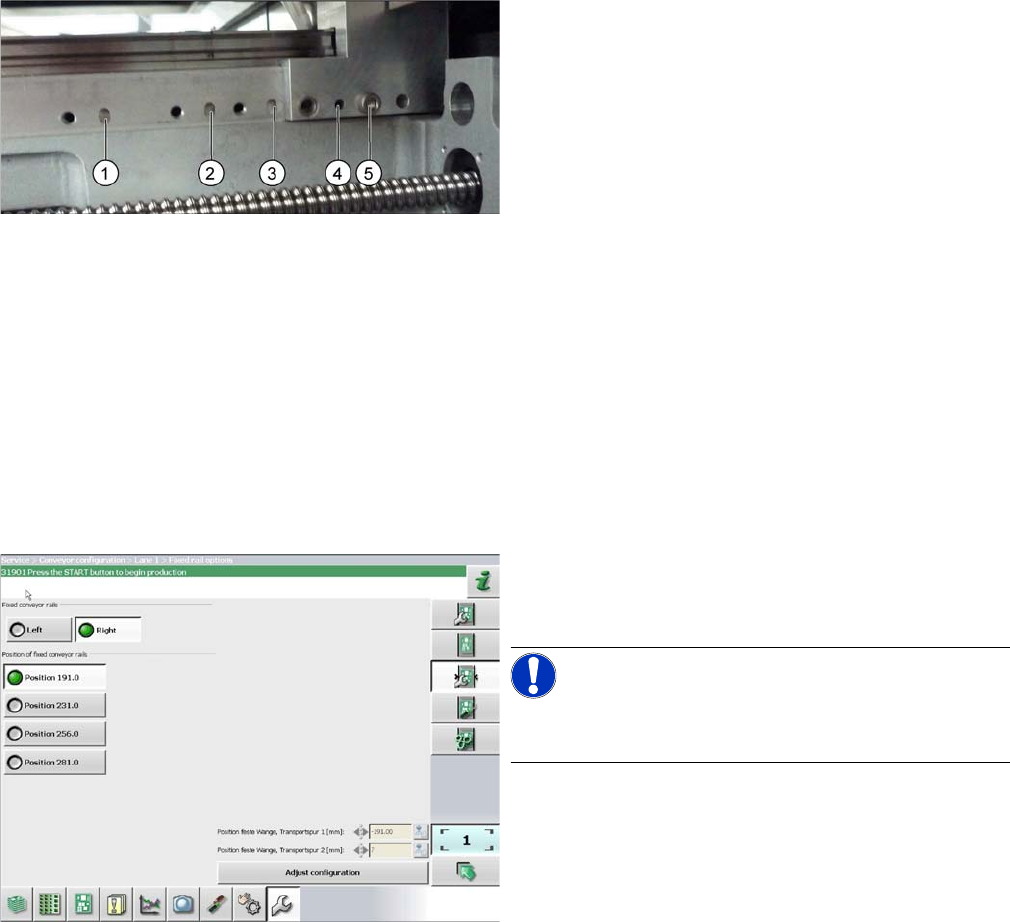
1. Printed circuit board 380 mm
2. Printed circuit board 460 mm (standard)
3. Printed circuit board 508 mm
4. Printed circuit board 560 mm
5. Fastening screw
The dowel pin is inserted at points (1) to (4):
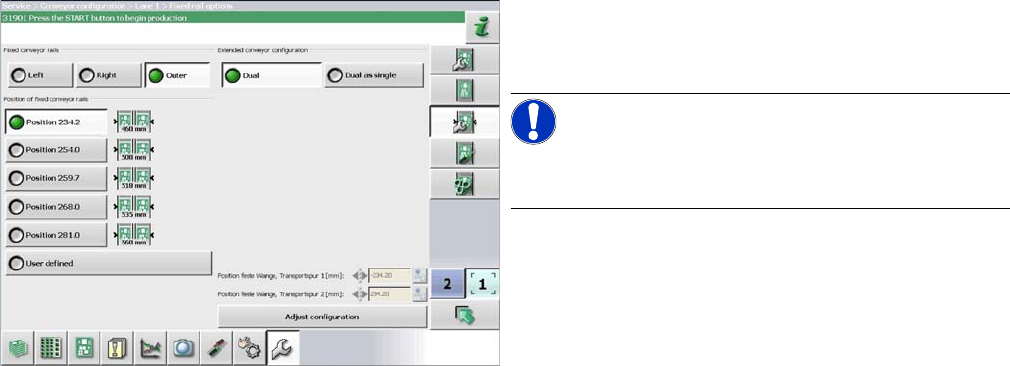
► In the software set the fixed conveyor side and the
position (see "4.6.3.3 Conveyor Sides - Settings"
[ ➙ 282]).
NOTICE!
This menu is accessible from operator level Service (cus-
tomer)!
Settings
4.6.3 Setting the Fixed Conveyor Side Conveyor Settings
Service Manual SIPLACE SX1/SX2/DX1/DX2 FS02 281
4.6.3.2
4.6.3.2 Setting the Fixed Conveyor Side on Dual Conveyors
Setting the Fixed Conveyor Side on Dual Conveyors
The fixed conveyor edge is always set with the software for dual conveyors.
Setting
► In the software set the fixed conveyor side and the
position (see "4.6.3.3 Conveyor Sides - Settings"
[ ➙ 282]).
NOTICE!
This menu is accessible from operator level Service (cus-
tomer)!
Settings
Conveyor Settings 4.6.3 Setting the Fixed Conveyor Side
282 Service Manual SIPLACE SX1/SX2/DX1/DX2 FS02
4.6.3.3
4.6.3.3 Conveyor Sides - Settings
Conveyor Sides - Settings
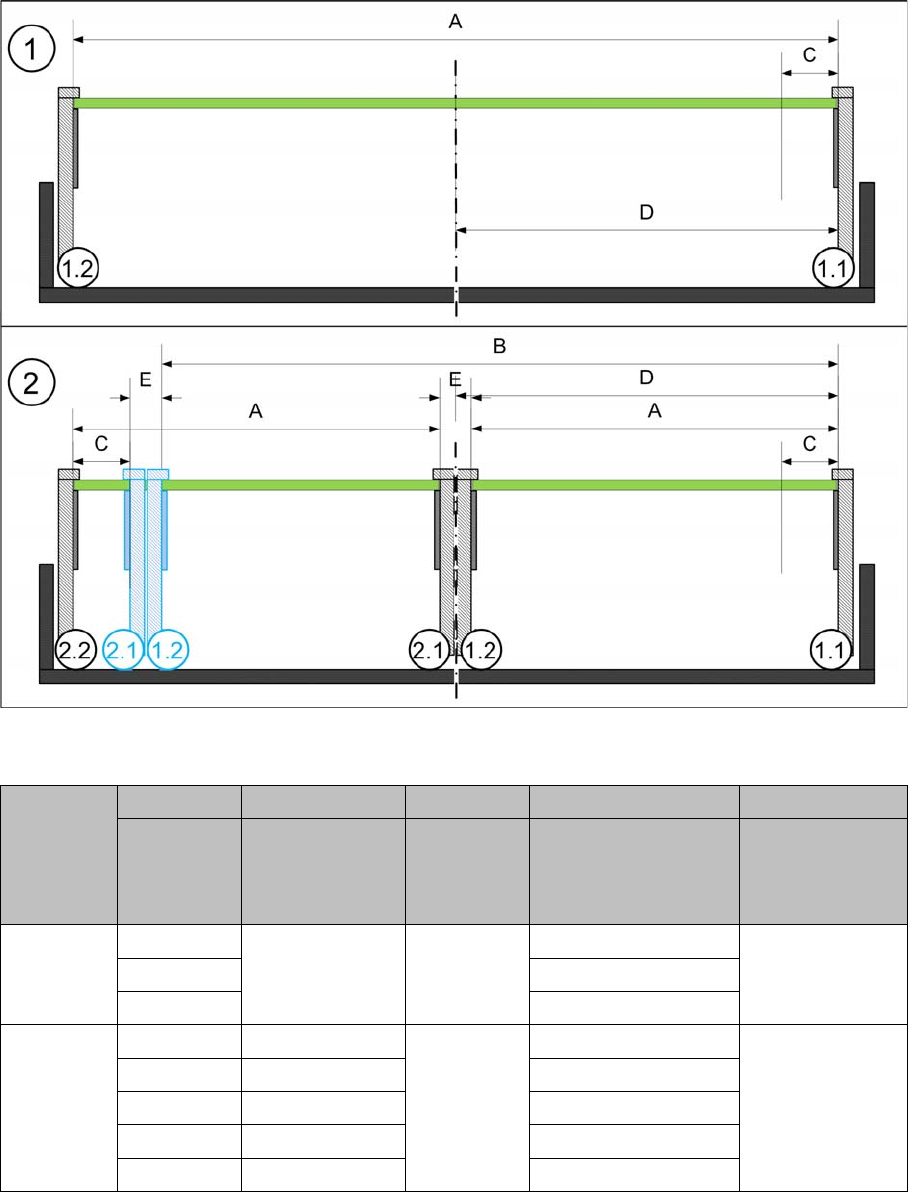
The following diagram shows a conveyor with the fixed conveyor side on the right. The same settings
apply to conveyors with the fixed side on the left.
View of a conveyor with a fixed side on the right (X-Series S as example)
SX1/SX2/DX1/DX2
SX1/SX2/DX1/DX2
* Dual conveyor FS02 with fixed side left: minimum PCB width 100 mm
A B C D E
Maximum
PCB width
Dual as single
conveyor
(flex)
Minimum
PCB width
Position of fixed
conveyor side
(from the
conveyor center)
Minimum
side distance
side 1.2/2.1
Single con-
veyor
510 --- 50 mm 231 ---
535 256
560 281
Dual con-
veyor
215 413 50 mm * 234.2 35 mm
235 433 254
242 430 259.7
250 450 268
260 460 281