00196497-07_SM_SXDX12_en.pdf - 第56页
Service Work Conveyor Electrical System 3.2.14 Replacing the Motor Circuit Breaker PKE 32/XTU-32 [03098183-xx] 56 Service Manual SIPLACE SX1/SX2/DX1/DX2 FS02 Removal ► Switch off the machine, disconnec t it from the po w…
Service Work Conveyor
3.2.14 Replacing the Motor Circuit Breaker PKE32/XTU-32 [03098183-xx] Electrical System
Service Manual SIPLACE SX1/SX2/DX1/DX2 FS02 55
3.2.14
3.2.14 Replacing the Motor Circuit Breaker PKE32/XTU-32 [03098183-xx]
Replacing the Motor Circuit Breaker PKE32/XTU-32 [03098183-xx]
Missing Axis Support – TI2013-07D10
Parts, Equipment and Tools
▪ Protective motor switch PKE32/XTU-32 assembly 3p. [03098183-xx]
The protective motor switch is supplied together with the release block.
▪ Technical information "Retrofit Guide Axis Support Motor Circuit Breaker PKE32/XTU-32 Assembly
3p. (Main Switch)" [DE: TI2013-07D10] [EN: TI2013-07E10].
Overview
CAUTION
New version
Do not confuse this version of the protective motor switch with the old one. Pay particular at-
tention to the settings.
NOTICE
Missing axis support
The machine is switched on with the help of an extension axis via the protective motor switch.
When inserting the door coupling handle onto the extension axis of the protective motor switch,
the axis could move into a slanted position. In this case, high traverse forces will be exerted
against the axis coupling of the protective motor switch, which could then break. This would
then make it impossible to switch the machine on or off.
Some machines do not have this additional axis support on the protective motor switch. This
support is used to limit the slant of the extension axis and therefore to reduce the traverse forc-
es against the axis coupling.
► This axis support can be retrofitted. For details, read the Technical Information "Retrofit
Guide Axis Support Motor Circuit Breaker PKE32/XTU-32 Assembly 3p. (Main Switch)"
[DE: TI2013-07D10] [EN: TI2013-07E10].
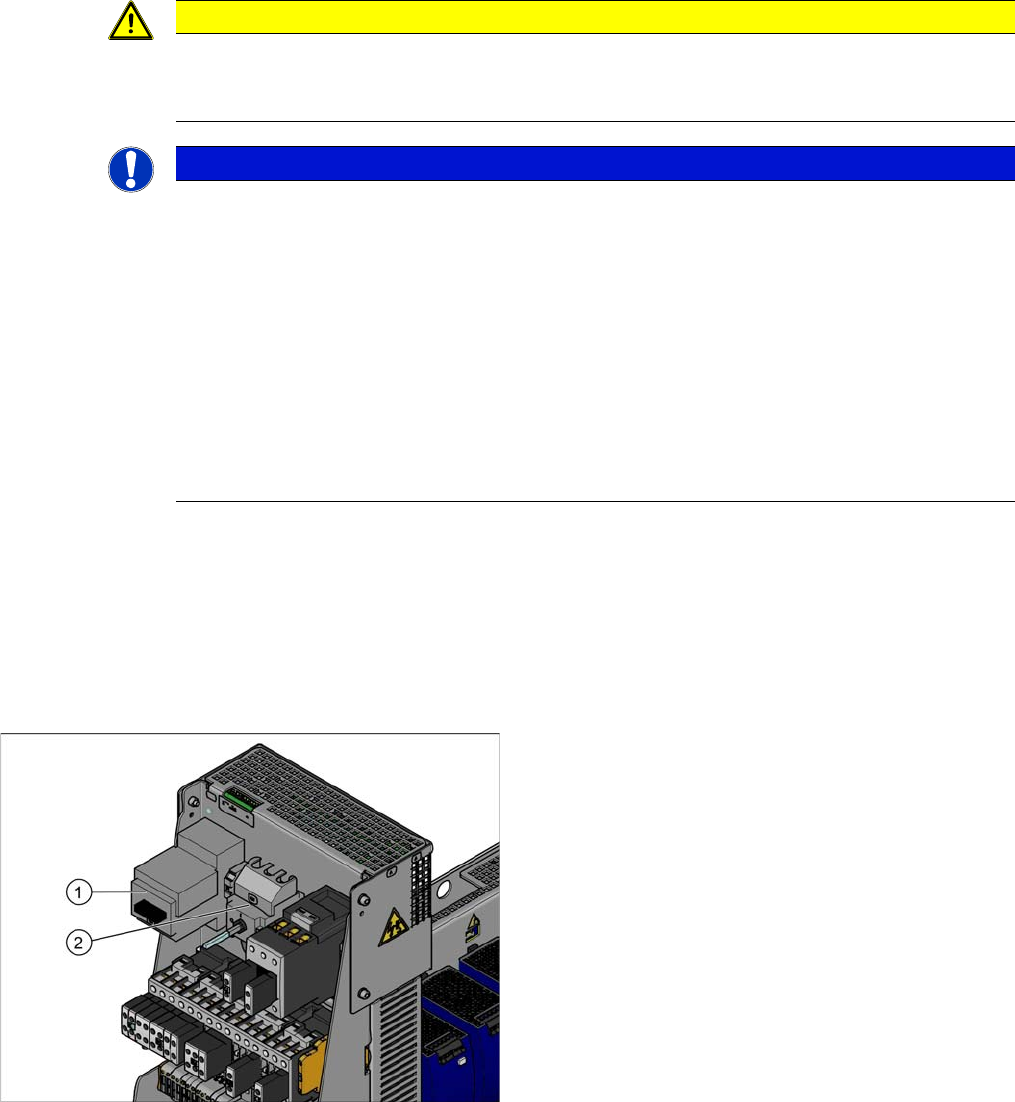
Protective motor switch and main switch (using example
of US version for the X-Series)
1. Protective motor switch
2. Main switch (US version only)
In non-US versions, the protective motor switch also
serves as the main switch.
Service Work Conveyor
Electrical System 3.2.14 Replacing the Motor Circuit Breaker PKE32/XTU-32 [03098183-xx]
56 Service Manual SIPLACE SX1/SX2/DX1/DX2 FS02
Removal
► Switch off the machine, disconnect it from the power supply and secure it to prevent unauthorized
reactivation. Observe the instructions in section "1.2 Preparatory Work..." [ ➙ 13].
Checking the Power Supply for Absence of Voltage
► Before you start working, check the power supply for absence of voltage and observe the waiting
times!
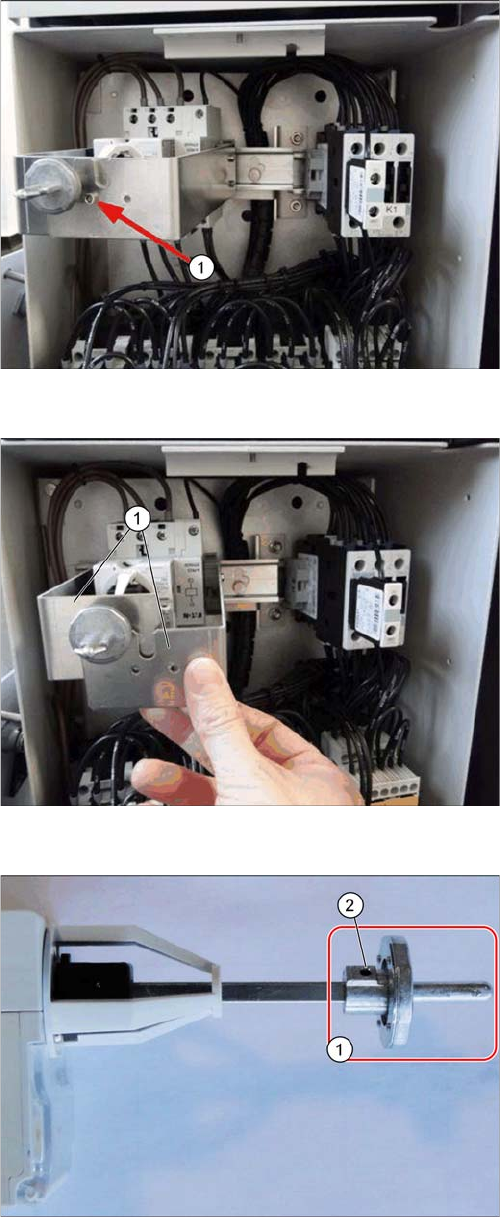
Shaft support, fitted (example of SX1)
► Remove the fastening screw (1) on the shaft support.
Shaft support, remove (example of SX1)
► Remove the two shaft support plates (1) from the DIN
rail. The plates are locked in place on the DIN rail with
gray clamping blocks.
Switch bracket
► Loosen the grub screw (2) at the switch bracket (1)
and pull the switch bracket off.
Service Work Conveyor
3.2.14 Replacing the Motor Circuit Breaker PKE32/XTU-32 [03098183-xx] Electrical System
Service Manual SIPLACE SX1/SX2/DX1/DX2 FS02 57
► Unplug the electrical connections to the protective motor switch. Mark their positions, to make clear
assignment easier later on.
► Mark the position of the protective motor switch on the DIN rail.
► Lift the protective motor switch off the DIN rail.
Installation
► Remove the shunt release from the old protective motor switch and install it on the new one. Also
read section "3.2.15 Replacing the Shunt Release A-PKZ0 24VDC [03102397-xx]" [ ➙ 61].
► Fit the new protective motor switch together with the shunt release on the DIN rail. Make sure to po-
sition and align it correctly (observe the marking).
► Reestablish all electrical connections.
The clamping screws are fastened with a torque. The valid torque values are printed on the packag-
ing of the protective motor switch:
Flexible cable 1.5 - 4 mm² → 1.7 Nm
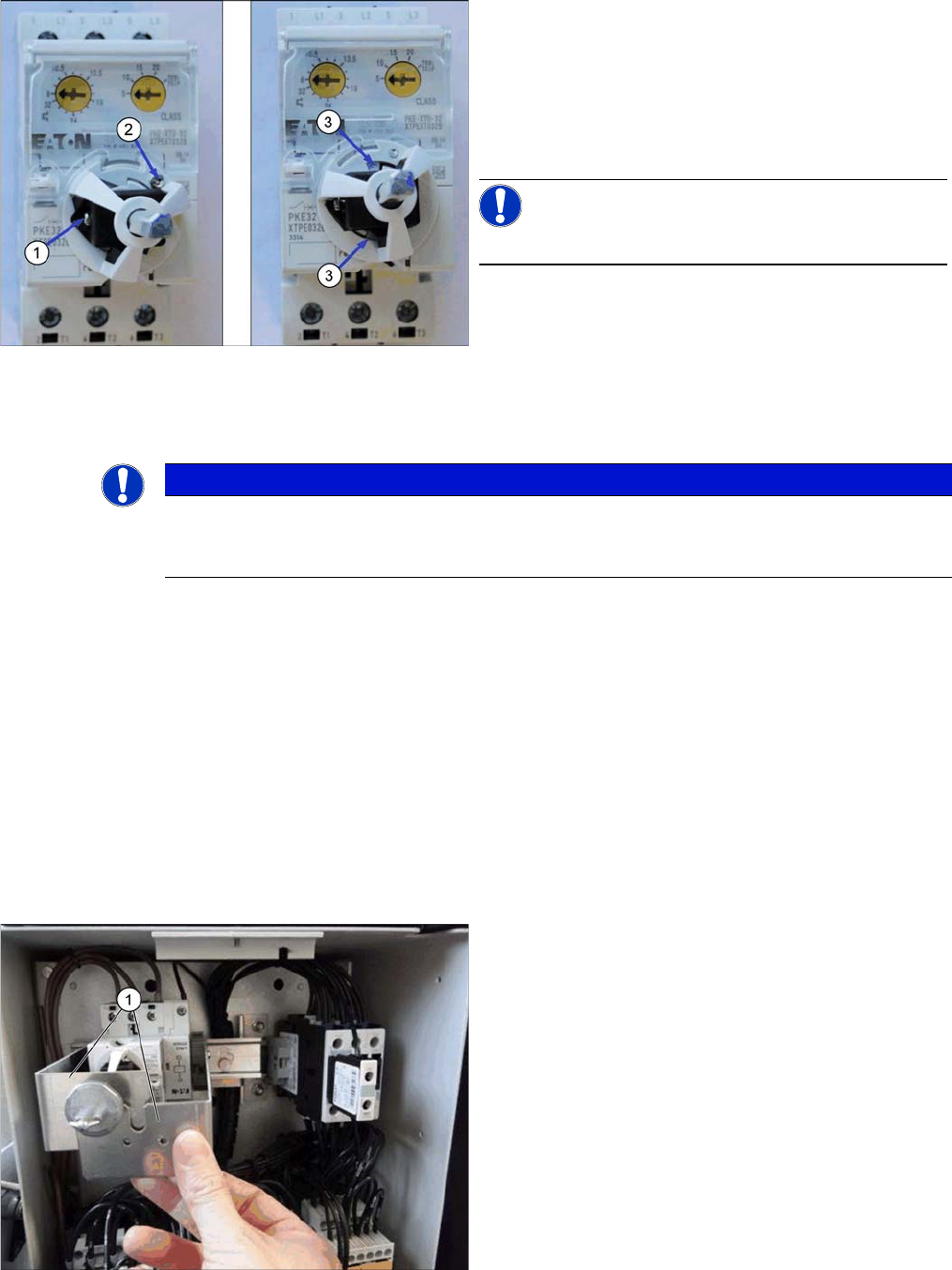
Dismantling the axis support
► Remove the screw (1), and remove the position indi-
cator on the axis.
► Remove the screw (2).
► Slightly turn the axis support to the left until you see
the snap tabs (3).
► Pull the axis support out towards the front.
NOTICE!
The snap tabs easily break.
NOTICE
Orientation of the protective motor switch
In older machines, the protective motor switch is installed at an angle of 180°. In this case the
connectors 1 to T3 are located on top.
Shaft support, fitted (example of SX1)
► Fit the two shaft support plates (1) on the DIN rail.
Have the gray clamping blocks engage with the DIN
rail.