00196497-07_SM_SXDX12_en.pdf - 第70页
Service Work Conveyor Control 3.3.2 Replacing the I/O Control Unit [03116049-xx] 70 Service Manual SIPLACE SX1/SX2/DX1/DX2 FS02 3.3.2 3 . 3 . 2 R e p la c in g t h e I / O C o n t r o l U n it [ 0 3 1 1 6 0 4 9 - x x ] R…
Service Work Conveyor
3.3.1 Replacing the Video Multiplexer Splitter / VGA Splitter Cable (Machine Nos.: Kxxx/Lxxx/Mxxx only) Control
Service Manual SIPLACE SX1/SX2/DX1/DX2 FS02 69
Installation
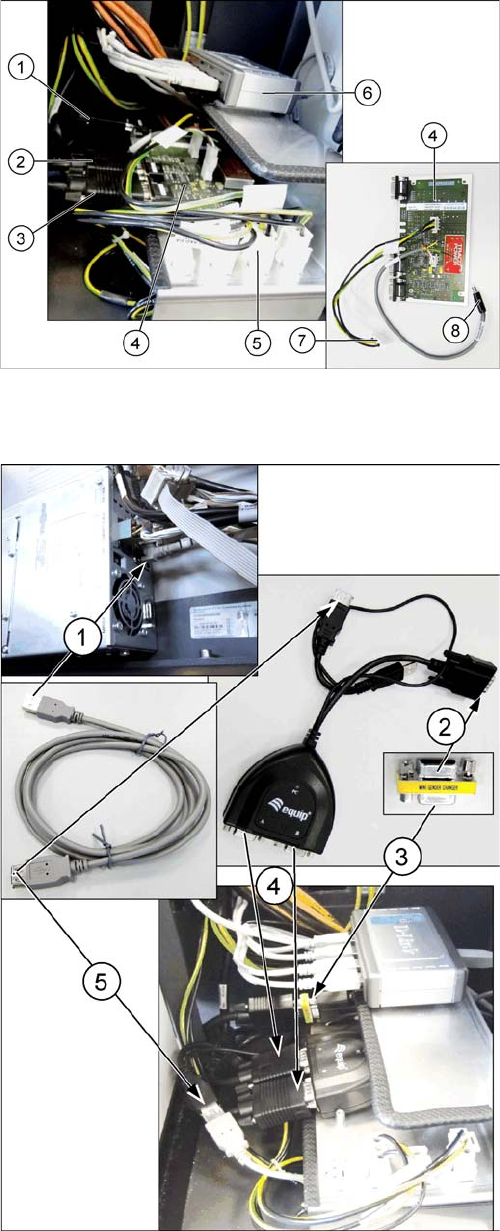
► Unplug all cables ((1), (2), (3)) from the defective vid-
eo multiplexer splitter (4).
► Remove the cable (7) from connection X2qv (5).
► Unplug the power supply cable (8) from the USB hub
(6). This cable will no longer be used. The line voltage
will be supplied via the existing USB cable from the
BoxPC in the future.
► Undo the four fastening screws (hexagon socket -
use Allen key) of the video multiplexer splitter and re-
move the splitter.
► Remove all cables which are not required.
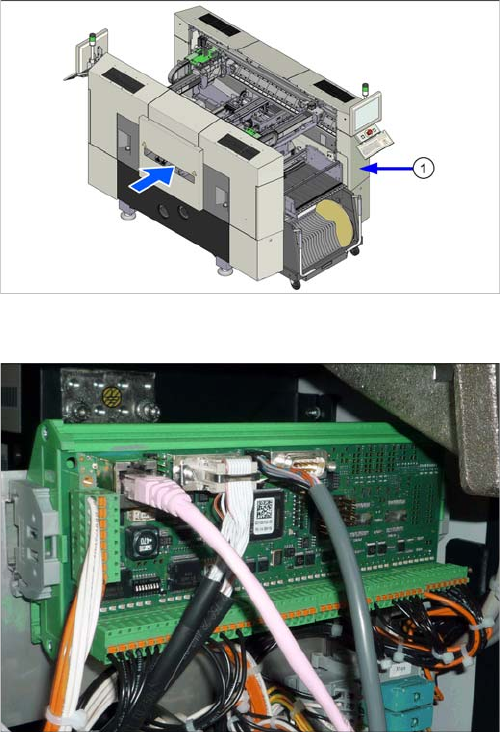
► (1) Plug the USB extension cable into a free port of
the BoxPC and run the cable through the cable duct
to the installation position of the video splitter.
► (2) Connect the mini gender changer to the PC input
cable of the "Splitter cable VGA 2 port".
► (3) Then connect the cable "computer 1 – video mul-
tiplexer [03055251-xx]" to the other side of the mini
gender changer.
► (4) Connect the cables "monitor 1 – video multiplexer
[03055254-xx]" and "monitor 2 – video multiplexer
[03055253-xx]" to the inputs A and B of the "splitter
cable VGA 2 port".
► (5) Connect the USB cable to the USB connector of
the "splitter cable VGA 2 port". This is the power sup-
ply for "splitter cable VGA 2 port". When the machine
is switched on, the green LED indicates that voltage
is present.
► Follow the removal instructions in reverse order for
further installation.
Service Work Conveyor
Control 3.3.2 Replacing the I/O Control Unit [03116049-xx]
70 Service Manual SIPLACE SX1/SX2/DX1/DX2 FS02
3.3.2
3.3.2 Replacing the I/O Control Unit [03116049-xx]
Replacing the I/O Control Unit [03116049-xx]
Parts, Equipment and Tools
▪ I/O control unit II [03116049-xx]
(replaces: I/O control unit [03052315-xx])
Overview
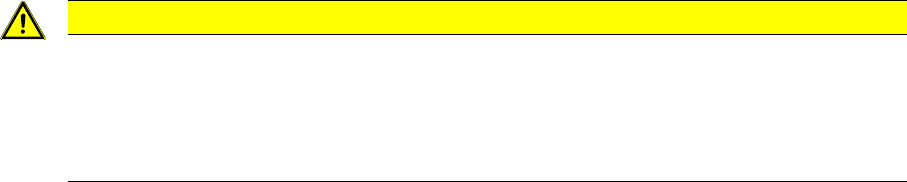
Installation position of I/O control unit
The I/O control unit is located under the cover (1), on the
right when viewed in the direction of transport.
I/O control unit II [03116049-xx]
I/O control unit
See the board description: "5.1.3 I/O control unit
[03116049-xx]" [ ➙ 303]
Service Work Conveyor
3.3.2 Replacing the I/O Control Unit [03116049-xx] Control
Service Manual SIPLACE SX1/SX2/DX1/DX2 FS02 71
Removal
► Take a note of the component counter reading at the software user interface.
► Switch off the machine, disconnect it from the power supply and secure it to prevent unauthorized
reactivation. Observe the instructions in section "1.2 Preparatory Work..." [ ➙ 13].
► Unplug all press-fit connections. You may want to mark the positions, to make clear assignment eas-
ier later on.
► Pull the I/O control unit out of its mount.
Installation
► Follow the removal instructions in reverse order for installation. Also observe the following instruc-
tions:
CAUTION
Installation instructions
► Make sure that the DIP switches are configured correctly (see "5.1.3 I/O control unit
[03116049-xx]" [ ➙ 303]).
► Check if the component counter of the software still matches the value you have written
down. If this is not the case, contact SIPLACE service.