00196497-07_SM_SXDX12_en.pdf - 第292页
Settings Settings on the Component Trolley 4.8.1 Setting the Changeover T able Height 292 Service Manual SIPLACE SX1/SX2/DX1/DX2 FS02 4.8 4 . 8 S e t t in g s o n t h e C o m p o n e n t T r o lle y Settings on the Compo…
Settings
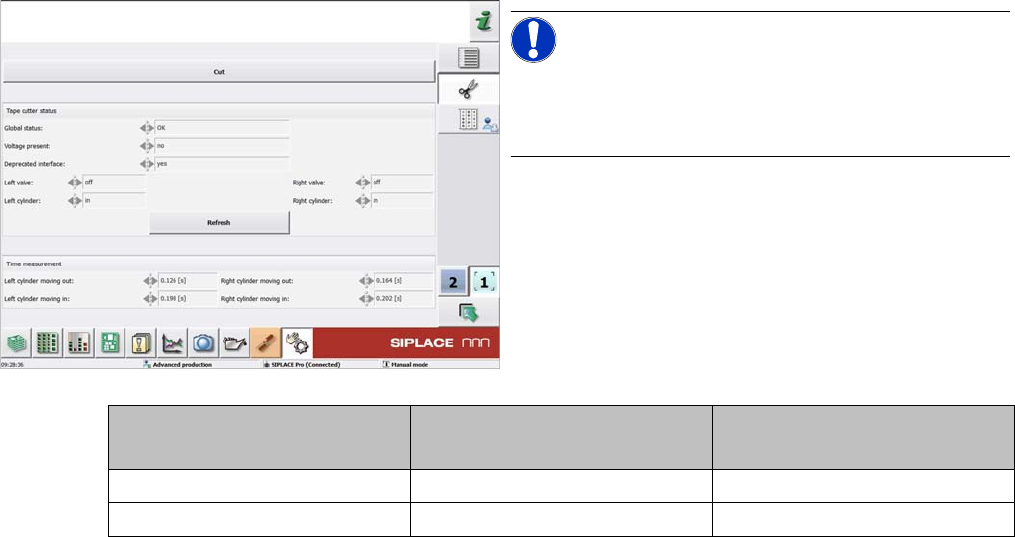
4.7.1 Times for Setting the Throttle on the Cutter (From SW707.1) Settings on the Cutter
Service Manual SIPLACE SX1/SX2/DX1/DX2 FS02 291
4.7
4.7 Settings on the Cutter
Settings on the Cutter
4.7.1
4.7.1 Times for Setting the Throttle on the Cutter (From SW707.1)
Times for Setting the Throttle on the Cutter (From SW707.1)
NOTICE!
From SW707.1
From software version 707.1, the throttle times on the
cutter are displayed in the station software.
Cutter SX1/SX2, DX1/DX2
[03063781-xx]
X-Series S
[03066690-xx]
Moving the balde out 160 to 220 ms 175 to 200 ms
Moving the blade in 210 to 230 ms 200 to 250 ms
Settings
Settings on the Component Trolley 4.8.1 Setting the Changeover Table Height
292 Service Manual SIPLACE SX1/SX2/DX1/DX2 FS02
4.8
4.8 Settings on the Component Trolley
Settings on the Component Trolley
4.8.1
4.8.1 Setting the Changeover Table Height
Setting the Changeover Table Height
4.8.1.1
4.8.1.1 Adjusting the Changeover Table to the Board Transport Height
Adjusting the Changeover Table to the Board Transport Height
4.8.1.2
4.8.1.2 Adjusting the Changeover Table Height to the Machine
Adjusting the Changeover Table Height to the Machine
Changeover table with a board transport height of
950 mm
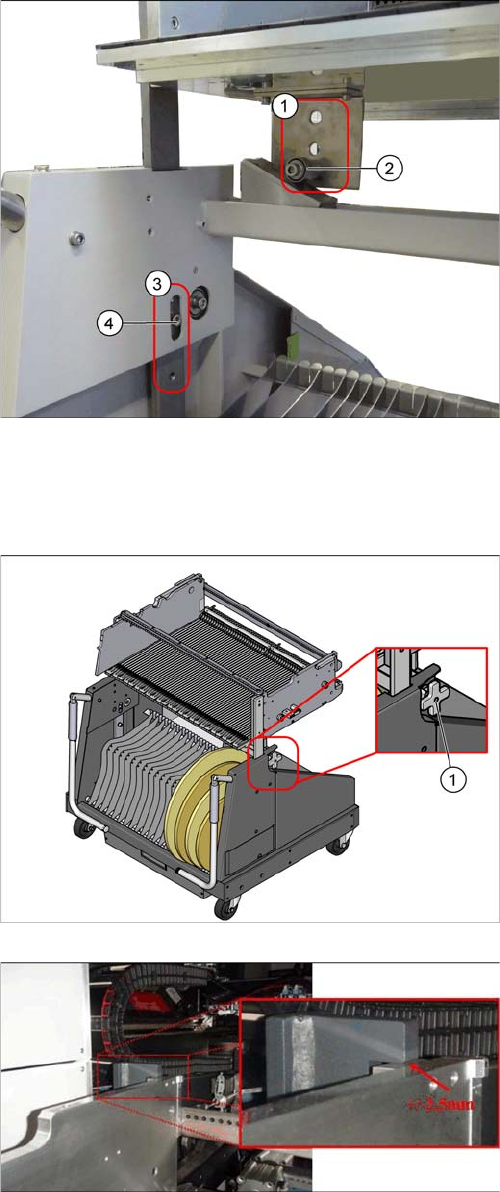
► Loosen the screws (4) for the top and bottom stop-
pers.
► Lift the changeover table plate. You may need to en-
list the help of a second person for this.
► Loosen the pulleys (2) and screw these tight again at
the required height:
⇨ 900 mm ± 15 mm SMEMA height
⇨ 930 mm ± 15 mm SMEMA height
⇨ 950 mm ± 15 mm SMEMA height
These heights correspond with the holes (1) (from top to
bottom).
► Insert the screws (4) for the top and bottom stoppers
in the corresponding holes (3).
1. Height adjustment wheel.
► To adjust the height to the COT insert, push the
changeover table into the machine until the stopper
block of the table is positioned under the bracket of
the table height check.
► Use the adjustment wheel to lift the changeover table
until the surfaces are almost but not quite touching.
The tolerance between the function surfaces is +/
- 2.5 mm.
Settings
4.9.1 Firmware Download (SW 70x) Other Settings
Service Manual SIPLACE SX1/SX2/DX1/DX2 FS02 293
4.9
4.9 Other Settings
Other Settings
4.9.1
4.9.1 Firmware Download (SW 70x)
Firmware Download (SW 70x)
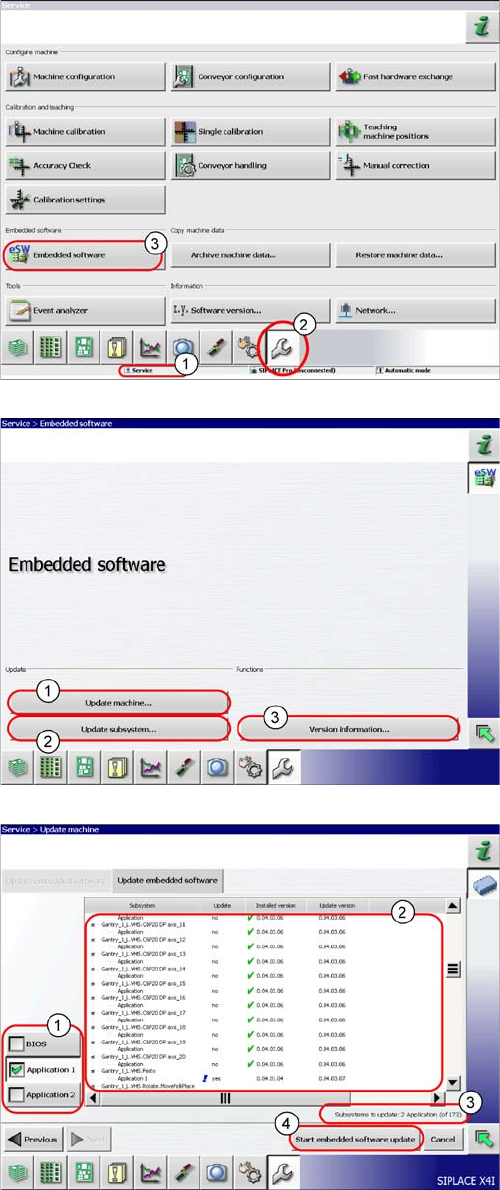
► The function Firmware Download can be performed
with the operator levels (1) Machine-Service or
SIPLACE-Service.
► Switch over to the service menu (2).
► Select the button Embedded Software (3).
► (1) Select this button to check the entire machine and
to perform an eSW download for multiple subsys-
tems.
► (2) Select this button to select and check one subsys-
tem, to perform an eSW download.
► (3) Select this button to view all versions of the sub-
systems, BIOS application 1/2.
1. Selection button, BIOS application 1/2
2. Shows the status of the individual subsystems.
3. Update information about the number of subsystems
which still have to be downloaded.
4. Starts the download.