00196497-07_SM_SXDX12_en.pdf - 第59页
Service Work Conveyor 3.2.14 Replacing the Motor Circuit Breaker PKE32/XTU-3 2 [03098183-xx] Electrical System Service Manual SIPLACE SX1/SX2/DX1/DX2 FS02 59 ► Follow the removal in structions in reverse order for instal…
Service Work Conveyor
Electrical System 3.2.14 Replacing the Motor Circuit Breaker PKE32/XTU-32 [03098183-xx]
58 Service Manual SIPLACE SX1/SX2/DX1/DX2 FS02
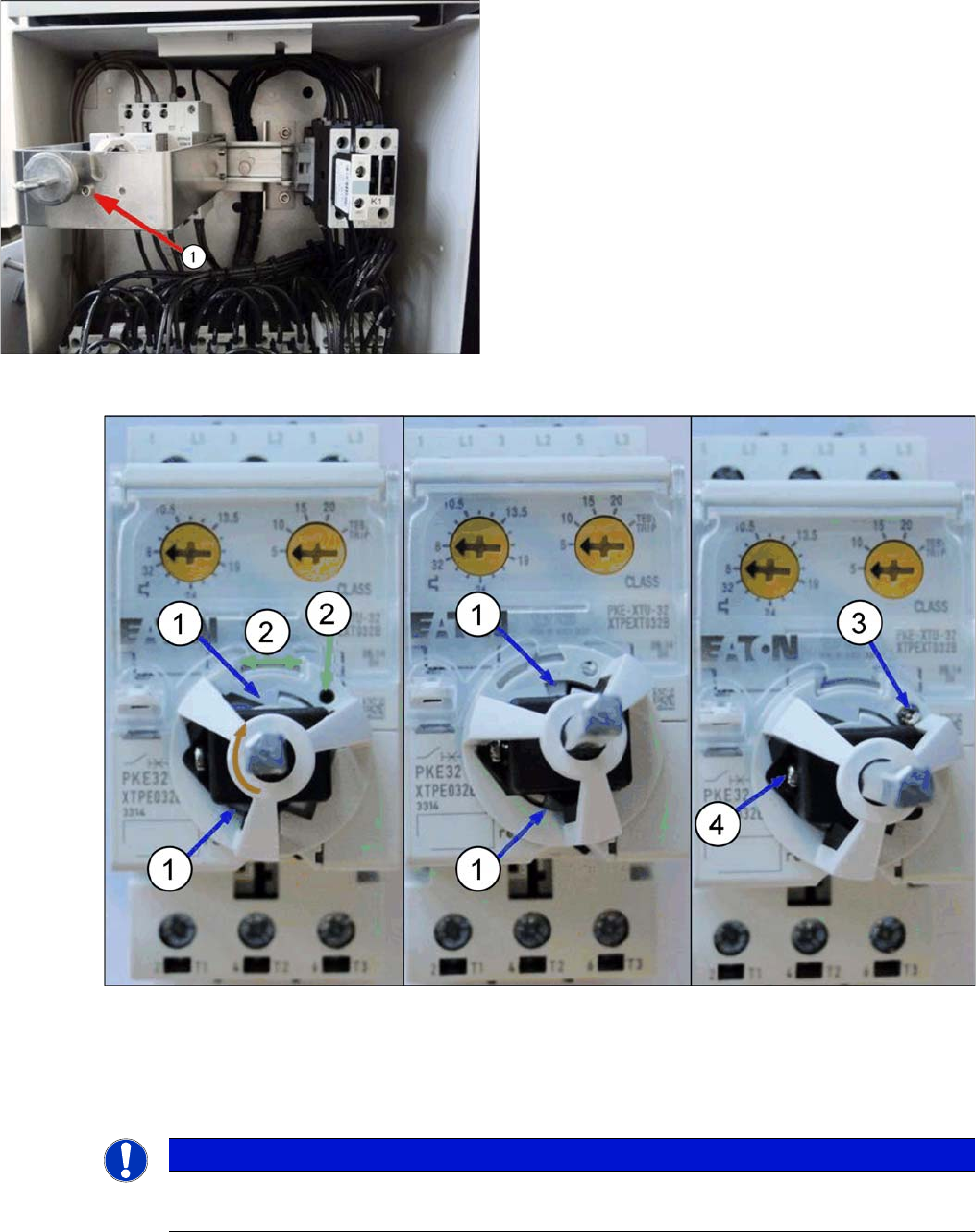
Fitting the axis support
► Gently insert the axis support and attach the switching axis (do not fix it yet).
Make sure that the two snap tabs of the axis support (1) can lock in place with the protective motor
switch by slightly rotating the axis support (green arrow). The hole in the base of the axis support (2)
is now above a hole in the PKE switch.
► Fix the axis support on the protective motor switch with the supplied (3) screw. Tighten the screw
with a torque of 0.5 to 1 Nm. The screw is self-drilling.
► Adjust the position indicator on the axis. In the switched-off position, the arrow points to the left if the
setting screws of the PKZ are on top. Fix the position indicator with the screw (4). Tighten the screw
with a torque of 0.5 to 1 Nm.
Shaft support, fitted (example of SX1)
► Secure the two shaft support plates with the fastening
screw (1).
NOTICE
The snap tabs easily break.
Proceed with caution as the snap tabs easily break.
Service Work Conveyor
3.2.14 Replacing the Motor Circuit Breaker PKE32/XTU-32 [03098183-xx] Electrical System
Service Manual SIPLACE SX1/SX2/DX1/DX2 FS02 59
► Follow the removal instructions in reverse order for installation. Also observe the following instruc-
tions:
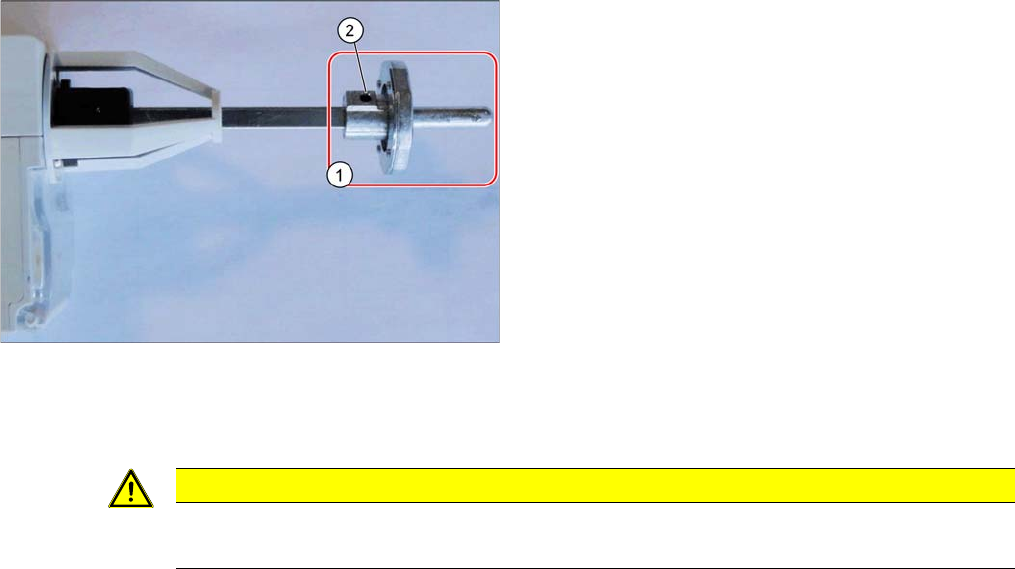
Fitting the switch bracket
► Fit the switch bracket (1) with the grub screw (2).
Tighten the screw with a torque of 0.6 Nm.
CAUTION
Installation instructions
► Set the nominal current and overcurrent (see below).
Service Work Conveyor
Electrical System 3.2.14 Replacing the Motor Circuit Breaker PKE32/XTU-32 [03098183-xx]
60 Service Manual SIPLACE SX1/SX2/DX1/DX2 FS02
3.2.14.1
3.2.14.1 Adjustment of the Motor Protection Switch PKE32 [03098183-xx]
Adjustment of the Motor Protection Switch PKE32 [03098183-xx]
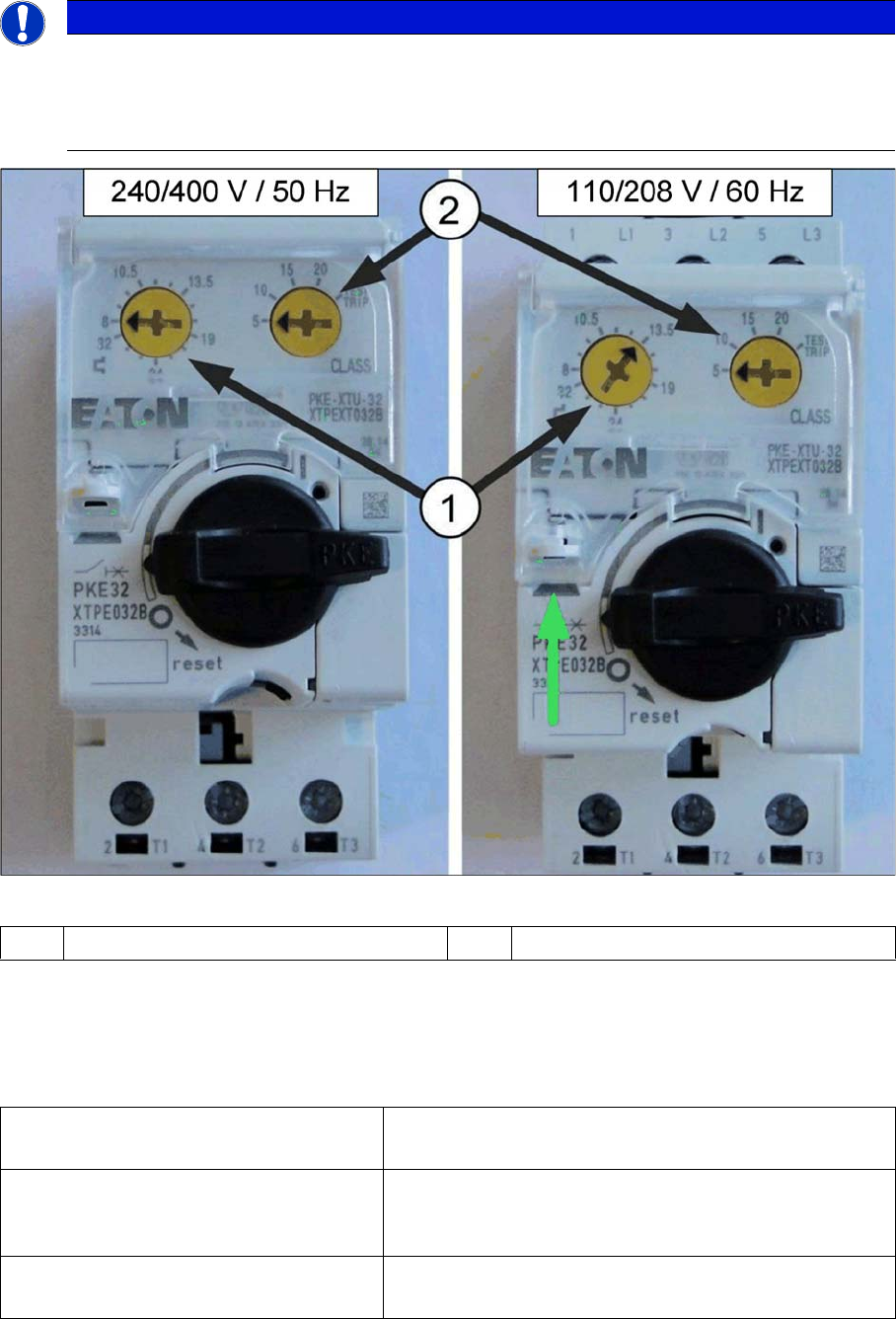
Adjusting the settings of the protective motor switch PKE32
► At the marked position (green arrow), open the cover above the adjustment screws. Use a size 1
screwdriver for this.
► Set the overcurrent class (2) to the value 5. This applies to all machines.
► Set the rated current (1) to the following values:
NOTICE
Supply of the vacuum pump with machine current
The following adjustment values are valid for all machines.
Exception: For machines with vacuum pumps that are supplied via the machine power supply
other values may apply.
1 Rated current 2 Overcurrent class
Without vacuum pump ▪ 240/400V 50Hz network: rated current: 8.0 A
▪ 110/208V 60Hz USA network: rated current: 13.5 A
With one vacuum pump
(SX1/SX2, DX1/DX2, SX4/DX4, X-Series
S)
▪ 240/400V (50Hz) network: rated current: 8.0 A
▪ 110/208V (60Hz ) USA network: rated current: 13.5 A
With two vacuum pumps
(SX4/DX4, X-Series S)
▪ 240/400V (50Hz) network: rated current: 13.5 A
▪ 110/208V (60Hz ) USA network: rated current: 17.2 A