00197369-02_AI_PPW_2te_Reihe_X-Serie-S_de_en.pdf - 第65页
Installation 3.1.1 Preparatory Steps X4i S - Installing the NC Row 2 NC Row 2 - NC in Front of MTC 2/WPC PPW 2te Reihe - PPW vor MTC 2/WPC 65 3 3 I n s t a lla t io n Installation Select the right section for your machin…

Brief Description
Tools and Equipment Required 2.4.3 Materials for Head-Specific Parts
64 NC Row 2 - NC in Front of MTC 2/WPC PPW 2te Reihe - PPW vor MTC 2/WPC
2.4.3
2.4.3 Materials for Head-Specific Parts
Materials for Head-Specific Parts
The following parts are needed for each location, depending on the head:
For C&P20 A
▪ Nozzle changer basic structure CPx/all assembly - short [03103649-xx]
▪ Magazine assembly C&P20 A [03016831-xx] (contains one magazine)
For CPP
▪ Nozzle changer basic structure CPx/all assembly - short [03103649-xx]
▪ Nozzle magazine type 20xx CPP [03066107-xx] (contains one magazine)
▪ Nozzle magazine type 28xx CPP [03065782-xx] (contains one magazine)
For C&P20 P
▪ Nozzle changer basic structure CPx/all assembly - short [03103649-xx]
▪ Nozzle magazine type 40xx C&P20 P [03101503-xx] (contains one magazine)
For Twin:
▪ Nozzle changer TH SX series (pos. 1) [00519845-xx] (contains the standard magazine configura-
tion)
2.4.4
2.4.4 Materials for MTC and WPC
Materials for MTC and WPC
2.5
2.5 Tools and Equipment Required
Tools and Equipment Required
Tools
▪ Allen key set
▪ Set of open-jawed spanners
▪ Diagonal cutters
▪ Depth measuring gauge 300 mm [03079617-xx]
Tools
▪ Assembly instructions "NC row 2 - NC in front of MTC 2/WPC – SIPLACE X-Series S" [00197369-xx]
(this manual)
2.6
2.6 Required Working Time
Required Working Time
The complete installation procedure for machines of type X4i S, including software settings, takes ap-
prox. 4 hours if all four locations are converted.
The complete installation procedure for machines of type X3 S and X4 S, including software settings,
takes approx. 3 hours if all four locations are converted.
Machine type and location Designation Item number
X3 S and X4 S location 2
with MTC
Holder nozzle changer TwinHead X series with MTC 00119747-xx
Nozzle changer TH SX series (position 1) 00519845-xx
Query reject bin SX4a_TH, CPP, MTC 03090845-xx
X3 S and X4 S location 2
with WPC and CPP
Basic assembly NC row 2 WPC
Contains: NC_short for CPP, 3x magazine type 20,
1x magazine type 28
03113144-xx
X3 S and X4 S location 2
with WPC and Twin
Basic assembly NC row 2 WPC basic assembly 03115109-xx
Nozzle changer TH SX series (position 1) 00519845-xx
Installation
3.1.1 Preparatory Steps X4i S - Installing the NC Row 2
NC Row 2 - NC in Front of MTC 2/WPC PPW 2te Reihe - PPW vor MTC 2/WPC 65
3
3 Installation
Installation
Select the right section for your machine:
▪ "3.1 X4i S - Installing the NC Row 2" [ ➙ 65]
▪ "3.2 X3 S / X4 S - Installing the NC Row 2" [ ➙ 83]
3.1
3.1 X4i S - Installing the NC Row 2
X4i S - Installing the NC Row 2
3.1.1
3.1.1 Preparatory Steps
Preparatory Steps
► Move the component trolley out of the machine.
► Switch off the machine, disconnect it from the power supply and secure it to prevent unauthorized
reactivation. Observe the instructions in section "1.2 Preparatory Work..." [ ➙ 58].
► Perform the following modifications to the machine before you fit "nozzle changer row 2":
▪ "3.1.1.1 Adjusting the Hood" [ ➙ 65]
▪ "3.1.1.2 Adjusting the Y Buffer" [ ➙ 67]
▪ "3.1.1.3 Adjusting the Hand Guard" [ ➙ 68]
▪ "3.1.1.4 Moving the COT Insert to the Second Table Position" [➙69]
3.1.1.1
3.1.1.1 Adjusting the Hood
Adjusting the Hood
Before the COT insert can be moved to position 2, you need to replace the original protective cover at
the relevant location with the "protective sheet assembly".
Parts required from "protective sheet assembly SX4/DX4" [03085665-xx]
Quantity Designation Item number
1 Protective plate 03081408-xx
1 Track ruler and safety marking 03092020-xx
Hood with original protective cover at table position 1
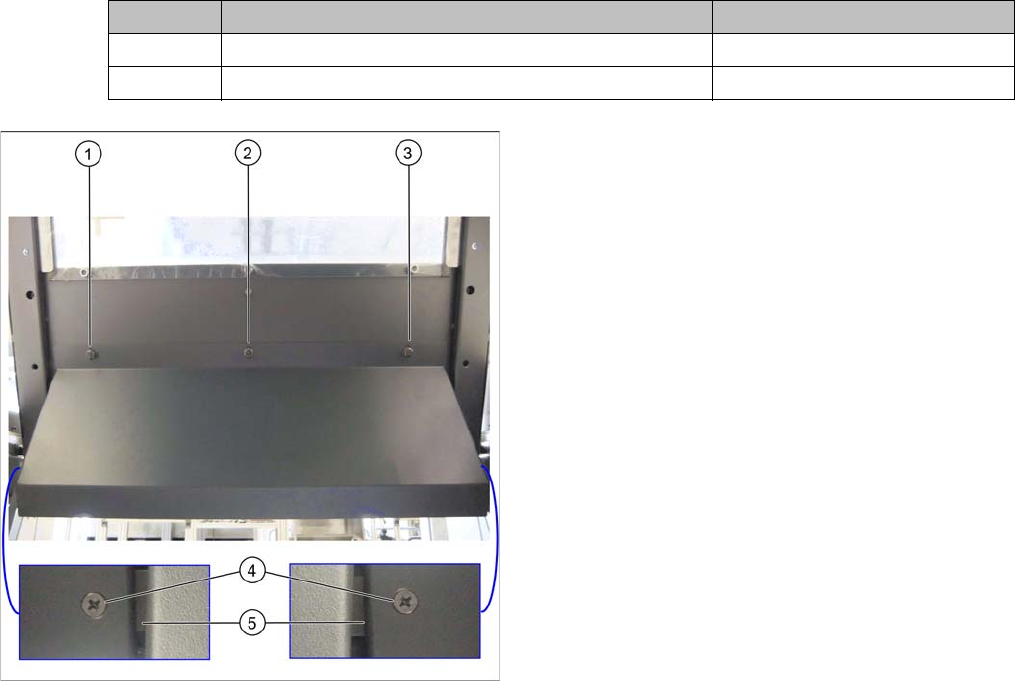
There are three bolts on the inside of the cover (1) to (3),
where the protective cover is hooked up and fixed.
► Remove the three hexagonal nuts that fix the protec-
tive cover and lift off the original cover.
► At (4), remove the fixture sheet on both sides (5).
Installation
X4i S - Installing the NC Row 2 3.1.1 Preparatory Steps
66 NC Row 2 - NC in Front of MTC 2/WPC PPW 2te Reihe - PPW vor MTC 2/WPC
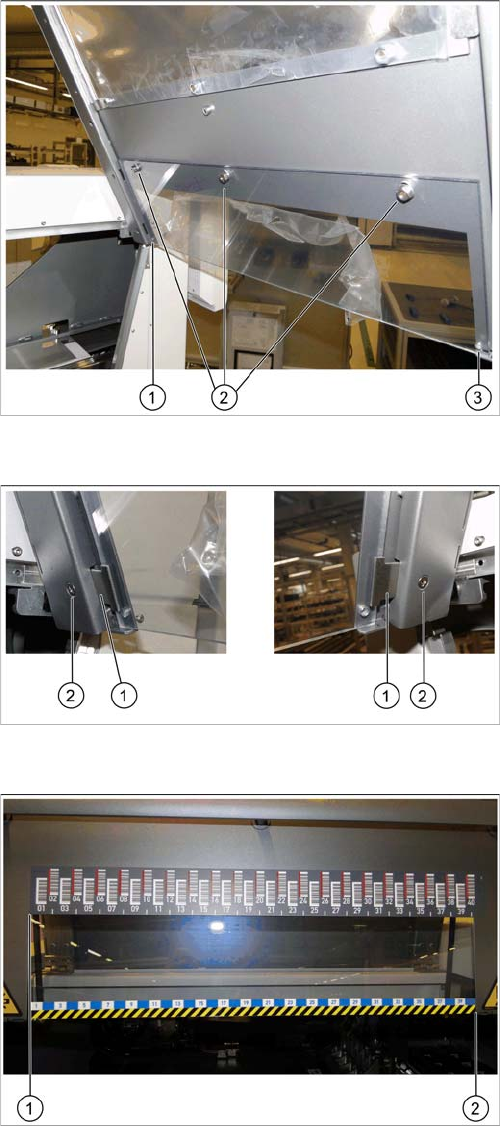
Fixture points for protective plate
► Hook the protective plate onto the three bolts and fas-
ten these into place with the three washers and the
hexagonal nuts (2) that you previously removed.
► Also secure the protective plate with the fixture
sheets on the left (1) and right (3).
Screwing the fixture sheets into place
► Insert the fixture sheets on the left and right (1).
► Screw the fixture plates (2) into place with the screws
that you previously removed.
The barcode ruler must be flat against the disk on the left
of all locations (1).
► Use adhesive to fix the track ruler at all locations to-
wards the machine center (2).