00197369-02_AI_PPW_2te_Reihe_X-Serie-S_de_en.pdf - 第66页
Installation X4i S - Installing the NC Row 2 3.1.1 Prepar atory Steps 66 NC Row 2 - NC in Front of MTC 2/WPC PPW 2te R eihe - PPW vor MTC 2/WPC Fixture points for protect ive plate ► Hoo k the pr otective p late onto the…
Installation
3.1.1 Preparatory Steps X4i S - Installing the NC Row 2
NC Row 2 - NC in Front of MTC 2/WPC PPW 2te Reihe - PPW vor MTC 2/WPC 65
3
3 Installation
Installation
Select the right section for your machine:
▪ "3.1 X4i S - Installing the NC Row 2" [ ➙ 65]
▪ "3.2 X3 S / X4 S - Installing the NC Row 2" [ ➙ 83]
3.1
3.1 X4i S - Installing the NC Row 2
X4i S - Installing the NC Row 2
3.1.1
3.1.1 Preparatory Steps
Preparatory Steps
► Move the component trolley out of the machine.
► Switch off the machine, disconnect it from the power supply and secure it to prevent unauthorized
reactivation. Observe the instructions in section "1.2 Preparatory Work..." [ ➙ 58].
► Perform the following modifications to the machine before you fit "nozzle changer row 2":
▪ "3.1.1.1 Adjusting the Hood" [ ➙ 65]
▪ "3.1.1.2 Adjusting the Y Buffer" [ ➙ 67]
▪ "3.1.1.3 Adjusting the Hand Guard" [ ➙ 68]
▪ "3.1.1.4 Moving the COT Insert to the Second Table Position" [➙69]
3.1.1.1
3.1.1.1 Adjusting the Hood
Adjusting the Hood
Before the COT insert can be moved to position 2, you need to replace the original protective cover at
the relevant location with the "protective sheet assembly".
Parts required from "protective sheet assembly SX4/DX4" [03085665-xx]
Quantity Designation Item number
1 Protective plate 03081408-xx
1 Track ruler and safety marking 03092020-xx
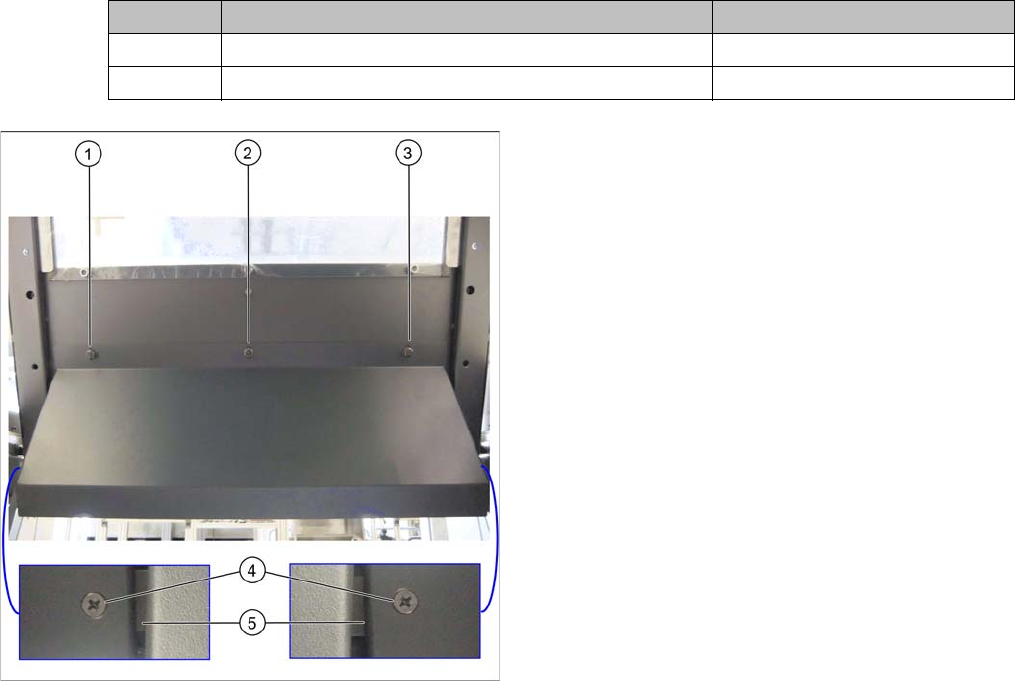
Hood with original protective cover at table position 1
There are three bolts on the inside of the cover (1) to (3),
where the protective cover is hooked up and fixed.
► Remove the three hexagonal nuts that fix the protec-
tive cover and lift off the original cover.
► At (4), remove the fixture sheet on both sides (5).
Installation
X4i S - Installing the NC Row 2 3.1.1 Preparatory Steps
66 NC Row 2 - NC in Front of MTC 2/WPC PPW 2te Reihe - PPW vor MTC 2/WPC
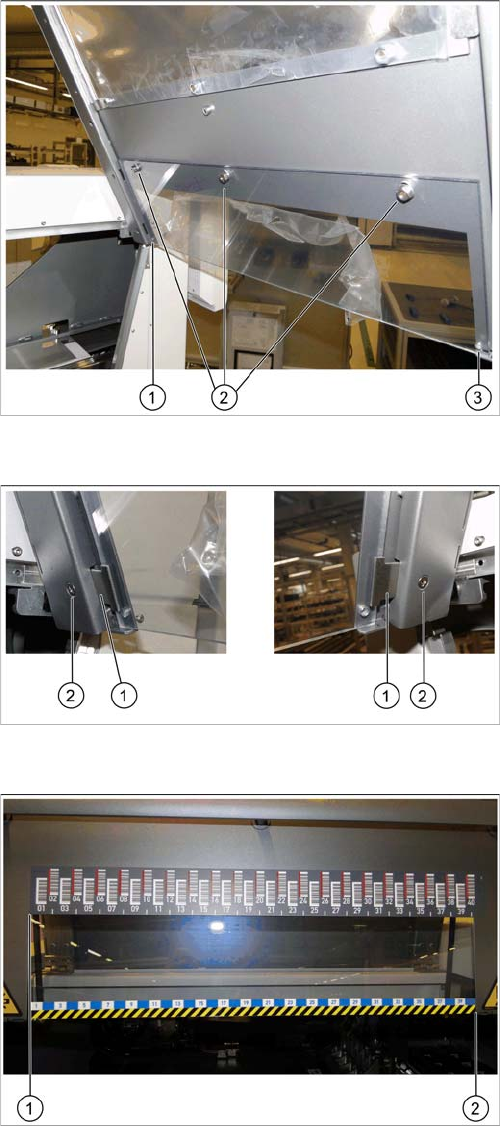
Fixture points for protective plate
► Hook the protective plate onto the three bolts and fas-
ten these into place with the three washers and the
hexagonal nuts (2) that you previously removed.
► Also secure the protective plate with the fixture
sheets on the left (1) and right (3).
Screwing the fixture sheets into place
► Insert the fixture sheets on the left and right (1).
► Screw the fixture plates (2) into place with the screws
that you previously removed.
The barcode ruler must be flat against the disk on the left
of all locations (1).
► Use adhesive to fix the track ruler at all locations to-
wards the machine center (2).
Installation
3.1.1 Preparatory Steps X4i S - Installing the NC Row 2
NC Row 2 - NC in Front of MTC 2/WPC PPW 2te Reihe - PPW vor MTC 2/WPC 67
3.1.1.2
3.1.1.2 Adjusting the Y Buffer
Adjusting the Y Buffer
Before the COT insert can be moved to position 2, you need to shorten the length of the Y buffer at the
relevant location.
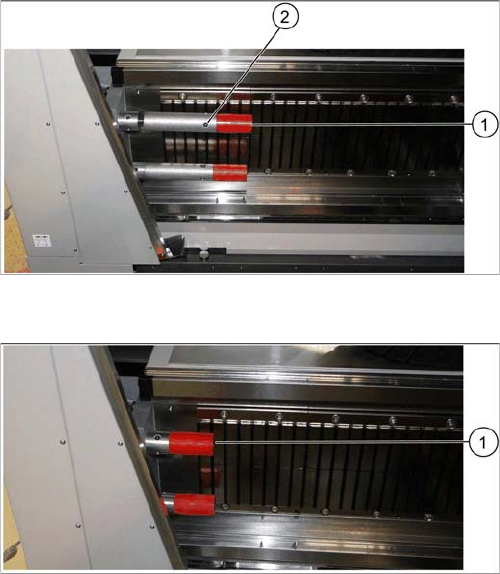
Length of Y buffer at table position 1
► Unscrew the top red buffer with the help of an Allen
key (1). Pay attention to the bushing.
► Insert the Allen key into one of the auxiliary holes (2)
and remove the middle section of the buffer.
► Repeat these steps for the lower buffer.
Length of Y buffer at table position 2
► Reinsert the red buffer and screw it tight (1).