00197369-02_AI_PPW_2te_Reihe_X-Serie-S_de_en.pdf - 第99页
Installation 3.2.5 Final work: X3 S / X4 S - Installing the NC Row 2 NC Row 2 - NC in Front of MTC 2/WPC PPW 2te Reihe - PPW vor MTC 2/WPC 99 3.2.4.8 3 . 2 . 4 . 8 I n s e r t in g a n d F ix in g t h e N C Inserting and…
Installation
X3 S / X4 S - Installing the NC Row 2 3.2.4 Location 2 with WPC and Twin/CPP
98 NC Row 2 - NC in Front of MTC 2/WPC PPW 2te Reihe - PPW vor MTC 2/WPC
3.2.4.7
3.2.4.7 Connecting the NC Row 2
Connecting the NC Row 2
► Set the jumpers (if present) on the nozzle changers (see "4.1.1 Jumpers on the Nozzle Changer"
[ ➙ 101]).
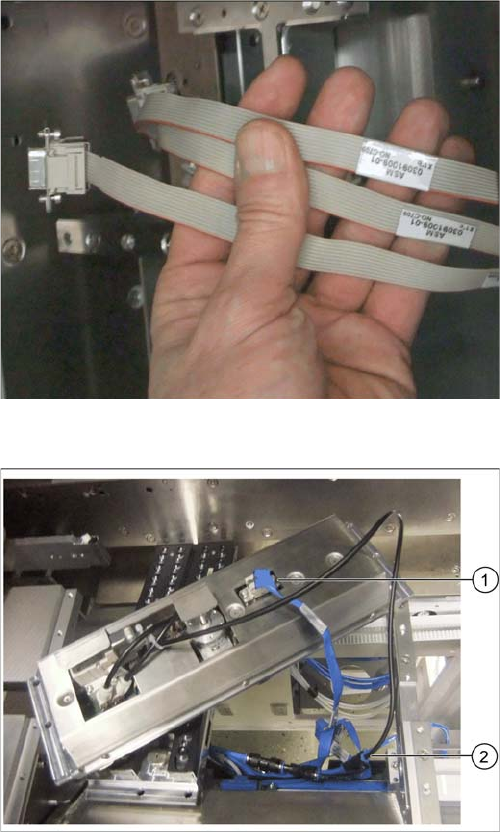
Data cable for NC 2 and SPS
Labeled data cables have been prepared in the machine
for the various configurations of nozzle changers with and
without Smart Pin Support (SPS).
▪ X1*a (NC 1)
▪ X1*b (SPS (1) or NC 2 (without SPS))
▪ X1*c (NC 2 with SPS)
▪ X1*d (SPS2)
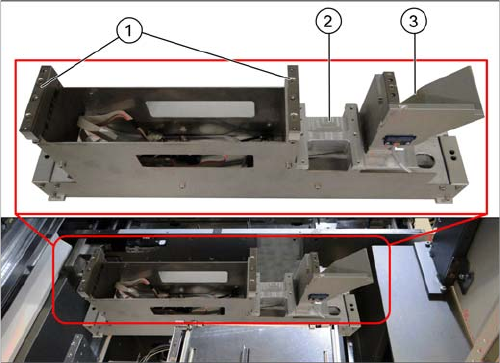
Underside of NC 2 with data cable and compressed air
line (example of X4i S)
► Connect the relevant data cable to the underside of
the NC 2 (1).
► Connect the compressed air line to the free connec-
tion on the Y coupling (2).
Installation
3.2.5 Final work: X3 S / X4 S - Installing the NC Row 2
NC Row 2 - NC in Front of MTC 2/WPC PPW 2te Reihe - PPW vor MTC 2/WPC 99
3.2.4.8
3.2.4.8 Inserting and Fixing the NC
Inserting and Fixing the NC
3.2.5
3.2.5 Final work:
Final work:
► Push the component trolley back into the relevant location.
► Switch the machine back on and boot the station computer.
► Perform a complete reference run.
► Switch over to the operator level Service.
► Select either Machine Calibration or Single Calibration and then the nozzle changer calibration.
► Calibrate the magazine position, reject position and pickup heights, one after the other.
► Select either Machine Calibration or Single Calibration and then the nozzle changer calibration.
► Calibrate the magazine position, reject position and pickup heights, one after the other.
► Calibrate the nozzle station and, if present, the SPS magazine(s).
3.2.5.1
3.2.5.1 Software Settings
Software Settings
► Add the second nozzle changer for the setup in SIPLACE Pro.
Inserting the NC
1. Basic assembly NC row 2
2. Installation point W5 magazine
3. Nozzle station
► Insert the nozzle changer and screw this to its
mounts.
► Insert the relevant magazine.
⇨ The installation is now complete.
► If you do not want to install another nozzle changer,
continue with section "3.2.5 Final work:" [ ➙ 99].
Installation
X3 S / X4 S - Installing the NC Row 2 3.2.5 Final work:
100 NC Row 2 - NC in Front of MTC 2/WPC PPW 2te Reihe - PPW vor MTC 2/WPC