BM料架治具使用手册.pdf - 第58页
Pickup position V R Set the view select lever to the R side. 4.1 Adjusting Wheel Position Feeder Inspection Unit 4.1−15 DX1OEC−31−240−B0 Adjustment Procedures 1. Secure the positioning pin to the clamp stand with an atta…
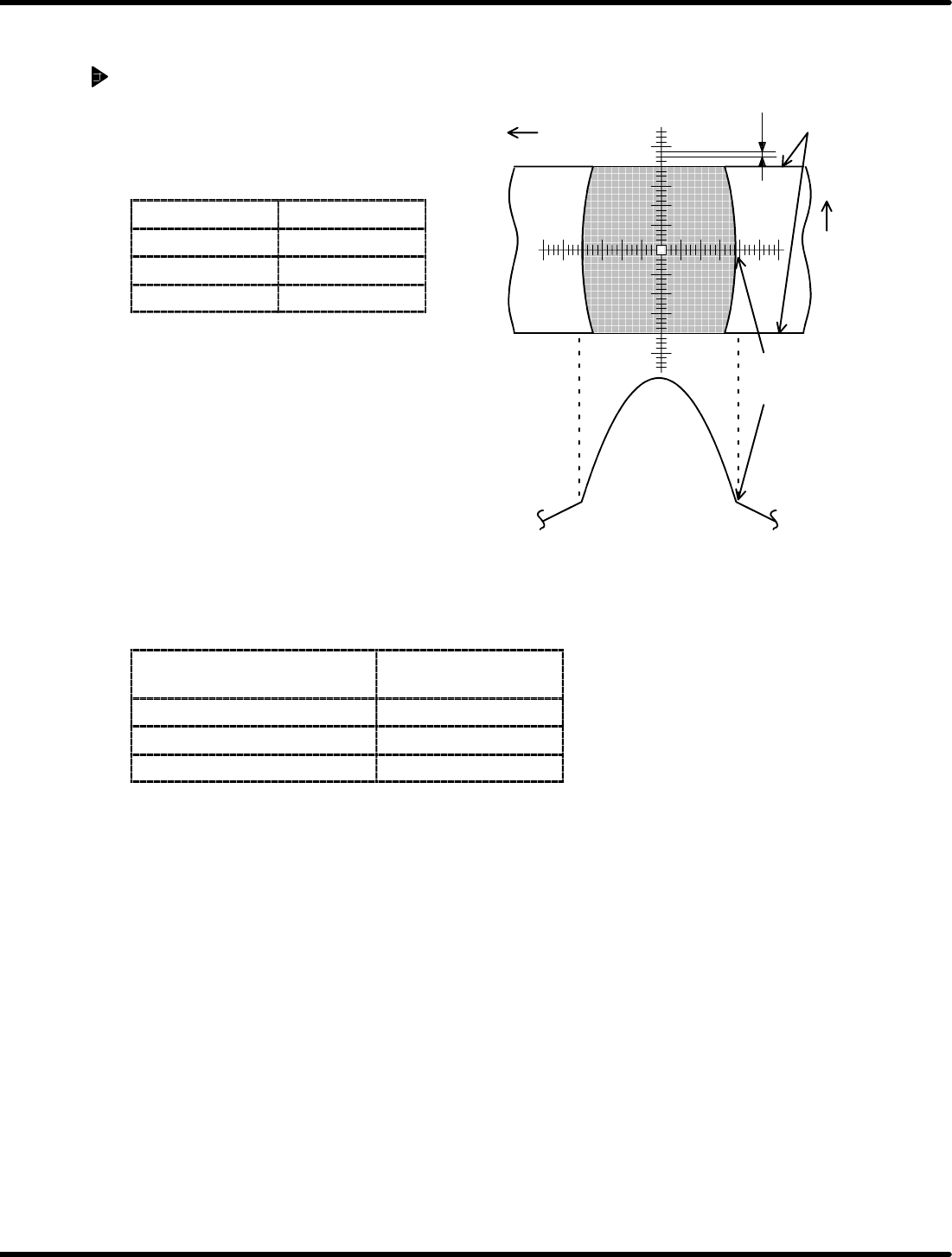
Y direction
(Feed direction)
0.025 mm
Graduation of scope: 0.025 mm/1 scale
Edge of wheel
X direction
(Tape width
direction)
Feeder Inspection Unit
4.1 Adjusting Wheel Position
4.1−14
DX1OEC−31−240−B0
4.1.6 Checking the Wheel Position in Tape Width Direction
Procedure
1. Wheel position check
Check if the edge of the wheel is within the
range of standard value.
=Specification=
Feeder type Standard
For 0603 ±0.1 mm
8to24mm ±0.15 mm
32 to 72 mm ±0.3 mm
2. If within the range
Hold down the lever to proceed the wheel by
six teeth and make checking similarly.
=REFERENCE=
• Check the wheel position for a complete
turn and if the wheel falls within the
standard range, the position is correct.
• Make checking every 12 crests regarding
the motorized feeders.
3. If out of the range
For the models in the table below, the wheel position in tape
feed direction can be adjusted.
Feeder type
Specifications
(Width)
Pneumatic feeder 8 mm * Note 1
Pneumatic double feeder 8mm
Motorized feeder 12 to 72 mm
* Note 1: Some feeders may not be adjusted depending on the time they were manufactured.
=REMARKS=
If the wheel position is deviated considerably due to fall or some impact, repair is needed.
=HINT=
Air may leak from the air conductor depending on the setting condition of the tape feeder on the
clamp stand.
In such a case, the position of the tape feeder is likely to be improper. Set it properly on the clamp
stand again.
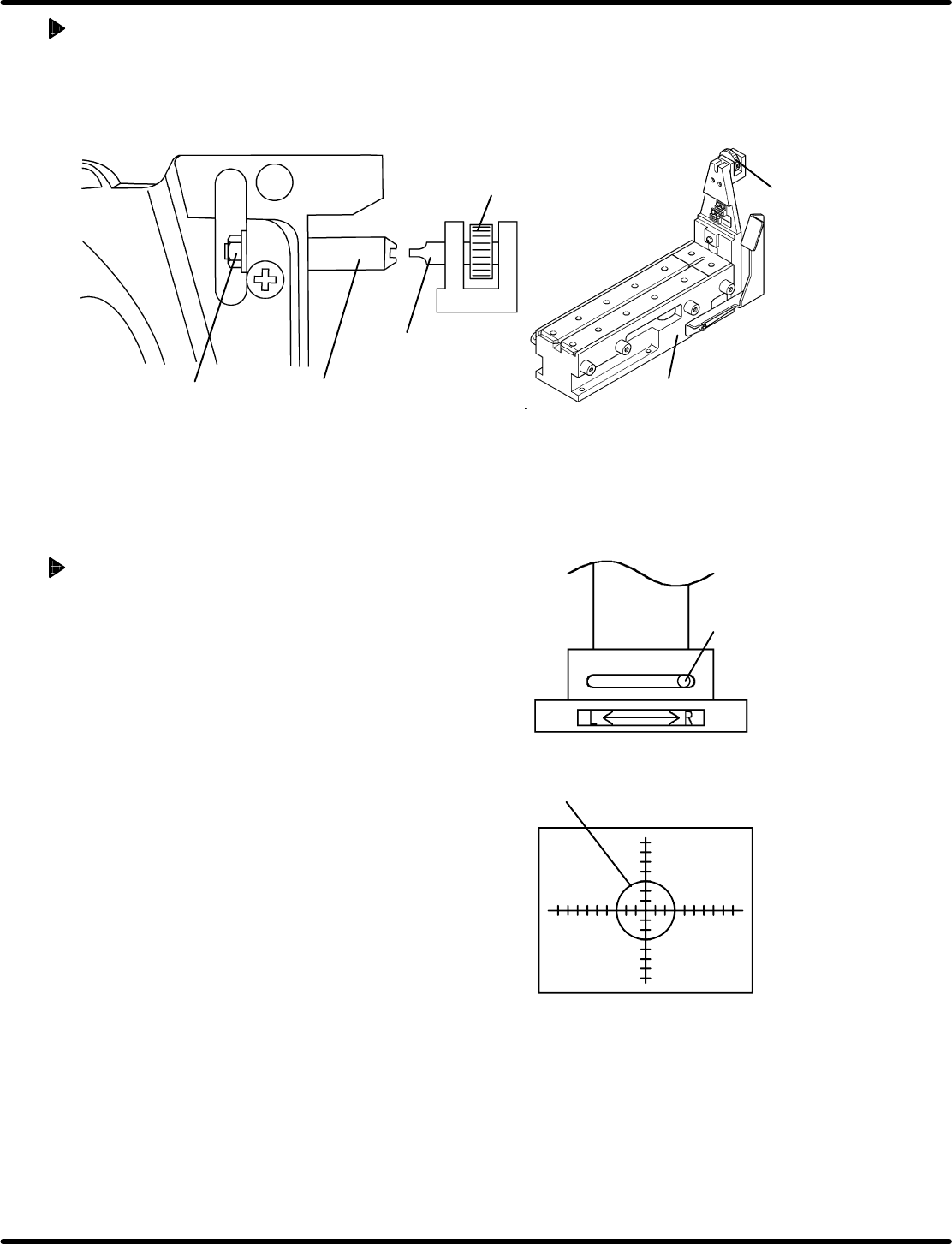
Pickup position V
R
Set the view select
lever to the R side.
4.1 Adjusting Wheel Position
Feeder Inspection Unit
4.1−15
DX1OEC−31−240−B0
Adjustment Procedures
1. Secure the positioning pin to the clamp stand with an attached screwdriver.
2. While securing the positioning pin with the screwdriver, loosen the nut using a wrench.
3. Since the positioning pin is decentered, rotate it with a screwdriver to adjust so that the feed wheel
tooth may fall within the standard value range of the stop position. Then secure the positioning pin.
Positioning pin
Nut
Screwdriver
Rotating knob
Clamp stand
Screwdriver
4.1.7 Checking Component Status at the Pickup Position
If the taping component is smaller than the camera
view (2 x 2.7 mm), the status of the fed component can
be checked at the pickup position.
Procedure
1. Attach the gauge jig to the clamp stand.
2. Set the camera view select lever to the R side.
3. Move the camera according to the V
R
of the gauge
jig and lock in place.
4. Attach a tape feeder containing the taping
components to the clamp stand.
This completes the preparation.
(For steps 1. through 4. , refer to ‘4.1.2’ and ‘4.1.3
Preparations for Inspection’.)
5. Set the panel switch according to the model of the
tape feeder to be checked.
Pressing “AUTO” allows you to check the status of
the fed taping components during feeding.
(For details on handling the panel switches, refer to
‘4.2 Tape Feeder Operation Check’.)

Feeder Inspection Unit
4.1 Adjusting Wheel Position
4.1−16
DX1OEC−31−240−B0
= MEMO =