BM料架治具使用手册.pdf - 第61页
Feeder Inspection Unit 4.2 T ape Feeder Operation Check 4.2−2 DX1OEC−31−250−A0 Applicable feeder Criteria Motorized feeder Pneumatic feeder (Double feeder included) Operation switches AUTO Performs feed operation accordi…
4.2 Tape Feeder Operation Check
Feeder Inspection Unit
4.2−1
DX1OEC−31−250−A0
4.2 Tape Feeder Operation Check
DX1OEC−31−250−A0
Sentence No.
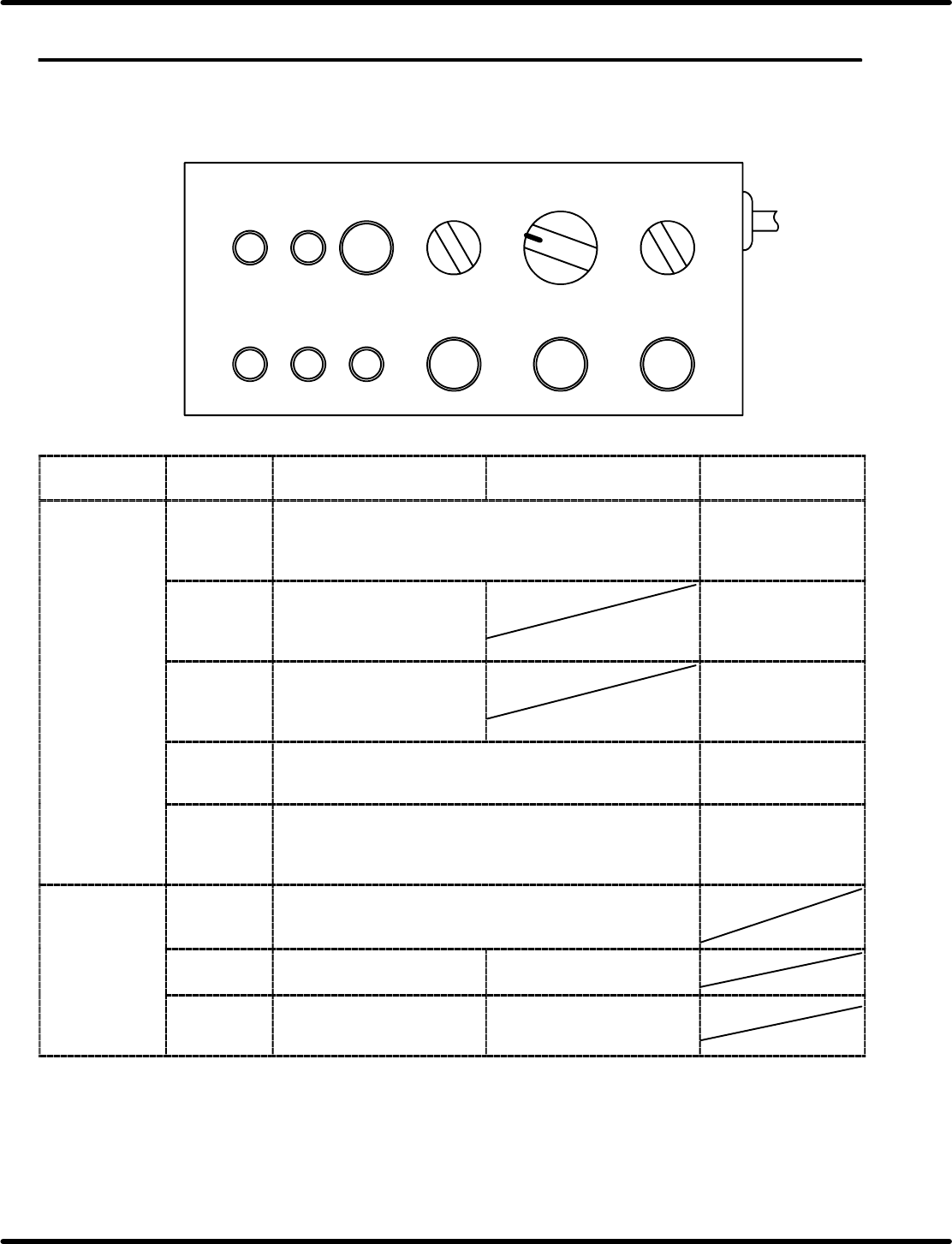
4.2.1 Control Panel Layout and Function
Here following describes the names and function of the switches on the control panel.
TAPE STATUS
LED ON
1
CASSETTE TYPE
2OP 2
FEED
TIMES
30
PEEL
SELECT
1
41
FEED
OK
ERROR TIME UP
AUTO FEED PEEL
Applicable
feeder
Pneumatic feeder
(Double feeder included)
Motorized feeder Criteria
Indicator lamps FEED OK Lights up when operation is normally finished after <AUTO>
is pressed.
When feeder
operation finishes
normally, the lamp will
come on.
ERROR Lights up if no feed operation
is executed within the
prescribed time after
“AUTO” is pressed.
Feeder operation
error
TIME UP Lights up if the cylinder
operation is not detected
within the prescribed time
after “AUTO” is pressed.
Feeder operation
error
TAPE Lights up when the tape detection sensor is turned ON.
(Available for the feeders with tape end detection function.)
Used when checking
sensor for proper
operation.
STATUS Lights up when the cylinder is at the forward limit or reverse
limit with the sensor ON.
(Checks the forward and reverse sensors of the cylinder for
proper operation.)
Check the cylinder
position and sensor
status.
Setting switches CASSETTE
TYPE
Usually, set to “1”.
When using a double feeder, set this switch to “2” to activate
the L side and set it to “1” to activate the R side.
FEED
TIMES
Sets the number of times to
feed. (1 to 4)
Set to “1”.
PEEL
SELECT
Usually, set to “0”.
For 32 mm paper tape, set to
“1”.
Set to “0”.

Feeder Inspection Unit
4.2 Tape Feeder Operation Check
4.2−2
DX1OEC−31−250−A0
Applicable
feeder
CriteriaMotorized feeder
Pneumatic feeder
(Double feeder included)
Operation
switches
AUTO Performs feed operation
according to the setting with
FEED and PEEL switches.
Performs feed operation. A series of feed
operation can be
made.
Check the operation
result with the
indicator lamps.
FEED Each time the button is
pushed, the feed cylinder
reciprocates.
Usually set to “OFF”. (Do not
push the switch.)
(Not used) Check the feed
cylinder for proper
operation.
PEEL Each time the button is
pushed, the peel cylinder
reciprocates.
(Used for 32 mm tape feeder
only.)
Usually set to “OFF”. (Do not
push the switch.)
(Not used) Check the peel
cylinder for proper
operation.
LED ON Enables the wiring check of the feeder select lamp. The feeder select
lamp will come on
whenever this switch
is pressed.
4.2 Tape Feeder Operation Check
Feeder Inspection Unit
4.2−3
DX1OEC−31−250−A0
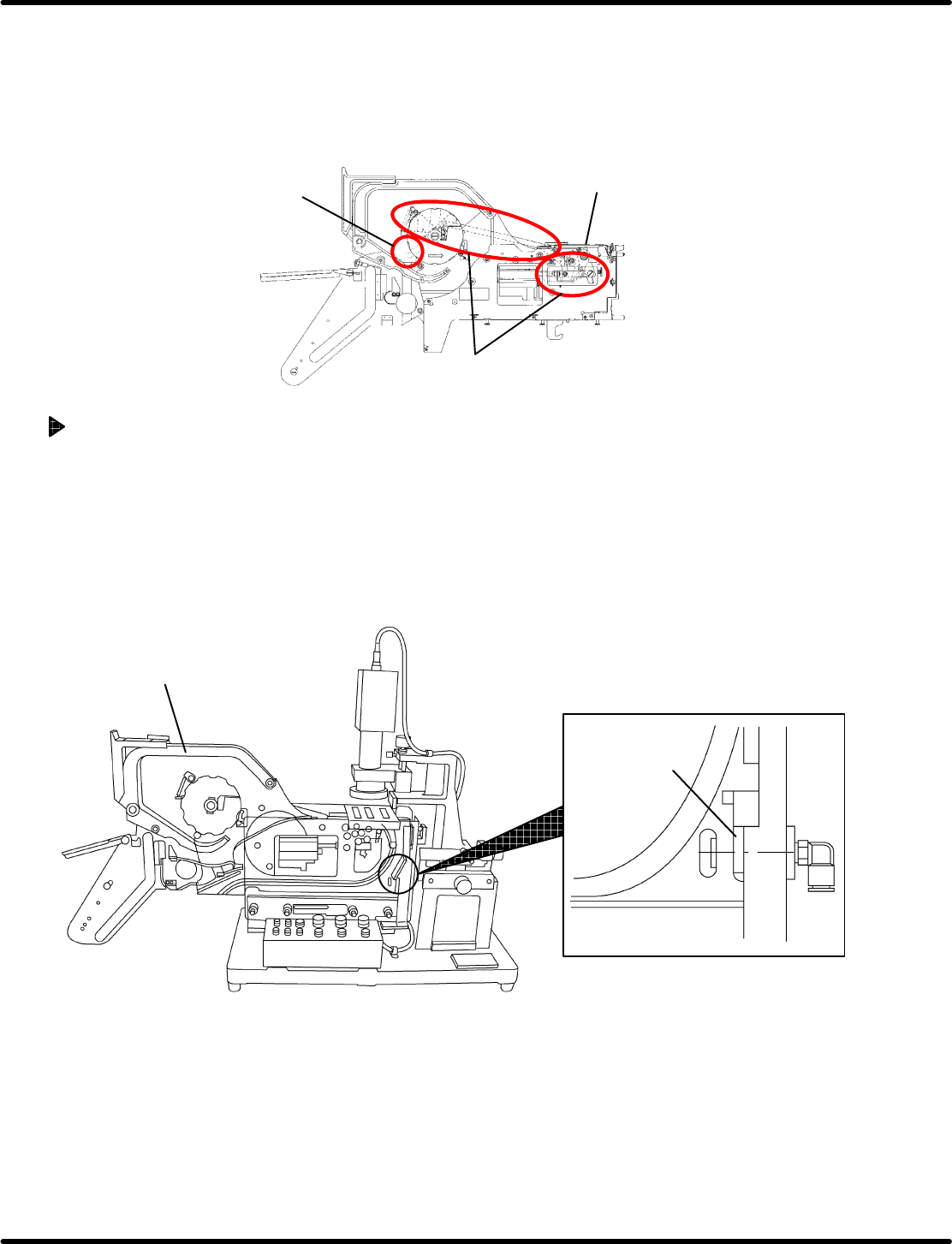
4.2.2 Preparations
=NOTICE=
Operating the pneumatic feeder allows some parts to be moved due to the link mechanism.
When touching the parts shown below, shut off the air pressure to the feeder to prevent your
hands from getting caught by the movable parts.
Winding lever
Link
Shutter
Turning ON the Power Box and Supplying Air
1. Turn ON the breaker switch.
2. Turn ON the main switch.
=REMARKS=
At this time, remove the tape feeder in advance.
3. Supply air.
(Refer to ‘4.1.3’ for details.)
4. Set a tape feeder onto the clamp stand.
Tape feeder to be
checked
Air conductor
=CHECK=
Check if the tape feeder and air conductor are in close contact with one another.
5. When set in position, the “STATUS” lamp on the control panel will come on. (Check the “STATUS”
lamp is lit.)
=REFERENCE=
If the “STATUS” lamp does not come on, request Panasonic Factory Solutions to repair the tape
feeder so that the reverse limit sensor of the feed or peeling cylinder may turn ON (Sensor LED
is lit.).