BM料架治具使用手册.pdf - 第67页
Feeder Inspection Unit 4.2 T ape Feeder Operation Check 4.2−8 DX1OEC−31−250−A0 Operation Check for the Cylinder Forward/Reverse Limit Sensors 1. Control panel switch settings Set the switches on the control panel accordi…
4.2 Tape Feeder Operation Check
Feeder Inspection Unit
4.2−7
DX1OEC−31−250−A0
4.2.4 Pneumatic Double Feeder
Checking Feed Operation
1. Control panel switch settings
Set the switches on the control panel according to the specified side (L or R side) of the feeder as
shown in the table below.
Switch
L side R side
CASSETTE TYPE 2 1
FEED TIMES Can be set
between 1 and 4.
Can be set
between 1 and 4.
PEEL SELECT Set to “0”. Set to “0”.
LED ON OFF (Do not push.) OFF (Do not push.)
FEED OFF (Do not push.) OFF (Do not push.)
PEEL OFF (Do not push.) OFF (Do not push.)
2. Operation check
Activate the side of the cylinder specified with ‘CASSETTE TYPE’. (Check the respective cylinders for
proper operation by changing with ‘CASSETTE TYPE’.)
Pressing the “AUTO” switch will turn ON the feed cylinder to move it from the reverse limit to the
forward limit. In 20 ms after the feed cylinder reaches the forward limit, it will turn OFF to move back
to the reverse limit. The tape feeder will repeat feeding at the time set by the “FEED TIMES” switch
and will terminate action.
When operation finishes normally, the ‘FEED OK’ lamp will come on.
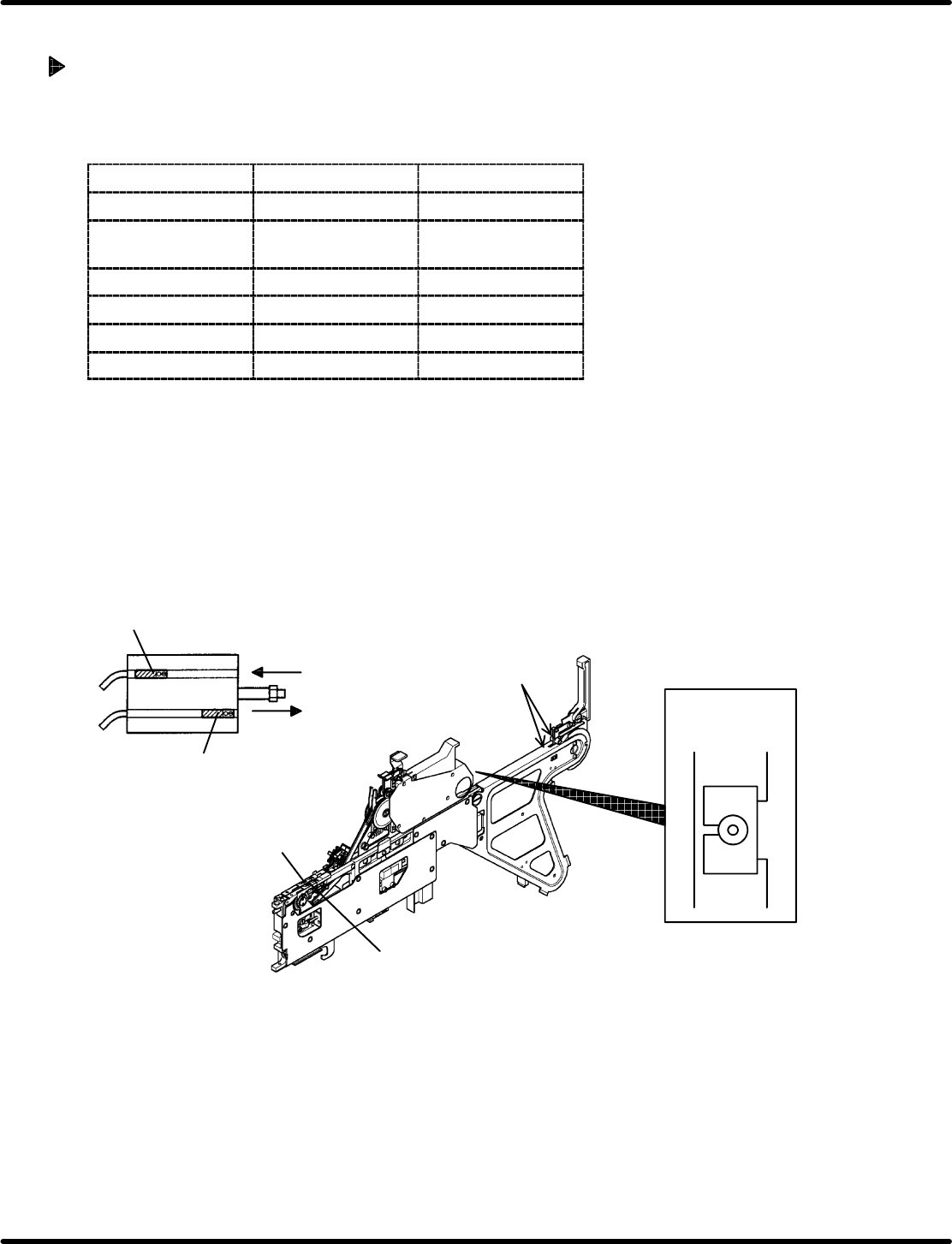
Left wheel
Right wheel
Tape end detection lever
Wheels and Tape End Detection Lever (Pneumatic Double Feeder)
Cylinder sensor (L/R side)
Forward limit sensor
Reverse
Forward
Reverse limit sensor
Feeder select
lamp
=HINT=
• If the ‘ERROR’ lamp lights up during operation, the probable cause is the space between the forward
limit and reverse limit sensors is too narrow. In such a case, make the space between them wider.
If the ‘TIME UP’ lamp lights up during operation, either of these sensors has become slow to react
or irresponsive.
• If the ‘TIME UP’ or ‘ERROR’ lamp lights up after pressing the “AUTO” switch, either the “FEED”
or “PEEL” switch is ON. In such a case, turn it OFF.
Feeder Inspection Unit
4.2 Tape Feeder Operation Check
4.2−8
DX1OEC−31−250−A0
Operation Check for the Cylinder Forward/Reverse Limit Sensors
1. Control panel switch settings
Set the switches on the control panel according to the specifications of the feeder as shown in the
table below.
Switch
L side R side
CASSETTE TYPE Set to “2”. Set to “1”.
FEED TIMES Set to “1”. Set to “1”.
PEEL SELECT Set to “0”. Set to “0”.
LED ON OFF (Do not push.) OFF (Do not push.)
PEEL OFF (Do not push.) OFF (Do not push.)
2. Operation check
Operation check for the feed cylinder forward/reverse limit sensors
• Turning ON the “FEED” switch will move the feed cylinder to the forward limit and then will stop.
If the ‘STATUS’ lamp comes on, the operation and the position of the forward limit sensor are correct.
• Turning OFF the “FEED” switch will move the feed cylinder to the reverse limit and then will stop.
If the ‘STATUS’ lamp comes on, the operation and the position of the reverse limit sensor are correct.
• The “FEED” switch can be held in the ON state. Usually, set it in the OFF state (do not push).
If any problem is observed in the forward/reverse limit sensors of t he feed cylinder and peeling
cylinder, they need be checked by us. Contact Panasonic service office.
Operation Check for the Feeder Select Lamp
Turning ON the “LED ON” switch will light up the lamp while the switch is held down. When the “LED
ON” switch is OFF (Turns to OFF if released.), the feeder select lamp will go out.
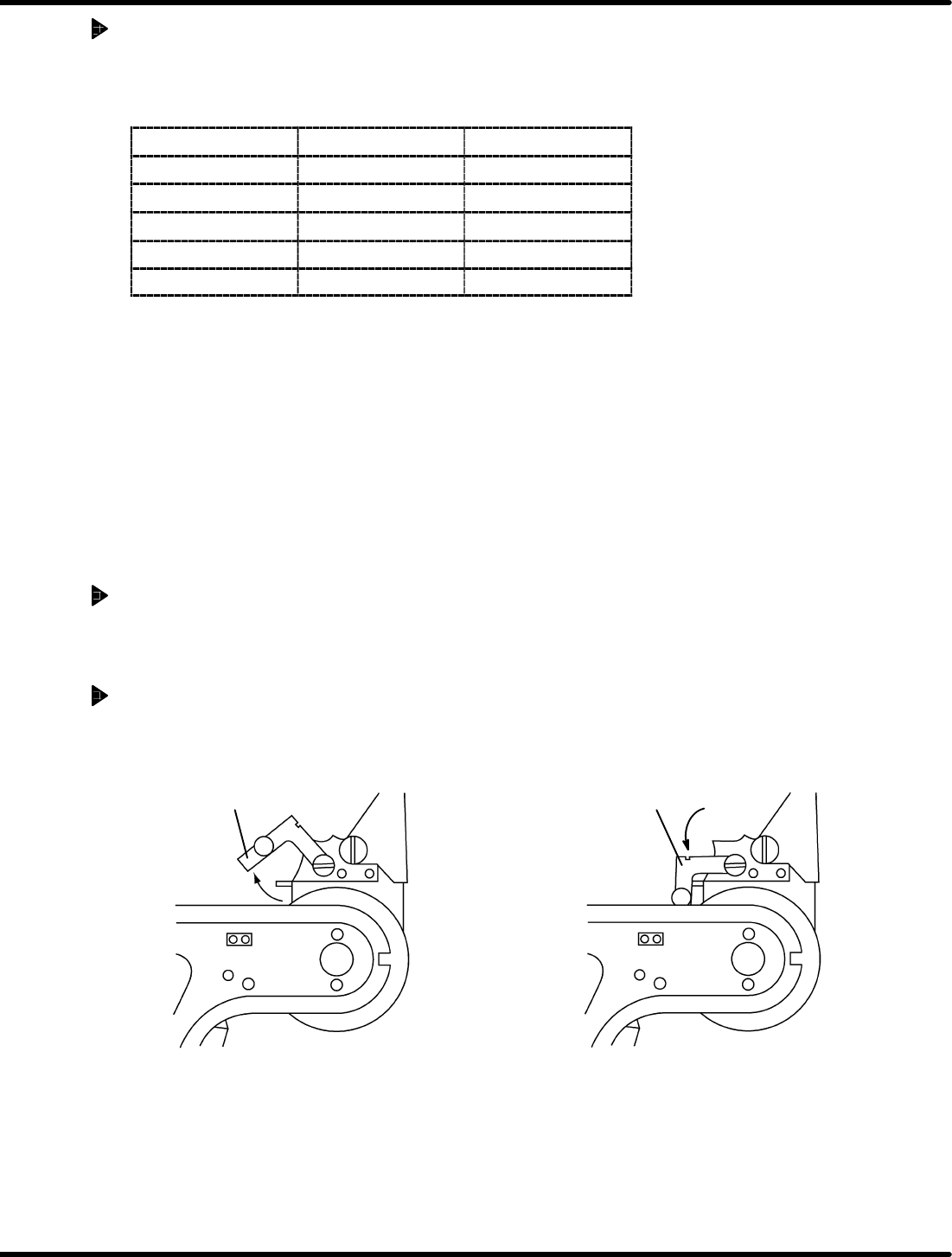
Operation Check for the Tape Exhaust Detection Sensor
If the tape in the feeder is exhausted, the ‘TAPE’ lamp will come on.
As shown in the drawing below, check the sensor for proper operation by using the tape end detection
lever.
‘TAPE’ lamp goes out. (When tape is set
in position.)
‘TAPE’ lamp comes on (When tape exhaustion occurs.)
Tape end detection lever
Tape end detection lever
4.2 Tape Feeder Operation Check
Feeder Inspection Unit
4.2−9
DX1OEC−31−250−A0
4.2.5 Motorized Feeder
Feed Operation Check
1. Control panel switch settings
Switch
Setting
CASSETTE TYPE Set to “1”.
FEED TIMES Set to “1”.
PEEL SELECT Set to “0”.
LED ON OFF (Do not push.)
FEED OFF (Do not push.)
PEEL OFF (Do not push.)
2. Operation check
Pressing “AUTO” will make feeding for the length specified on the feeder side and then will stop.
When operation finishes normally, the ‘FEED OK’ lamp will come on.
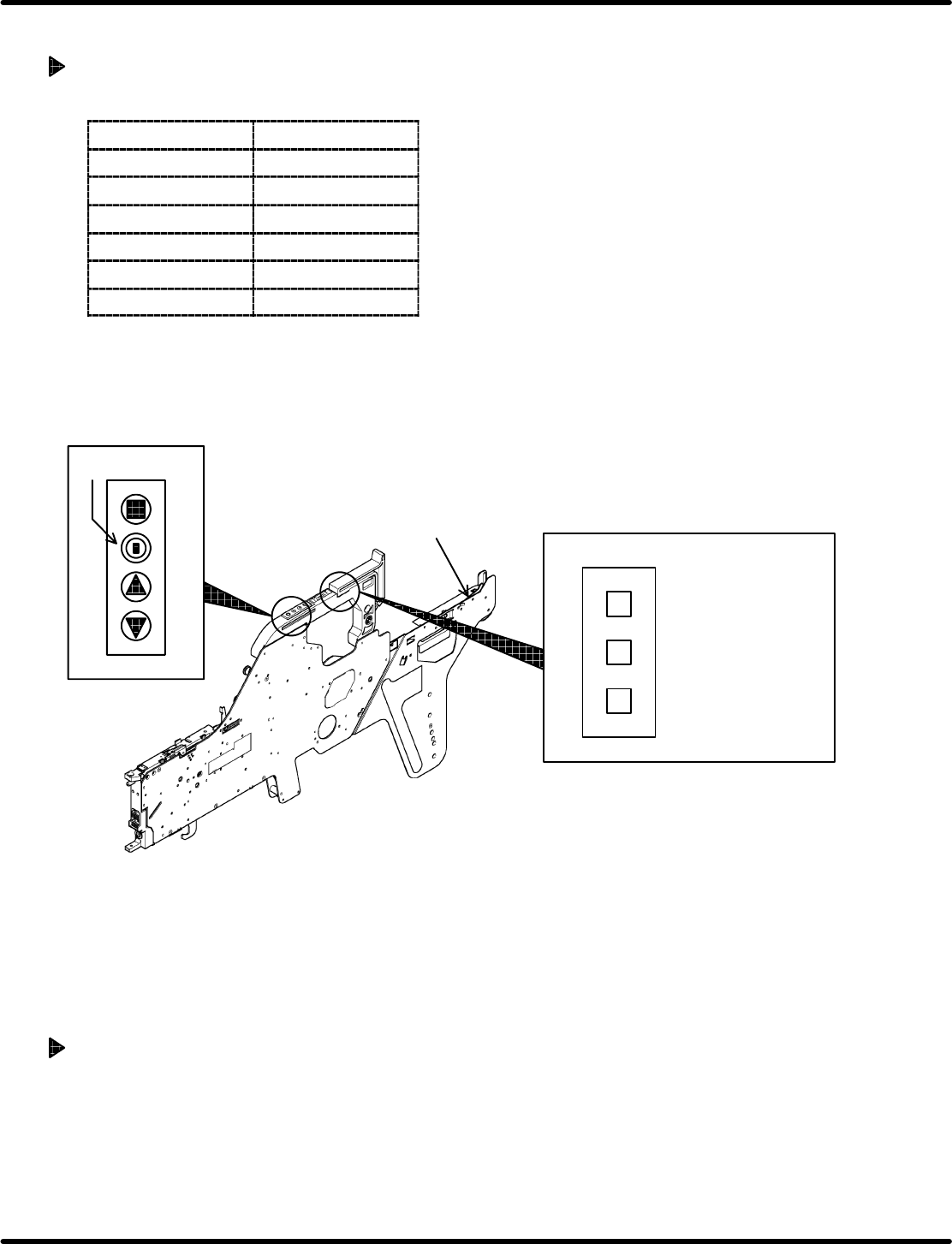
4
−
+
Status indicator
lamp
=HINT=
Set the amount of
feed on the f eeder
side within the
allowable range.
Dial switch
Motorized feeder
Tape end detection lever
=HINT=
• If wanting to reattempt the feed operation with “AUTO”, set so that the tape end detection lever
will detect a tape exhaustion beforehand. (Doing so prevents an operation error of the motorized
feeder.)
• If the ‘TIME UP’ or ‘ERROR’ lamp lights up after pressing the “AUTO” switch, either the “FEED”
or “PEEL” switch is ON. In such a case, turn it OFF.
Operation Check for the Feeder Select Lamp
Turning ON the “LED ON” switch will light up the lamp while the switch is held down. When the “LED
ON” switch is OFF (Turns to OFF if released.), the feeder select lamp will go out.