BM料架治具使用手册.pdf - 第72页
4.2 T ape Feeder Operation Check Feeder Inspection Unit 4.2−13 DX1OEC−31−250−A0 =REMARKS= • If any of the errors marked with an asterisk (*) in the LED column occurs, turn OFF the feeder once and turn it back ON. Contact…
Feeder Inspection Unit
4.2 Tape Feeder Operation Check
4.2−12
DX1OEC−31−250−A0
Error Indication of the Motorized Feeder (Reference)
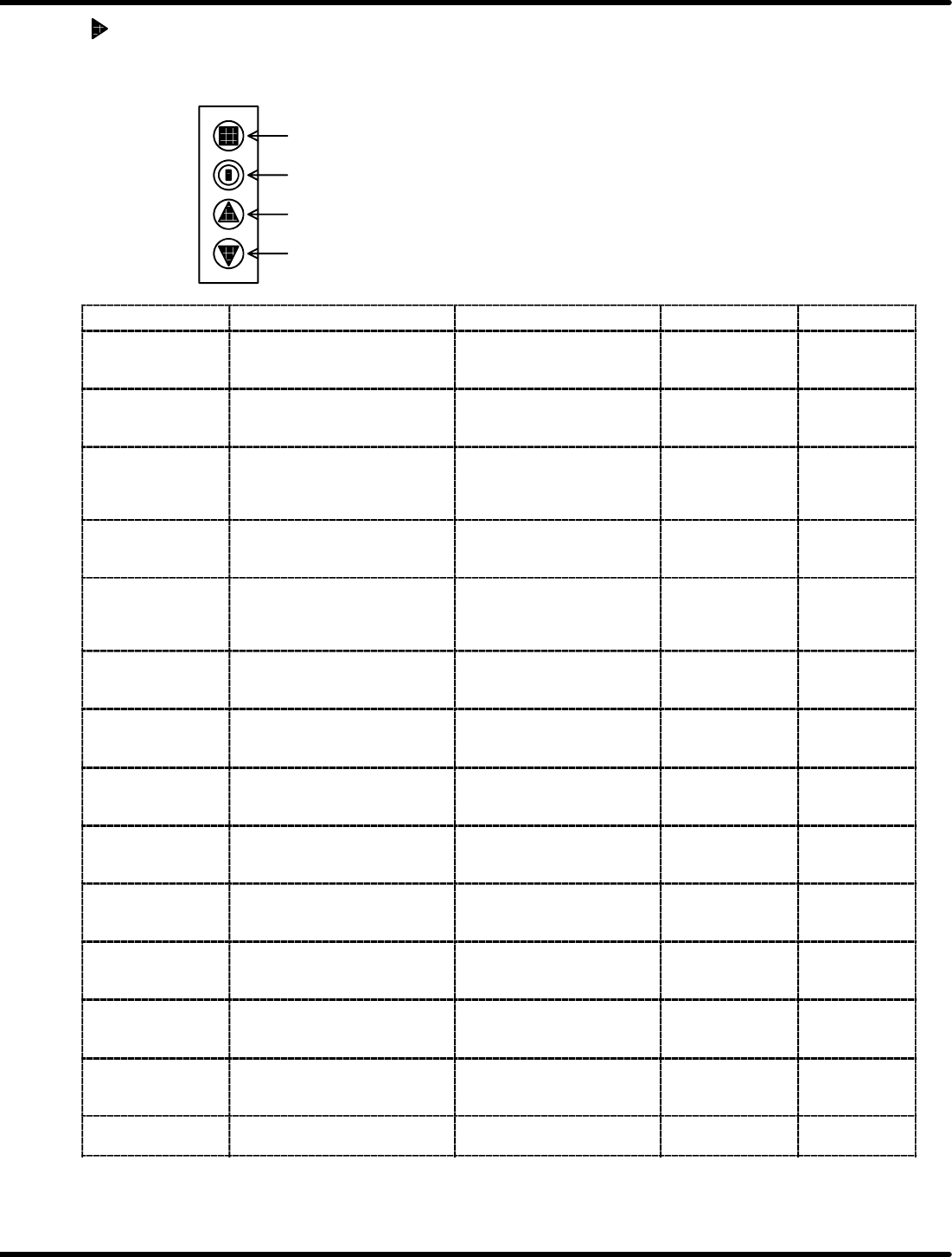
The LEDs on the control switches vary with the status as shown in the table below.
Control switches
(1)
(2)
(3)
(4)
Status Description Cause/Countermeasure How to reset LED
Feed overload
Stops operation if the torque
command of the feed motor
exceeds the setting value.
Feeding has been stopped due
to jammed component, etc.
Press the reset
switch on the
feeder.
Flashes in red 2
times
Servo position
overdeviation
Stops operation if the position
deviation of the feed motor
exceeds the setting value.
Check the reel turn resistance
or tape for jamming, etc.
Press the reset
switch on the
feeder.
Flashes in red 2
times
Origin OFF
Stops operation if an origin sensor
signal will not be sent within 2
turns of the feed motor when
returning to its origin.
The origin sensor may be
defective.
Press the reset
switch on the
feeder.
Flashes in red 2
times
Cylinder setting error
Checks feed count by the feed
pitch in the cylinder mode and
stops operation if an error occurs.
Modify the feed count value in
the parts library on the machine
side.
Press the reset
switch on the
feeder.
Flashes in red 3
times
Winding timeout 1
Stops operation if a winding limit
signal does not turn OFF even
after the tape is wound for the
specified length.
Check if the tape is exhausted
or take−up motor is locked.
Press the reset
switch on the
feeder.
Flashes in red 4
times
Winding timeout 2
Stops operation if no winding
command is issued during two
feeding operations.
Check if the tape is not
jammed, etc.
Press the reset
switch on the
feeder.
Flashes in red 4
times
Illegal function
changeover
Issues a warning if the setting
switch is changed when the power
is ON.
Check the setting value and
press RESET for more than 2 s
to determine.
Press the reset
switch on the
feeder.
Flashes in red 4
times
Servomotor
overcurrent
Stops operation if overcurrent is
detected in the feed motor.
The servomotor is damaged or
improper connection, etc.
Press the reset
switch on the
feeder.
Lit red *
Servo sensor error
Stops operation if a sensor input
error is detected in the feed motor.
The encoder cable may be
broken.
Press the reset
switch on the
feeder.
Lit red *
Feed signal error
Stops operation if a feed signal
does not turn OFF after feeding is
finished.
Trouble occurred in the
machine.
Press the reset
switch on the
feeder.
Lit red *
Overvoltage
Stops operation if the power
voltage (24V) is over the allowed
range.
Trouble occurred in the supply
power.
Press the reset
switch on the
feeder.
Lit red *
Undervoltage
Stops operation if the power
voltage (24V) is under the allowed
range.
Trouble occurred in the supply
power.
Press the reset
switch on the
feeder.
Lit red *
Other
(current detection
error)
Stops operation if the A/D
conversion offset value exceeds
the allowed range.
Trouble occurred in the current
detection circuit.
Press the reset
switch on the
feeder.
Lit red *
Monitor mode
Ignores winding timeout 1 and
receives a feed signal only.
− − Flashes in red

4.2 Tape Feeder Operation Check
Feeder Inspection Unit
4.2−13
DX1OEC−31−250−A0
=REMARKS=
• If any of the errors marked with an asterisk (*) in the LED column occurs, turn OFF the feeder once
and turn it back ON. Contact service if the error persists.
• Press the button (1) to reset the motorized feeder.
Or detach it from the clamp stand.
• Refer to the ‘Operation Manual of the Tape Feeder’ for details on the error items.

Feeder Inspection Unit
4.2 Tape Feeder Operation Check
4.2−14
DX1OEC−31−250−A0
= MEMO =