AL1_SiplaceX-en.pdf - 第265页
1 - 1 1 S tudent Guide SIPLACE X Ausgabe 02/2005 7 Sit est 11 7.2.2 Precondition for calibrate the machine ➠ S tart SITEST . ➠ Under menu item "Main view", click "O verall refe rence run", to re feren…

1 - 10
Student Guide SIPLACE X
7 Sitest Ausgabe 02/2005
10
7.2.1 Calibration in general
Fig. 7.2 - 1 General sequence to calibrate the machine
Note:
Since the head modularity concept means that either a Twin Head or a C&P head can be fitted to
each gantry, the functions displayed for processing area 1(PA1) and processing area 2 (PA2) re-
spectively may vary. The functions described for PA1 and PA2 below apply for a Twin Head con-
figured on gantry 3 and a C&P head configured on gantry 1 on a X2 machine.
Sequence of calibrate the Siplace X machine with SW 601
Preperation the machine
All heads and cameras..
Sitest: Button "Calibrate machine...."
Calibrate and
teach of positions
(conveyor edges,
conveyor width,
PCB reference
corner, pick-up
positions)
PCB Mapping
Head Mapping
Gantry 1
(X2/X3/X4)
Gantry 2
(X4)
Gantry 4
(X3/X4)
Gantry 3
(X2/X3/X4)
PCB Mapping PCB Mapping PCB Mapping
Head Mapping Head Mapping Head Mapping
Calibrate and
teach of positions
(conveyor edges,
conveyor width,
PCB reference
corner, pick-up
positions)
Calibrate and
teach of positions
(conveyor edges,
conveyor width,
PCB reference
corner, pick-up
positions)
Calibrate and
teach of positions
(conveyor edges,
conveyor width,
PCB reference
corner, pick-up
positions)

1 - 11
Student Guide SIPLACE X
Ausgabe 02/2005 7 Sitest
11
7.2.2 Precondition for calibrate the machine
➠ Start SITEST.
➠ Under menu item "Main view", click "Overall reference run", to reference all gantry- and head-
axes.
➠ Configure the nozzle changer and filling level
–
Precondition for calibrate the nozzle changer
C&P head (6/12/20) :
(1) Every magazine of the nozzle changer has to be configured with a nozzle type.
(2) No nozzle on segment 1.
(3) There must be minimum one nozzle present and configured (1) in garage 1 of every magazine.
TWIN- head : (1) Garage 1 of the nozzle changer has to be "empty"
(2) Both nozzles at the TWIN head has to be configured.
NOTE : For C&P12 head it is also possible to configure every magazine "empty" and the head
"full" of nozzles.
➠ Check the zero point correction D-Axis Twin head
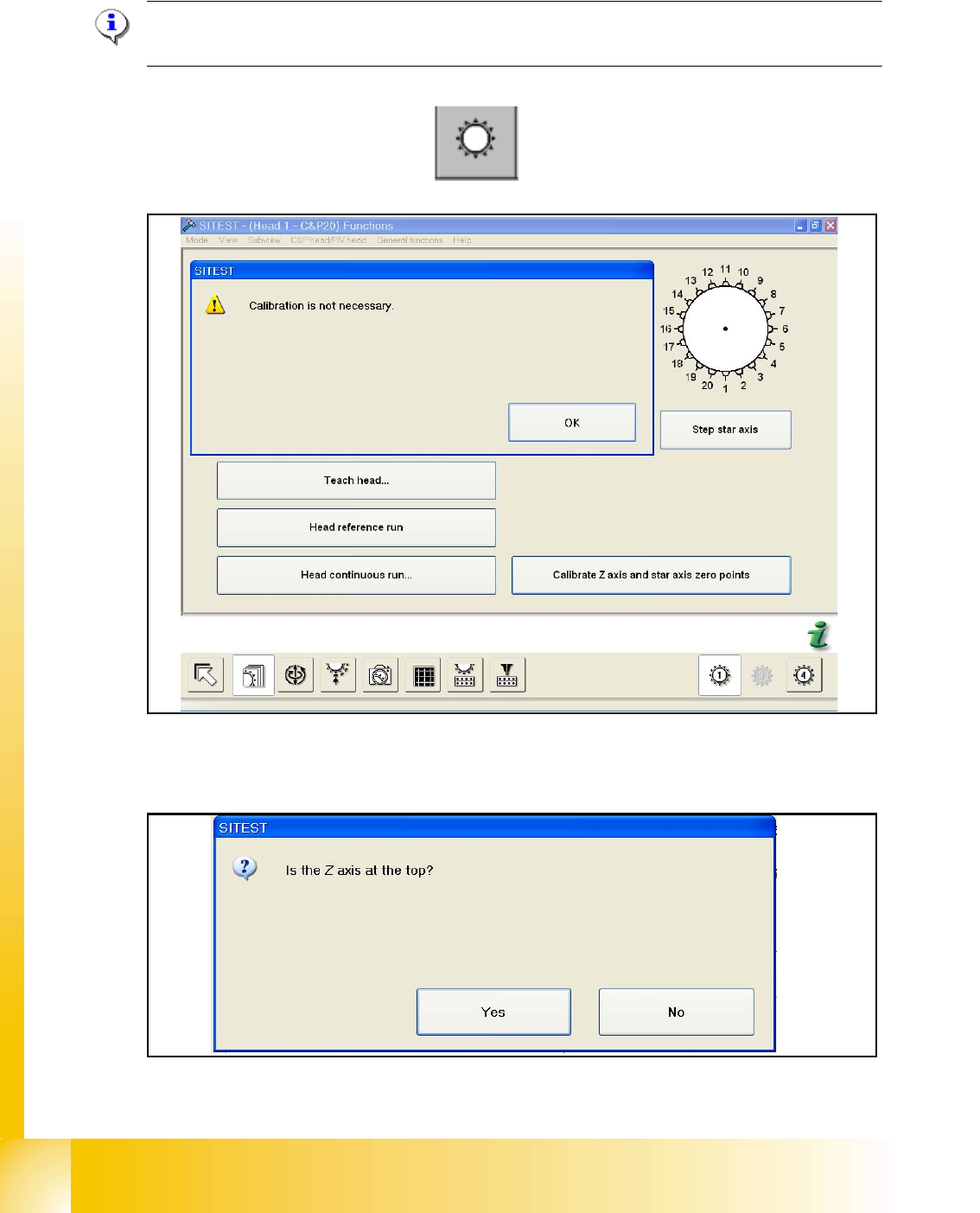
➠ Check the zero point correction Z- and Star Axis with the Sitest at the C&P20 head,
if necessary or an error message appears.
1 - 12
Student Guide SIPLACE X
7 Sitest Ausgabe 02/2005
12
7.2.3 Determination of Z- and Star axes zero point correction (Sitest) :
NOTE : Determination of Z- and star axes zero point correction is only offered if the zpc- values
of the Achs_ver.ma and the EPROM (head) are not the same.
Are the value identical appears the following message:
– Start the Sitest --> Head functions
The values are not identical, you have to calibrate the zero point correction and the following mes-
sage appears:
Check the position of the Z-Axis and press Yes.