EUKYX-199-4110_G5S2_Instruction_Vol4_E.pdf - 第150页
EUKYX 2-21 199-4100 2.2 Management Information list Code D isp lay Ar ea A Di spl ay Are a B 0d3c 03 Pi n Rec og Li ght ( head1 ) The c omp s ize is over t he pin re co g ligh t sp ec. 0d3c 04 Pi n Rec og Li ght ( head 2…
EUKYX
2-20199-4100
2.2 Management Information list
Code Display Area A Display Area B
0d3203
Feeder Base Up/Down
Operation Restrictions
(Block1)
Please set “a feeder connection check / feeder serial communication”
of test operation as “Disable” for a unit check.
0d3204
Feeder Base Up/Down
Operation Restrictions
(Block1)
Please check that Recycle Conveyor is not carried on a feeder base,
and perform UP operation of a base again.
0d3301
Feeder Base Up/Down
Operation Restrictions
(Block2)
In order to make a feeder base go up and down, please remove the
stock stick unit on a base.
0d3302
Feeder Base Up/Down
Operation Restrictions
(Block2)
Please check that the stock stick unit is not carried on a feeder base,
and perform UP/DOWN operation of a base again.
0d3303
Feeder Base Up/Down
Operation Restrictions
(Block2)
Please set “a feeder connection check / feeder serial communication”
of test operation as “Disable” for a unit check.
0d3304
Feeder Base Up/Down
Operation Restrictions
(Block2)
Please check that Recycle Conveyor is not carried on a feeder base,
and perform UP operation of a base again.
0d3401
And without substrate
transfer step without
mounting
Because there is no step installed, that does not provide a substrate
transfer, can not operate.
Simple or cancel the skip, please go to the substrate transfer.
0d3501
High Speed Head flux
coating impossible
Because you do not want to use the side view camera, can not high
speed dip. Verify the following settings, please change.
System setting : Side view camera : Use
Test run :No parts : Detected
0d3601
The appointed external
communication
Please clear the P-OUT mode.
0d3701 VM Data Error
Abnormalities occurred in data expansion. Please inspect with a tester
again.
0d3801
The cart for
independent production
(Block1) Test operation When you do not carry out a feeder
connection check, please raise the feeder base which carries out
production use.
0d3802
The cart for
independent production
(Block2) Test operation When you do not carry out a feeder
connection check, please raise the feeder base which carries out
production use.
0d3901
Unit exchange of Tray
Feeder
Please restart.
0d3a01 Comp. existence check Please turn off the Valve.
0d3b01 Check for a function The nozzle is not applicable to this operation.
0d3901
Uninstalled Brush Unit
(Block1)
Please put a brush unit on F107-F153.
0d3902
Uninstalled Brush Unit
(Block1)
Please put a brush unit on F107-F119.
0d3903
Uninstalled Brush Unit
(Block1)
Please put a brush unit on F107.
0d3904
Uninstalled Brush Unit
(Block2)
Please put a brush unit on F207-F253.
0d3905
Uninstalled Brush Unit
(Block2)
Please put a brush unit on F207-F219.
0d3906
Uninstalled Brush Unit
(Block2)
Please put a brush unit on F207.
0d3c01 Pin Recog Light (head1) The high speed head cannot move to the pin recog light.
0d3c02 Pin Recog Light (head2) The high speed head cannot move to the pin recog light.

EUKYX
2-21199-4100
2.2 Management Information list
Code Display Area A Display Area B
0d3c03 Pin Recog Light (head1) The comp size is over the pin recog light spec.
0d3c04 Pin Recog Light (head2) The comp size is over the pin recog light spec.
0d3d01 Comp Height Ovr (head1) This function cannot use. Beause of comp height over.
0d3d02 Comp Height Ovr (head2) This function cannot use. Beause of comp height over.
0d3e01
Full detection of trash
box for component
(Block1)
Trash box for component become full. Please clean trash box for
component.
0d3f01
Full detection of trash
box for component
(Block2)
Trash box for component become full. Please clean trash box for
component.
EUKYX
2-22199-4100
3. Machine Information
3. Machine Information
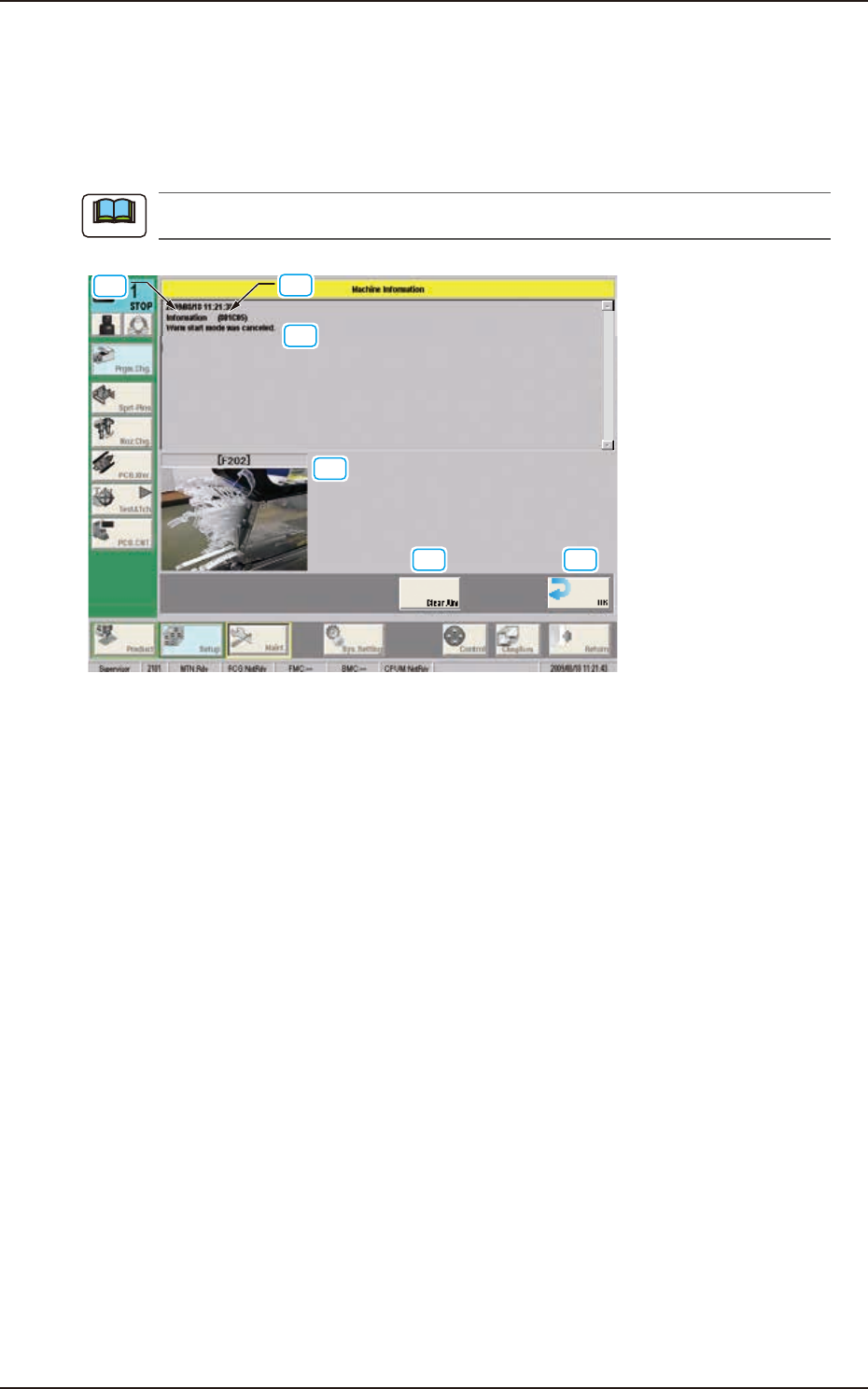
3.1 “Machine Information” Window
In this window, various machine information items are displayed during the machine operation.
The machine is not stopped with this indication.
[1]
[6]
[3]
[2]
[4] [5]
F4B3
[1] Machine Information Code
The machine information code is described in this text box.
[2] Display Area A
The outline of the machine information is displayed in this area.
[3] Display Area B
The details of the machine information are displayed in this area.
[4] [Clear Alm] Button
When this button is pressed, only the alarm buzzer is canceled.
[5] [OK] Button
When this button is pressed, the “Machine Information” window is closed.
[6] Error Display
When a full previous notice of the cover tape has occurred (Error code 0x802401), the feeder
number and the image are displayed. (Three subjects can be displayed in order from the left.)
Note