PCBRM_User_Manual_R9.pdf - 第91页
Pcbrm15 & PCBRM Syst em 5.2 User ’s Manual Chapter 6: Troubl eshootin g Part No. 4005.00.906 6- 5 6.2 Temperature Controller Installation (CAL 9900 only) 1. Remove the socket by pressing in the lock b uttons. 2. Slid…

Pcbrm15 & PCBRM System 5.2 User’s Manual Chapter 6: Troubleshooting
Part No. 4005.00.906 6-4
6.1.3 Poor Solder Results
1. Un-level pump (see leveling procedure).
2. Un-level machine (see leveling procedure).
3. Z-Axis height not set correctly.
4. Baffle not being used.
5. Flow duration not set correctly.
6. Ramp up/down not set correctly.
7. Consult Air-Vac for further help.
6.1.4 Excessive Fluctuation of Solder Wave
1. Replace motor belt.
2. Motor belt tension too tight.
3. Solder pump needs to be removed from pot, disassembled and thoroughly cleaned.
4. Consult Air-Vac for further help.
6.1.5 Fault Indication (CAL9900 only)
Temperature display, on a fault indication, is replaced by “EE” flashing, followed by a digit. This indicates
that an error has been detected in the system. Action should be taken as follows:
EE1 – SENSOR BURNOUT – CHECK SENSOR AND/OR CONNECTIONS THEN KEY*
EE2 – TEMPORARY SYSTEM ERROR SELF CLEANING
EE8 – LOSS OF CALIBRATION
EE9 – NVM DATA FAULT (NON VOLATILE MEMORY)
Note: Repair & Re-Calibration
DUE TO THE NATURE OF ITS DESIGN, THE 9900 CAN ONLY BE REPAIRED AND RE-CALIBRATED
BY USING SPECIAL EQUIPMENT AND SHOULD BE RETURNED TO AIR-VAC IF FOUND TO BE
FAULTY.
Note
TO RESET EE9 FAULT (CAUSED BY SPIKING), TURN OFF MACHINE, PRESS “P” IN AND TURN ON
POWER UNTIL DISPLAY COMES ON LINE. PARAMETER LOCK NEEDS TO BE IN THE SETTING
POSITION.
Pcbrm15 & PCBRM System 5.2 User’s Manual Chapter 6: Troubleshooting
Part No. 4005.00.906 6-5
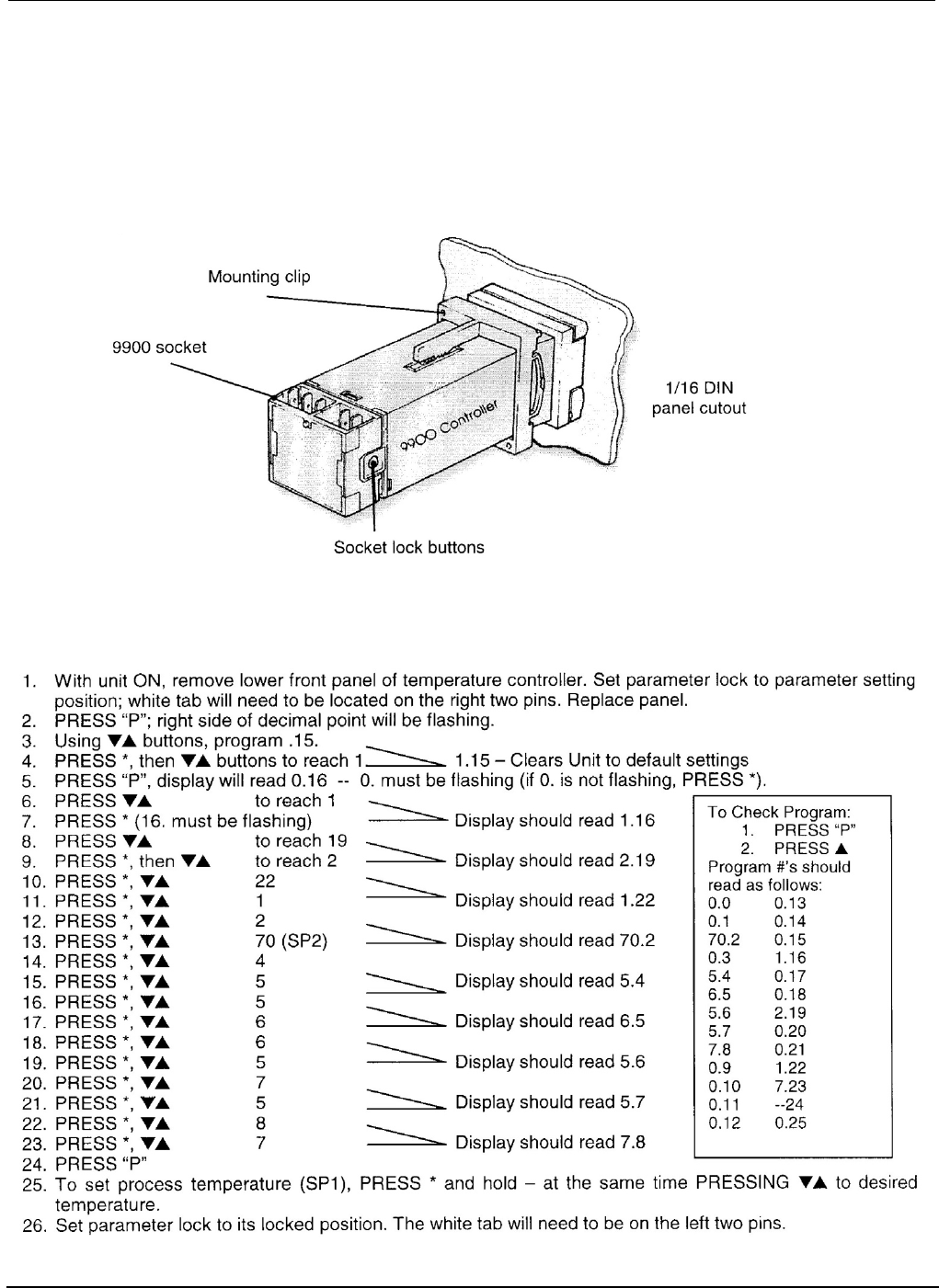
6.2 Temperature Controller Installation (CAL 9900 only)
1. Remove the socket by pressing in the lock buttons.
2. Slide the controller into the cut-out.
3. Fit the mounting clip by pressing it firmly against the panel, jacking screws optional.
4. Plug on the socket.
6.2.1 Setting Parameters of the CAL 9900 Temp Controller (also refer to Cal control booklet)

Pcbrm15 & PCBRM System 5.2 User’s Manual Chapter 6: Troubleshooting
Part No. 4005.00.906 6-6