00195166-0402_SM_D4_EN.pdf - 第133页
Service W ork Replacing the Limit Switch for the End Position Wi dth Adjustment Syste m [00365108-xx] Modular Conveyor Service Manual SIPLACE D4 133 4.4.12 Replacing the Limit Sw itch for the End Position Wid th Adjustme…
Service Work
Modular Conveyor Replacing the Stepping Motor of the Width Adjustment System [00367174]
132 Service Manual SIPLACE D4
Removal/Installation
See also:
J
6.5.1 Adjusting the Tension of the Conveyor Toothed Belt [
J
242]
X Loosen the screws fastening the lifting table
plate and remove the lifting table plate from the
lifting table unit.
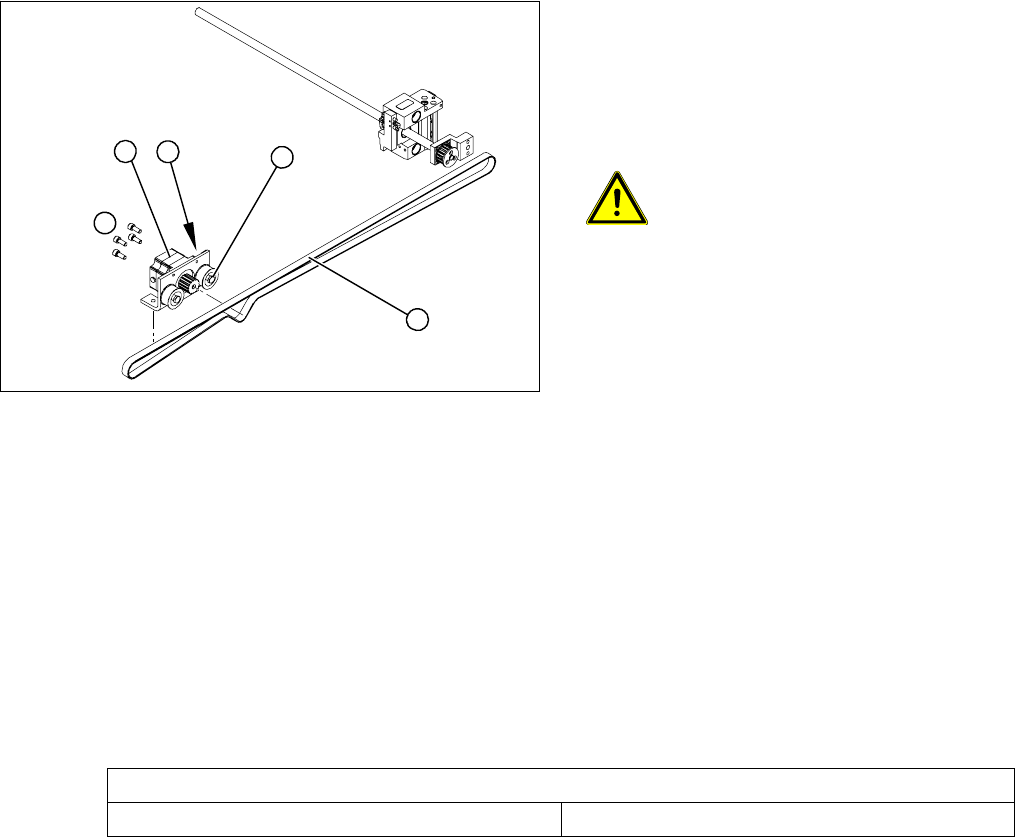
X Loosen the eccentric axis (1) on the deflection
pulley and relieve the tension on the drive
toothed belt (5).
ATTENTION: Toothed belt must not
come off!
When relaxing the toothed belt, make
sure the belt does not come off (skip)
the toothed disks at the 3 adjustment
units. This would cause incorrect
alignment of the adjustment units.
Secure these positions with a suitable
tool (screw clamp etc.)
X Remove the 4 fastening screws (3) and then
lift out the stepping motor (4).
X Unplug the connection cable in the cable duct.
X Fit the new stepping motor and reconnect the
system to the electrical system.
X Tension the drive toothed belt.
Position the measuring point of the belt
tension device at the strand center (i.e. the
longest distance between two toothed disks)
of the conveyor toothed belt.
X Set the tension of the drive toothed belt
according to the following values.
4
5
1
3
2
Belt tension - width adjustment
Toothed belt for the drive 24 Hz +/- 2 Hz
Service Work
Replacing the Limit Switch for the End Position Width Adjustment System [00365108-xx] Modular Conveyor
Service Manual SIPLACE D4
133
4.4.12 Replacing the Limit Switch for the End Position Width Adjustment System
[00365108-xx]
Parts
Limit switch on the assembly tray [00365002-xx]
Limit switch for width adjustment 1 [00365108-xx]
Limit switch for width adjustment 2 [00365109-xx]
Limit switch for width adjustment - on the conveyor side [00362345-xx]
Overview
Legend
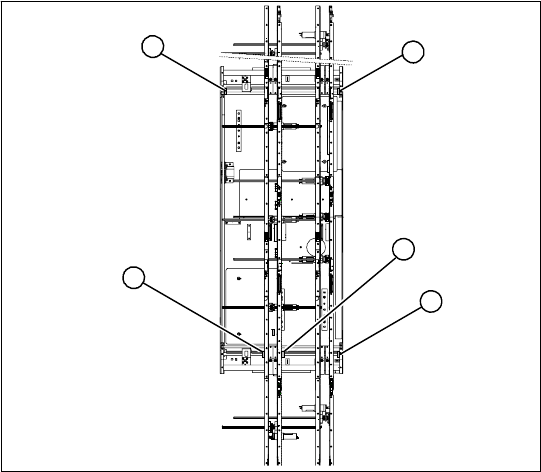
1. Limit switch 1 for width adjustment system of
the adjustment unit
2. Limit switch for width adjustment system (for
side)
3. Limit switch for assembly tray (for side)
4. Limit switch 2 for width adjustment system of
the adjustment unit
Limit switch on the input conveyor:
In the vicinity of the input conveyor there are 4 limit
switches under the conveyor sides. The limit
switch is designed to prevent the conveyor sides
hitting one another or the conveyor base.
Limit switch on the output conveyor:
There are 2 limit switches for the adjustment unit
in the vicinity of the output conveyors. They serve
to secure the transport area and to initialize the
adjustment unit during width adjustment.
2
1
4
3
2
Service Work
Modular Conveyor Replacing the Limit Switch for the End Position Width Adjustment System
134 Service Manual SIPLACE D4
Removal/Installation
NOTE:
The limit switches are preassembled
and include cables.
X However, if the limit switch itself is
faulty, the wiring can be unsoldered/
soldered right at the switch in
question.
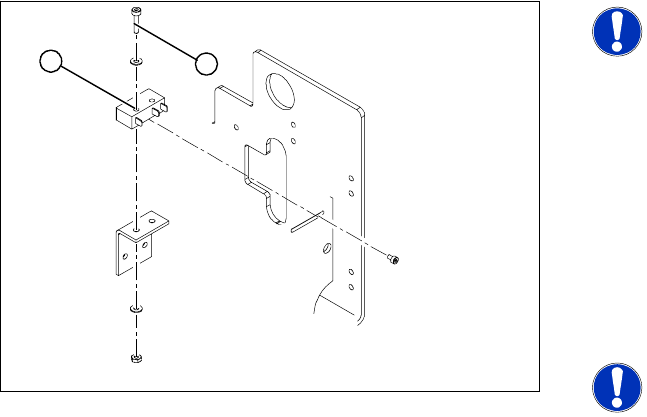
X Unsolder the connection wires on the faulty
limit switch (1).
X Loosen and remove the two screws (2)
fastening the defective limit switch.
X Fit the new limit switch and re-solder the
connection wires in the correct allocation.
NOTE:
If you have discovered a break in the
connection cable during a continuity
check, this cable must be unthreaded
as far as the conversion board of the
assembly tray and unplugged there.
This might be somewhat complicated
depending on the routing of cables
inside the machine base.
X You may wish to contact SIPLACE
Se
rvice regarding this
work.
Checking t
he position of the limit switch:
X Check the minimum and maximum width of
the relevant machine type and the parallelism
of the conveyor sides.
1
2