00195166-0402_SM_D4_EN.pdf - 第89页
Service W ork Cutter Component Handling Service Manual SIPLACE D4 89 X Remove the cover fr om the cable duct (5) . X Disconnect the co mpressed a ir conn ection (9) (Y socket un ion) fo r the cutter in th e cable duct (5…
Service Work
Component Handling Cutter
88 Service Manual SIPLACE D4
Removing the Cutter
X Turn the machine and then the flow of
compressed air ON.
X Disconnect the movable changeover table
from the machine and move it out of the
machine.
X Switch off the supply of compressed air at the
compressed air unit and actuate the needle
valve on the compressed air unit to bleed the
compressed air lines.
X Turn the machine OFF, disconnect the
machine from the line and turn off the flow of
compressed air at the compressed air unit.
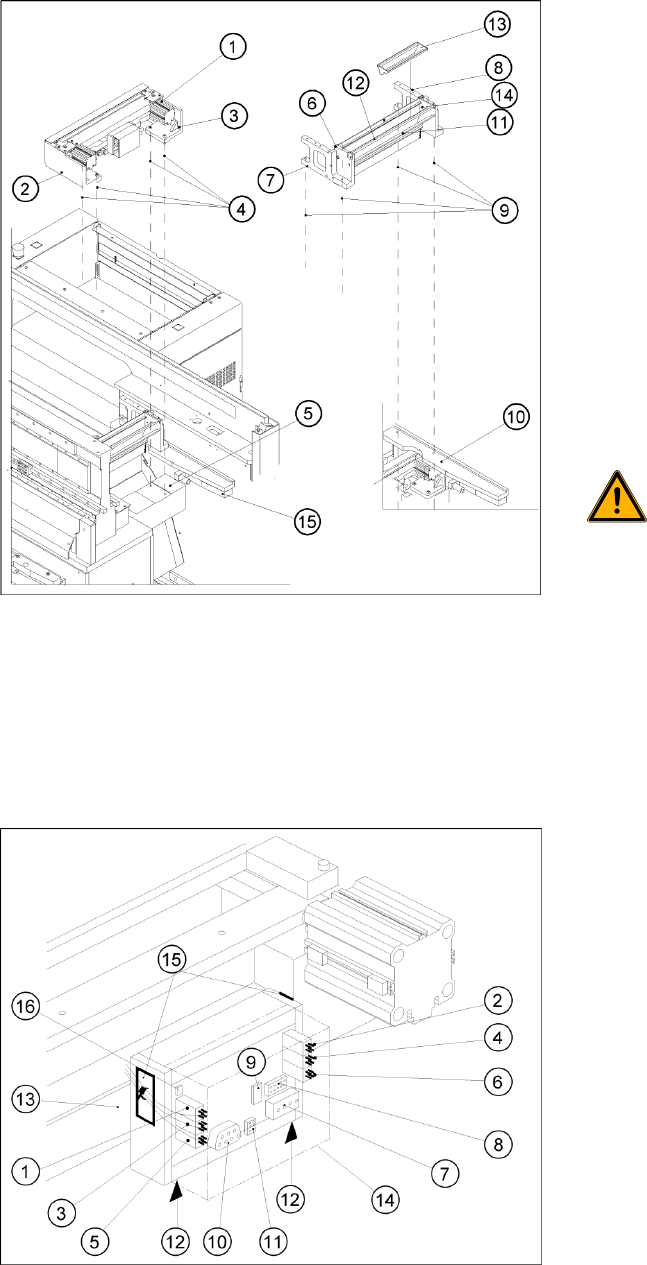
X Loosen the screws fastening the empty-tape
duct assembly (6) (M6x35), lift the empty-tape
duct and place it carefully down on the PCB
conveyor. The nozzle changer remains fixed
to the empty-tape duct.
WARNING:
There is always a risk of injuring
yourself on the cutting edge of the
blades.
X For this reason, the deflector plate,
the cover and the protective sheet
must be left in place.
X Undo the fixtures for the stop buffer assembly
(15) (two hexagon-socket head screws M8x25
on each side) on the left and right-hand sides
of the machine base, under the surface
supporting the changeover table.
X Remove the cover from the control board (14).
X Unplug the press-fit connection of the power
supply and the drive from the control board
(11, 10).
Service Work
Cutter Component Handling
Service Manual SIPLACE D4
89
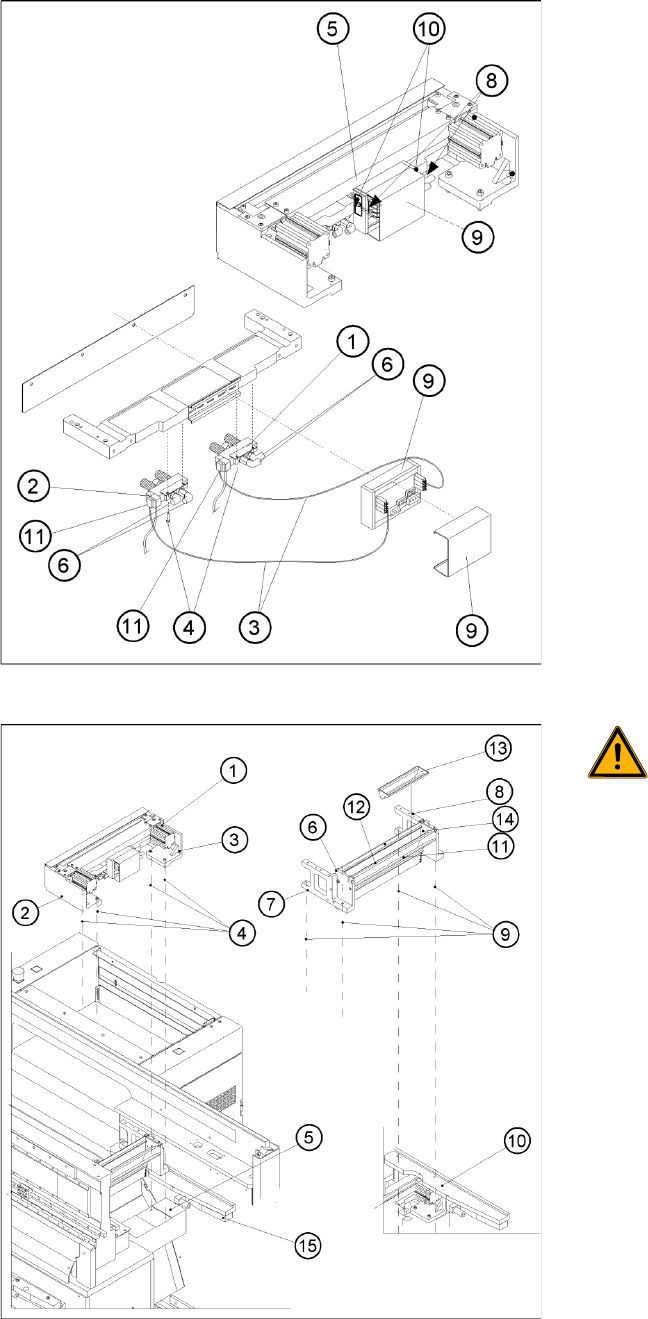
X Remove the cover from the cable duct (5).
X Disconnect the compressed air connection (9)
(Y socket union) for the cutter in the cable duct
(5).
X Unplug the plug-and-socket connection of the
power supply and the drive on the control
board (see -> 11, 10).
X Carefully undo the corresponding cable tie
(10) on the outside of the control board box.->
Do not damage the cables in this process.
WARNING:
The area under the cutter must be
clear.
X (e.g., do not place your feet under it
either).
X Loosen the screws fastening the cutter to the
machine base
2 M6x25 screws each (4), on the left (2) and
right cutter holders (3).
In exceptional cases, disks or plates may have
been installed between the contact surface of
the cutter on the machine base and the cutter
itself.
-> Save these disks / plates and re-install them
later.
X Securely hold the cutter tight at both ends.
X Pull the cutter out away from the contact
surfaces (on the machine base) towards the
outside of the machine (towards your body).
X Set the cutter down such that it does not pose
a risk of injury to uninvolved personnel either.
Put it in its own crate / container immediately.
Service Work
Component Handling Cutter
90 Service Manual SIPLACE D4
Installing the Cutter
X Make sure that the following warning signs are on the cover plate over the moveable blade (see
operating manual) and, if they are not, attach them:
Adhesive Label with text " Disconnect machine from line voltage and....",
Adhesive Label: Triangle warning symbol "Hand injury".
NOTE:
X If you are installing a new cutter, remove any excess oil or lubrication grease, before
installation.
CAUTION:
X Tighten the screws to the correct
torque.
X If there were disks or plates inserted between
the contact surface of the cutter on the
machine base and the cutter itself, re-install
them now.
The cutter must be shimmed to the same
height at all 4 contact points.
X In the reverse order to disassembly, place the
new pneumatic cutter on the contact surfaces
of the machine base and push it in to the
fixture position.
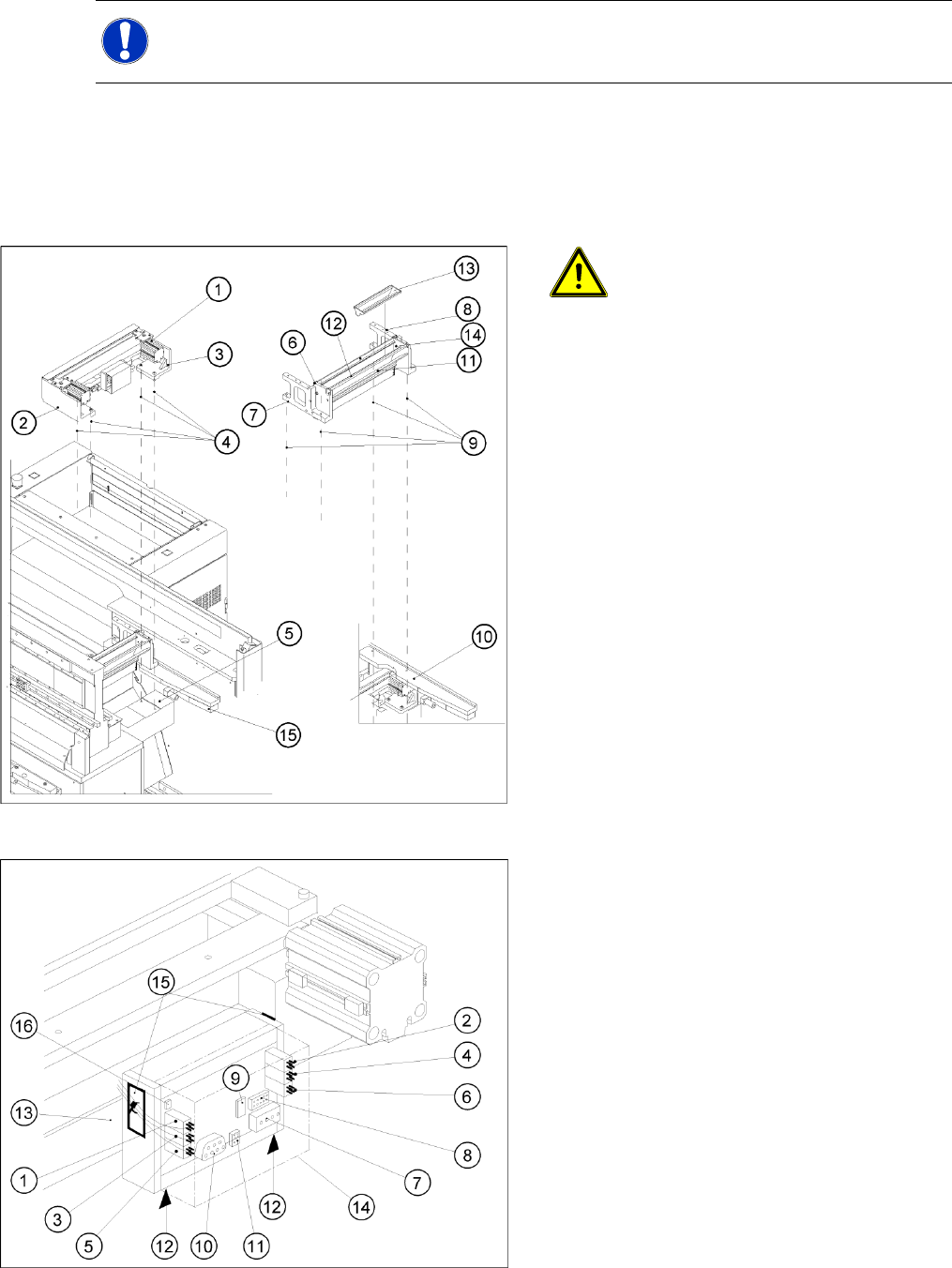
X To avoid dropping the cutter, insert all 4 M6
screws (4) into the holes now:
X Pull the cutter as far as possible away from the
PCB conveyor for the time being.
X Snug up the screws somewhat for the time
being.
X Remove the cover (14) from the control board
of the new cutter.
X Plug the press-fit connection of the power
supply and the drive into the control board (11,
10).
X Use a cable tie to fasten the cables running to
the cable duct to the fixing pedestal on the
control board box.
Make sure that there is no strain on the cable/
press-fit connections