80S-2080F480F5.pdf - 第160页
3 Placement Functions SIPLACE 80S-20/F4 /F5 User Manual 3.3 Error 05/99 Issue from Software Version SR.405.xx 3 - 20 3.3.4 General Errors Click on the symbo l butto n for Errors in the Display all general er rors menu. F…

SIPLACE 80S-20/F4/F5 User Manual 3 Placement Functions
05/99 Issue from Software Version SR.405.xx 3.3 Error
3 - 19
3.3.3.1 Error Information
Mark a single line (highlighted against a blue bar) and click on the
Error information
button. Call up the
on-line help for information on the selected error. In this connection see Chapter 7.1.
3.3.3.2 Diagnostics
Select a single line (highlighted against a light blue bar) and click on the
Diagnostics
button. The diagnos-
tics procedure for the error selected is started. In this connection see Chapter 7.2.
3 Placement Functions SIPLACE 80S-20/F4/F5 User Manual
3.3 Error 05/99 Issue from Software Version SR.405.xx
3 - 20
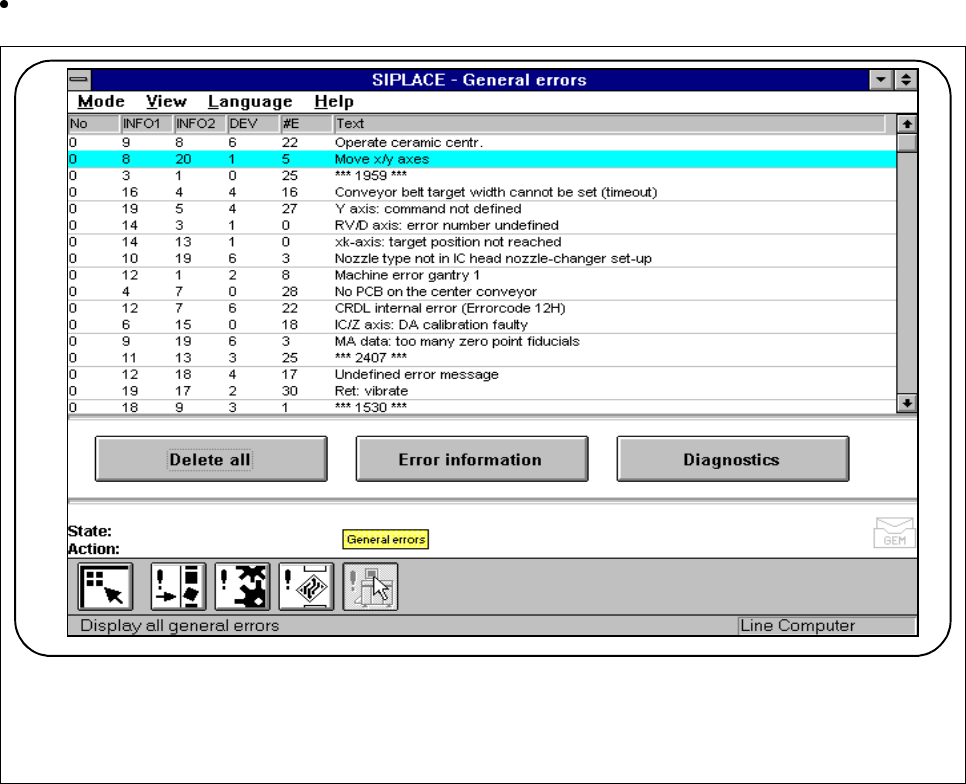
3.3.4 General Errors
Click on the symbol button for
Errors
in the
Display all general errors
menu.
Fig. 3.3.5 General errors
l No.
The error numbers of the errors in question are displayed in this column.
l Information 1 and information 2 (INFO1 and INFO2)
Usable only by Siemens for internal purposes.
l DEV
In this column the pick-up side, i.e. the gantry where the fault occurred, is displayed.
l #E
This column indicates how often (cumulative) this error has already occurred.
l Text
In this column a description is given of the fault which occurred.
F

SIPLACE 80S-20/F4/F5 User Manual 3 Placement Functions
05/99 Issue from Software Version SR.405.xx 3.3 Error
3 - 21
3.3.4.1 Error Information
Mark a single line (highlighted against a blue bar) and click on the
Error information
button. Call up the
on-line help for information on the selected error. In this connection see Chapter 7.1.
3.3.4.2 Diagnostics
Select a single line (highlighted against a light blue bar) and click on the
Diagnostics
button. The diagnos-
tics procedure for the error selected is started. In this connection see Chapter 7.2.