80S-2080F480F5.pdf - 第488页
9 Maintenance SIPLACE 80 S-20/F4/F5 User Manual 9.3 Machine Base 05/99 Issue f rom Software Version SR.405.xx 9 - 22 9.3.3.6 Refitt ing the Feeder Modules Remove t he cover s trips over th e compres sed air distributo r …
SIPLACE 80S-20/F4/F5 User Manual 9 Maintenance
05/99 Issue from Software Version SR.405.xx 9.3 Machine Base
9 - 21
9.3.3.3 Cleaning the Feeder Modules, Clearing Loose Components
Remove the tapes and with the vacuum cleaner thoroughly clean the surface of the modules, particularly
the area of the tape guide.
9.3.3.4 Oiling the bearing surface for the feeder modules
The bearing surface should be lightly oiled every time a feeder module is changed.
Apply a small quantity of WD40 corrosion protection agent to a clean cloth and rub it over the module bear-
ing surface on the components table. Remove excess WD40 and replace the module in the track.
9.3.3.5 Maintenance of the Magnetic Strips and Bearing Surfaces of the Feeders
DANGER
Do not carry out any cleaning work with alcohol in the presence of naked lights or fire!
Caring for the magnetic strips
The feeder modules are removed from the components table (see Section 9.3.3.1).
NOTE
The compressed air distributor strip on the components table is used for connecting the bulkcase feeders.
This strip runs parallel to the board conveyor and has upward-pointing open nozzles. Make sure that the
nozzles do not get contaminated with oil or come into contact with grease. Grease, oil or dirt will lead to
feeder malfunctions or components on the feeder will be rendered unusable.
Cover the nozzles of the distributor strip with insulation tape, for example.
Check the surface of the components table magnetic strips for damage or scratches.
If necessary, work over the surface with an oilstone and then wipe the magnetic strip with a cloth soaked in
alcohol.
Apply a small quantity of WD40 corrosion protection agent to the magnetic strip with a cloth.
Cleaning and oiling the bearing surfaces of the feeders
Wipe the bearing surfaces of the feeder modules on the components table with a cloth soaked in alcohol.
Apply a small quantity of WD40 corrosion protection agent to the magnetic strip with a cloth.

9 Maintenance SIPLACE 80S-20/F4/F5 User Manual
9.3 Machine Base 05/99 Issue from Software Version SR.405.xx
9 - 22
9.3.3.6 Refitting the Feeder Modules
Remove the cover strips over the compressed air distributor block.
Replace the feeder modules back into the correct track on the components table.
Replace the tapes in the module (see the
Component supply
section of this user’s manual).
NOTE
If you are not certain of the assignment of the rolls to the division, have the location’s set-up displayed in
this way :
Set-up
menu →
Setup location no.
Further information in this connection will be found in the
Components Handling
section of this user’s manual.
Close the safety hoods.
In the
PCB transport
menu select the
Conveyor width
option and set the conveyor back to the width of
the board which is to be processed.
9.3.3.7 Safety instructions for docking and undocking the mobile component table
WARNING
Never reach into the gap between the component tables and the placement system frame while the
machine is running.
Always check that the component table is docked on the placement system before connecting or discon-
necting the component table power cable at the socket on the placement system.
NEVER connect the component table connecting cable to the socket on the placement system and then
operate the component table via the external compressed air control unit.
SIPLACE 80S-20/F4/F5 User Manual 9 Maintenance
05/99 Issue from Software Version SR.405.xx 9.3 Machine Base
9 - 23
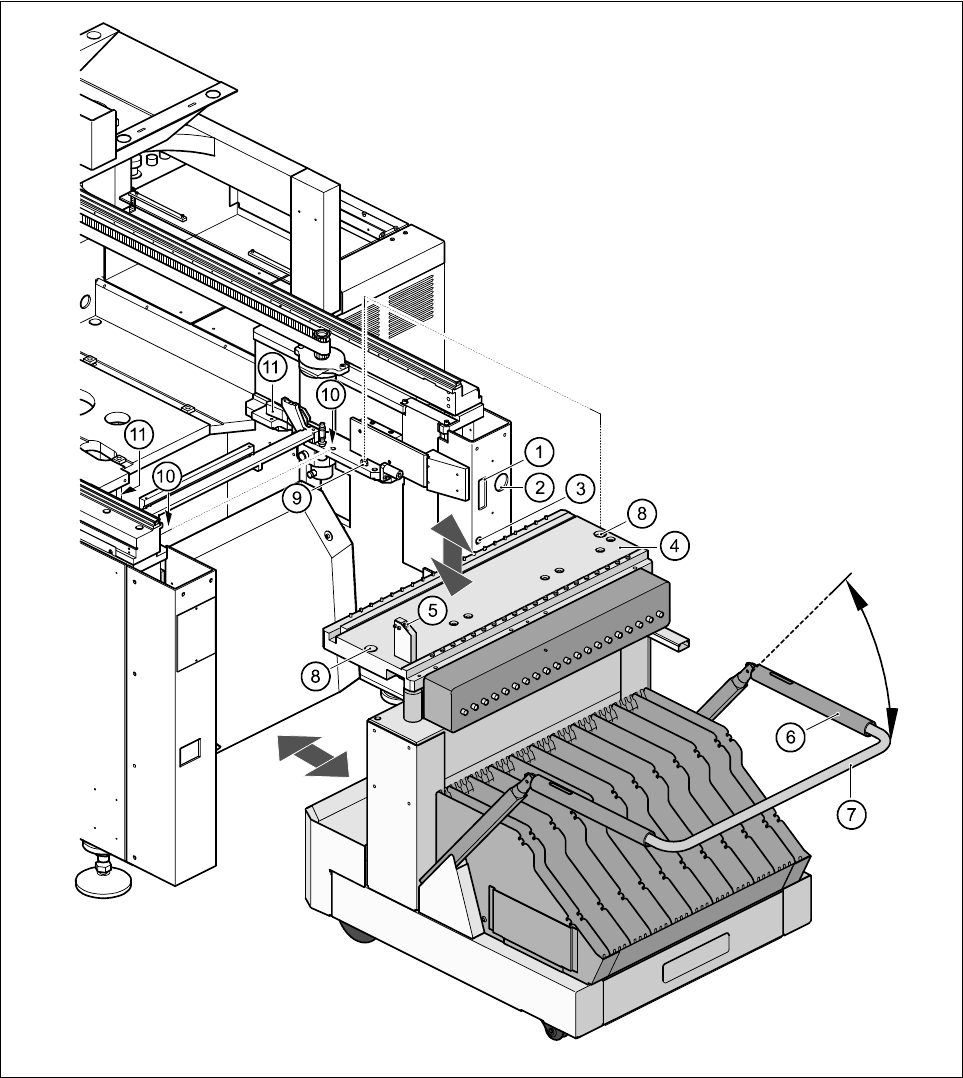
9.3.3.8 Undocking the component table
Fig. 9.3.2 Undocking the mobile component
Key to Fig. 9.3.2
(1) Communication interface connector
(2) Power supply connector for the component table
(3) Compressed air connection
(4) Component table bed