80S-2080F480F5.pdf - 第603页
SIPLACE 80 S20/F4/F5 User Manual 10 Component Handling 05/99 Issue from Software Vers ion SR.405.xx 10.8 Empty Tape Cutter on SIPLACE 80F5 Automatic Placement M achines 10 - 31 10.8 Empty T ape Cutter on SIPLACE 80F 5 Au…
10 Component Handling SIPLACE 80 S20/F4/F5 User Manual
10.7 Support for Flatpack Magazine (Manual Tray Rest) 05/99 Issue from Software Version SR.405.xx
10 - 30
10.7.3 Changing the Retainer
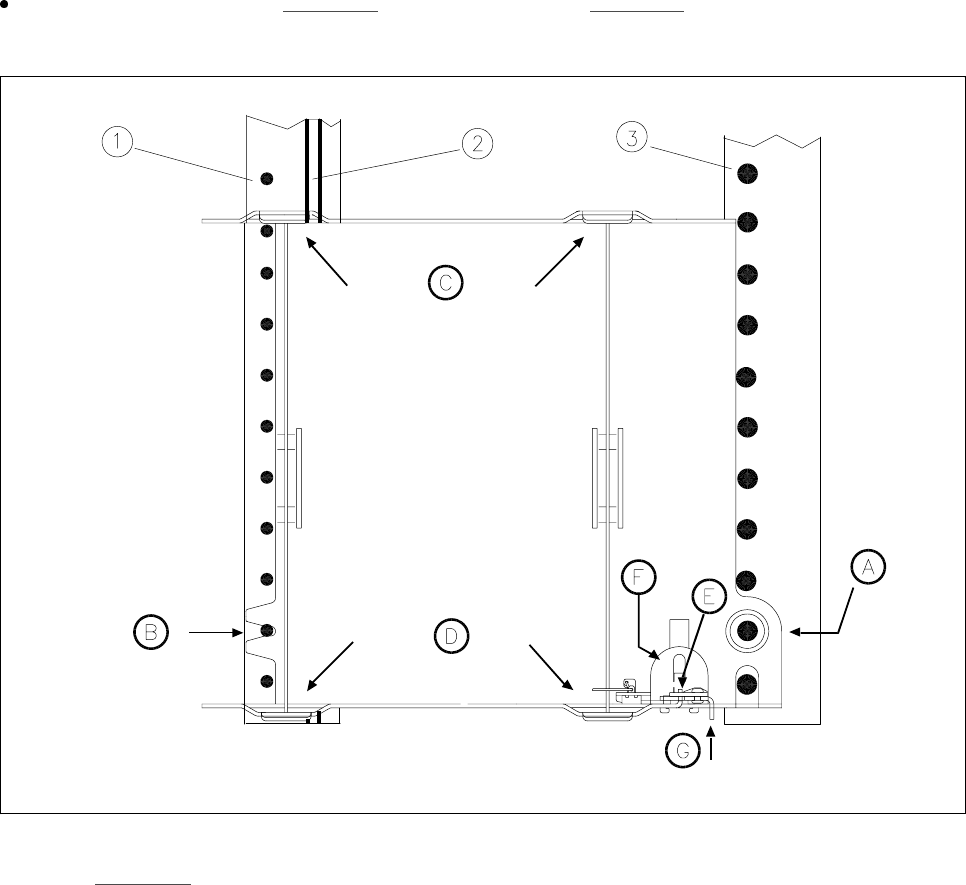
Hold the retainer firmly (
G
in Fig. 10.7.1). Press the clamp (
F
in Fig. 10.7.1) downwards and remove the
retainer by pressing it out sideways.
Fig. 10.7.1 Installation/Removal
-Key to Fig. 10.7.1
1 Centering pins 2 Magnetic rail
3 Spherical caps
10.7.4 Data Input
Define the flatpack magazines as described in the SIPLACE UNIX line computer UNIX user’s
manual.
SIPLACE 80 S20/F4/F5 User Manual 10 Component Handling
05/99 Issue from Software Version SR.405.xx 10.8 Empty Tape Cutter on SIPLACE 80F5 Automatic Placement Machines
10 - 31
10.8 Empty Tape Cutter on SIPLACE 80F
5
Automatic
Placement Machines
10.8.1 General
The SIPLACE 80F
5
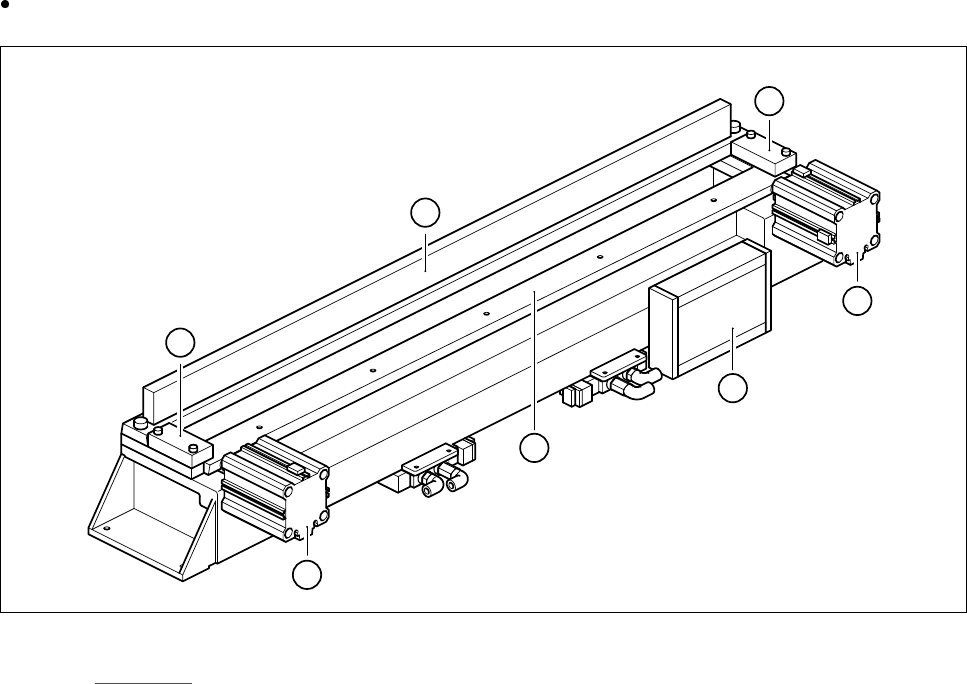
automatic placement system is equipped with a empty tape cutter at the installation loca-
tions for the two component tables. The empty tape cutter cuts up the waste tape.
The cut pieces of tape drop into the tape container beneath the component table.
Empty the tape container on a daily basis.
Fig. 10.8.1 Inserting the tape into the tape cutter
- Key to Fig. 10.8.1
1 Fixed cutting blade 2 Retainer
3 Moving cutting blade 4 Electronic control unit
5 Short stroke cylinder
2
2
3
4
5
5
1
10 Component Handling SIPLACE 80 S20/F4/F5 User Manual
10.8 Empty Tape Cutter on SIPLACE 80F5 Automatic Placement Machines 05/99 Issue from Software Version SR.405.xx
10 - 32
10.8.2 Inserting the Tape into the Tape Cutter
PLEASE NOTE
On SIPLACE 80F
5
automatic placement systems, only use the tape feeder modules specified for these
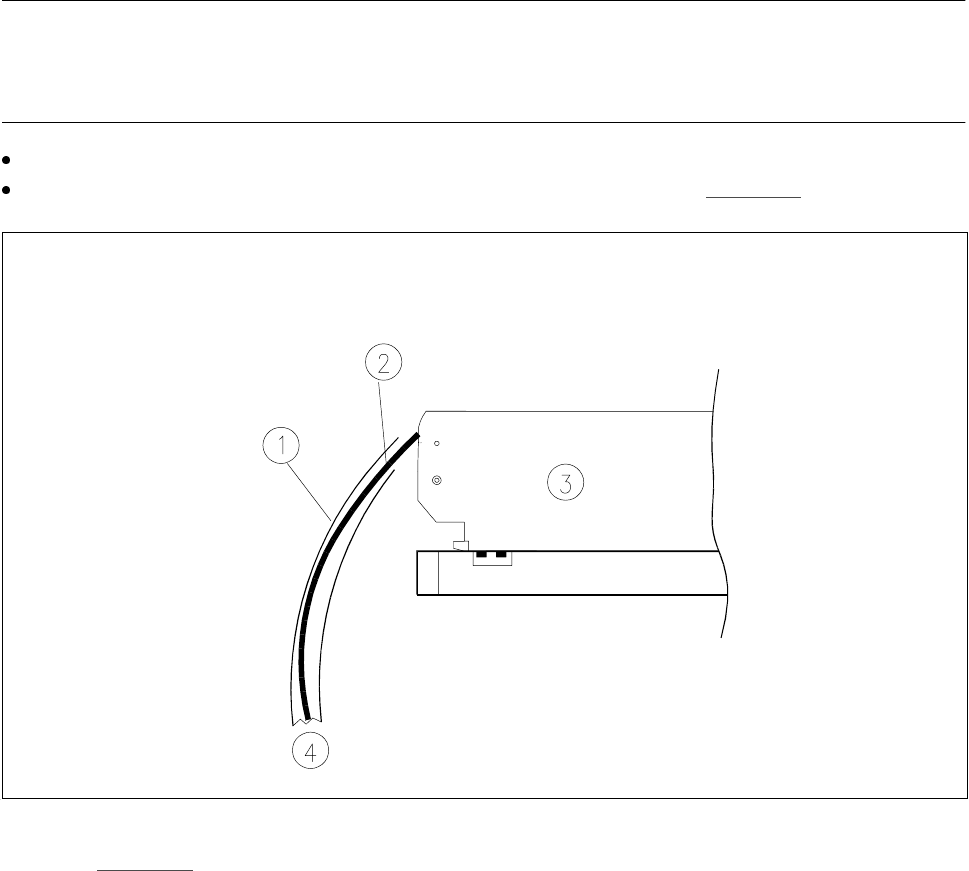
machines. The used tape channel which removes the used tape is located upstream of the feeder modules.
Insert the tape into the feeder as described in the corresponding section.
Guide the used tape into the used tape channel of the cutter as described in Fig. 10.8.2
Fig. 10.8.2 Inserting the tape into the tape cutter
-Key to Fig. 10.8.2
1 Used tape channel 2 Used tape
3 Tape feeder module 4 To used tape cutter