80S-2080F480F5.pdf - 第207页
SIPLACE 80S-20/F4/F5 User M anual 4 Single Functions 05/99 Issue from Software Version SR.405.xx 4.3 Single Functions, Gantry with 6x Revolver Head (f or 80F5) 4 - 31 4.3.3 IC Head Functions (SIPLACE 80F 5 ) With th e IC…

4 Single Functions SIPLACE 80S-20/F4/F5 User Manual
4.3 Single Functions, Gantry with 6x Revolver Head (for 80F5) 05/99 Issue from Software Version SR.405.xx
4 - 30
4.3.2.7 Pick-Up Circuit - Measure Vacuum
When this function is activated, the activated vacuum at the pick-up position will be measured.
Switch the vacuum on.
Within the
Pick-up circuit
working area click on the
Measure vacuum
button. At the nozzle which is in the
pick-up position the vacuum will be measured. The results of measurement will be shown in the display
window.
Switch the vacuum off.
4.3.2.8 Reject Circuit - Forced Air
When this function is activated, the forced air at the reject position will be switched on.
Within the
Reject circuit
working area click on the
Forced air
button. At the nozzle which is in the pick-up
position the forced air will be switched on.
4.3.2.9 Reject Circuit - Vacuum
When this function is activated the vacuum at the reject position will be switched on.
Within the
Reject circuit
working area click on the
Vacuum
button. At the nozzle which is in the reject
position the vacuum will be switched on.
4.3.2.10 Head Reference Run
When this function is activated the head axes will carry out a reference run. During this run gantry axes x and
y will travel over the reject container in order to discard components in a defined manner.
Within the working area click on the
Head reference run
button. The head axes will perform a reference
run.
4.3.2.11 Holding Circuit - Measure Vacuum
When this function is activated, the vacuum in the holding circuit will be measured.
Within the
Holding circuit
working area click on the
Measure vacuum
button. The vacuum is measured
at the nozzle which is in the holding circuit.
SIPLACE 80S-20/F4/F5 User Manual 4 Single Functions
05/99 Issue from Software Version SR.405.xx 4.3 Single Functions, Gantry with 6x Revolver Head (for 80F5)
4 - 31
4.3.3 IC Head Functions (SIPLACE 80F
5
)
With the
IC head functions
menu you can access and control IC head functions.
NOTE
When the cover is open, head functions can be carried out only when the key-operated switch has been
turned. When the IC head menu is quit the IC head and the star head will make a reference run over the reject
container. If the x or y axes are to be moved the cover must be closed.
In the
Gantry functions
menu, click on the symbol button for
IC head functions
.
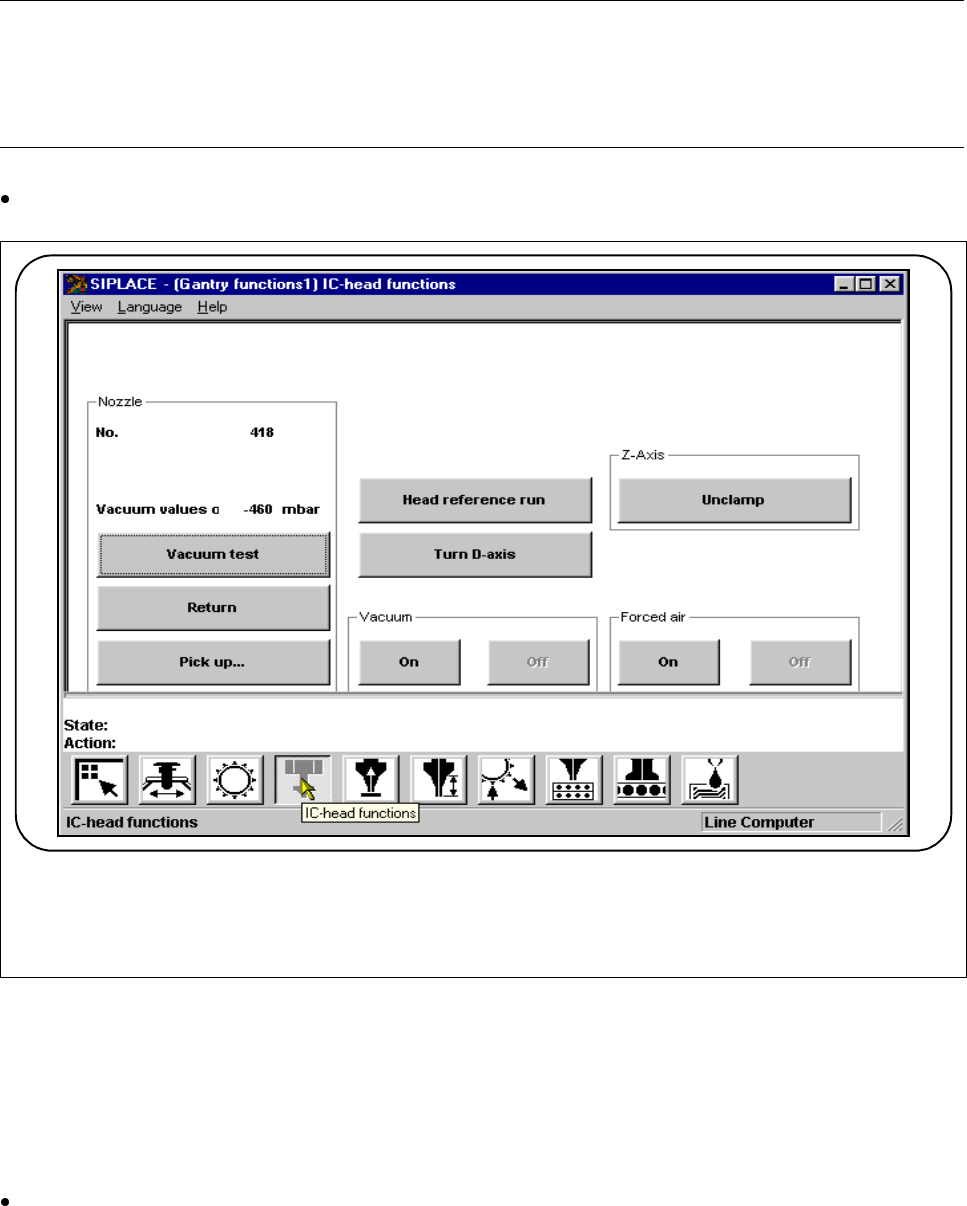
Fig. 4.3.4 IC head functions
4.3.3.1 Nozzle - Vacuum Test
When this function is activated, the vacuum and the height of the nozzle located at the head will be measured.
There must actually be a nozzle at the head.
The vacuum value and the height of the current nozzle will be displayed.
F
4 Single Functions SIPLACE 80S-20/F4/F5 User Manual
4.3 Single Functions, Gantry with 6x Revolver Head (for 80F5) 05/99 Issue from Software Version SR.405.xx
4 - 32
4.3.3.2 Nozzle - Return
When this function is activated, the nozzle found at the IC head can be returned. The current nozzle will be
displayed.
Within the
Nozzle
working area click on the
Return
button. The nozzle which is at the IC head will be
returned.
4.3.3.3 Nozzle - Pick Up
When this function is activated, the various nozzles which are included in the nozzle-changer set-up can be
picked-up.
Within the
Nozzle
working area click on the
Pick up
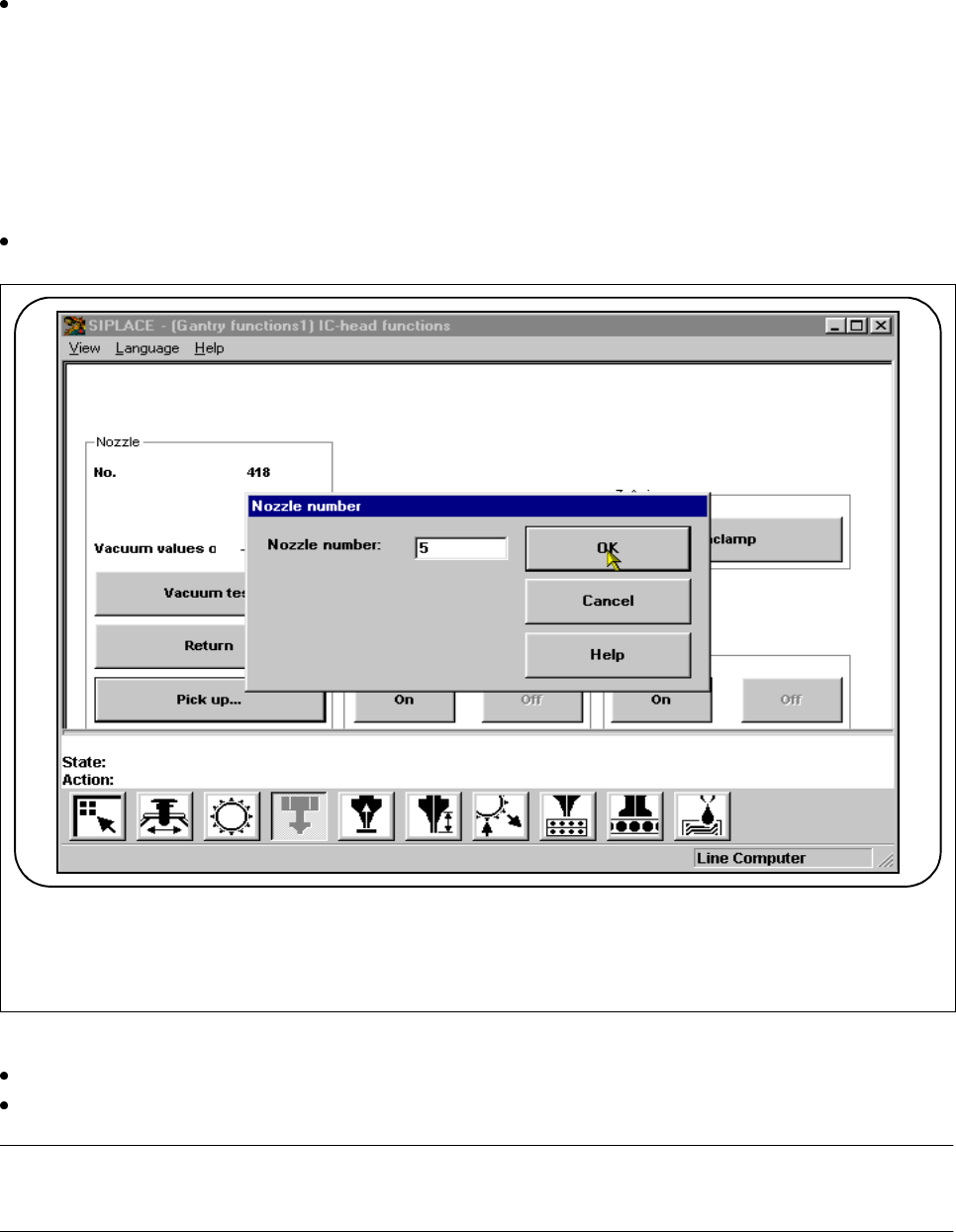
button. The following input window will appear.
Fig. 4.3.5 IC head functions: pick up nozzle
Type the number of the nozzle which is to be picked up into the input field of the input window.
Click on the OK button. The nozzle selected will be picked up and displayed in the display window.
NOTE
If there is a nozzle at the IC head, it will be returned first.
F