Eagle 3D-8800_MANUAL-中文.pdf - 第74页
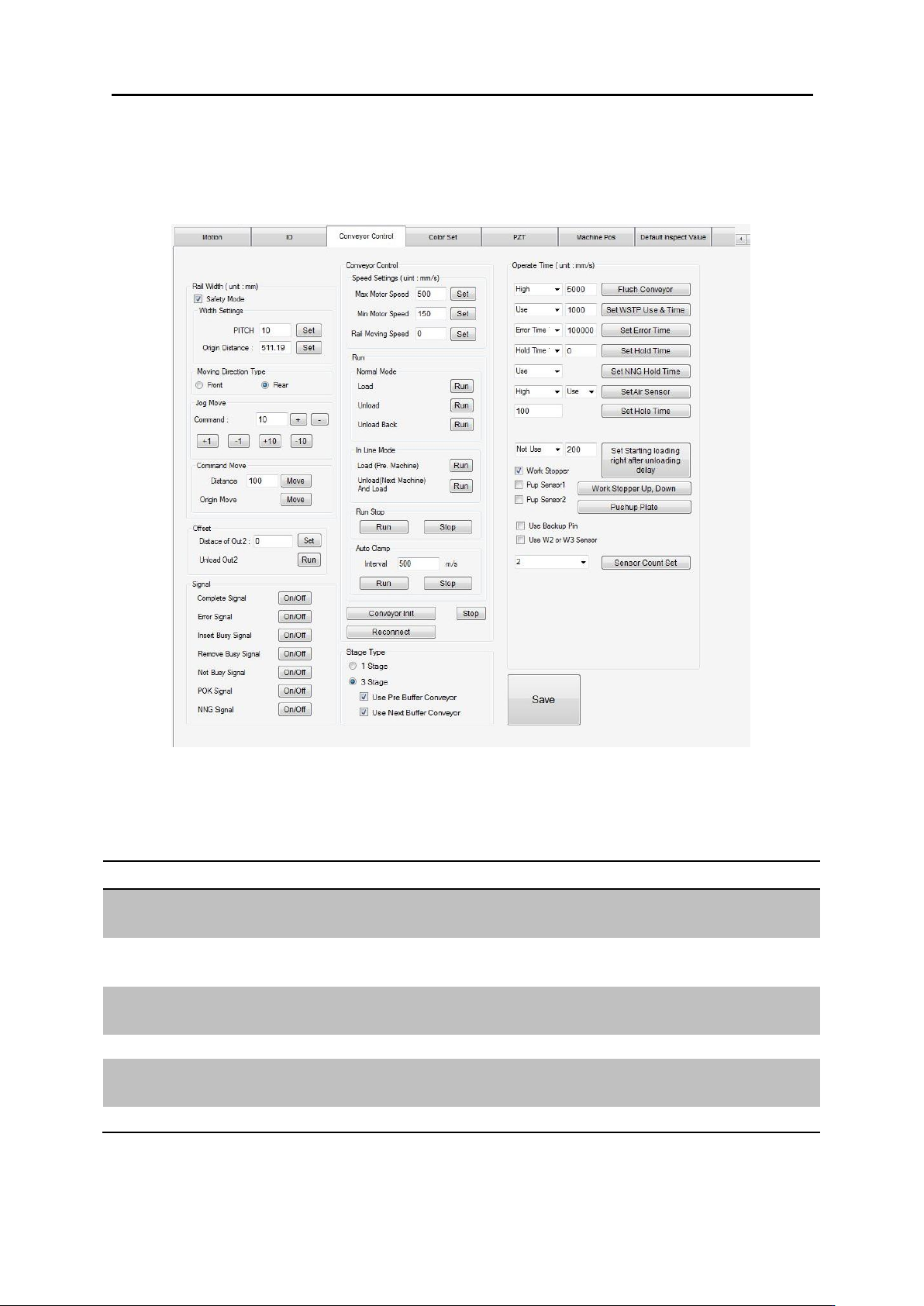
软件构造 3.4. 使用 者环境 B. (Signal) 功能 使用方法 说 明 Complete <On/Off> 选择 轨 道 运转 完成信 号 Error <On/Off> 选择 轨 道失 败 Insert Busy <On/Off> 选择 PCB Load 进 板信 号 Remove Bus y <On/Off> 选择 PCB Unload 出板信 号 Not Busy <O…
软件构造 3.4. 使用者环境
3.4.6.4.轨道设定窗口
<(Conveyor)>选择。
A. 轨道宽度(Rail Width, 单位: mm) 调整
分类
功能
使用方法
说明
Width Setting
Pitch
输入值
<Set> 选择
轨道调整丝杆频频设定
Origin Distance
输入值
<Set> 选择
轨道最小宽度: mm
Jog Move
Command
输入值
<+>, <-> 选择
轨道相对宽带: mm
+/- 1/10
选择
1, 10 mm 轨道宽度移动
Command
Move
Distance
输入值
<Move> 选择
轨道宽度移动相对值: mm
Origin Move
<Move> 选择
轨道宽度调到最小值

软件构造 3.4. 使用者环境
B. (Signal)
功能
使用方法
说明
Complete
<On/Off> 选择
轨道运转完成信号
Error
<On/Off> 选择
轨道失败
Insert Busy
<On/Off> 选择
PCB Load 进板信号
Remove Busy
<On/Off> 选择
PCB Unload 出板信号
Not Busy
<On/Off> 选择
等板信号
P.OK
<On/Off> 选择
等板信号
N.OK
<On/Off> 选择
出板信号
C. (Conveyor) 调整
分类
功能
使用方法
说明
Save
选择
设定值保存
Conveyor Init.
选择
轨道设定初始化
F.ED
选择
轨道停止
Work Stopper
Up/Down
选择
Stopper Up/Down
Pushup Plate
选择
Pushup Plate Up/Down
Run / Normal
Load
<Run>选择
PCB Load
Run / Normal
Unload
<Run>选择
PCB Unload
Run / Normal
Unload Back
<Run>选择
PCB 移动到进板口
Run / In-Line
Load
<Run>选择
PCB Load
Run / In-Line
Unload
<Run>选择
PCB Unload 出板
Run / In-Line
In-Line Unload
<Run>选择
PCB 出板
Speed Setting
Max Motor Speed
输入值
<Set>选择
轨道高速
单位: mm sec
Speed
Min Motor Speed
输入值
<Set>选择
轨道低速
단위: mm sec
Speed
Rail Moving Speed
输入值
<Set>选择
轨道宽度调整速度
단위: mm sec
软件构造 3.4. 使用者环境
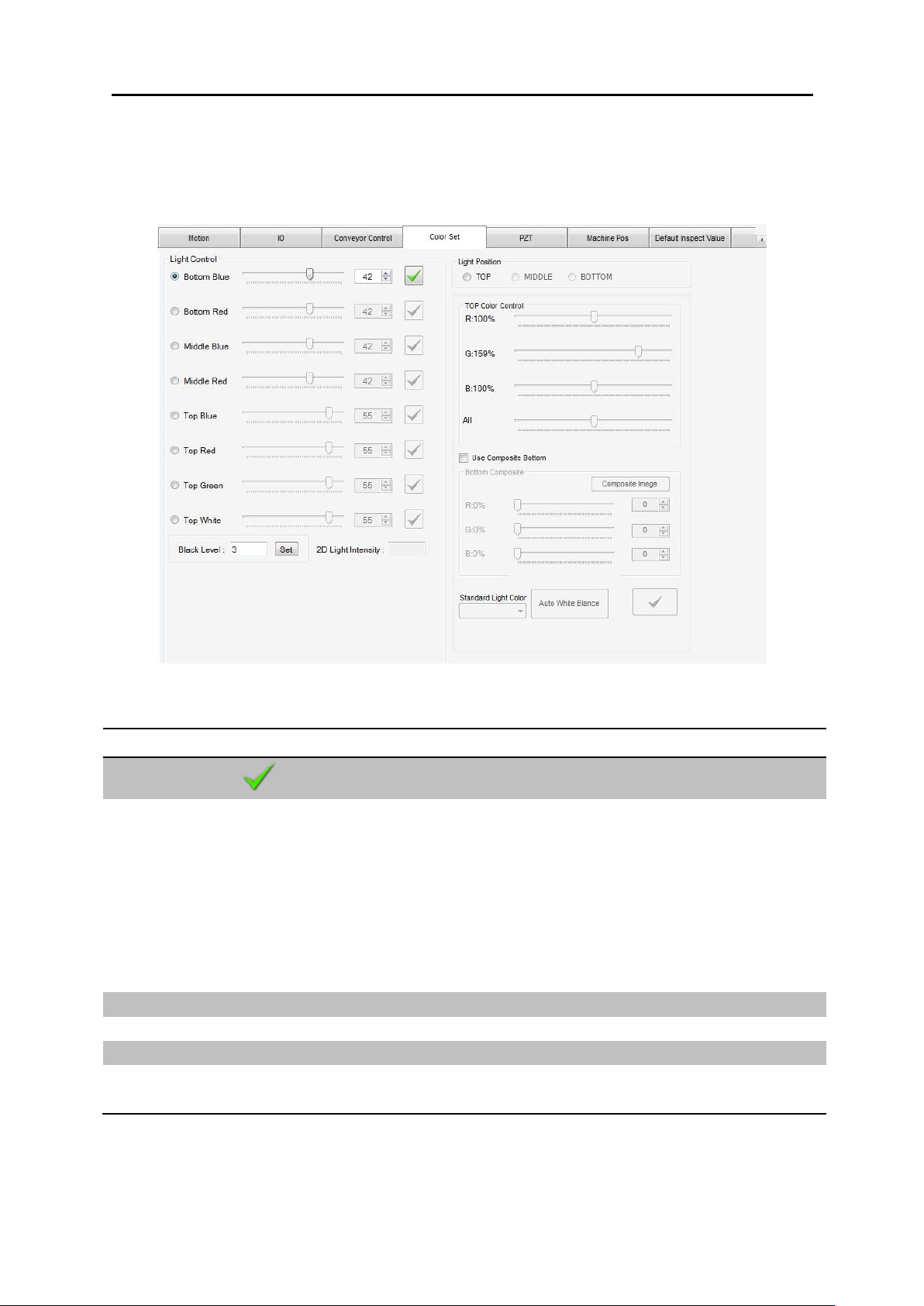
3.4.6.5. 2D 灯光设定
<(Color Set)> 选择
功能
使用方法
说明
保存
选择
设定值保存
各 照明 选择
Light Control 照明 选择
Bottom Blue: Blue 照明
Bottom Red: Red 照明
Middle Blue: Blue 照明
Middle Red: Red 照明
Top Blue: Blue 照明
Top Red: Red 照明
Top Green: Green 照明
Top White: White 照明
照明亮度值
输入值 <Enter-Key>
范围: 0~63
Light Intensity
亮度平均值
照明 选择
Light Position 照明 角度 选择
照明 角度 选择
颜色比例调整
R/G/B: 混合比例调整
All: R/G/B 全部比例增减